2026 · Sonic WeaverAbout 15 min readNovus Stream Solutions
A repeatable release look: brand kit and saved projects
A catalog looks intentional when every track shares a palette, a caption style, and a logo corner. Here is how to build that look once in Sonic Weaver, save it as a project, and generate an on-brand variant for every track in a release.
Reviewed and updated August 1, 2026. Re-checked against the Sonic Weaver V3 catalog on August 1, 2026. The app now ships ten engines with six modes each, sixty modes in total, so the counts, the engine list, and the mode arithmetic in this article have been corrected. The Logo engine landed after this piece was first published.
Contents
- 1.Overview
- 2.What a brand kit actually is here
- 3.Colors: locking a palette you reuse
- 4.Type and captions: one voice across the catalog
- 5.The logo and where it lives
- 6.Saving the project so the look persists
- 7.No template picker: your saved project is the template
- 8.Generating release variants
- 9.Varying the engine without breaking the family
- 10.Keeping motion consistent with shared audio bindings
- 11.Refining a flagship track without losing the kit
- 12.Rendering the whole catalog
- 13.Extending the look beyond the video
Overview
A single track can look great on its own. A catalog is a different problem. When you drop five singles, an EP, and a couple of loop videos into a feed over a few months, the thing a listener actually registers is not any one clip but whether they all feel like they came from the same person. If every video uses a different palette, a different caption style, and the logo in a different corner, the release reads as a pile of unrelated uploads. If they share a look, the same set of clips reads as one body of work. Sonic Weaver is built so you can settle that look once and carry it across everything, starting from the editor at sonicweaver.com/editor.
This post is about the practical version of that idea: a brand kit (the small set of decisions that make a release recognizably yours, meaning a palette, a caption treatment, and a logo with a fixed home), plus the mechanism that lets you reuse it, which is a saved project, plus the move that turns one look into a whole family, which is generating a variant per track. None of it depends on a preset library or a template store, because Sonic Weaver does not have one. The reusable thing is a document you author yourself and then copy, which is a more flexible foundation than a menu of someone else's looks, and it is the through-line of everything below.
What a brand kit actually is here
A brand kit is not a feature you switch on. It is a short, deliberate list of choices you make once and then refuse to relitigate for the rest of the release. In practice it comes down to four things: the colors, the type, the logo, and a small amount of overlay furniture (a grain, a vignette, a frame) that sits on top of every scene. Everything else about a given video is allowed to change from track to track. These four are the constants that hold the catalog together, and the discipline is treating them as fixed rather than as knobs you happen to fiddle with again each time you sit down to make a new video.
Why these four? Because they are the parts of the frame a viewer registers before they register anything about the specific engine or the specific song. Color reads first, type reads second, the logo confirms whose work it is, and the overlay gives everything the same surface texture. The engine, the mode, the motion, the audio-driven movement: those are what make each track its own thing. Separating the two lists, constants and variables, is the whole trick. Once you know which decisions belong in the kit and which belong to the individual track, building a consistent catalog stops being a matter of memory and taste and becomes a matter of reusing a fixed set.
Colors: locking a palette you reuse
Color is the fastest identity signal a visualizer has, which makes the palette the first thing to fix. In the Classic Editor you set colors alongside geometry and direction, and the practical move is to choose a small palette (a background, one or two primaries, an accent) and then write those exact values down somewhere you will not lose them. The point is not that a good palette is hard to pick; it is that picking a slightly different one each time is what quietly wrecks a catalog. Two videos that are eighty percent the same color but not identical look like a mistake, not a series, and the mistake is louder than any single strong frame.
The reason to be strict here is that engines render color differently. A particle field spreads your accent across thousands of small points; a spectrum surface lays it across a broad gradient; a radial mode concentrates it in the center. The same three values can produce very different-feeling frames depending on the engine, which is welcome (that variety is the point of having ten engines), as long as the underlying values are the same. Keeping the palette constant while the engine changes is what makes the difference read as 'range' rather than 'inconsistency'. The color and theme controls are where this happens, and locking them is the single highest-leverage thing you can do for catalog coherence.
Type and captions: one voice across the catalog
The type in your videos is mostly captions: track titles, section labels, the occasional lyric line. Sonic Weaver lets you add and style captions in the Classic Editor, and the brand-kit question is not which words to show but how they look every single time. Pick a treatment (a size relationship, a position, a casing, an alignment) and hold it. If your single title sits lower-left in small caps on one video, it should sit lower-left in small caps on the next. Type is quieter than color, so inconsistency here is easy to let slide, but a viewer feels it even when they cannot name it: two title cards formatted differently make two videos feel unrelated.
The move that pays off is deciding the caption rules as part of the kit rather than per video. Where does the track name go, how large is it, is it upper-case or title-case, does it fade or cut? Answer those once and every release inherits the answer. Because captions travel with the saved project, you are not re-deciding the layout each time; you are dropping new text into a treatment that is already correct. That is also what keeps a lyric video, made later in the companion Lyric Video Creator, looking like it belongs to the same family as the main visualizer rather than reading as a separate experiment you did on a different afternoon.
The logo and where it lives
The logo is the smallest element and the one that most directly says whose work this is. In the Classic Editor you can place a logo on the scene, and the two decisions that matter for a catalog are placement and restraint. Placement: pick a corner and an inset and never move them. A logo that lives bottom-right at a fixed margin on every video becomes a signature; a logo that wanders is just clutter. Restraint: size and opacity should be enough to be legible on a phone without competing with the motion. The goal is that a viewer scrubbing a feed can identify your videos from the logo corner alone, before the audio even loads.
Beyond the persistent corner mark, the logo is also the natural anchor for an intro or outro moment: a brief hold where the mark is the focus before the track takes over, or a sign-off at the end. Building that beat once, as part of the kit, means every release opens and closes the same way, which is a surprisingly strong unifier across a catalog. The specifics of placing and animating a logo have their own walkthrough, but the brand-kit principle is simpler than any technique: decide the logo's home and behavior once, and then leave them alone so they can do their job of marking the work as yours across an entire release.
Saving the project so the look persists
All of these decisions are only reusable if they survive past the session, which is what saving the project is for. Sonic Weaver keeps your work as a saved document, and the important detail is that the two editors share it: the guided Classic Editor and the node-based Studio Workstation are two views of one document, not two separate tools with two separate files. So the kit you assemble in the Classic Editor (palette, captions, logo, overlays) is the same document you can later open in the Studio Workstation to refine, and nothing about the look is stranded in one editor or trapped in the other where you cannot get at it.
Saving also matters because of how the renderer works. Sonic Weaver uses a single deterministic renderer, which means the preview and the export are computed the same way: what you see is what you get, every time you open the document. A saved look is therefore not an approximation you have to re-tune on each render; it is a fixed specification that produces the same frames whenever it runs. That reliability is exactly what a repeatable release look requires. There is no drift between the version you approved last week and the version you export today, because the saved document and the deterministic renderer together pin the result down to the frame.
No template picker: your saved project is the template
It is worth being explicit about something Sonic Weaver deliberately does not have: a template store or a preset library. There is no menu of pre-built looks to start from, and there is no 'apply this theme' button that stamps a canned style onto your track. That can sound like a gap until you see what replaces it. The reusable starting point is not something the app ships; it is the saved project you built. Once you have assembled a document that embodies your look, that document is your template: a fully specific, entirely yours starting point that no preset library could match, because it encodes your exact palette, captions, and logo rather than a generic approximation of them.
This inverts the usual relationship between the tool and your identity. With a preset system, everyone starts from the same handful of looks and tries to customize their way toward something distinct, which tends to converge on a house style that is the tool's, not yours. Here you converge on your own look first and then reuse it, so the thing you carry across the catalog is genuinely yours from the start. The mechanism for reuse is ordinary (you open your saved project and duplicate it), but the effect is that your first good release becomes the seed for every one after it, without a template system anywhere in the picture.
Generating release variants
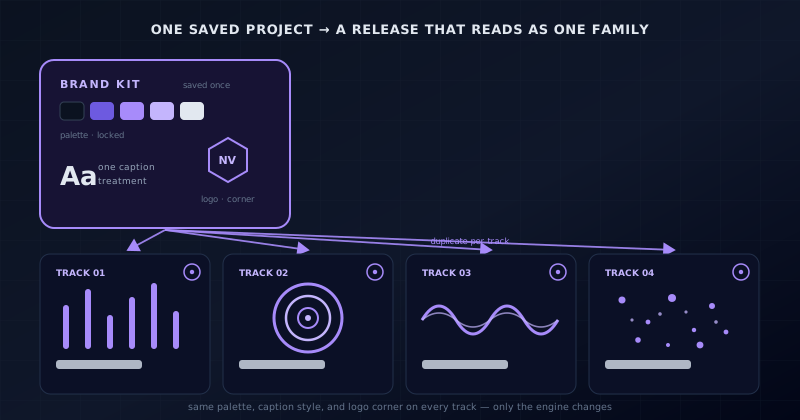
Turning one look into a catalog is a copy operation. You take the saved project that holds your kit, duplicate it, and swap in the next track. Because the palette, the caption treatment, the logo placement, and the overlays are already part of that document, the new video starts life on-brand: you have not rebuilt anything, you have inherited it. From there you change only what should change for this particular song: the audio file itself, and, if you want, the engine and mode that give the track its own character. The constants ride along untouched; the variables are the only thing you actually reach for, which is what keeps the work fast.
Done across a release, this produces a set of videos that are obviously siblings. The single, the EP tracks, the loop version for streaming: each one is a duplicate of the same kit-bearing project with a different song inside it. That is what makes the feed read as one body of work instead of a scatter of one-off uploads. The discipline is to always start a new track by duplicating the kit rather than starting fresh, because a fresh start is exactly where inconsistency creeps back in. Duplicate first, then vary within the boundaries the kit sets, and the family resemblance takes care of itself without you policing it clip by clip.
Varying the engine without breaking the family
A reasonable worry about reusing a saved project is that every video will look identical, which is not what you want either. A catalog of clones is as monotonous as a catalog of strangers. This is where the ten engines and their six modes each earn their keep. With sixty engine-and-mode combinations available, you can give each track in a release its own motion identity (one song on a particle field, another on a spectrum surface, a third on a radial mode) while the palette, type, and logo hold them all together. The engine changes; the brand kit does not. That is the balance between variety and coherence, and it is why the kit approach does not flatten a catalog into sameness.
The depth options extend the same idea without adding a separate control to manage. Because 3D lives inside specific modes (the 3D Columns under Bars, the Spectral Mesh under Spectrum, the 3D Surface under Waveform, the tube modes under Tunnel), you can reach for a dimensional look on one track and a flat one on another simply by choosing a different mode, all within the same kept palette. A viewer moving through the release sees genuine variety in the motion, so no two videos feel like reruns, and yet the color, the captions, and the logo corner stay constant enough that the variety reads as the range of one artist rather than the noise of many unrelated hands.
Refining a flagship track without losing the kit
Some tracks deserve more than a duplicate-and-swap. A lead single might want a keyframed intro, a masked logo reveal, or a couple of layers that come and go on specific bars. The Studio Workstation is where that deeper work happens: direct canvas editing, ordered layers, a beat-aware timeline with beat and bar markers, keyframes with graph curves, clips and loop regions, groups, masks, blend modes, character rigs, and full-document undo and redo. Crucially, it is editing the same document the kit lives in, so the extra craft you invest in a single track sits on top of the brand kit rather than replacing any of it.
This means the constant look and the per-track ambition are not in tension. You can take the kit-bearing project, open it in the Studio Workstation, and build an elaborate timeline for your flagship release, and the palette, captions, and logo are still exactly the kit's: you are adding, not overriding. For the deep album cuts you might never leave the Classic Editor; for the single you might spend an afternoon in the Studio. Both come out of the same saved document, so both belong to the same family. The two editors being one document is precisely what lets effort scale per track without the look fragmenting along the way.
Rendering the whole catalog
A repeatable look is only useful if you can actually render all of it, and this is where the export model matters. Sonic Weaver encodes video in the browser with WebCodecs, to MP4 or WebM, up to 4K at 24, 30, or 60 fps, with platform presets for the usual destinations. There is no watermark and no export quota, which is the part that makes a catalog practical: rendering a whole release (several tracks, each in a couple of aspect ratios for different platforms) does not run into a per-export paywall or stamp a mark across your work. You can render as many variants as the release needs and never meter yourself into a corner.
The platform presets are what let one saved look become the right file for every destination without you rebuilding it. The same kit-bearing project can export a 16:9 version for YouTube, a 9:16 version for Shorts, Reels, and TikTok, a square for the feed, and a short loop for Spotify Canvas: same palette, same logo, correct dimensions for each. Because the output is copyright-free and unwatermarked, the whole set is genuinely publishable as-is. A consistent catalog is not just a set of consistent projects; it is a set of consistent files across every platform, and the export layer is what turns the former into the latter.
Extending the look beyond the video
A release is more than its main visualizer, and the brand kit is most powerful when it reaches the rest of the rollout. Sonic Weaver ships companion tools that share the same visual vocabulary: Cover Art Studio for the artwork, the Lyric Video Creator for the lyric cut, Stream Overlays for anything you put on a live stream, plus an Audio Effects Generator and an Audio Library on the sound side. Carrying the same palette, type treatment, and logo into those tools is what makes the cover, the lyric video, and the stream frame look like they came from the same release as the main video rather than from three unrelated projects.
The principle at the end is the same one from the start: decide the look once, and then let every surface inherit it. The saved project holds the kit for the videos; the companion tools let you apply the same colors, type, and logo to the artwork and overlays; and the platform presets get all of it out the door in the right shapes. A listener scrolling past your release sees a cover, a video, a short, and a stream that all clearly belong together, which is the entire point of a brand kit. The work of consistency is front-loaded into building the kit once, so everything after it is duplication rather than reinvention.
Frequently asked questions
Quick answers to common questions about this topic.
How do I make all my music videos look like part of the same release?
Build a small brand kit (a fixed palette, a caption treatment, and a logo placement) inside one project, save it, and duplicate that project for each track. Because the constants ride along in the saved document, every video starts on-brand and you only change the song and, if you want, the engine.
Does Sonic Weaver have brand kit templates or presets?
No. There is no preset library or template store. The reusable starting point is a project you author yourself: once you have built a document that holds your look, that document is your template, and you duplicate it per track.
Can each track use a different engine and still look like one release?
Yes. With sixty engine-and-mode combinations you can give each track its own motion while the palette, type, and logo stay constant across the catalog. The engine varies; the brand kit does not, so the videos read as the range of one artist.
Do I have to pay per export to render a whole catalog?
No. Export runs in your browser with WebCodecs, with no watermark and no export quota, so you can render every track in several aspect ratios (16:9, 9:16, square, and a Spotify Canvas loop) without a per-export paywall.
Related troubleshooting
Was this page helpful?
Your answer stays in this browser, it is not sent anywhere and no account or cookie is involved.