2026 · Novus VisualizersAbout 12 min readNovus Stream Solutions
Turning sound into motion: reading audio with the Web Audio API
How Novus Visualizers analyzes an uploaded track (a real-time 32-band FFT plus beat, onset, and loudness detection) and uses that signal to drive a rendered animation frame by frame, all in the browser.
Reviewed and updated August 1, 2026. Re-checked against the Novus Visualizers V3 catalog on August 1, 2026. The app now ships ten engines with six modes each, sixty modes in total, so the counts, the engine list, and the mode arithmetic in this article have been corrected. The Logo engine landed after this piece was first published.
Contents
- 1.Overview
- 2.Reading the raw signal: the Web Audio API and the FFT
- 3.Beyond raw frequency: beats, onsets, and loudness
- 4.Splitting the spectrum: bass, mid, and treble
- 5.Driving the render, frame by frame
- 6.The window-size tradeoff in the FFT
- 7.Smoothing the signal so motion does not jitter
- 8.Beat detection is more than a loudness spike
- 9.The audio-visual latency budget
- 10.What good reactivity feels like
- 11.Why it all runs on the device
Overview
A music visualizer lives or dies on one thing: whether the motion actually feels connected to the music. Anyone can put a looping animation behind a track. The difference between that and a real visualizer is that the visuals respond: the burst on the beat, the swell of particles when the bass hits, the way the whole scene breathes with the loudness of the mix. That responsiveness is not decoration; it is the entire product. And it all starts with reading the audio signal precisely. This post is about how Novus Visualizers does that: how it turns an uploaded track into a stream of numbers that drive the animation, frame by frame, entirely in the browser, something you can watch happen live by dropping a file into visualizers.novusstreamsolutions.com/editor.
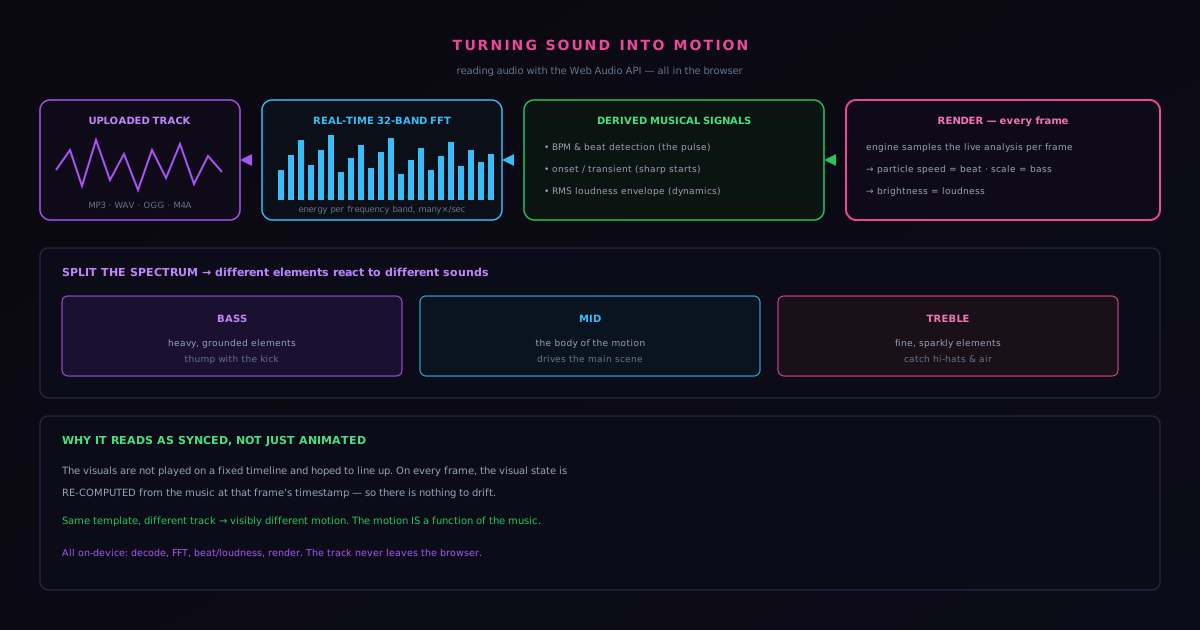
The pipeline has a clear shape. The browser's Web Audio API decodes and analyzes the track in real time, producing frequency and amplitude data. That raw data is refined into musically meaningful signals: tempo, beats, onsets, loudness, and separate bass/mid/treble energy. Those signals become the inputs that the rendering engine reads every frame to decide how the visuals should move. Understanding each step is understanding why the output looks synced rather than merely animated.
Reading the raw signal: the Web Audio API and the FFT
The foundation is the Web Audio API, the browser's built-in system for processing audio. When a track is loaded, the audio is routed through an analysis stage that performs a Fast Fourier Transform (an FFT) in real time. The FFT is the mathematical operation that takes a slice of the waveform, which is just amplitude over time, and decomposes it into its component frequencies, telling you how much energy is present at each pitch in that instant. Novus Visualizers runs a 32-band FFT, dividing the audible spectrum into 32 frequency bands and reporting the energy in each, many times per second. That array of 32 numbers, updating continuously, is the primary raw material everything else is built from.
Thirty-two bands is a deliberate resolution choice. Too few and the spectrum is too coarse to distinguish a kick drum from a bassline; too many and you are reacting to noise and spending computation that the per-frame budget cannot spare. Thirty-two bands captures the musically important structure (the low-end thump, the body of the mix, the high-frequency detail of cymbals and air) at a resolution the visuals can meaningfully respond to without drowning in data. Each band becomes a tap that a visual parameter can be wired to, which is the first half of making something react to sound.
Beyond raw frequency: beats, onsets, and loudness
Raw frequency energy is necessary but not sufficient, because the most important musical events are not "how much 80Hz energy is there right now" but "was that a beat?" and "did something just start?" So the analysis layer derives higher-level signals from the FFT stream. Beat and BPM detection finds the track's underlying pulse (the tempo and the location of the beats) which is what lets the visuals lock to the rhythm rather than just jittering with the waveform. Onset and transient detection catches the sharp starts of sounds: the attack of a snare, the pluck of a string, the moment a new element enters. Those are the events that, visually, deserve a hit: a flash, a burst, a camera kick.
Layered on top is an RMS loudness envelope. RMS (root mean square) is a measure of the signal's overall energy over a short window, which tracks perceived loudness far better than instantaneous amplitude. The loudness envelope is the slow-moving signal that captures the dynamics of the track: the build into a drop, the breakdown, the quiet intro swelling into the full mix. Where beat detection drives the punchy, rhythmic motion, the loudness envelope drives the broad, breathing motion of the whole scene. Together they give the visualizer both the sharp accents and the long arcs of the music.
Splitting the spectrum: bass, mid, and treble
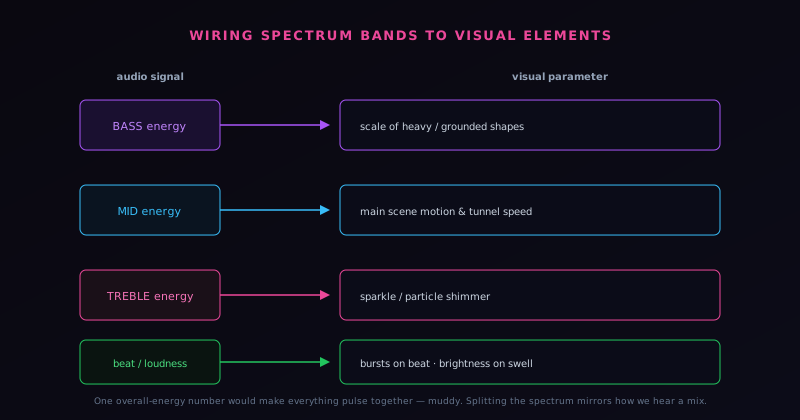
A single overall-energy number would force every visual element to react to the whole mix at once, which looks muddy: everything pulsing together on every sound. Real musical motion comes from different elements reacting to different parts of the spectrum. So the analysis isolates bass, mid, and treble energy as separate signals. Now a designer can wire the heavy, grounded elements of a scene to the bass (so they thump with the kick and the low end) while the fine, sparkly elements react to the treble, catching the hi-hats and the air, and the mid-range drives the body of the motion. The result reads as musical because it mirrors how we actually hear a mix as separate layers rather than one undifferentiated sound.
This separation is what produces the effects the product describes as true beat synchronization: comets that accelerate on the beat, particles that swarm with the energy of the track, tunnels that rush forward as the music drives. None of that is a pre-rendered loop timed to a guess. It is the visual elements reading their assigned slices of the live audio analysis and moving accordingly, which is why the same scene produces visibly different motion for a slow ambient track and a fast electronic one. You can route those bass, mid, and treble slices to separate effects yourself at Multi-band beat sync: drive effects from bass, mid, and treble, so a kick pulses one layer while hi-hats animate another. The motion is a function of the music, not a backdrop placed behind it.
Driving the render, frame by frame
The analysis only matters if the visuals read it at the right moment, and the binding happens per frame. On every rendered frame, the engine samples the current state of the audio analysis (the 32-band spectrum, the beat and onset flags, the loudness envelope, the bass/mid/treble energies) and feeds those values into the parameters of the active visual. A parameter that controls particle speed reads the beat signal; a parameter that controls scene brightness reads loudness; a parameter that controls the scale of a low-frequency element reads bass energy. Because this sampling happens every frame, in lockstep with the audio playback position, the motion stays synchronized to the music as it plays and, crucially, as it exports.
That frame-by-frame coupling is what keeps preview and final output consistent. The visuals are not animated on a fixed timeline and hoped to line up with the audio; they are a direct function of the audio analysis at each frame's timestamp. Wherever you are in the track, the visual state is computed from the music at that exact position. This is the technical reason the synchronization holds together rather than drifting: there is nothing to drift, because the motion is recomputed from the music on every single frame rather than played back independently alongside it.
The window-size tradeoff in the FFT
A detail that shapes how the analysis feels is the size of the window the FFT operates on, because it sits at the center of an unavoidable tradeoff between time precision and frequency precision. A short analysis window reacts quickly to changes (it notices a transient almost the instant it happens) but resolves frequency coarsely, because there is not much signal in a short slice to distinguish nearby pitches. A long window resolves frequency finely but reacts sluggishly, smearing fast events across the longer slice. There is no setting that maximizes both at once; improving one necessarily costs the other, which is a fundamental property of the transform rather than an implementation limitation.
For a visualizer, this tradeoff has to be tuned toward responsiveness, because the whole point is that the visuals feel tightly coupled to the music in time. A visual that lagged the audio by a noticeable fraction of a second would feel disconnected no matter how accurate its frequency analysis, so the window is chosen to keep the reaction quick, accepting coarser frequency resolution as the price. This is part of why the thirty-two-band division is sensible: it does not demand fine frequency resolution, so it pairs well with a window short enough to stay responsive. The window choice is invisible to the user but is one of the decisions that determines whether the motion feels locked to the music or merely near it.
Smoothing the signal so motion does not jitter
Raw analysis output is noisy (frame to frame, the energy in a band jumps around even during a sustained sound), and wiring a visual parameter directly to that raw value would produce jittery, twitchy motion that looks broken rather than alive. So the signals are smoothed before they drive the visuals, typically by blending each new value with the recent history so that the parameter moves responsively but not erratically. The art is in the amount of smoothing: too little and the motion jitters, too much and it feels laggy and mushy, missing the sharp accents that make a visualizer feel punchy.
The subtlety is that different visual behaviors want different smoothing. A camera shake on a beat wants almost no smoothing, so it hits sharply on the transient; a slow background swell wants heavy smoothing, so it glides with the loudness envelope rather than flickering. This is why the analysis exposes both fast signals like onsets and slow signals like the RMS loudness envelope: they are smoothed differently by nature, and binding the right one to the right behavior is what makes the motion read correctly. Getting the smoothing right per signal is a large part of the difference between motion that feels musical and motion that feels like a noisy meter, even though it is invisible as a distinct feature.
Beat detection is more than a loudness spike
Naive beat detection just watches for energy spikes and calls them beats, but that falls apart on real music, where a busy mix has energy spikes everywhere and a sparse one has clear beats with modest energy. Robust beat and tempo detection has to infer the underlying pulse of the track (the regular grid the music is organized around) rather than reacting to every loud moment. That means looking for periodicity in the energy over time, locking onto the tempo, and predicting where beats fall, so the visuals can anticipate and land on the pulse even through sections where the raw energy is ambiguous. It is closer to finding the rhythm than to detecting loudness.
This matters because the difference between a visualizer that locks to the beat and one that flails on every loud sound is exactly the difference between feeling musical and feeling random. A visual driven by a true tempo lock pulses with the song's rhythm, staying coherent through busy and sparse passages alike; a visual driven by raw energy spikes twitches inconsistently, hitting on the wrong moments. The investment in real beat and tempo detection, rather than simple energy thresholding, is what lets the motion feel like it understands the rhythm of the track. It is one of the higher-level signals derived from the FFT precisely because raw frequency energy alone cannot answer the question that matters most: where is the beat.
The audio-visual latency budget
Synchronization is not only about computing the right visual state for a given moment in the music; it is about the visual appearing at the right moment, which introduces a latency budget the system has to respect. There is inherent delay in analyzing audio, in computing the visual response, and in rendering the frame, and if the total delay grows large enough, the visuals visibly trail the music: the beat is heard before it is seen. Keeping that end-to-end latency small enough to be imperceptible is a constraint that shapes the whole pipeline, from the analysis window size to how much computation each frame can afford.
During export the constraint changes character but does not disappear. Live preview must keep latency low in real time, while export computes each frame from the audio at that frame's exact timestamp, so the synchronization there is about precise alignment rather than real-time responsiveness. The frame-by-frame coupling described earlier is what guarantees the exported video has the visuals exactly where the music is, independent of any real-time latency, because each frame is computed from the music at its own position. Managing latency in preview and precise alignment in export are two faces of the same goal (that the eye and the ear agree) which is the entire promise a visualizer makes and the thing the analysis pipeline exists to keep.
What good reactivity feels like
It is worth describing the goal in experiential terms, because all the signal processing is in service of a feeling: that the visuals are genuinely listening to the music. Good reactivity feels like the visual is anticipating and landing on the music's events (the burst arrives exactly on the beat, the swell rises with the build, the detail flickers with the high end) so that watching the visual and hearing the track feel like one synchronized experience rather than two things playing alongside each other. When it works, the synchronization is invisible because it is total; the viewer simply feels that the visual belongs to the song.
Bad reactivity, by contrast, feels subtly off in ways a viewer may not be able to name: the motion is near the beat but not on it, or it twitches on the wrong moments, or it pulses uniformly regardless of what the music is doing. The processing described here (the responsive FFT window, the per-signal smoothing, the real beat detection, the managed latency, the band separation) all exists to push the experience from the second category into the first. None of it is visible as a feature; it is felt as the difference between a visual that moves with the music and one that merely moves near it. That felt synchronization is the entire product, and the unglamorous signal work is what produces it.
Why it all runs on the device
Every stage described here (decoding the track, running the FFT, deriving beats and loudness, driving the render) happens in the browser, on the user's device. The Web Audio API is a browser capability; the analysis runs locally; the audio never has to be uploaded to a server to be understood. That is consistent with the rest of the Novus approach to client-side tools, and it has the same payoff: a creator can drop in an unreleased track and watch it drive a visualizer without that track leaving their machine, which matters a great deal when the audio is a song that has not come out yet. Even the optional AI caption feature, which transcribes lyrics, runs an on-device model so the audio stays local.
Reading audio well is the unglamorous foundation that everything visible is built on. The engines and their modes, the color themes, the export: all of it is downstream of having a clean, musically meaningful signal to react to. If the analysis is coarse or laggy, no amount of visual polish makes the result feel synced; if the analysis is precise, even simple visuals feel alive. The companion posts cover what happens next: how the analyzed motion meets the engine and mode creators actually start from, and how the finished animation becomes an exportable video, all without leaving the browser.
Frequently asked questions
Quick answers to common questions about this topic.
How does a music visualizer react to the audio?
Novus Visualizers runs a real-time 32-band FFT plus beat, onset, and loudness detection on the uploaded track, then maps that signal onto visual parameters each frame. The motion follows the actual rhythm and energy of the music rather than a fixed loop.
What audio formats can I upload?
MP3, WAV, OGG, and M4A. The track is analyzed on your device with the Web Audio API, so the audio never leaves your browser.
Can different parts of the music drive different elements?
Yes. Multi-band beat sync isolates bass, mid, and treble energy so each can trigger its own elements: a kick can pulse one layer while hi-hats animate another, instead of the whole frame strobing on one global beat.
Related workflow
A track to a release-ready visualizer, per platform
Render the visual once, then produce the platform masters from it, instead of re-rendering the whole video for every aspect ratio.
- Render the beat-synced videoNovus Visualizers: Pick the engine and mode against your actual track; the analysis is done on your audio, not on a preset preview.
- Trim or upscale the exportNSS Background Remover: The video utilities handle the tidy-up pass so the render does not have to be repeated to fix ten seconds of it.
- Produce the per-platform mastersNovus Convert: Each destination wants a different container and bitrate; converting the finished render is far cheaper than re-rendering it.
Related troubleshooting
Was this page helpful?
Your answer stays in this browser, it is not sent anywhere and no account or cookie is involved.