2026 · Novus VisualizersAbout 14 min readNovus Stream Solutions
Building Novus Visualizers: from uploaded track to exported video
The definitive build story of Novus Visualizers: the gap it was built to fill, how it reads audio and turns it into synchronized motion, the Classic Editor and Studio Workstation editing model, the client-side export pipeline, the MVP scoping calls that got it shipped, and what building it taught us.
Reviewed and updated August 1, 2026. Re-checked against the Novus Visualizers V3 catalog on August 1, 2026. The app now ships ten engines with six modes each (sixty modes in total), so the counts, the engine list, and the mode arithmetic in this article have been corrected. The Logo engine landed after this piece was first published.
Contents
- 1.Overview
- 2.The gap: too simple or too complex, nothing in between
- 3.Reading the audio: turning sound into motion
- 4.The render and the editing model
- 5.Getting a real video out: client-side export
- 6.The scoping calls that shipped it
- 7.Why the middle of the market is the hard place to build
- 8.One look, harvested across every format
- 9.A release needs more than the main video
- 10.Ownership is the quiet differentiator
- 11.What building it taught us
Overview
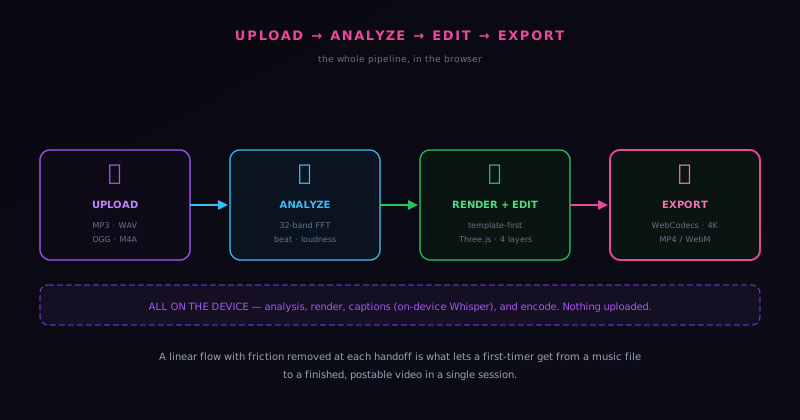
This is the full story of Novus Visualizers: how a music file becomes a finished, postable video entirely in the browser, and the decisions that shaped each step. It is the definitive account, distinct from the launch announcement, and it is meant to be read alongside the deeper companion posts that take each stage further. The product, at visualizers.novusstreamsolutions.com, lets a creator upload a track, choose a visual direction, customize it, and export a video. Underneath that simple promise is a real chain of engineering and product decisions about audio analysis, rendering, editing, export, and scope.
The throughline of the whole story is the same as the rest of the Novus ecosystem: do the work on the user's device, keep it free, and let architecture make the promises real. But where the background remover's story is mostly about privacy and a single hard ML problem, the visualizer's story is about a longer pipeline (reading sound, turning it into motion, giving a non-specialist creative control, and getting a real video file out the other end) and about the scoping discipline that made shipping that pipeline possible at all.
The gap: too simple or too complex, nothing in between
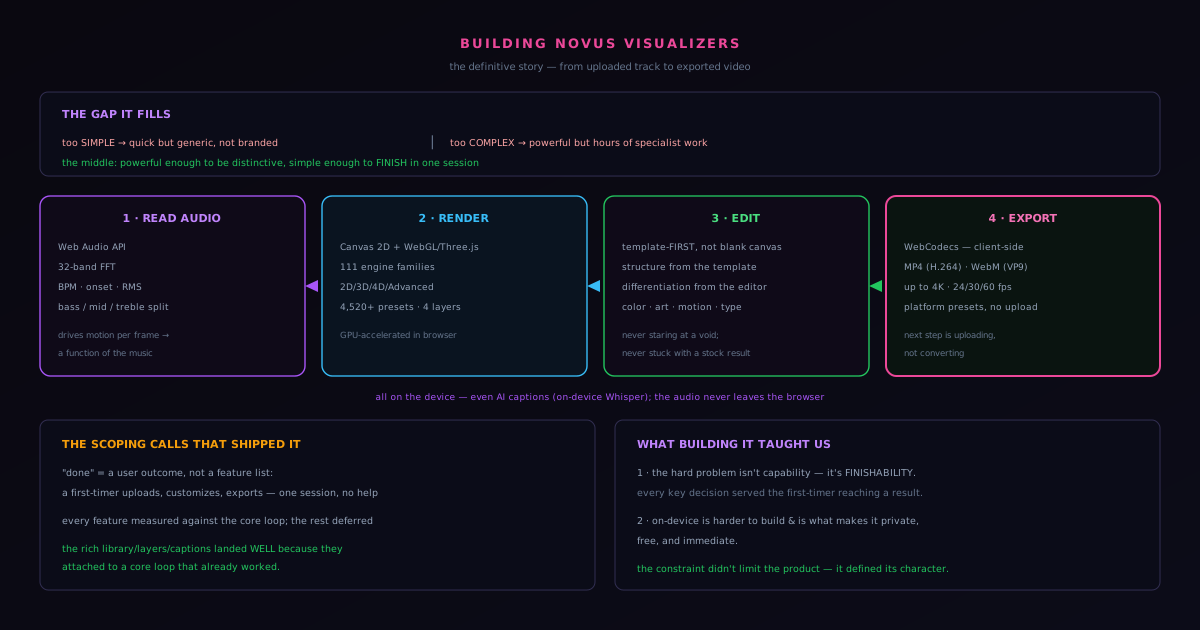
Music visualizers already existed when we started, so the question was never whether the category had tools; it was whether any of them fit how the target creator actually needs to work. The honest answer was that the options clustered at two extremes. On one end, tools simple enough to use in a minute but too limited to produce something that feels branded and distinctive. On the other, professional motion-graphics software powerful enough to make anything but complex enough that producing a single visualizer is hours of specialist work. The independent artist finishing a track, the small label, the streamer who needs a branded clip by tomorrow: they were stranded in the gap, forced to choose between a generic result and a time sink.
Novus Visualizers aims squarely at that gap: powerful enough to produce something distinctive, simple enough that a non-specialist can finish in a single focused session. Hitting the middle is harder than occupying either extreme, because the simple tools are simple by doing little and the complex tools are capable by exposing everything, and the middle requires giving real creative control without the blank-canvas complexity that stops non-specialists cold. The product's core decisions (a working engine-and-mode starting point, a linear workflow, on-device everything) are all answers to the question of how to be both capable and finishable at once.
Reading the audio: turning sound into motion
A visualizer is only as good as the connection between the music and the motion, and that connection starts with reading the audio precisely. The browser's Web Audio API decodes and analyzes the uploaded track in real time, running a 32-band FFT that decomposes the sound into its frequency content many times a second. From that raw spectrum, the analysis derives the musically meaningful signals: beat and BPM detection for the underlying pulse, onset and transient detection for the sharp starts of sounds, and an RMS loudness envelope for the broad dynamics of the mix. Bass, mid, and treble energy are isolated as separate signals so different visual elements can react to different parts of the sound rather than everything pulsing together.
On every rendered frame, the visual engine samples that live analysis and drives the scene from it: particle speed from the beat, scene brightness from loudness, the scale of low-frequency elements from the bass. Because this happens per frame, in lockstep with the playback position, the motion stays synchronized as a function of the music rather than as a loop placed behind it, which is why the same engine and mode produce visibly different motion for a slow ambient track and a fast electronic one. All of it runs on the device; even the optional AI caption feature uses an on-device Whisper model, so the audio never leaves the browser. The audio-analysis layer has its own dedicated companion post.
The render and the editing model
The visuals themselves are rendered with HTML5 Canvas and WebGL via Three.js for the engines and modes that use depth, GPU-accelerated in the browser. The system is deliberately structured rather than sprawling: ten engines (Particles, Trails, Bloom, Character Motion, Radial, Spectrum, Bars, Tunnel, Waveform, and Logo) each available in six modes, for sixty modes in total. Depth and 3D live inside specific modes (Bars 3D Columns, Spectrum Spectral Mesh, Waveform 3D Surface, Character Motion 3D Performer, the Tunnel corridor) rather than as a separate class, and each project composes ordered layers with one-click color themes on top. But structure alone would just be a bigger blank canvas, and the key product decision was how a non-specialist meets all that capability without being paralyzed by it.
The answer is a starting point that already works: the creator picks an engine and a mode that already reads well against the music (set up in the editor at visualizers.novusstreamsolutions.com/editor) and customizes from there, rather than building from nothing. The engine and mode provide structure (a look, a motion style, a relationship to the music that already holds together) and the editing provides differentiation: color, artwork, motion intensity, scene emphasis, typography, layered engines. Two editors share one saved document and one deterministic renderer (the guided Classic Editor for a fast, structured path, and the node-based Studio Workstation for deeper control), so the same project moves between them without losing anything. That split resolves the tension between accessibility and originality, because the user is never staring at a void and never locked into a stock result. The blank-canvas problem is the single biggest reason non-specialists abandon creative tools, and starting from a working engine and mode instead of an empty editor is how the visualizer sidesteps it. The editing model is covered in depth in its own companion.
Getting a real video out: client-side export
A visualizer that can only show a pretty animation in the tab has not solved the creator's problem; the hard part is producing a finished, shareable file. Novus Visualizers encodes the final video entirely client-side using WebCodecs (the browser API that gives direct access to the device's media encoders) with no upload and no server render queue. It exports MP4 (H.264) and WebM (VP9), up to 4K, at 24, 30, or 60 fps, with platform presets for YouTube, TikTok and Reels, Instagram, Spotify Canvas, X, and Discord so the dimensions and format match the destination automatically. The creator's next step after export is uploading, not converting.
Choosing client-side export was a real tradeoff, taken deliberately. It means export performance is bound by the user's device rather than a uniform server, and it depends on modern browser support, but in exchange it means no uploads of the creator's audio or video, no server render queue to operate, and no per-export cost, which is what keeps the tool genuinely free and sustainable the same way the background remover's client-side processing does. Platform presets cap resolution and frame rate to sensible targets so most exports finish in seconds, and the interface communicates progress clearly so the creator always knows where their video is. The export pipeline and its tradeoffs have a dedicated companion post.
The scoping calls that shipped it
The reason Novus Visualizers exists as a shipped product rather than a perpetual work-in-progress is scoping discipline, and it is worth being honest that this was the hardest and most important part. The MVP was defined not by a feature list but by a user outcome: a person who has never seen the app can upload a track, customize a visualizer enough to make it feel like theirs, and export a finished video they can post, in one session, without help. Every proposed feature was measured against whether it made that core loop more reliable, and the ones that did not, however appealing, were deferred rather than crammed into version one. That ruthless narrowing is what got a real product live.
The discipline paid off in the order things could be built. The rich capability the product has now (the ten engines and their modes, the ordered layers, the AI captions, the full export options) landed well precisely because they were added on top of a core loop that already worked, rather than being forced into a first version that could not yet reliably get a user from upload to export. Deferring is not abandoning; it is sequencing, and the sequence mattered. The specific scoping calls and the philosophy behind them are the subject of a dedicated companion post, and they are the same instinct (protect the core, defer the rest) that runs through how the whole Novus portfolio is built.
Why the middle of the market is the hard place to build
It is worth dwelling on why aiming at the gap between too-simple and too-complex is harder than occupying either extreme, because it shaped every decision in the product. The simple tools are easy to build precisely because they do little: limited capability is a small surface to design and implement. The complex tools are, in their own way, straightforward too: you expose all the capability and let the specialist user navigate it, putting the burden of usability on the user's expertise. The middle is hard because it requires delivering real capability while keeping it navigable for a non-specialist, which means neither cutting capability nor offloading complexity onto the user: both of the easy escapes are off the table.
This is why occupying the middle demanded the specific product inventions the visualizer relies on. A working engine-and-mode starting point, a linear workflow, platform presets, a scoped MVP: each is a mechanism for delivering capability without the complexity that would normally accompany it, which is exactly the problem the middle of the market poses. A tool that simply had a powerful engine would slide toward the complex extreme; a tool that simply limited itself would slide toward the simple one; staying in the middle required actively engineering capability and approachability to coexist. The difficulty of the middle is the difficulty of refusing both easy resolutions, and the product's distinctive design is the accumulated set of answers to how capability and finishability can be held together rather than traded off. Building for the underserved middle is harder than building for either end, which is also why the middle was underserved and therefore worth building for.
One look, harvested across every format
A piece of the build worth highlighting is how the export design turns a single created visualizer into an entire release's worth of platform-specific videos, because it multiplies the value of the creator's effort. The platform presets mean a creator establishes their look once and then exports it sized correctly for each destination (landscape for one platform, vertical for another, square, the looping format some music services use) without rebuilding the visual for each. The look is the expensive creative work; the formats are cheap derivations of it, produced in seconds each because the client-side export is fast and unmetered. One session of creative effort yields a complete, coherent set of platform assets.
This design reflects an understanding that a modern release is not one video but a set of them, and that forcing a creator to rebuild their visual for each platform would be both tedious and a source of inconsistency. By making the look reusable across formats, the export design lets a creator produce a unified set where every platform version shares the same identity, which is what makes a release look coherent rather than assembled from mismatched pieces. The leverage is significant: the marginal cost of another platform format is a reframe and a fast export rather than a fresh build, so covering many platforms is feasible in a single session. Building the export around harvesting one look into many formats, rather than treating each format as a separate project, is part of how the tool serves the real shape of a creator's need, which is a complete platform set from one creative effort.
A release needs more than the main video
The visualizer is the centerpiece, but a complete release needs a surrounding set of assets, and the product grew a companion toolkit to provide them so a creator can assemble a whole release in one place. Album art at visualizers.novusstreamsolutions.com/albums, lyric videos at visualizers.novusstreamsolutions.com/lyric-videos, stream overlays, and a royalty-free audio library sit alongside the main visualizer, sharing its approach and its visual identity, so the cover, the lyric piece, and the overlays for a release can be produced together with the main video rather than sourced from scattered, unrelated tools. The point is that a release is a coordinated set of visual assets, and producing them in one coherent place keeps them unified in a way that assembling them from separate tools cannot.
This companion ecosystem is the visualizer's version of the same breadth-with-coherence the background remover achieved: capability expanded around a core without fragmenting, because each addition shares the foundation and the identity. For a solo creator, the value is that a complete, consistent release kit becomes producible by one person in a focused effort, rather than requiring a designer for the cover, one tool for the lyric video, and another for the overlays. The main visualizer anchors the set, and the companions extend it into everything else a release needs, all sharing one palette, one identity, one approach. Recognizing that the creator's actual need is a full release rather than a single video, and building the companions to meet that need coherently, is part of what makes the product a genuine solution to the creator's problem rather than just an excellent visualizer that leaves the rest of the release unsolved.
Ownership is the quiet differentiator
Amid the discussion of audio, rendering, and export, it is worth surfacing a property that matters enormously to creators and is easy to overlook: they own what they make, outright. The exports are copyright-clean, carry no watermark, and require no attribution, so a creator can use them commercially or personally without restriction, which is rarer than it should be among free creative tools, many of which quietly attach a watermark, a license claim, or an attribution requirement to anything made without paying. For a working artist whose visualizer is going on a commercial platform attached to their release, that freedom from strings is not a minor perk but a precondition for the tool being usable for real work.
This ownership is the same architectural fact as the privacy, seen from another angle. Because the render happens entirely on the creator's own device through the client-side export, with no upload and no server in the path, there is no point where a service inserts itself between the creator and their video to stamp a mark or assert a claim. The audio that drives the visual and the video that comes out both stay with the creator, who owns the result completely. The combination that the on-device approach delivers (professional output, real privacy, no cost, and full ownership) is what makes the tool genuinely a creator's own rather than a borrowed service that takes a cut in watermarks or rights. Ownership rounds out the set of guarantees the architecture provides, and for an independent artist it is often the one that turns a tool from something to experiment with into something to build a release on.
What building it taught us
The clearest lesson from building Novus Visualizers is that the hard problem in a creative tool for non-specialists is not capability but finishability. It is comparatively easy to build something powerful and comparatively easy to build something simple; the actual challenge is building something a first-timer can complete that still produces a result they are proud of. Almost every important decision (a working engine-and-mode start over blank-canvas, a linear workflow over a sandbox, platform presets over raw export settings, a tightly scoped MVP over a feature pile) was in service of finishability, because a tool that the user cannot finish is a tool that does not matter how good its engine is.
The second lesson echoes the background remover's: the client-side, on-device approach is harder to build and is what makes the product what it is. Reading audio in the browser, rendering with WebGL, encoding with WebCodecs, running Whisper on-device: each was more work than a server equivalent, and together they produced a tool that is private, free, and immediate in a way a server pipeline could not be. The constraint of doing it all on the device did not limit the product; it defined its character. To make a visualizer, go to visualizers.novusstreamsolutions.com/editor; for the reference detail on formats, engines, and export, see the Visualizers documentation at Novus Visualizers; and for the depth on any stage of this story, follow the companion posts linked throughout.
Frequently asked questions
Quick answers to common questions about this topic.
How does Novus Visualizers turn a track into a video?
It analyzes the uploaded audio in real time (32-band FFT plus beat, onset, and loudness), drives a chosen engine and mode with that signal, lets you customize its ordered layers and color, then exports the result client-side via WebCodecs, all in the browser.
What powers the visuals?
Ten engines, each with six modes (60 modes in total), rendered with Canvas and WebGL/Three.js, with multi-band beat sync so bass, mid, and treble drive different elements. Depth and 3D live inside specific engines and modes rather than as a separate class.
Where can I read the technical deep-dives?
See audio analysis at Turning sound into motion: reading audio with the Web Audio API, client-side export at Exporting a release-ready video in the browser, and the tradeoffs we accepted, and the editing model at Engine and mode starting points: creative control without blank-canvas paralysis.
Related workflow
A track to a release-ready visualizer, per platform
Render the visual once, then produce the platform masters from it, instead of re-rendering the whole video for every aspect ratio.
- Render the beat-synced videoNovus Visualizers: Pick the engine and mode against your actual track; the analysis is done on your audio, not on a preset preview.
- Trim or upscale the exportNSS Background Remover: The video utilities handle the tidy-up pass so the render does not have to be repeated to fix ten seconds of it.
- Produce the per-platform mastersNovus Convert: Each destination wants a different container and bitrate; converting the finished render is far cheaper than re-rendering it.
Related troubleshooting
Was this page helpful?
Your answer stays in this browser, it is not sent anywhere and no account or cookie is involved.