2026 · Novus VisualizersAbout 13 min readNovus Stream Solutions
Exporting a release-ready video in the browser, and the tradeoffs we accepted
Novus Visualizers encodes finished videos entirely client-side with WebCodecs (MP4 and WebM up to 4K) with no upload and no server render queue. Here is how that pipeline works and the honest tradeoffs of choosing it over a render farm.
Contents
- 1.Overview
- 2.What "release-ready" means here
- 3.The pipeline: WebCodecs doing the encoding
- 4.The tradeoffs we accepted
- 5.Why WebCodecs beats capturing the canvas
- 6.Muxing the audio and video together
- 7.Bitrate, quality, and the 4K case
- 8.Hardware encoders and why they matter
- 9.Why client-side export fits a free tool
- 10.Communicating progress through a long encode
- 11.Preview and export are different promises
Overview
The hardest part of a browser-based video tool is not making the visuals: it is getting a finished, shareable video file out the other end. Plenty of tools can show you a pretty animation in the tab and then fall down at the moment you actually need an MP4 you can upload to YouTube. Novus Visualizers encodes the final video entirely in the browser, client-side, with no upload and no server render queue, producing MP4 or WebM files up to 4K straight from visualizers.novusstreamsolutions.com/editor. This post is about how that export pipeline works, what "release-ready" actually means here, and (because every engineering choice has a cost) the tradeoffs we accepted to ship it this way rather than the easier server route.
The honest framing up front: client-side export is the harder path, and we chose it deliberately. A server render farm is in many ways simpler to build and gives more predictable performance. We went the other way for reasons that are about cost, privacy, and the kind of product we wanted, and we accepted real compromises in exchange. Understanding those tradeoffs is more useful than a feature list, because they are the decisions any team building in this space will have to make.
What "release-ready" means here
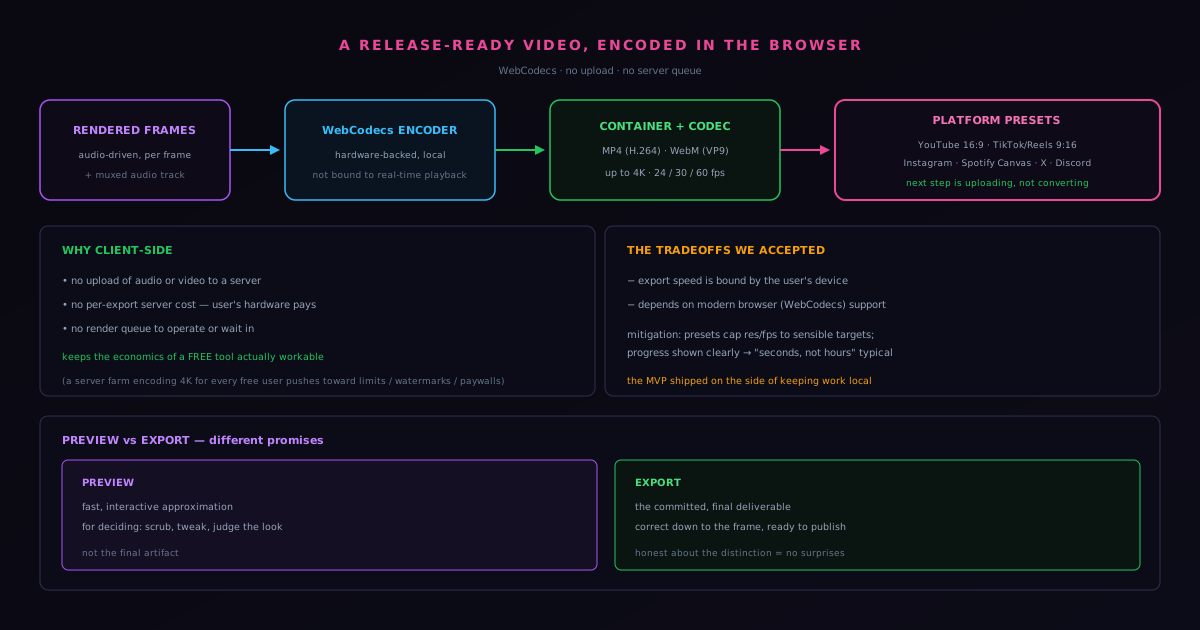
Release-ready is a specific bar, not a vague aspiration. It means the file that comes out is something a creator can actually publish without another tool in the chain: a standard container and codec that the major platforms accept, at a resolution and frame rate appropriate for those platforms, with the audio muxed in and the visuals synced. Concretely, Novus Visualizers exports MP4 with the H.264 codec and WebM with the VP9 codec (the two formats that cover essentially every destination a creator targets) at resolutions up to 4K (3840×2160) and frame rates of 24, 30, or 60 fps. It also ships platform presets for YouTube, TikTok and Reels, Instagram, Spotify Canvas, X, and Discord, so the aspect ratio and dimensions match the target without the user having to know the spec.
That preset layer is part of what makes the output genuinely usable rather than technically correct. Knowing that a TikTok needs 9:16 and a YouTube video wants 16:9 is exactly the kind of friction that stops a non-specialist from finishing. Encoding the right dimensions for the chosen destination, automatically, is the difference between "here is a video file, figure out if it fits" and "here is a video ready for the platform you picked." If you want the exact preset settings before you start, Export settings and the companion tools walks through each destination. Release-ready means the creator's next step is uploading, not converting.
The pipeline: WebCodecs doing the encoding
The engine that makes in-browser export possible is WebCodecs, a browser API that exposes low-level access to the device's media encoders. Older browser-based video tools had to fake this: capturing a canvas stream in real time and recording it, which ties export time to playback time and produces inconsistent results. WebCodecs lets the application feed rendered frames directly to a hardware-backed encoder and get compressed video data back, without routing through a server and without being bound to real-time playback. The rendered frames coming out of the visual engine (the same frames driven by the audio analysis) are handed to the encoder, combined with the audio track, and written into the chosen container. The whole operation happens in the tab, on the user's machine.
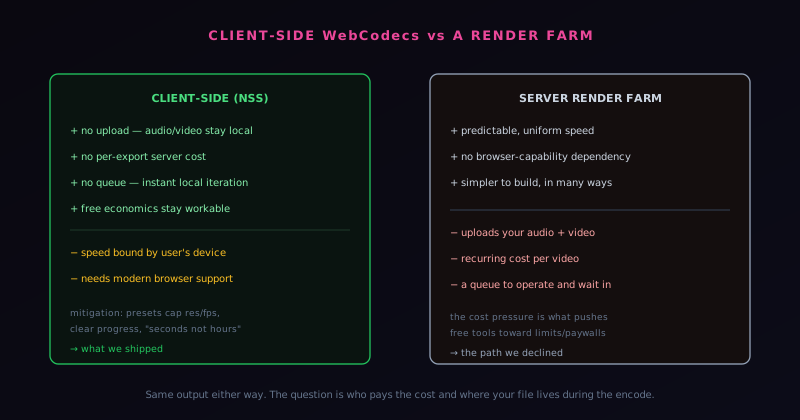
Because the encode is local, the privacy and cost properties that define the rest of the Novus ecosystem hold here too. There is no upload of the user's audio or the rendered video to a processing server, and there is no per-export server cost, because the marginal cost of an export is paid by the user's own hardware. For a free, ad-supported tool, that last point is not incidental: a server render farm encoding 4K video for every free user is an expensive thing to operate, and the pressure of that cost is exactly what pushes free tools toward export limits, watermarks, or paywalls. Keeping the encode client-side keeps the economics of "free" actually workable.
The tradeoffs we accepted
The central tradeoff is that export performance is bound by the user's device. A server farm runs on known, fixed, powerful hardware and gives every user the same encode speed. We run on whatever machine the visitor brought, which ranges from a workstation that encodes 4K quickly to a modest laptop that takes longer on the same scene. We leaned into that constraint rather than pretending it away: the platform presets cap resolution and frame rate at sensible targets so that the common cases finish quickly, and the interface communicates render and export progress clearly so the user always knows where their video is rather than staring at a frozen button. The goal was to make the typical export feel fast ("in seconds, not hours") even though we cannot promise identical timing across every device.
The second tradeoff is reach: WebCodecs and the surrounding APIs are modern browser features, so the client-side path depends on the user's browser supporting them. A server pipeline would have sidestepped that by doing the work remotely. We judged the tradeoff worth it because the browsers that creators actually use for this kind of work support the needed capabilities, and because the benefits on the other side (no uploads, no queue, no recurring cost, instant local iteration) are exactly the properties that make the tool feel immediate and keep it sustainable as a free product. A server pipeline would have removed the device dependency and reintroduced uploads, a queue we would have to operate, and a cost per video. The MVP shipped on the side of keeping the work local.
Why WebCodecs beats capturing the canvas
The older way to get video out of a browser tool was to capture the canvas as it played and record that stream, and understanding why that approach is inferior clarifies what WebCodecs actually buys. Canvas capture ties the export to real-time playback: a three-minute video takes at least three minutes to record, because you are filming the animation as it runs. Worse, it is fragile: if the tab is busy or a frame is slow, the recording drops frames or stutters, baking playback hiccups permanently into the output. The result is an export whose quality depends on how smoothly the animation happened to run during recording, which is no way to produce a reliable deliverable.
WebCodecs breaks the tie to real-time playback by giving the application direct access to the device's media encoder. Rendered frames are fed to the encoder as fast as the machine can produce and compress them, decoupled from playback speed, so export is bound by how quickly the device can render and encode rather than by the length of the video. Just as importantly, every frame is rendered deliberately and handed to the encoder intact, so there are no dropped or stuttered frames from real-time pressure: the output is exactly the frames the engine produced, in order, at full quality. This is the difference between filming a screen and actually encoding a video, and it is why a tool serious about release-ready output needs WebCodecs rather than canvas capture.
Muxing the audio and video together
A finished video is not just a sequence of encoded frames; it is video and audio combined into a single container in a way players understand, and that combining step (muxing) is a real part of the export that is easy to overlook. The rendered, encoded visual frames have to be interleaved with the track's audio into the chosen container format, with the timing aligned so the audio and the visuals stay in sync through playback. Get the muxing wrong and you can end up with a video whose audio drifts out of sync, or a file a player refuses to open, even if the individual streams were encoded correctly.
This matters for the release-ready bar because a creator needs a single file with the music in it, not a silent video they have to combine with audio elsewhere. The export pipeline handles the muxing so the output is a complete, self-contained video with the track embedded and aligned, ready to upload. It is another instance of the last mile being where the real work is: encoding the frames is necessary but not sufficient, and assembling them with the audio into a correct, playable container is what turns a stream of compressed frames into an actual video file. Doing it in the browser, alongside the encoding, keeps the whole assembly local and is part of what makes the in-browser export genuinely complete rather than a partial step.
Bitrate, quality, and the 4K case
Resolution is the headline number, but the bitrate (how many bits per second the encoder spends) is what actually determines visual quality at a given resolution, and balancing it is part of producing good output. Too low a bitrate and the video shows compression artifacts, blocking and smearing especially in the high-motion, high-detail scenes a visualizer produces; too high and the file is needlessly enormous. The encode has to choose a bitrate that preserves the quality of detailed, fast-moving visuals without bloating the file, which is a real tradeoff because visualizer content, with its particles and gradients and motion, is demanding to compress cleanly.
The 4K case sharpens all of this, because four times the pixels of 1080p means far more data to encode and far more demand on the device doing it. A 4K export is the most demanding thing the pipeline does, stressing both the encoder and the device's memory and compute, which is exactly where the device-bound performance tradeoff is felt most. The platform presets help by matching resolution to destination so users do not reach for 4K when a lower resolution would serve, but when 4K is genuinely needed, the pipeline has to handle the heaviest load gracefully. Treating bitrate as a real quality lever, and the 4K path as the demanding case to design around, is part of making the export genuinely release-ready rather than just nominally high-resolution.
Hardware encoders and why they matter
A key reason in-browser export can be fast is that WebCodecs can reach the device's hardware media encoder (dedicated silicon built specifically for encoding video efficiently) rather than encoding in slower general-purpose code. Most modern devices have hardware encoders precisely because video encoding is common and demanding, and using them is dramatically faster and more power-efficient than doing the same work on the general CPU. By exposing access to these encoders, WebCodecs lets a browser tool tap the same hardware acceleration native applications use, which is much of why a local export can finish in seconds rather than the long waits older browser approaches required.
This hardware access is also part of why the device-bound performance varies, since not every device has equally capable encoders, and it is why the experience ranges from very fast on a modern machine to slower on an older one. But the floor is much higher than it would be without hardware acceleration: even a modest device with a hardware encoder handles common exports reasonably, where a software-only encode of 4K video in a browser would be painfully slow everywhere. Leveraging the hardware encoder is the difference between in-browser export being a practical feature and a frustrating one, and it is a concrete example of how recent browser capabilities (not just faster computers) are what made serious client-side video tooling viable.
Why client-side export fits a free tool
The economic argument for client-side export deserves to be stated plainly, because it is a large part of why the harder technical path was the right one. Encoding video, especially at 4K, is computationally expensive, and a server render farm doing that work for every free user is a significant, ongoing cost that grows with usage. That cost is exactly the pressure that pushes free video tools toward export limits, watermarks, or paywalls: when every export costs the operator money, unlimited free export is hard to sustain. Moving the encode to the user's device removes that per-export cost entirely, because the user's hardware does the work.
This is why the client-side choice is not just a privacy or convenience decision but an economic precondition for the free, unlimited model. A tool that pays for every export cannot afford to offer unlimited free exports indefinitely; a tool whose exports cost it nothing per use can. The same architecture that keeps the user's audio and video off a server keeps the operator's costs near zero, which is what allows the export to be free, unwatermarked, and unlimited, funded by ads rather than by metering. The harder engineering of client-side WebCodecs encoding buys the sustainable economics that make "free and unlimited export" a promise the tool can actually keep, which a server-based free tool at scale structurally cannot.
Communicating progress through a long encode
Because export performance is bound by the user's device, an export can take a meaningful amount of time on a modest machine or a heavy 4K scene, and how that wait is communicated determines whether it feels acceptable or broken. A progress indicator that genuinely reflects how far along the encode is (rather than a generic spinner that gives no sense of remaining time) is what turns a multi-second or multi-minute export from an anxious "is this frozen?" into a tolerable "it is working, and here is how far it has gotten." The honesty of the progress reporting is part of the product, because a wait you can see ending is a different experience from a wait that might never end.
This matters especially for a client-side tool, where the device-bound timing means the wait varies and cannot be promised in advance. A server tool can sometimes give a consistent estimate; a client tool has to be honest that the time depends on the machine, which makes clear, accurate progress communication more important rather than less. The user needs to trust that the export is advancing toward completion, and a truthful indicator of real progress provides that trust where a vague or fake one would erode it. Treating the progress display as a real feature (accurate, legible, reflecting true state) is part of why the local export feels dependable despite its variable timing, and it is the kind of detail that separates a tool that respects the user's wait from one that leaves them guessing.
Preview and export are different promises
One subtlety worth making explicit is that previewing and exporting are different trust contracts, and treating them as the same thing is a common way to disappoint users. The preview is a fast, interactive approximation meant for making decisions: you scrub, you tweak, you judge whether the look is right. The export is the committed, final artifact that has to be correct down to the frame. Communicating that distinction honestly (that the preview is for deciding and the export is the deliverable) sets expectations correctly and is part of why the output earns the "release-ready" label rather than surprising someone with a final file that does not match what they thought they were getting.
The export pipeline is the unglamorous half of a visualizer that determines whether the whole thing is actually useful. A beautiful animation that cannot leave the browser as a standard file has not solved the creator's problem. Choosing client-side WebCodecs encoding, accepting the device-bound performance and browser-support tradeoffs in exchange for no uploads and sustainable free economics, and being honest about the preview-versus-export distinction is the combination that makes the output something a creator can take straight to a platform. The companion post on what the MVP deliberately left out covers the scoping discipline that made shipping this pipeline possible in the first place.
Frequently asked questions
Quick answers to common questions about this topic.
Does Novus Visualizers render video on a server?
No. Export runs entirely in your browser via the WebCodecs API: there is no upload and no shared render queue. The encode happens on your own device, so render time depends on your hardware rather than a server's load.
What video formats and resolutions can I export?
MP4 (H.264) or WebM (VP9), up to 4K at 24, 30, or 60 fps, with platform presets for YouTube, TikTok/Reels, Instagram, Spotify Canvas, and more that cap resolution and frame rate to sensible targets per destination.
Why does my export take longer on some devices?
Because the encode is local, a capable machine finishes a 4K render in seconds while a modest one takes longer on the same scene. The platform presets exist partly to keep most exports finishing quickly.
Related workflow
A track to a release-ready visualizer, per platform
Render the visual once, then produce the platform masters from it, instead of re-rendering the whole video for every aspect ratio.
- Render the beat-synced videoNovus Visualizers: Pick the engine and mode against your actual track; the analysis is done on your audio, not on a preset preview.
- Trim or upscale the exportNSS Background Remover: The video utilities handle the tidy-up pass so the render does not have to be repeated to fix ten seconds of it.
- Produce the per-platform mastersNovus Convert: Each destination wants a different container and bitrate; converting the finished render is far cheaper than re-rendering it.
Related troubleshooting
Was this page helpful?
Your answer stays in this browser, it is not sent anywhere and no account or cookie is involved.