Novus Visualizers
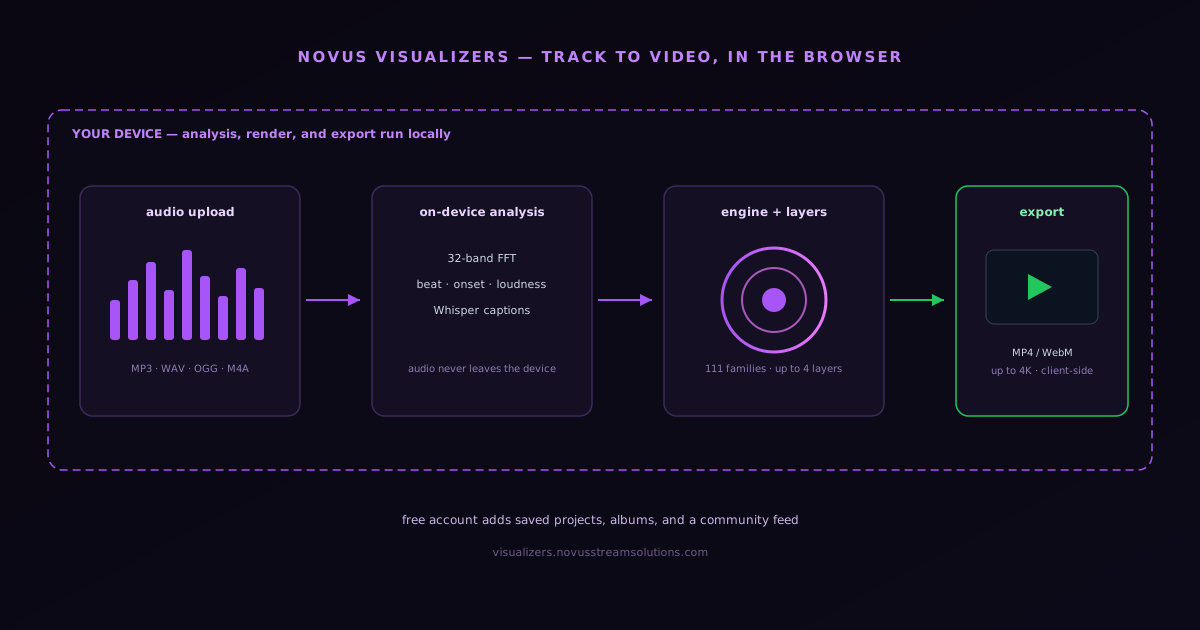
Novus Visualizers is the live music-video workflow inside the Novus ecosystem. The app runs at visualizers.novusstreamsolutions.com for creators, artists, editors, and small teams who want to upload a track (MP3, WAV, OGG, or M4A), pick an engine and a mode, customize motion and layout, and export a finished video without building every animation from scratch. The heavy compute stays on the user's device: a real-time 32-band FFT plus beat, onset, and loudness detection drives the motion; rendering uses HTML5 Canvas and WebGL via Three.js across 13 engines (Particles, Trails, Bloom, Character Motion, Radial, Spectrum, Bars, Tunnel, Waveform, Logo, Lattice, Terrain, and Stage Lights) that each carry 6 modes (78 in total), composited as ordered layers; on-device Whisper generates lyric captions; and export is client-side via WebCodecs to MP4 (H.264) or WebM (VP9) up to 4K at 24/30/60 fps, with platform presets, no watermark, and no export quota. Two editors share one saved document and one deterministic renderer, so the preview always matches the export: the Classic Editor is the guided path (upload a track, choose an engine and mode, then tune colors, geometry, direction, audio bindings, captions, logos, and overlays) while the Studio Workstation is the node-based path, with direct canvas editing, ordered layers, a beat-aware timeline with beat and bar markers, keyframes and graph curves, clips and loop regions, groups, masks, blend modes, and full-document undo/redo. What is no longer ephemeral is the work itself: a free Novus account adds a Creator Studio dashboard where drafts, projects, saved documents, and albums persist durably and reopen with every setting intact, a community feed where creators publish, like, and save visualizers, and a Creators hub for building an audience, plus companion tools (Cover Art Studio, Audio Effects Generator, Lyric Video Creator, Stream Overlays, and an Audio Library) around the core editors. The distinction worth holding onto is between local compute (rendering, transcription, and export run on your hardware) and account-backed persistence (your saved projects, albums, and community posts live with your account so you can reopen them on any device). This page is the canonical hub-side reference for the product; for the full build story see novusstreamsolutions.com/product-blog/building-novus-visualizers-uploaded-track-to-video.
Contents
- 1.What Novus Visualizers is for
- 2.Who Novus Visualizers is designed to serve
- 3.Core workflow: upload, customize, export
- 4.Engines, modes, layers, and audio reactivity
- 5.Classic Editor and Studio Workstation
- 6.Audio ingestion, preprocessing, and trust
- 7.Editing controls that matter most
- 8.Previewing versus final export
- 9.Accounts, the Creator Studio dashboard, and saving your work
- 10.Community, creators, and sharing
- 11.Companion tools around the editor
- 12.Branding, artwork, and release packaging
- 13.Performance, rendering reliability, and support posture
- 14.Rights, ownership, and user expectations
- 15.How Visualizers fits the broader Novus ecosystem
- 16.Roadmap posture for a live, maturing product
- 17.Where to go next
What Novus Visualizers is for
Most creators do not need a blank timeline; they need a repeatable way to turn a finished audio file into a visual asset that looks intentional, fits a release window, and can be exported without hand-animating every frame. Novus Visualizers is built for that middle ground. It gives users a starting system instead of an empty canvas: upload the music, select an engine and one of its modes, adjust the design, and render a video that is ready for posting, review, or distribution.
That product framing shapes what the app optimizes for. The goal is not to replace a full compositing suite; it is to make the most common workflow dependable: ingest audio reliably, offer editable visual starting points across 13 engines and their modes, expose the controls creators actually reach for, and output a clean exported file every time. The product has grown well past its initial release, adding 13 engines with 6 modes each (78 in total), ordered layers, multi-band beat synchronization, two editors that share one saved document and one renderer, on-device caption generation, and client-side 4K export, but the organizing principle is unchanged: it solves a real problem for artists and operators who would otherwise stitch together plugins, manual keyframes, and rushed export settings across several tools.
The broader Novus role of the app is also clear: the hub explains the ecosystem and hosts long-form documentation, while visualizers.novusstreamsolutions.com is where the working product runs. Product blog posts on novusstreamsolutions.com handle launch narratives, operating philosophy, and rollout notes. The app itself handles rendering, account flows, and the editing experience. Keeping that boundary explicit avoids mixing marketing promises with production controls.
Who Novus Visualizers is designed to serve
The clearest users are independent artists, small labels, content teams, streamers, and editors who already have finished or near-finished music but do not want to spend hours building an accompanying video from zero. They care about speed to first draft, enough visual control to make the output feel branded, and exports that can survive real publishing surfaces such as YouTube, Instagram, TikTok, short-form promos, or internal review workflows.
The app is a production tool for practical media teams, not a hobby toy. Users want a short path from audio upload to a presentable result. They want to adjust timing, color treatment, layout, backgrounds, typography where supported, and the visual reaction to the music, including how different frequency bands of the track drive different elements of the scene. They also want the app to be predictable enough that they can promise a teammate or client, "I can get you a draft this afternoon," without gambling on a fragile chain of third-party plugins. Streamers in particular are served by the Stream Overlays and Creator Studio surfaces, which extend the same engine library into live, broadcast-oriented use.
This audience also overlaps cleanly with the rest of the Novus ecosystem. A creator can pair a Novus Visualizers export with the product blog and portfolio pages to build a coherent public presence around a release. Each part of the stack keeps its role: Visualizers handles the media output, and the hub handles the narrative.
Core workflow: upload, customize, export
The workflow stays linear even though advanced options exist. Step one is audio upload (MP3, WAV, OGG, or M4A). Users should understand what file types are supported, how large uploads may be, and what happens while a track is being processed: a real-time 32-band FFT plus beat, onset, and loudness detection reads the track so motion stays synchronized. Step two is scene or engine selection: instead of architecting a motion system from scratch, the user begins from one of the 13 engines and picks one of its 6 modes. Step three is customization, where branding, pacing, color, layering, and the audio-reactive behavior become specific to the artist or campaign. Step four is export, where the product cashes the promise it made at the top of the funnel.
A workflow like that succeeds when each stage has obvious defaults and obvious recovery paths. If an upload fails, say why and how to fix it. If a selected engine cannot support a certain output mode, say that before the user invests an hour editing. If export takes time, give the user a render-progress state they can trust rather than a vague spinner. Reliability at handoff points is what makes the app feel professional.
The core promise the copy should make is concrete and already delivered: users can upload music, customize a visualizer across 13 engines and their modes, and export a release-ready video (up to 4K, in platform-specific proportions) entirely in the browser. Further capability expansion continues to happen through changelog and documentation updates as engines, modes, and workflow depth grow.
- Start with a finished or near-finished audio track rather than an empty project.
- Choose an engine and one of its modes, then customize layout, style, and behavior.
- Render an exportable video (up to 4K, client-side) without rebuilding the sequence manually in another app.
Engines, modes, layers, and audio reactivity
The visual system is organized into engines and modes rather than a flat list of effects. There are 13 engines (Particles, Trails, Bloom, Character Motion, Radial, Spectrum, Bars, Tunnel, Waveform, Logo, Lattice, Terrain, and Stage Lights) and each carries 6 modes, for 78 distinct looks in total. Bars, for example, runs Linear Equalizer, Center Mirror, Stacked Bands, Radial Bars, 3D Columns, and Piano/Step Grid; Waveform runs Line, Mirrored, Filled, Ribbon, Oscilloscope/Lissajous, and 3D Surface; Logo, the brand-first engine, runs Waveform Ring, Spectrum Halo, Orbiting Bars, Particle Aura, Pulse Frame, and Kinetic Reveal, every one of which clears a centred mark instead of covering it. Lattice is hard-edged geometry (mirrors, tilings, wireframes, trusses) that switches on the beat; Terrain renders the last few seconds of the track as receding landscape; Stage Lights is a lighting rig rather than a readout: beams, haze, pools, and chases cued by the beat. Simpler engines render through HTML5 Canvas; the dimensional modes render through WebGL via Three.js. This structure gives a creator a meaningful starting direction (the engine) plus a specific variation (the mode) before any manual editing, which is what makes the path from upload to a distinctive draft short without sacrificing range.
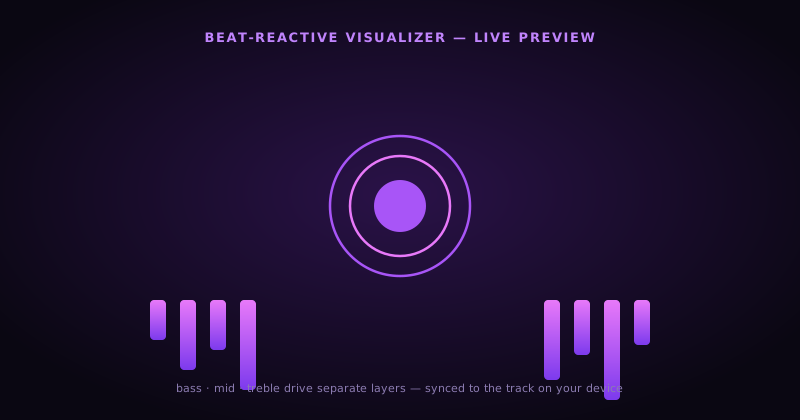
Scenes are built from ordered layers rather than a single effect, which is where much of the expressive depth comes from: a background field, a reactive midground, an artwork or typography layer, and accents can be stacked and re-ordered rather than forcing one engine to carry the whole frame. Depth is not a separate axis: it lives inside specific engines and modes, such as Bars' 3D Columns, Spectrum's Spectral Mesh, Waveform's 3D Surface, Character Motion's 3D Performer, and Tunnel's corridor and tube modes. Audio reactivity is driven by a real-time 32-band FFT with beat, onset, and loudness detection, and multi-band beat synchronization lets bass, mid, and treble energy drive different layers independently, so the elements of a scene respond to the parts of the track they are meant to, rather than all pulsing on the same signal.
On-device caption generation uses a Whisper model running locally in the browser to transcribe a track's lyrics or speech with per-word timing, so captioned lyric videos can be produced without sending audio to a transcription service. As with rendering and export, the transcription is client-side: the audio never leaves the device. For creators working in live contexts, the Stream Overlays and Creator Studio surfaces extend the same engine library and reactivity into broadcast-oriented output.
- 13 engines (Particles, Trails, Bloom, Character Motion, Radial, Spectrum, Bars, Tunnel, Waveform, Logo, Lattice, Terrain, and Stage Lights) each with 6 modes, for 78 distinct looks.
- Ordered layers per scene for background, reactive, artwork, and accent roles, stacked and re-ordered freely.
- Depth lives inside engine modes (Bars 3D Columns, Spectrum Spectral Mesh, Waveform 3D Surface, Character Motion 3D Performer, Tunnel corridor/tube) rather than a separate variant axis.
- Real-time 32-band FFT with beat, onset, and loudness detection; multi-band sync drives layers from bass, mid, and treble independently.
- Engine-wide beat-sync overhaul (v4.1) gives all 13 engines deterministic timing, so the same track and seed land the same hits every render.
- Every control in the panel applies to the render (nothing is preview-only) and Studio node graphs carry their full data into exports.
- On-device Whisper captions with per-word timing for lyric videos: audio stays local.
- Stream Overlays and Creator Studio extend the engines into live, broadcast-oriented use.
Classic Editor and Studio Workstation
Novus Visualizers ships two editors, and the important architectural fact is that they are not two separate apps: they share one saved document and one deterministic renderer. Because both edit the same underlying document and both draw through the same renderer, the preview a creator sees always matches the exported file: there is no "it looked different in the editor" gap between the two surfaces, and a project started in one editor is the same project in the other.
The Classic Editor is the guided, beginner-friendly path. A creator uploads a track, picks an engine and one of its modes, and then tunes the things that make an output feel like their release: colors, geometry, direction, audio bindings, captions, logos, and overlays. It foregrounds the decisions most creators actually reach for and keeps the path from upload to a presentable draft short, without asking anyone to assemble a motion graph by hand.
The Studio Workstation (/studio) is the node-based path for creators who want direct control. It offers direct canvas editing, ordered layers built from normalized nodes, a beat-aware timeline with beat and bar markers, keyframes and graph curves, clips and loop regions, groups, masks, blend modes, and ranges, schema-generated controls, an assets panel, manual 2D and 3D character rigs, and full-document undo/redo. It is the surface for precise, timeline-driven work, but because it writes the same document the Classic Editor reads, a creator can move between guided editing and detailed editing without losing anything or re-rendering into a different engine. /compare runs two engines on one loop, or Classic next to Studio, so a creator can check the shared-document claim rather than take it on faith.
Treat the two editors as one product with two entry points rather than a beginner tool and a separate pro tool. The saved document is the source of truth, the engines and modes are the visual vocabulary, and the deterministic renderer is the guarantee that what a creator approves in preview is exactly what leaves the browser at export. That shared foundation is what keeps the app dependable as scenes get more ambitious.
Audio ingestion, preprocessing, and trust
Audio upload is one of the first trust moments in the product. Users are handing over a primary creative asset, often on a deadline. They need to know which formats work, how long processing may take, and whether the app is analyzing the file only for visualization or storing it for later project access. Even if the underlying implementation changes over time, the user-facing contract must stay understandable. Ambiguity at ingestion is how support queues fill with questions that should have been answered by the interface.
Preprocessing should be framed as a reliability step, not as magic. If the product generates waveform or energy data, normalize that explanation into plain language: the app reads the uploaded track so motion and visual response can stay synchronized during editing and export. Users do not need DSP jargon to trust the system; they need a believable explanation of why the app is taking time before editing begins and what they gain from waiting for that processing to finish.
Operationally, this stage also defines several boundaries: file size limits, supported codecs (MP3, WAV, OGG, M4A), upload retry behavior, temporary project states, and what happens when a user closes the tab mid-process. Document those boundaries explicitly, because they become harder to explain later if users learn one behavior and production quietly shifts beneath them.
Editing controls that matter most
A good editor does not surface every control with equal weight; it foregrounds the right ones. In a music visualizer product, the high-value edits are the ones tied directly to audience perception: color treatment, visual intensity, background and artwork handling, scene framing, layer composition, timing offsets, and how reactive elements respond to the music. With multi-band beat synchronization, that last control becomes more expressive: bass, mid, and treble energy can drive different elements independently, so a kick can pulse one layer while a hi-hat animates another. Exposing the high-value controls prominently helps users get from "generic output" to "recognizably ours" quickly, which is what determines whether the product feels publishable.
Good editing controls also protect users from self-sabotage. Powerful software often fails when it exposes too many interdependent options without guardrails. A more pragmatic model is to provide sensible ranges, preview states, and reset paths. Users should be able to experiment without fear that they have irreversibly broken the project. That is especially important in a visualizer app, where small changes in color, scale, or responsiveness can dramatically affect the emotional read of the final video.
For teams, saved project state and predictable re-editing matter almost as much as the initial edit. If a client requests a small change after review, the user should not need to rebuild from upload. However versioning is handled, the product should communicate how projects are saved, revisited, and re-exported so the workflow feels like software, not a one-time generator.
Previewing versus final export
Preview and export are different trust contracts. Preview exists to help the user make decisions quickly. Export exists to deliver a file they can actually publish. Those goals overlap, but they are not identical. The app can make previews lightweight if it is honest about the difference, while reserving final quality, encoding, and duration guarantees for the export step. Users tolerate preview shortcuts; they do not tolerate final renders that look materially worse than what they approved in the editor.
Export settings are presented with clarity rather than mystique. The export is fully client-side via the WebCodecs API to MP4 (H.264) or WebM (VP9), up to 4K at 24, 30, or 60 fps, with platform presets (YouTube 16:9, TikTok and Reels 9:16, square, and others) that cap resolution and frame rate to sensible targets per destination. The encode itself never goes to a server render farm; it runs on the user's own hardware, so the finished video is produced locally and the export is bound by the device rather than a queue. Saving a project to a Novus account is a separate, opt-in step from rendering: that persistence is what lets a draft reopen later with its settings intact, and it does not change where the encode happens. Settings should be explained in terms of publishing outcomes: which preset for a short-form teaser, which for a standard upload. That opinionated guidance reduces support load and makes the product feel mature.
Because export is local, render time is bound by the user's device rather than a server queue: a capable machine encodes 4K quickly, a modest one takes longer on the same scene, which is why the platform presets exist to keep most exports finishing in seconds. The interface communicates render and export progress clearly in-app so a creator always knows where their video is. Predictability at this stage beats raw feature count.
Accounts, the Creator Studio dashboard, and saving your work
Browsing, opening the editor, and exporting do not require an account, but signing up for a free Novus account is what turns a session into saved work. The two entry points are Sign Up Free and Sign In, and once a user is signed in, Creator Studio becomes the home base: it is described in-product as the place to "manage your visualizers, saved projects, and community presence." A project is the combination of the uploaded audio, the chosen engine and mode, the layer composition, the editing settings, and the album it belongs to, and the dashboard is where those projects and drafts live between sessions.
The saving model is concrete and durable. As of the reliability overhaul, saved albums, projects, and their documents persist durably rather than living only in a tab that can be lost. A creator can save a draft mid-edit, leave, and "open any saved project straight back into the editor with all settings intact", and because the project lives with the account rather than only in the browser, it can be reopened from another device. Drafts are works in progress; projects are saved states a creator returns to; albums group related visualizers (for a release, an EP, or a campaign) so they can be managed together. My Albums and the dashboard are the two surfaces a returning user navigates first.
It is still primarily a single-operator workflow (the value of accounts here is durability and a public creator presence, not simultaneous multi-user editing) so a team should treat one account as the owner of a given project rather than expecting live co-editing. The honest framing is that the account era solves the problem creators actually hit (losing work, or wanting to come back to a release months later), and that export is free and unmetered: every export is client-side and watermark-free, with no monthly quota, so editing, saving, exporting, and community participation are all uncapped. Documentation should keep that clear so a creator planning a multi-format release knows they can render every variant they need without budgeting against a limit.
- No account needed to browse, edit, or export; a free account adds saving, albums, and a community presence.
- Username and password with no email required, optional passkeys, one-time recovery codes, and session management.
- Creator Studio is the dashboard for managing visualizers, saved projects, and community presence.
- Drafts, projects, saved documents, and albums persist durably and reopen with every setting intact, on any device.
- Albums group related visualizers (a release, EP, or campaign) so they can be managed as a set.
- Export is free, watermark-free, and unmetered: there is no monthly quota, and editing, saving, and community participation are uncapped too.
Community, creators, and sharing
Novus Visualizers is now a place to publish, not only a place to render. The Community page is a public feed of audio-reactive visualizers made by creators, with views for the main feed, Trending, Following, and Saved, genre filters (Electronic, Hip-Hop, Ambient, Rock, Jazz, Pop), sort options (Recent, Most Liked, Most Viewed), and aspect-ratio toggles (16:9, 9:16, 1:1) so a viewer can browse the format they care about. Browsing is free and open; the social actions (like, save, and post) require signing in, which is the natural upgrade moment for a creator who has been rendering and now wants their work to live somewhere public.
The Creators hub is the audience side of the same system. It exists to "discover talented visualizer creators" and to let a creator "share your visualizers and build an audience," and the Community surface highlights Top Creators and standout visualizers so good work rises rather than disappearing into a feed. It is early (at the time of writing the Creators hub can still show "no creators yet," inviting someone to "be the first to share a visualizer") and the docs should describe it honestly as a young, growing surface rather than a mature network. The important, durable fact is the ownership stance: every visualizer is copyright-free and creators retain full ownership of their exports, so publishing to the community does not trade away rights to the work.
For documentation purposes, the cleanest mental model is three concentric rings: the editor is where work is made, Creator Studio is where a creator manages their own work and presence, and the Community feed is where that work is published, discovered, liked, and saved by others. Keeping those rings distinct in the copy prevents the common confusion between saving a private draft and posting a public visualizer, two different actions that both became possible in the account era.
- Community feed with Feed, Trending, Following, and Saved views; genre filters; and Recent / Most Liked / Most Viewed sorting.
- Browsing is free; liking, saving, and posting require a signed-in account.
- Top Creators and trending visualizers surface strong work.
- Every visualizer is copyright-free: creators keep full ownership of their exports, including posted ones.
Companion tools around the editor
The core upload-to-export editor is the center of the product, but a release rarely needs only a visualizer. Novus Visualizers ships a set of companion tools that share the same account and the same copyright-clean stance, so a creator can assemble a fuller release kit without leaving the ecosystem or stitching together unrelated apps. These are surfaced under the Tools area and each addresses a specific, adjacent job rather than duplicating the main editor.
The Cover Art Studio produces cover and square artwork (and supports album cover upload, so existing art can be brought in and adapted). The Audio Effects Generator is a sound-effects preset library (synth pads, bass, leads, and percussion) for creators who need short audio elements rather than only visuals. The Lyric Video Creator is a guided wizard that pairs the on-device Whisper transcription with caption styling to build lyric videos. Stream Overlays provides a curated catalog of broadcast-oriented overlays for streamers, extending the engine library into live use. The Audio Library offers tracks and audio assets to work with when a creator does not have their own. Documented together, these tools explain why a single song can become a cover image, a Canvas, a lyric video, an overlay pack, and supporting SFX from one place.
- Cover Art Studio: cover and square release artwork, with album-cover upload.
- Audio Effects Generator: SFX preset library (synth pads, bass, leads, percussion).
- Lyric Video Creator: guided wizard over on-device Whisper captions.
- Stream Overlays: curated catalog of broadcast overlays for streamers.
- Audio Library: tracks and audio assets to build with.
Branding, artwork, and release packaging
Many users will approach Novus Visualizers with an album cover, single artwork, or campaign image that must remain visually central. The app should therefore be described not only as a reactive effects tool, but as a packaging tool for release assets. That framing opens better operator decisions: safe zones for key artwork, readable text handling where titles appear, enough contrast for motion overlays, and a design system that respects the identity of the artist instead of flattening everything into the same neon waveform aesthetic.
This also affects how documentation should speak about customization. Good customization is not endless toggles. It is the ability to make the exported video look aligned with the release. If a creator can load their audio, integrate their cover art, adapt the visual system to their palette, and export something that feels coherent with the song, then the product is doing the job the market actually needs from it.
That positioning supports broader campaigns and use cases, and it helps users understand why the product exists. It is not only about motion. It is about turning a track into a releasable visual asset with less friction.
Performance, rendering reliability, and support posture
Creative tools earn trust by surviving unglamorous conditions: large files, repeated exports, browser variability, interrupted sessions, and users who are tired and rushing. Novus Visualizers is documented with a reliability mindset. Spell out expected behavior when a render is in progress, when it fails, and how users can retry without losing the project. The support burden of any release is often determined less by flashy features than by how understandable the failure states are.
Reliability also includes scope control. It is better to export a dependable set of workflows well than to advertise a huge matrix of output combinations that only work some of the time. The public site reflects that philosophy: it positions the app as a fast route from audio upload to exportable visualizer video, while docs explain the operational details and present the product as disciplined rather than overclaimed.
When issues do happen, the hub should route users clearly: app-specific problems belong to the visualizers subdomain support surfaces when they exist, while ecosystem framing and long-form reference remain on novusstreamsolutions.com. That routing clarity keeps the hub informative without making it a dumping ground for every product-specific edge case.
Rights, ownership, and user expectations
Because the product handles user-uploaded music and exported media, expectations around rights should be plain. Users should assume they are responsible for having the rights to upload the audio they use and to publish the resulting video wherever they distribute it. The app provides tooling; it does not grant music rights, clear samples, or resolve disputes around ownership. Documentation should state that directly so the product is not silently interpreted as legal coverage it does not provide.
The same clarity should apply to project assets. If users upload artwork or other visuals, the product should communicate whether those assets persist with the project and how long they remain available. People building under deadline care a lot about whether they can come back later to tweak a release video without reassembling the entire asset set from scratch. Strong expectation-setting here reduces panic and makes the app feel more dependable.
This is one of those areas where simple, direct language is better than dense legalese on a product page. The formal policies belong elsewhere; the operational expectation belongs here.
How Visualizers fits the broader Novus ecosystem
Visualizers adds a media-output layer to the Novus Stream Solutions product lineup, alongside the NSS Background Remover, Novus PDF Studio, Novus Convert, and Novus Learn. That widens the Novus story from image preparation into audio-to-video creation and document workflows while keeping each app focused on one clear job.
At the same time, the site should not pretend every tool does the same job. The docs and portfolio pages should keep the distinctions clear: Visualizers is for music-driven video creation and the Background Remover is for image preparation and cutouts. The cleaner those boundaries are, the easier it is for users to understand where to click and what each product is actually supposed to do.
That clarity also strengthens SEO and support routing. When pages are explicit about purpose, they rank better for the right intent and generate fewer misdirected requests. For a growing portfolio, that operational clarity is not cosmetic. It is infrastructure.
Roadmap posture for a live, maturing product
The app is live and well past its initial release: the upload-customize-export loop is active in production, the engine library spans 13 engines with 6 modes each (78 in total) across the guided Classic Editor and the node-based Studio Workstation, multi-band beat sync and on-device captions are shipping, export reaches 4K client-side, and the account era (Creator Studio, durable saved projects and albums, a community feed, and companion tools) is now live rather than promised. Roadmap communication should therefore focus on measurable improvements and new capability rather than launch framing: deeper engines and modes, richer layering and customization, broader export and platform support, a growing community and creator network, and any move toward genuine multi-user collaboration, which is the main social capability the current single-operator account model does not yet provide.
The product blog narrates the build story and the operating philosophy; this documentation stays operational, describing what the app is, how it works, and what users should expect today. Together those surfaces keep the site current without overcommitting to features still in flux.
Keep changelog and docs discipline tight as the product evolves. When export options expand, say so. When new engines or modes ship, say so. When new workflow guarantees exist, document them. The canonical picture of current functionality is always what the docs and the changelog say, not what any roadmap preview suggests, and the compounding value of the hub comes from the habit of making product evolution legible.
Where to go next
Open visualizers.novusstreamsolutions.com for the live product surface: /editor for the Classic Editor, /studio for the node-graph Workstation (same saved document and renderer), /templates to browse every engine and mode, /compare to run two engines or Classic next to Studio, /glossary for editor vocabulary, /editorial-policy for review and corrections, /community for the public feed, /creators for the creator hub, and (after signing in) Creator Studio and My Albums for saved projects. For the definitive build story, read Building Novus Visualizers: from uploaded track to exported video. The deep-dives go further on each stage: reading audio with the Web Audio API (Turning sound into motion: reading audio with the Web Audio API), choosing engines and modes instead of a blank canvas (Engine and mode starting points: creative control without blank-canvas paralysis), the upload→customize→export flow (Designing an upload → customize → export flow a first-timer can actually finish), client-side export and its tradeoffs (Exporting a release-ready video in the browser, and the tradeoffs we accepted), and what was deliberately left out of the MVP (What we deliberately left out of the Visualizers MVP, and why scoping down shipped it).
For the broader map of the ecosystem, continue through Portfolio and Ventures. For the other live products, see their docs at Documentation.
Frequently asked questions
Quick answers to common questions about this topic.
Is Novus Visualizers free to use?
Yes. The editors, the engine library, and client-side export are free, supported by non-intrusive ads rather than a subscription. There is no export quota and no watermark: you can render as many videos as you need, and editing, saving projects, and community participation are uncapped too.
Do I need an account to make a visualizer?
No. You can browse the community, open the editor, customize a visualizer, and export without signing in. A free account is optional and adds durable saved projects, albums, a Creator Studio dashboard, and the ability to post to the community feed. Sign up at https://visualizers.novusstreamsolutions.com.
What audio formats can I upload?
MP3, WAV, OGG, and M4A are supported. The track is analyzed in real time on your device with a 32-band FFT plus beat, onset, and loudness detection, so the visuals react to the actual rhythm and energy of the music.
What can I export, and does rendering happen on a server?
Export is fully client-side via WebCodecs: there is no upload and no render queue. You can export MP4 (H.264) or WebM (VP9) up to 4K at 24, 30, or 60 fps, with platform presets for YouTube, TikTok/Reels, Instagram, Spotify Canvas, and more. Render time depends on your own device rather than a shared server.
Who owns the videos I create?
You do. Every export is copyright-free, so you can use it commercially or personally without restriction or attribution, including visualizers you post to the community feed. For the full feature reference, see the live help pages at https://visualizers.novusstreamsolutions.com/help.
Are the AI lyric captions private?
Yes. Captions use an on-device Whisper model running through Transformers.js, so your audio never leaves the browser. Transcriptions can be edited per word and styled, then used to build lyric videos with the Lyric Video Creator.
Related workflow
A track to a release-ready visualizer, per platform
Render the visual once, then produce the platform masters from it, instead of re-rendering the whole video for every aspect ratio.
- Render the beat-synced videoNovus Visualizers: Pick the engine and mode against your actual track; the analysis is done on your audio, not on a preset preview.
- Trim or upscale the exportNSS Background Remover: The video utilities handle the tidy-up pass so the render does not have to be repeated to fix ten seconds of it.
- Produce the per-platform mastersNovus Convert: Each destination wants a different container and bitrate; converting the finished render is far cheaper than re-rendering it.
Related troubleshooting
Was this page helpful?
Your answer stays in this browser, it is not sent anywhere and no account or cookie is involved.