2026 · Novus VisualizersAbout 13 min readNovus Stream Solutions
Why the preview now matches the export: rebuilding a music-visualizer render engine
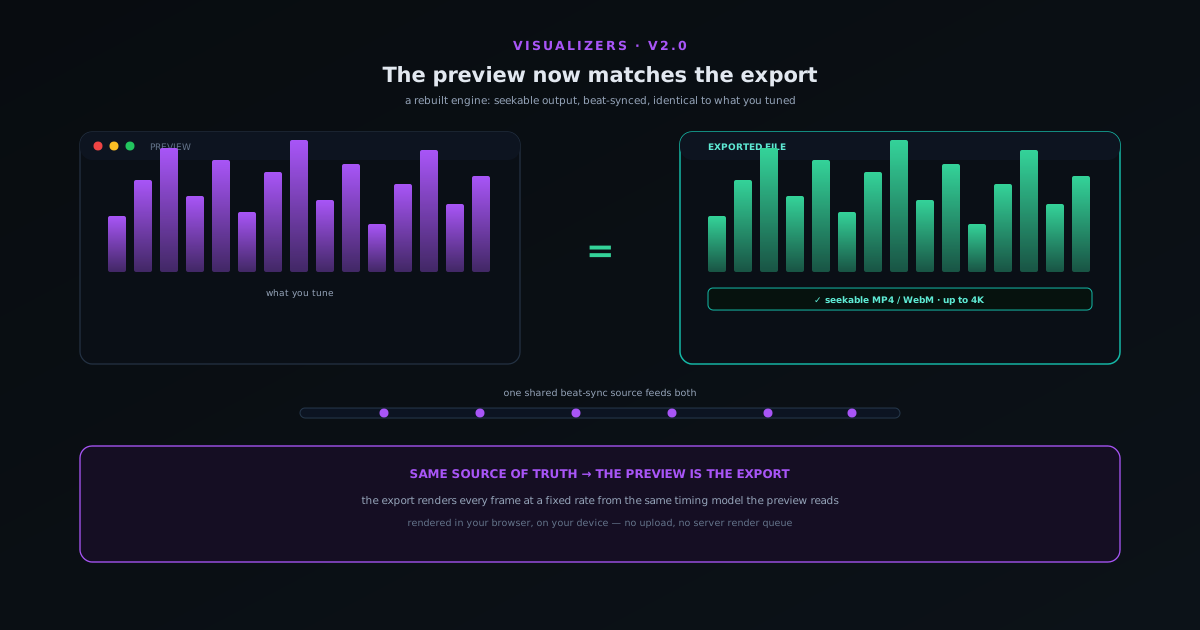
The deepest frustration with any visual tool is when the export does not match the preview you carefully tuned. The Novus Visualizers v2.0 release rebuilt the render engine so the downloaded video is the clip you saw: seekable, beat-synced, and identical to the preview. This is why that is genuinely hard and how it was fixed.
Contents
- 1.Overview
- 2.Why preview and export drift apart
- 3.What "seekable" means and why it matters
- 4.Keeping beat-sync locked end to end
- 5.Every mode visually distinct
- 6.What "release-ready" actually requires
- 7.Why this is genuinely hard in a browser
- 8.Resizing and refitting without re-rendering wrong
- 9.What it means for the videos you make
- 10.A note on what did not change
- 11.Rendering on your device, not a server
Overview
There is a specific, deflating moment that anyone who has used a visual creation tool knows well. You spend twenty minutes tuning something until it looks exactly right in the preview (the colours, the motion, the way it hits on the beat), and then you click export, wait, open the downloaded file, and it is subtly, maddeningly wrong. The timing is off. A colour shifted. The thing that pulsed perfectly on the kick in the preview now drifts a beat behind. That gap between what you tuned and what you got is the single most corrosive flaw a creative tool can have, because it makes every preview a lie and every export a gamble. The Novus Visualizers v2.0 release was, more than anything else, an effort to close that gap, and the headline is simple: the preview now matches the export.
That sounds like it should be the default (surely the export is just the preview, recorded?) but it is genuinely one of the harder problems in a browser-based visual tool, and the reasons it is hard are worth understanding whether or not you ever use this particular app. A live preview and a rendered file are produced by different machinery under different constraints, and keeping them identical means making deliberate engineering choices rather than hoping they happen to agree. This article walks through why preview and export drift apart, what it takes to lock them together, what "seekable" output means and why it used to break, how beat-sync stays consistent end to end, and why every mode being visually distinct is part of the same story. It is a look under the hood of a free, in-browser tool that renders everything on your own device.
Why preview and export drift apart
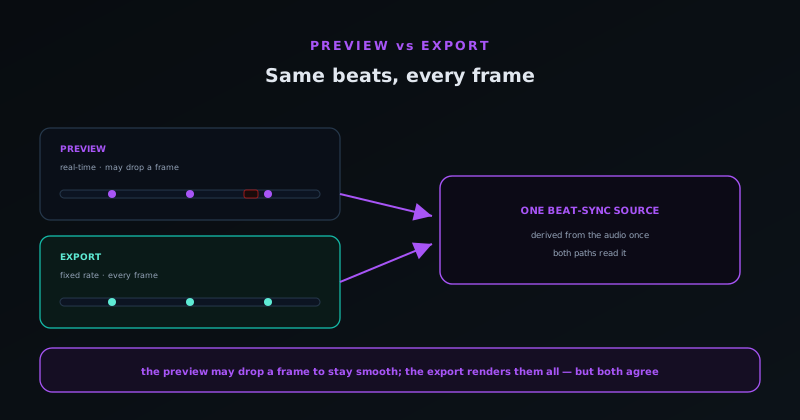
The root of the problem is that a live preview and an exported video are not the same process. A preview is rendered in real time, frame by frame, as fast as your device can manage while you watch: if a frame is expensive, the preview might quietly drop it and keep up with the music, because smoothness matters more than completeness when you are just looking. An export, by contrast, must produce every single frame at a fixed rate and stitch them into a file at a precise duration, because a video with dropped or mistimed frames is a broken video. So the very thing the preview does to stay smooth (skipping work under load) is the thing the export must never do, and a naive implementation that "just records the preview" inherits all the preview shortcuts as permanent defects in the file.
On top of that, the two paths historically used slightly different code: the preview drew to a canvas one way, the exporter encoded frames another way, and any divergence between them (a colour space handled differently, an effect computed at a different resolution, a timing assumption baked into one but not the other) showed up as the preview-versus-export mismatch. The fix is conceptually clean and practically demanding: make the export render from the same source of truth as the preview, decoupled from real-time speed so it can take the time it needs to produce every frame correctly, rather than racing the clock the way the preview does. That is the heart of what the rebuilt engine does, and everything else follows from it.
What "seekable" means and why it matters
One of the concrete wins in v2.0 is that the exported files are seekable, and it is worth explaining what that means because it is the difference between a file that feels broken and one that feels finished. A seekable video is one you can scrub through instantly (drag the playhead to the middle and it jumps there immediately) because the file contains the index information a player needs to find any point without reading everything before it. A non-seekable file plays from the start fine but stalls or refuses when you try to jump around, and worse, some platforms reject it on upload or mis-handle it, because they expect that index to be present and near the front of the file.
In-browser video encoding has historically been prone to producing exactly this kind of not-quite-right file, because assembling a correct, indexed container in JavaScript is fiddly and easy to get subtly wrong. The rebuilt engine treats the container as a first-class concern rather than an afterthought: it produces MP4 and WebM files with the indexing in the right place, so the result scrubs smoothly in a player, uploads cleanly to the platforms creators actually use, and behaves like a file from a desktop tool rather than a browser experiment. Choosing between the two containers for your destination is its own small decision, which the ecosystem covers in MP4 vs WebM: which to export for a music video; the point here is that whichever you pick, the file is now well-formed.
Keeping beat-sync locked end to end
A music visualizer lives or dies on whether the motion actually lands on the beat, so beat-sync is the one thing that absolutely cannot drift between preview and export. The risk is exactly the drift described earlier: if the preview computes beat positions one way in real time and the exporter computes them another way frame by frame, a visualizer that looked locked to the kick in the preview can come out a fraction of a beat off in the file, and a fraction of a beat is enough to make the whole thing feel wrong without the viewer being able to say why. Solving the preview-export match is therefore not just about pixels; it is about time.
The engine handles this by deriving the beat structure from the audio once and treating it as the shared source of truth that both the preview and the export read from, rather than recomputing it independently in each path. When the export renders frame number N, it asks the same timing model where the beats are at that exact moment that the preview would have, so the motion is bound to the music identically in both. This is also what makes the more advanced multi-band reactivity (bass, mids, and treble driving different elements) reliable in the final file, since each band reads from the same analysed audio. The deeper treatment of how audio becomes motion in the first place is in Turning sound into motion: reading audio with the Web Audio API, and the v2.0 work is largely about making sure that motion survives the trip from preview to file intact.
Every mode visually distinct
A quieter but important part of v2.0 was making every visualizer mode genuinely visually distinct. It is a common failure for a tool with a big library of styles to have many of them look like minor variations on a theme (a dozen "particle" modes that are basically the same particles with a different colour), which makes a large catalogue feel smaller than its count and makes choosing harder rather than easier. The rebuild went through the modes to ensure each is its own thing: a distinct visual idea, distinctly beat-synced, so that browsing the library is browsing real options rather than near-duplicates.
This matters for the preview-export story too, because a mode that is genuinely distinct has its own rendering needs, and a render engine that only really supported a couple of underlying styles would betray that by rendering the others approximately. Making every mode distinct and making every mode export faithfully are two sides of one commitment: that what is on offer is real and what you tune is what you get. Choosing the right mode for a given track is its own craft (the ecosystem covers it in Best music-visualizer styles for each genre), and the value of that guidance depends on the modes actually differing, which v2.0 is what made true.
What "release-ready" actually requires
Release-ready is a higher bar than it sounds, and naming what it requires explains why the rebuild was necessary. A video is release-ready only if three things hold together: the frame rate is consistent so motion is smooth rather than stuttering, the total duration matches the audio exactly so the visualizer does not drift out of sync by the end, and the container is well-formed so every player and platform accepts it. Miss any one and the file looks amateurish or fails outright on upload, and the older pipeline could miss all three under load, which is precisely the gap between a preview that looked finished and a file that did not.
The rebuilt engine treats each of these as a hard requirement rather than a best effort. It renders at a fixed frame rate so the cadence is even, it ties the render length to the analysed audio so the last beat lands where it should, and it assembles the container correctly so the result behaves like a file from a desktop tool. The reason this is worth dwelling on is that release-ready is binary in practice: a creator either trusts the export enough to post it without checking, or they do not, and the whole value of the tool depends on landing on the trustworthy side of that line. Everything else the engine does is in service of moving the output firmly onto that side.
Why this is genuinely hard in a browser
It is worth being honest that doing all of this in a browser is harder than doing it in a native desktop application, which is part of why the mismatch persisted as long as it did. A desktop video tool has direct access to mature encoding libraries and the machine resources to use them; a browser tool has to encode video through the platform interfaces available to a web page, assemble the container in code that runs in the page, and do it all within the memory and timing constraints of a tab. Each of those is a place where a subtle bug produces a file that plays but is not quite right: the not-quite-seekable container being the classic example of a defect that is invisible until a viewer tries to scrub.
The rebuild leaned on the modern browser capabilities that have matured specifically to make this possible, using the platform encoding paths where they exist and falling back sensibly where a particular device or format gives trouble. The payoff of taking on that difficulty is the same principle that runs through the whole product: keeping the work on the device means the audio never leaves it and the tool can stay free, and the cost of that choice is exactly the engineering the rebuild absorbed so the user does not have to think about it. A browser tool that matches a desktop export is not free; someone paid for it in difficulty, once, so that every export afterwards comes out clean.
Resizing and refitting without re-rendering wrong
Alongside the export rebuild, the same release added a size-and-fit control that lets you resize and re-centre a visualizer to a different frame, and it belongs in this story because it is the same problem viewed from another angle: making what you see become what you get across different shapes. The old way of changing aspect ratio risked a result where the visualizer was cropped awkwardly or sat off-centre in the new frame, so the export did not match the intent even when it matched the preview. The fit control makes refitting a deliberate, visible adjustment rather than a gamble, so one project can become a vertical clip, a square post, and a wide video while still looking composed in each.
This matters because the most efficient way to use any visual tool is one-source-many-outputs (build a piece once and adapt it to each destination rather than rebuilding from scratch), and that strategy only works if the adaptation is trustworthy. A fit control that produced a slightly-wrong result in each new frame would push you back to building each format separately, undoing the efficiency. By making the refit faithful, the release extends the preview-matches-export guarantee from a single frame shape to every shape you might export, which is what makes a visualizer practical to use across the several platforms a release actually targets rather than just one.
What it means for the videos you make
For anyone actually making visualizers, the practical effect of all this is that the tuning step becomes the only step that requires judgment. You can spend your attention on choosing a mode, dialling the reactivity, and getting the look right, and then trust that the export is a faithful recording of that work rather than a second variable to manage. The deflating loop of export, inspect, find a mismatch, re-tune, and re-export collapses to tune once and export once, which is a large difference in both time and confidence over a run of videos rather than a single one.
It also changes what is reasonable to attempt. When the export was unreliable, the safe move was to keep things simple so there was less to go wrong in the file; when the export faithfully reproduces the preview, you can use the more elaborate, multi-band-reactive, visually distinct modes knowing they will survive the trip. The rebuilt engine does not just fix a bug; it widens the range of what a creator can confidently ship from a browser tab, which is the real measure of whether an in-browser tool can stand in for a desktop one rather than merely approximate it.
A note on what did not change
It is worth saying what the rebuild deliberately kept, because not everything needed fixing. The on-device, no-account, no-watermark, copyright-free nature of the output was never in question; those are foundational commitments, not features to revisit. What changed was strictly the fidelity and reliability of turning a tuned preview into a finished file, which is the one place the older version genuinely fell short. Keeping everything else stable while rebuilding the export meant existing projects and habits carried over rather than being disrupted by the improvement.
That focus is itself a lesson in how to ship an improvement: identify the specific thing that is broken (here, the preview-export mismatch) and rebuild that, rather than using the opportunity to churn the whole product. A creator returning after the update finds the tool they knew, with the one frustration that mattered most quietly removed. The narrow, deep fix is usually more valuable than the broad, shallow refresh, because it solves a real problem without imposing the cost of relearning everything around it.
Rendering on your device, not a server
All of this happens in your browser, on your hardware, which is both the constraint that makes it hard and the principle that makes it worth doing. A server-side renderer could sidestep some of these problems by throwing a render farm at them, but it would do so by uploading your track and your project to someone else infrastructure and charging (directly or in attention) for the privilege. Doing the render locally means your audio never leaves the device, there is no queue behind other users, and the tool can be genuinely free and copyright-free on the output because it is spending your compute, not a bill it has to recover.
The trade is that the engine has to be efficient and honest about your device limits, which is exactly why the decoupled export, the seekable container work, and the shared timing model matter so much. Get those right and a browser tab can produce a release-ready, 4K-capable, beat-synced video that matches its preview; get them wrong and you get the deflating mismatch this whole article is about. The companion piece Exporting a release-ready video in the browser, and the tradeoffs we accepted covers the export pipeline these improvements sit on top of in more depth. The practical upshot for anyone making a visualizer is simple: tune it until the preview looks right, and trust that the file you download will be that clip, which you can put to the test at visualizers.novusstreamsolutions.com.
Frequently asked questions
Quick answers to common questions about this topic.
Why did the export not match the preview before?
A live preview renders in real time and can drop frames to stay smooth, while an export must produce every frame at a fixed rate and exact duration. When the two paths used slightly different code or timing, the file came out subtly different from what you tuned. The v2.0 engine renders the export from the same source of truth as the preview, decoupled from real-time speed, so they match.
What does a "seekable" video file mean?
A seekable file lets a player jump to any point instantly because it contains the index information needed to find any frame without reading everything before it. Non-seekable files stall when you scrub and can be rejected by upload platforms. The rebuilt engine produces properly indexed MP4 and WebM so the output scrubs and uploads cleanly.
Does the visualizer still stay locked to the beat in the exported file?
Yes. The engine derives the beat structure from the audio once and both the preview and the export read from that shared timing model, so the motion is bound to the music identically in both. Multi-band reactivity (bass, mids, treble driving different elements) reads from the same analysed audio, so it survives the export intact.
Is my audio uploaded to a server to render the video?
No. The visualizer reads your audio with the Web Audio API and renders frames in your browser on your device. Nothing is uploaded, there is no render queue, and the output is copyright-free: the tool spends your compute rather than a server bill, which is what lets it be free.
What formats and quality can it export?
It exports seekable MP4 and WebM, up to 4K, at standard frame rates. Which container to choose depends on your destination (MP4 for broad compatibility, WebM for some web and platform cases) covered in the MP4 vs WebM comparison.
What does "every mode is visually distinct" mean for me?
The v2.0 rebuild ensured each visualizer mode is its own visual idea rather than a minor recolour of another, so a large library means real choices rather than near-duplicates. It also means each mode exports faithfully, since the engine genuinely supports each one rather than approximating the less-common ones.
Related workflow
A track to a release-ready visualizer, per platform
Render the visual once, then produce the platform masters from it, instead of re-rendering the whole video for every aspect ratio.
- Render the beat-synced videoNovus Visualizers: Pick the engine and mode against your actual track; the analysis is done on your audio, not on a preset preview.
- Trim or upscale the exportNSS Background Remover: The video utilities handle the tidy-up pass so the render does not have to be repeated to fix ten seconds of it.
- Produce the per-platform mastersNovus Convert: Each destination wants a different container and bitrate; converting the finished render is far cheaper than re-rendering it.
Related troubleshooting
Was this page helpful?
Your answer stays in this browser, it is not sent anywhere and no account or cookie is involved.