2026 · Novus VisualizersAbout 13 min readNovus Stream Solutions
Best music-visualizer styles for each genre
A visualizer should feel like it belongs to the music. Here is how to match engine families, motion, and color to lo-fi, EDM, hip-hop, ambient, rock, and pop, with the controls that get you there.
Reviewed and updated August 1, 2026. Re-checked against the Novus Visualizers V3 catalog on August 1, 2026. The app now ships ten engines with six modes each (sixty modes in total), so the counts, the engine list, and the mode arithmetic in this article have been corrected. The Logo engine landed after this piece was first published.
Contents
- 1.Overview
- 2.Read the track first: energy and tempo
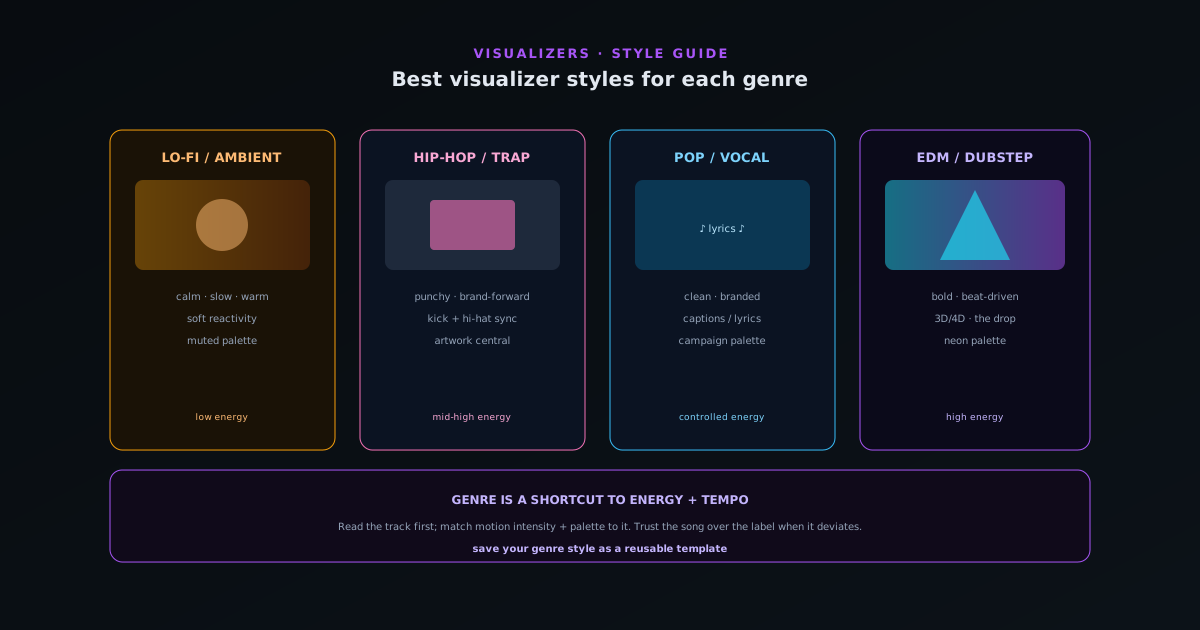
- 3.Lo-fi, chillhop, and ambient: calm and evolving
- 4.EDM, house, and dubstep: bold and beat-driven
- 5.Hip-hop and trap: punchy and brand-forward
- 6.Rock, indie, and band music: organic and dynamic
- 7.Pop and vocal-forward music: clean and branded
- 8.Color and theme as a genre signal
- 9.Match the platform, not just the genre
- 10.When to break the genre conventions
- 11.Build a genre style into a reusable project
Overview
A music visualizer works when the visuals feel like they belong to the track: when the motion, energy, and color match the mood of the music rather than fighting it. A frantic, strobing visualizer over a gentle lo-fi beat feels wrong; a flat, slow visual over a high-energy EDM drop feels like a missed opportunity. Matching the style to the genre is mostly about reading two things (the energy and the tempo of the track) and choosing an engine family, a motion intensity, and a color palette that fit them. This guide walks the practical pairings for the genres creators most often work with, and the controls in Novus Visualizers that get you to each look, so you can start from a style that already suits your music rather than fighting a mismatched one.
The useful way to think about it is that genre is a shortcut to the energy and tempo that actually drive the visual choice. "EDM" tells you high energy, strong beats, and bold motion; "ambient" tells you low energy, slow evolution, and subtle motion. So while the genre labels below are a helpful starting point, the real skill is reading your specific track's energy and matching the visuals to it, since a mellow song in a high-energy genre wants the mellow treatment. With 10 engines and 6 modes each, plus color themes and beat-sync controls, the app gives you the range to match almost any track; the genre pairings here are the fast path to the right neighborhood. Browse them in the editor at visualizers.novusstreamsolutions.com/editor, then tune one to your track.
Read the track first: energy and tempo
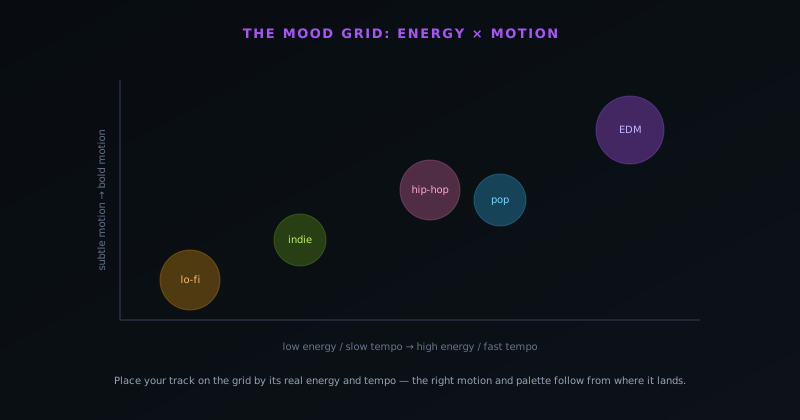
Before reaching for a style, read the two qualities that should drive the choice: energy and tempo. Energy is how intense and forceful the track feels (a hard-hitting drop is high energy, a soft acoustic piece is low energy) and it should map to the motion intensity and visual boldness of the visualizer. Tempo is how fast the track moves, which should map to the pace of the visual motion and how the beat-reactive elements pulse. A high-energy, fast track wants bold, quick visuals; a low-energy, slow track wants subtle, evolving ones. Getting these two right matters more than any specific style pick, because they are what make the visuals feel synchronized to the music's actual character.
Reading energy and tempo also guards against the most common mistake, which is choosing a visually impressive style that does not fit the track. A spectacular, busy depth mode might look great in isolation but overwhelm a delicate song; a minimal waveform might be perfect for that song and underwhelming for a festival anthem. The genre pairings below are really shortcuts for the typical energy and tempo of each genre, so when a specific track deviates from its genre's norm (a slow song in an energetic genre, or an intense track in a usually-mellow one), trust the track's actual energy and tempo over the genre label. The visuals serve the song, not the category.
Lo-fi, chillhop, and ambient: calm and evolving
Low-energy, atmospheric genres (lo-fi, chillhop, ambient, downtempo) call for visuals that are calm, slow-evolving, and warm rather than reactive and busy. The goal is a mood, a backdrop that breathes with the music without demanding attention, which suits gentle gradient flows, soft particle fields, slow geometric drifts, and warm color palettes. Heavy beat-reactivity works against these genres; the beat is soft and the visual should respond gently if at all, favoring slow continuous motion over sharp pulses. A lo-fi visualizer that strobes on every beat breaks the relaxed mood the genre is built on.
In practice, reach for the smoother, more atmospheric engine families and dial the motion intensity down, choosing a warm or muted color theme that matches the cozy feel these genres evoke. Where you use audio reactivity, bind it to slow, subtle responses (a gentle swell on the bass, a soft shift in color) rather than sharp triggers. Album-art-forward styles also suit these genres well, since lo-fi and ambient releases often lean on evocative cover imagery, and a visualizer that keeps the artwork central with gentle motion around it fits the aesthetic. The throughline is restraint: these genres want a visualizer that sets a mood and stays out of the way, which is a different and quieter craft than the high-energy styles, but no less effective for the right track.
EDM, house, and dubstep: bold and beat-driven
High-energy electronic genres (EDM, house, dubstep, drum and bass) are where bold, beat-driven, high-motion visuals shine, because the music is built around powerful beats and drops that the visuals can hit in sync. These genres want strong beat-reactivity, dramatic motion, bright or neon color palettes, and the more spectacular engines and their 3D depth modes that bring dimensionality and intensity. The drop is the moment the whole visual approach is built around: a buildup that intensifies, a beat-synced explosion of motion at the drop, and reactive elements that pulse hard with the kick are exactly what these genres reward.
This is where multi-band beat sync earns its keep, letting the kick drive a powerful pulse on one element while the higher frequencies animate finer details, so the visuals track the layered intensity of electronic production rather than strobing uniformly. Crank the motion intensity, choose bold or neon themes, and lean into the depth modes that can deliver the spectacle these genres invite. The risk to avoid is visual chaos (so much motion that nothing reads), so even at high energy, keeping one clear focal element amid the intensity helps the visualizer land. EDM and its relatives are the genres that most reward going big, which is why the app's most spectacular engines and strongest beat-sync features were built with exactly this kind of music in mind.
Hip-hop and trap: punchy and brand-forward
Hip-hop and trap sit between the extremes: strong, prominent beats that invite beat-reactivity, but often paired with a focus on identity, artwork, and brand that calls for the visuals to feature the cover art and artist branding prominently. The beat, especially the hi-hats and the kick, gives plenty for reactive elements to lock onto, so beat-sync works well, but the visual usually wants to keep the album art or artist name central rather than dissolving into pure abstraction. The result is a punchy, rhythmic visualizer that still reads as belonging to a specific release and artist.
Multi-band beat sync fits hip-hop and trap especially well because the genres' signature is the interplay of the kick and the rapid hi-hats: binding a bold element to the kick and a finer, faster element to the hi-hats produces visuals that feel locked to the beat in the way the production is. Pair that with a style that keeps the artwork or artist branding prominent and a color palette drawn from the cover, and you get a visualizer that is both rhythmically tight and clearly branded. These genres reward a balance (enough beat-reactive energy to feel alive, enough brand presence to feel like a deliberate release asset), which is a different target than the pure-abstraction approach that suits electronic music or the mood-setting approach that suits lo-fi.
Rock, indie, and band music: organic and dynamic
Guitar-driven and band-based genres (rock, indie, alternative) have a different character than electronic music: the energy is dynamic and organic, with builds and dynamics driven by performance rather than programmed drops, and the visuals often suit a more textured, less synthetic look. Reactive styles that respond to the overall energy and the dynamics of the track tend to fit better than rigid beat-grid pulsing, because rock's rhythm is human and varies, so a visualizer that swells and recedes with the band's intensity feels more natural than one locked to a strict beat. Warmer, more textured visual treatments often suit the organic feel of live instrumentation better than neon abstraction.
The practical approach for these genres is to favor reactivity bound to loudness and overall energy rather than sharp per-beat triggers, so the visual breathes with the performance, intensifying in the choruses and pulling back in the verses the way the band does. Color palettes drawn from the band's aesthetic or the cover art keep it feeling like a deliberate release rather than a generic effect. Indie and alternative releases in particular often have a strong visual identity that the visualizer should complement rather than override, so an artwork-forward, dynamically-reactive style usually serves them well. These genres reward a visualizer that feels alive and human in the way the music is, which is a matter of binding the reactivity to the music's dynamics and choosing textures that match its organic character.
Pop and vocal-forward music: clean and branded
Pop and other vocal-forward, mainstream genres usually want clean, polished, brand-forward visuals that put the song and the artist front and center, since these releases are typically part of a coordinated visual campaign with a strong aesthetic to match. The visualizer here is less about abstract spectacle and more about a clean, professional look that reinforces the release's branding: artwork prominent, color drawn from the campaign palette, motion that is energetic but controlled rather than chaotic. Captions and lyric treatments also fit pop especially well, since the vocals and hooks are central and lyric videos are a staple of pop promotion.
For these genres, lean toward the cleaner, more refined styles and the artwork-and-text-forward treatments, with beat-reactivity that adds polish and energy without overwhelming the branding. The Lyric Video Creator at visualizers.novusstreamsolutions.com/lyric-videos is particularly valuable here, turning a pop track into a lyric visualizer that serves the genre's emphasis on memorable vocal hooks. The goal is a visualizer that looks like a deliberate part of a professional release campaign (consistent with the artwork, the color scheme, and the overall brand) rather than a generic effect applied to a song. Pop's reward is polish and consistency, which is why a clean, branded, lyric-aware style that matches the campaign aesthetic tends to serve it better than the experimental approaches that suit more underground genres.
Color and theme as a genre signal
Color does as much genre signaling as motion, and choosing a palette that matches the genre's conventions is a fast way to make a visualizer feel right. Neon and high-saturation palettes read as electronic and high-energy; warm, muted tones read as lo-fi and organic; monochrome or high-contrast schemes read as moody or alternative; clean, bright palettes read as pop. These associations are not rules but conventions that audiences have internalized, so leaning into them helps a visualizer immediately feel like it belongs to its genre, while fighting them (a neon palette on a folk track) creates a dissonance the viewer feels even if they cannot name it.
The one-click color themes in the app make it easy to try a palette that matches the genre and then refine it, and drawing the palette from the release's cover art is a reliable way to keep the visualizer consistent with the broader release branding. The most cohesive results come from treating color as part of the genre match rather than an afterthought: pick a palette that fits the energy and the genre conventions, tie it to the artwork where there is one, and keep it consistent across the release so the visualizer reinforces the brand. Color is one of the highest-leverage, lowest-effort levers for making a visualizer feel genre-appropriate, which is why it is worth deciding deliberately rather than accepting a default.
Match the platform, not just the genre
Genre is one axis of the style decision, but the platform the visualizer is destined for is another, and the best results come from matching both, because a style that works for a full-length YouTube upload may need adapting for a vertical TikTok clip or a looping Spotify Canvas. Platform shapes the aspect ratio (16:9 for YouTube, 9:16 for TikTok and Reels, square for feeds, vertical loops for Canvas), the length and pacing (a few hypnotic seconds for Canvas versus a full track for YouTube), and the safe zones where platform UI overlays the frame. A genre-appropriate style still has to be conformed to these platform realities to land, which is why thinking about the destination alongside the genre produces the strongest output.
In practice this means choosing the genre-appropriate engine, motion, and color, and then adapting the composition to the platform: keeping key visuals and any text inside the safe zone for vertical formats, tightening to a clean loop for Canvas, and pacing the energy to the platform's typical viewing length. A high-energy EDM style, for instance, translates differently to a 60-second vertical clip than to a four-minute landscape video: the vertical version front-loads the impact because viewers drop off fast, while the landscape version can build. The genre sets the visual character; the platform sets the frame and the pacing it has to live in. Designing for both, rather than picking a genre style and forcing it into every platform unchanged, is what makes a visualizer feel native wherever it is posted. The companion guide at Making a vertical music visualizer for TikTok & Reels covers the vertical case in detail.
When to break the genre conventions
The genre pairings in this guide are conventions, not rules, and one of the most effective creative moves is to break them deliberately when an artist's identity calls for it, because a visualizer that defies its genre's expectations can stand out precisely by not looking like everything else in the category. An artist whose brand is built on contrast might pair a hard genre with unexpectedly delicate visuals, or a soft genre with stark, bold ones, creating a tension that becomes part of their signature. The conventions exist because they usually work, but usually is not always, and a creator with a clear, intentional aesthetic vision can use the violation of expectation as a tool.
The key word is deliberate: breaking genre conventions works when it is an intentional artistic choice serving a clear identity, and fails when it is an accident born of not understanding the conventions in the first place. The way to break the rules well is to know them (to understand why neon suits EDM and warmth suits lo-fi) and then to choose, knowingly, to do something different because it serves the artist. A visualizer that defies its genre for a reason reads as a distinctive creative statement; one that defies it by mistake reads as a mismatch. So the progression is to learn the conventions, apply them as the reliable default, and then break them consciously where an artist's vision is strong enough and specific enough to justify it. The conventions are the foundation that makes intentional rule-breaking legible as a choice rather than an error, which is why understanding them matters even for creators who ultimately want to subvert them.
Build a genre style into a reusable project
Once you have dialed in a style that fits your genre and your brand, the highest-leverage move is to save it as a reusable project, so every future release in that genre starts from your established look rather than being rebuilt from scratch. A saved project carries the engine choice, the motion settings, the color theme, the layer composition, and the reactivity bindings together, which means applying it to a new track is closer to opening a working starting point than re-deciding every setting. For an artist or label working consistently in one genre, this turns the per-release visualizer from a creative project into a fast, branded production step.
Building a genre style into a project also enforces the visual consistency that makes a catalog of releases feel like one coherent artist, which is exactly what builds a recognizable brand over time. Rather than each release looking slightly different because it was styled independently, every release shares the established look, with only the track and artwork changing. This is the same principle that governs consistency in product photos or content production: fix the approach once and apply it repeatedly, so consistency is a byproduct of the process rather than an effort on each project. For creators releasing regularly, a per-genre project is what makes a strong, genre-appropriate visualizer style sustainable across a whole body of work rather than a one-off achievement on a single release.
Frequently asked questions
Quick answers to common questions about this topic.
What visualizer style is best for lo-fi music?
Calm, slow-evolving, warm visuals: gentle gradients, soft particle fields, and muted palettes with little or subtle beat-reactivity. Lo-fi and ambient want a mood-setting backdrop that breathes with the music rather than a busy, strobing visual.
What style suits EDM and high-energy electronic music?
Bold, beat-driven, high-motion visuals: strong beat-reactivity, neon palettes, and the app's spectacular depth modes, built around the drop. Multi-band beat sync lets the kick drive a hard pulse while higher frequencies animate finer detail.
How do I pick a visualizer style for my track?
Read the track's energy and tempo first, then match the motion intensity and color to them; genre is a shortcut to those qualities. Trust the specific track's actual energy over its genre label when a song deviates from the norm.
Can I reuse a style across releases?
Yes. Save your genre-appropriate setup as a reusable project that carries the engine, motion, color, and reactivity together, so each release starts from your established look. It is what keeps a catalog visually consistent. See https://visualizers.novusstreamsolutions.com.
Related workflow
A track to a release-ready visualizer, per platform
Render the visual once, then produce the platform masters from it, instead of re-rendering the whole video for every aspect ratio.
- Render the beat-synced videoNovus Visualizers: Pick the engine and mode against your actual track; the analysis is done on your audio, not on a preset preview.
- Trim or upscale the exportNSS Background Remover: The video utilities handle the tidy-up pass so the render does not have to be repeated to fix ten seconds of it.
- Produce the per-platform mastersNovus Convert: Each destination wants a different container and bitrate; converting the finished render is far cheaper than re-rendering it.
Related troubleshooting
Was this page helpful?
Your answer stays in this browser, it is not sent anywhere and no account or cookie is involved.