2026 · Novus VisualizersAbout 14 min readNovus Stream Solutions
Choosing a visualizer engine: the ten engines and their modes
Novus Visualizers is built on ten engines, each with six modes, sixty looks in all. They are not interchangeable skins: each engine reads the music differently and asks different things of your hardware. Here is an honest comparison to help you pick the right engine and mode for your track, your format, and your device.
Reviewed and updated August 1, 2026. Re-checked against the Novus Visualizers V3 catalog on August 1, 2026. The engine roster is now ten, not nine (sixty modes in total) and the comparison has been extended to cover the Logo engine, which arranges reactive geometry around a centred mark.
Contents
- 1.Overview
- 2.The ten engines, grouped by what they do
- 3.The literal readouts: Spectrum, Bars, and Waveform
- 4.The atmospheric engines: Particles, Trails, and Bloom
- 5.Radial and the centered look
- 6.The GPU is the hidden variable
- 7.Playback context should decide before taste does
- 8.Export time and file size differ too
- 9.Mixing engines across ordered layers
- 10.When the fanciest option is the wrong one
- 11.An audition workflow that makes the choice low-stakes
- 12.The immersive engines: Tunnel and Character Motion
- 13.When in doubt, start with a flat readout
- 14.How to actually choose
Overview
Novus Visualizers is built on ten engines, and each one offers six modes, sixty looks in all. In the editor they can feel like interchangeable skins you flip between. They are not. The engine you choose decides what kind of form is on screen and how it reads the music, and the mode within it decides the specific shape that form takes. Picking well is the difference between a visual that looks effortless and one that feels generic or fights the device. This is an honest comparison of the ten, without pretending the flashiest one is always the right answer.
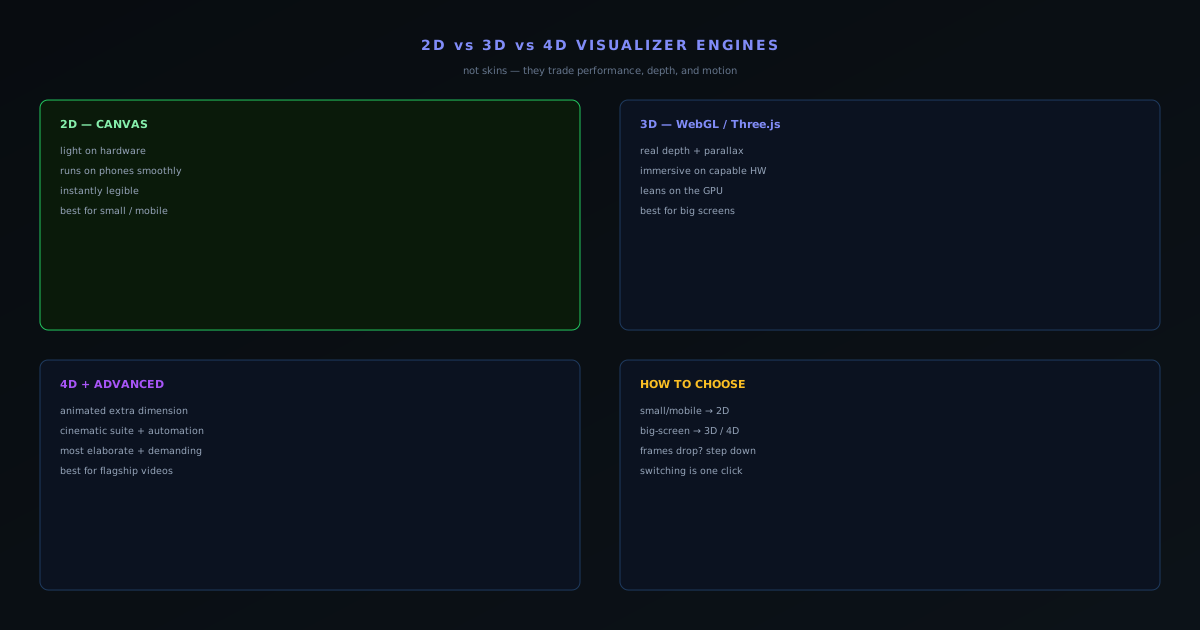
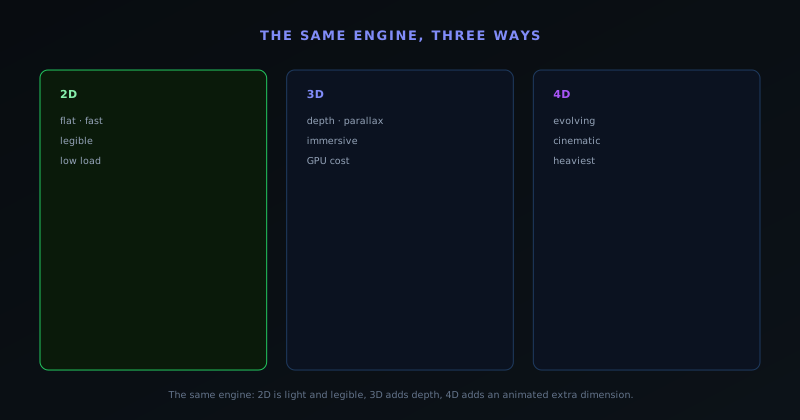
The underlying fact that makes this a real choice: most engines and modes draw flat on the Canvas and run cheaply almost anywhere, while a handful of specific modes (the depth and 3D ones) render through WebGL and lean on the graphics processor. That split between flat Canvas drawing and GPU-accelerated rendering is the source of every performance tradeoff below, and it is why the depth modes cost more than the flat ones.
The ten engines, grouped by what they do
It helps to hold the ten as a few groups rather than a flat list. Three of them are literal readouts of the sound: Spectrum draws the frequency content, Bars is the classic equalizer, and Waveform traces the level, all of them legible, tightly coupled to the audio, and strong on small screens. Three are atmospheric rather than literal: Particles throws points of light around, Trails leaves motion streaks behind moving points, and Bloom grows organic forms like petals, ink, and crystals. Radial builds everything around a center: orbs, rings, mandalas, sunbursts, and a Logo Crown for branding.
Two carry the most spectacle. Tunnel moves the eye through space with corridors, grids, and tubes; Character Motion animates glyphs, words, and ASCII, and goes as far as 2D and 3D puppets and cloned crowds. The tenth engine, Logo, is its own category: it arranges reactive geometry around your artwork rather than over it, and every one of its modes (Waveform Ring, Spectrum Halo, Orbiting Bars, Particle Aura, Pulse Frame, and Kinetic Reveal) automatically clears a centred mark so the branding stays readable while the motion happens around it.
That grouping is the fastest way to narrow the field: decide whether you want a literal readout, an atmosphere, a centered emblem, an immersive scene, or a brand-first frame, and you have already cut ten engines down to two or three worth auditioning.
The literal readouts: Spectrum, Bars, and Waveform
The three literal engines are the ones most people reach for first, because they visibly correspond to the sound. Spectrum draws the frequency content and offers Line Spectrum, Mirrored Area, Ribbon Surface, Spectrogram Waterfall, Frequency Ridge, and Spectral Mesh. Bars is the equalizer everyone recognises, with Linear Equalizer, Center Mirror, Stacked Bands, Radial Bars, 3D Columns, and a Piano/Step Grid. Waveform traces the level as a Line, Mirrored, Filled, or Ribbon shape, an Oscilloscope/Lissajous, or a 3D Surface. All three stay legible when a video is watched small, which is why they are the safe default for a Spotify Canvas or a short-form clip.
Each of these engines also holds one of the depth modes (Spectrum's Spectral Mesh, Bars' 3D Columns, Waveform's 3D Surface) so you can stay with a familiar readout and still add dimension when the track and the screen can carry it. That is the pattern worth noticing early: depth is not a separate engine you switch to, it is a mode that lives inside the engine you already like, one step away in the same menu.
The atmospheric engines: Particles, Trails, and Bloom
When you want texture and mood rather than a literal readout, the atmospheric engines take over. Particles scatters points of light (Dust Storm, Waterfall, Starfield, Fountain Burst, Orbit Swarm, and Constellation) and reads as weather, sparks, or a night sky depending on the mode. Trails leaves motion behind moving points, from a Comet Shower or Ribbon Flow to a Snake/Braid, Orbit Trace, Flow Field, or Echo Streaks, so the frame carries a sense of momentum. Bloom grows organic forms (Petal Bloom, Ink Diffusion, Cellular Growth, Vine/Mycelium, Crystal Growth, and Ripple Blossom) that develop over the length of the track rather than pulsing in place.
These engines suit music where the vibe matters more than the beat-by-beat detail: ambient, downtempo, cinematic beds, anything where you want the screen to feel alive without demanding attention. They mostly draw flat and run smoothly on modest hardware, and their character comes from the mode and the audio bindings rather than from depth. Reach for them when a literal equalizer would feel too clinical for the song.
Radial and the centered look
The Radial engine is worth calling out on its own because it solves a specific problem: building a visual around a fixed center. Its modes (Pulse Orb, Concentric Rings, Mandala, Sunburst, Orbit Halo, and Logo Crown) all radiate from the middle of the frame, which reads as focused and symmetrical rather than sprawling. That makes it a natural fit for anything with a subject in the center: a single glowing form that breathes with the track, a mandala that turns with the arrangement, or a Logo Crown that wraps branding around your mark.
The reason to think of Radial as its own category is that its symmetry does a job the other engines do not. A centered, radiating composition holds a logo or a title cleanly and reads instantly even at a glance, which is exactly what you want for a brand bumper, a podcast cover in motion, or a release where the artwork sits at the center of the frame. Pick it when the composition needs a middle to organise around rather than an open field to fill.
Playback context should decide before taste does
The strongest single input to the choice is not aesthetic, it is where the video will actually be watched, and it is worth settling that before you fall in love with a look. A Spotify Canvas or a TikTok clip is watched small, on a phone, often glanced at rather than studied, and in that context a flat Spectrum, Bars, or Waveform mode frequently outperforms a depth mode because it reads instantly and never asks too much of a mobile GPU. A flagship YouTube release video destined for a desktop or a TV is the opposite case: the screen is large, the attention is longer, and the depth modes and immersive engines like Tunnel have room to pay off.
Letting context lead protects you from a common mistake, which is choosing the most impressive mode in the editor on a powerful machine and then shipping it to an audience watching on phones where it neither reads well nor runs smoothly. The editor is not the viewing environment. Deciding "this is a vertical mobile asset" or "this is a big-screen showpiece" first, and choosing the engine and mode to fit, produces work that performs where it is actually seen rather than where it was made.
Export time and file size differ too
The mode you choose affects more than the live preview: it follows through to the export. A depth mode with real geometry, or a dense particle or tunnel scene, is more work to render frame by frame than a flat readout, so on a given machine it will take longer to encode through the in-browser WebCodecs pipeline, and at 4K the gap widens. This is not a reason to avoid the heavier modes, but it is a reason to factor export time into the decision when you are on a deadline or working on a modest device, because the render that looks best is not always the one you have time to wait for.
The recent reliability work helps here in a way worth noting: eliminating per-frame canvas read-backs on the heaviest modes specifically improved their export performance, so the most demanding scenes encode faster than they used to. Still, the relationship holds (more geometry and more motion cost more to render) and a sensible workflow keeps the flatter modes in mind for the formats where you need many exports quickly, like a batch of short platform cuts, while reserving the heaviest treatment for the one hero video where the wait is justified. Export itself stays free and unlimited either way, with no watermark and no quota, so the only real cost of a heavier mode is your own render time.
Mixing engines across ordered layers
The choice is not strictly either/or, because a project stacks ordered layers, each running its own engine and mode. That lets you place a calm flat field in the background and a depth accent on top, getting dimension where it counts without paying the GPU cost of rendering the whole frame in 3D. This is often the smartest answer to the performance-versus-spectacle tension: rather than committing the entire composition to a heavy mode, you spend the expensive mode on the one layer that benefits most and keep the rest light.
Mixing also solves a legibility problem. A fully depth-rendered frame can become busy enough that the music's rhythm gets lost, whereas a layered approach lets you keep a clear, legible flat base (a Bars or Waveform mode carrying the beat) while a Tunnel or Spectral Mesh overlay adds richness. Combined with multi-band beat sync, where each layer can follow a different frequency band, layering across engines is how the most considered compositions are built, not by picking the single best engine, but by assembling a few that each do one job well.
When the fanciest option is the wrong one
It is worth saying plainly, because the temptation is real: the depth modes and the immersive engines are not a synonym for best. They are the most elaborate and most demanding options, and reaching for a churning Tunnel or a 3D Performer by default (because they look like the premium choice) is the most common way to end up with a worse result. A quiet acoustic single watched on a phone is actively ill-served by a warping tunnel; it wants the calm legibility of a flat Waveform or Spectrum mode that lets the music breathe. The heaviest engine is the right choice for the track and audience that can carry it, and overkill everywhere else.
The discipline is to match the spectacle to the material rather than to the spec sheet. Dense, energetic, cinematic music on a big screen can absorb and reward the most elaborate treatment; spare, intimate music cannot, and trying anyway reads as a tool showing off rather than a visual serving a song. Choosing a flatter mode on purpose, when the song calls for restraint, is a sign of taste, not a limitation of the tool, and the tool makes that restraint easy by keeping the calmer modes every bit as polished as the showy ones.
An audition workflow that makes the choice low-stakes
Because all of this can sound like a lot to weigh, the reassuring part is that the decision is cheap to make empirically rather than in the abstract. In the editor at visualizers.novusstreamsolutions.com/editor you can switch engines and cycle their six modes against your actual track in seconds, so instead of reasoning about which one suits the song, you can simply watch each respond to it and trust your eyes. A good audition loop is: pick an engine whose form fits the mood, cycle its six modes on your real audio, watch for frame drops as a hardware signal, and keep the mode that reads best for your playback target.
That empirical approach beats theory every time, because the interaction between a specific song, a specific engine, and a specific device is hard to predict and easy to observe. The whole point of making engines and modes switchable in a click is to turn the choice from an anxious commitment into a quick comparison. Use it that way: do not agonize over which engine is best on paper, audition a few on the track and let the best-performing, best-reading option win.
The immersive engines: Tunnel and Character Motion
The two engines that carry the most spectacle deserve their own note, because they are where the depth modes concentrate. Tunnel moves the eye through space: Concentric Rings, Corridor Grid, Warp Field, Spectrum Tube, Waveform Tube, and Particle Vortex all give a sense of travelling forward, and the corridor and tube modes are among the heaviest looks in the app. Character Motion is the other, animating text and figures (Glyph Field, Word Wave, ASCII Cascade, a 2D Puppet, a 3D Performer, and a Crowd/Clone mode) with the Studio Workstation's manual 2D and 3D character rigs behind the puppet and performer modes.
The practical guidance for these is the same as for any depth mode, only more so. They are the right tool for a flagship moment (a single hero video, a release where the visuals are part of the show) and the wrong default for routine output or mobile-first clips. Treat them as the top of the range you reach for deliberately, audition them against your track to confirm they both read and run, and do not feel that skipping them means leaving quality on the table. A perfectly judged flat Waveform will beat a poorly chosen tunnel every time, because suitability beats spectacle.
When in doubt, start with a flat readout
If all of this still feels like too much to weigh, there is a safe default that rarely steers you wrong: start with a flat readout: a Spectrum, Bars, or Waveform mode. A flat mode runs smoothly on essentially any device, reads instantly at any size, never drops frames, and exports quickly even in volume, which makes it the lowest-risk choice for the majority of real-world uses, especially anything mobile or short-form. You can always switch to a depth mode or an immersive engine once you have confirmed the song and the playback target genuinely call for it, but starting flat means your baseline is something that works everywhere rather than something that might struggle somewhere.
This default also matches how most viewing actually happens. A large share of music-video and visualizer content is watched on phones, muted, in passing, and that environment rewards clarity over spectacle. Beginning flat and only adding depth where it earns its place is the opposite of the instinct to start with the flashiest mode and scale back, and it is the more reliable path to a result that performs in the wild. Reach for the depth modes as a deliberate upgrade, not as the starting point.
How to actually choose
A simple heuristic covers most cases. Start from the playback context: small and mobile leans toward the flat readouts, while big-screen and desktop opens up the depth modes and the immersive engines. Then weigh the track: spare and intimate music is usually served by a calm Spectrum, Waveform, or Bloom look, while dense, energetic, or cinematic music can carry a Tunnel or a 3D mode. Finally, sanity-check against hardware: if frames drop, switch to a flatter mode rather than fighting it, because smooth motion in a flat mode beats a stuttering depth scene every time.
The good news is that switching is cheap. In the editor you can try any of the ten engines and cycle their six modes on your actual track in seconds, so you do not have to decide in the abstract. Drive whichever you choose with the multi-band beat sync for motion that tracks the music, and see the full build workflow in the how-to guide.
Frequently asked questions
Quick answers to common questions about this topic.
What are the ten Novus Visualizers engines?
Particles, Trails, Bloom, Character Motion, Radial, Spectrum, Bars, Tunnel, Waveform, and Logo. Each is a distinct family of visual form, and each offers six modes, sixty looks in all. Some read the frequencies and level directly and stay legible small; others are atmospheric, centered on a logo, or built for depth and spectacle.
Which visualizer engine should I use?
Match the engine to the track and the format. Spectrum, Bars, and Waveform draw the frequencies and level directly and read well even on a phone; Particles, Trails, and Bloom are more atmospheric; Radial builds around a center or a logo; Tunnel and Character Motion carry the most spectacle. Then pick a mode within it, and audition: switching is instant.
Which engines have depth or 3D?
Depth is not a separate axis; it lives in specific modes: Bars has a 3D Columns mode, Spectrum a Spectral Mesh, Waveform a 3D Surface, Character Motion a 3D Performer, and the Tunnel engine's corridor and tube modes move through space. Those modes render through WebGL and lean on the GPU; the flatter modes run lighter, so if one drops frames, switch to a flatter mode.
Related workflow
A track to a release-ready visualizer, per platform
Render the visual once, then produce the platform masters from it, instead of re-rendering the whole video for every aspect ratio.
- Render the beat-synced videoNovus Visualizers: Pick the engine and mode against your actual track; the analysis is done on your audio, not on a preset preview.
- Trim or upscale the exportNSS Background Remover: The video utilities handle the tidy-up pass so the render does not have to be repeated to fix ten seconds of it.
- Produce the per-platform mastersNovus Convert: Each destination wants a different container and bitrate; converting the finished render is far cheaper than re-rendering it.
Related troubleshooting
Was this page helpful?
Your answer stays in this browser, it is not sent anywhere and no account or cookie is involved.