2026 · Novus VisualizersAbout 12 min readNovus Stream Solutions
Multi-band beat sync: triggering bass, mid, and treble independently
A single global beat makes the whole frame pulse on the kick drum. Multi-band beat sync, added to Novus Visualizers in v1.19, splits the signal so bass, mid, and treble can each drive their own effects: motion that follows the arrangement, not just the downbeat.
Reviewed and updated August 1, 2026. Re-checked against the Novus Visualizers V3 catalog on August 1, 2026. The app now ships ten engines with six modes each, sixty modes in total, so the counts, the engine list, and the mode arithmetic in this article have been corrected. The Logo engine landed after this piece was first published.
Contents
- 1.Overview
- 2.The problem with a single global beat
- 3.Splitting the signal into bands
- 4.Pairing each band with the right kind of effect
- 5.What it unlocks creatively
- 6.Multi-band sync across ordered layers
- 7.Why a single global beat was the tempting default
- 8.Tuning it without overthinking it
- 9.How it plays across genres
- 10.Setting up your first band assignment
- 11.How the same preset breathes differently across songs
- 12.Telling whether it is actually working
- 13.The honest limit of beat reactivity
Overview
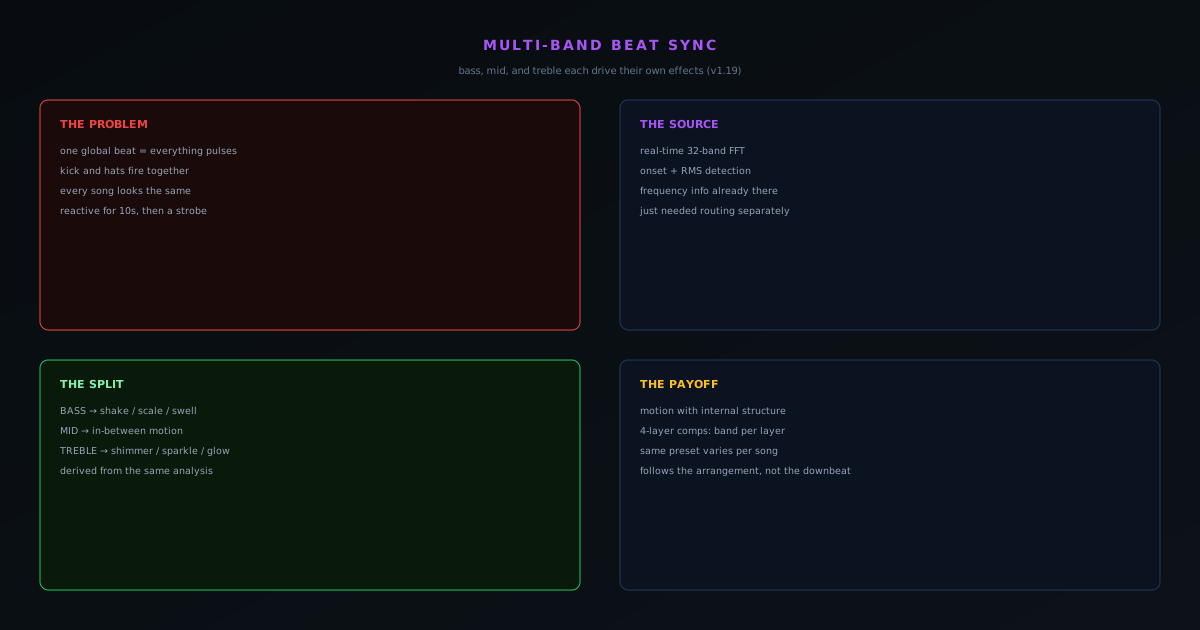
The fastest way to spot a cheap music visualizer is that everything moves at once. The bars jump, the particles flare, the glow swells: all on the same beat, all at the same time, because the whole animation is driven by a single global loudness number. It looks reactive for about ten seconds and then reveals itself as a strobe that happens to be near the music. Real music is not one signal; it is a kick drum, a bassline, a snare, hats, vocals, and synths occupying different frequency bands. Novus Visualizers v1.19 added multi-band beat sync to track that structure, letting bass, mid, and treble trigger effects independently.
This post is about why that distinction is the difference between a visualizer that decorates a track and one that feels like it is listening to it, and how it sits on top of the audio analysis the app already does.
The problem with a single global beat
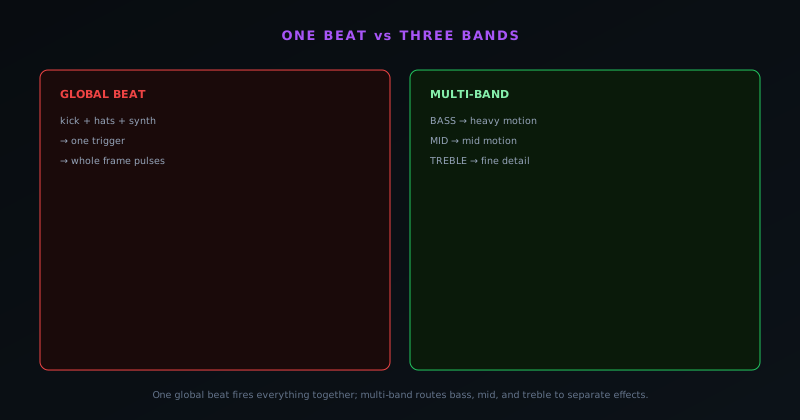
When one number drives everything, every visual element is forced into lockstep. The element that should respond to the bassline and the element that should sparkle on the hi-hats both fire on the same trigger, so the visual cannot distinguish a booming low end from a busy top end. Genres expose this immediately: a track with a steady four-on-the-floor kick and intricate hats looks identical to a sparse ambient piece, because the visualizer only ever saw "loud now / quiet now."
The fix is to stop collapsing the spectrum into a single value. The audio is already analyzed with a real-time 32-band FFT plus onset and loudness detection, which means the frequency information is right there: it just was not being routed separately. Multi-band sync routes it.
Splitting the signal into bands
Bass, mid, and treble are isolated from the FFT and each becomes its own trigger source. Now a heavy effect (a camera shake, a scale pulse, a background swell) can be bound specifically to the bass, so it responds to the kick and the low end rather than to everything. A finer effect (a shimmer, a particle burst, a glow flicker) can be bound to the treble, so it follows the hats and the air of the track. The mids can drive whatever sits in between. The result is motion with internal structure: different parts of the frame respond to different parts of the music.
Because this rides on the existing onset, beat, and RMS detection, it inherits all of that signal quality. The bands are not a crude EQ split bolted on the side; they are derived from the same analysis that already drives true beat synchronization, so they stay tight to the track rather than lagging or smearing.
Pairing each band with the right kind of effect
Splitting the signal is only half the craft; the other half is matching each band to an effect that suits its character. Low frequencies carry weight and impact, so the bass band wants effects that read as force: a camera shake, a scale pulse that makes a form swell on the kick, a background that surges and recedes with the low end. High frequencies are fast and detailed, so the treble band wants effects that read as air and sparkle: a shimmer, a particle burst that flickers with the hi-hats, a glow that flutters on the top of the mix. The mids, where most of the melodic and vocal information lives, suit motion in between: a steady drift, a tilt, a pulse that follows the body of the track rather than its extremes.
The visualizer exposes a vocabulary of beat-reactive behaviors (shake, pulse, glow, tilt, and drift) precisely so these pairings are possible, and the skill is assigning them by frequency character rather than firing them all on everything. A shake bound to the bass feels like the visual is being hit by the drum; the same shake bound to the treble feels nervous and wrong, because the eye expects weight to come from the low end. Getting these pairings right is what makes multi-band sync read as musical understanding rather than just more triggers, and it is the difference between a frame that moves with intent and one that merely moves a lot.
What it unlocks creatively
The creative payoff is that a visualizer can now express the relationship between the elements of a track. You can build a scene where the core form pumps with the bass while a halo of detail flickers on the highs, and the two stay legibly independent. Layered across the app's ordered layers (each running its own engine) multi-band sync means a layered composition can have a background driven by bass, a mid layer following the vocal range, and an overlay sparkling on the treble, all at once.
It also makes the same preset behave differently across different songs in a way that feels intentional. A bass-heavy remix and an acoustic version of the same track will drive the visuals differently because the energy lives in different bands, which is exactly what you want from something claiming to visualize the music rather than just animate near it.
Multi-band sync across ordered layers
The feature compounds with the app's layer system, and that is where it stops being a single trick and becomes a compositional tool. A project stacks ordered layers, each running its own engine, and each can be driven by a different band. A composition can put a slow form on the background that breathes with the bass, a mid-driven element in the middle that follows the vocal range, and a fine overlay on top that sparkles on the treble, so the depth of the frame and the depth of the mix line up. Different parts of the image respond to different parts of the music, layered front to back, which reads as a visual that genuinely understands the arrangement.
This is the kind of result that is effectively impossible with a single global beat, because one trigger cannot drive multiple layers differently. Multi-band sync is what makes a layered composition feel orchestrated rather than synchronized: the layers are not all pulsing together on the downbeat, they are each tracking the part of the spectrum they were assigned. For a creator building a flagship release video, that layered, band-aware motion is the ceiling of what the tool can express, and it is reachable in the browser, whether you assign the bands in the guided Classic Editor or shape them by hand on the Studio Workstation timeline.
Why a single global beat was the tempting default
It is worth understanding why most visualizers settle for one global beat, because the reason is instructive rather than lazy. A single loudness or beat value is trivial to compute and trivial to wire: you take one number out of the audio analysis and feed it to everything, and the result looks reactive immediately. It is the path of least resistance, and for a quick demo it is genuinely convincing for the first few seconds. The cost only shows up over the length of a real track, when the lack of internal structure reveals itself as a strobe that happens to be near the music rather than a visual that follows it.
Multi-band sync is more work precisely because it refuses that shortcut. It has to isolate the bands cleanly from the spectrum, route each to its own set of triggers, and keep all of that tight to the track without smearing or lagging. The reason it can do this without becoming sluggish is that the frequency information was already being computed (the real-time 32-band FFT with onset and loudness detection produces it as a matter of course) so the additional work is routing, not analysis. The app paid the analysis cost once, up front, which is what made the richer coupling affordable to add.
Tuning it without overthinking it
The practical advice is to assign deliberately rather than binding everything to every band. Pick the one or two elements that should feel anchored to the rhythm section and bind them to the bass; pick the elements that should feel airy and bind them to the treble; leave the rest on a gentler global response so the frame does not become noise. Restraint reads as musicality. A visual where three things move with intent beats one where everything twitches constantly.
Multi-band beat sync is a small change in description and a large change in feel, which is why it earned its own release. If you want the upstream story of how the raw audio becomes these triggers, the Web Audio walkthrough covers the FFT and beat detection end to end, and the product update post places this feature in the larger v1.0 → v1.20 arc.
How it plays across genres
Multi-band sync earns its keep most visibly across genres, because different styles of music load the frequency bands in completely different ways. Electronic music with a four-on-the-floor kick and a dense top end gives the bass band a steady, driving pulse and the treble band a constant shimmer, so a visual can pump on the kick while detail flickers continuously above it. Hip-hop, built around a heavy 808 and sparse, deliberate hats, drives the bass band hard and intermittently while leaving the treble to punctuate, which produces a visual with weight and space rather than constant motion. The decomposition adapts to the genre because it is reading the actual spectrum, not a fixed pattern.
Acoustic and orchestral material is where the contrast is sharpest. A track with no programmed kick puts most of its energy in the mid band, where voices and melodic instruments live, so a mid-driven element will carry the motion while the bass and treble effects stay restrained, exactly the calm, breathing feel that suits the music. A single-band global beat cannot make these distinctions; it animates a thrash track and a piano ballad with the same logic. Multi-band sync lets one tool serve wildly different genres well, because the genre itself shapes which bands are doing the work.
Setting up your first band assignment
In practice, getting started is less about configuration depth and more about one good decision. In the visualizers.novusstreamsolutions.com/editor, pick the single element in your scene that should feel anchored to the rhythm (the core form, the thing the eye lands on) and bind it to the bass so it moves with the low end and the kick. That one assignment does most of the work of making a visual feel locked to the track, because the human eye reads bass-synced motion as the beat. Everything after that is refinement: choose a secondary element for the treble if the track has an active top end you want to express, and leave the rest on a gentler response so the frame has a focal rhythm rather than uniform twitching.
The mistake to avoid is binding every element to every band out of enthusiasm, which collapses back into the all-at-once look multi-band sync exists to escape. Start with one bass assignment, listen to how it sits against the track, and add a second band only if the song genuinely calls for it. Because switching and reassigning is immediate, you can audition a band pairing against your actual audio in seconds rather than committing blind, which means the tuning loop is fast and the cost of trying an idea is essentially zero. Restraint plus quick iteration is the whole technique.
How the same preset breathes differently across songs
One of the most satisfying consequences of multi-band sync is invisible until you reuse a preset: the same visual setup behaves differently on different tracks, in a way that feels intentional rather than random. A bass-heavy remix drives the bass-bound effects hard while the treble effects stay relatively calm; an acoustic version of the same song, with its energy spread differently across the spectrum, animates the same preset in a noticeably different rhythm. Because the motion is tied to where the energy actually lives in each track, a single saved look adapts to the material instead of imposing the same pattern on everything.
This is exactly what you want from something that claims to visualize music rather than animate near it. A global-beat preset looks the same on every song because it only ever saw "loud now"; a multi-band preset is shaped by the frequency profile of each particular track, so it reads as responding to that song specifically. For a creator with a consistent visual identity across a release or an album, that property is valuable: one carefully tuned look stays recognizably theirs while still feeling tailored to each track it runs on.
Telling whether it is actually working
A useful check, once you have assigned your bands, is to watch the visual against a part of the track where the instrumentation changes: a drop, a breakdown, a section where the drums cut out. With genuine multi-band sync, that structural change should be visible: when the kick drops out, the bass-bound effect should go quiet while the treble and mid effects keep responding to whatever is still playing; when the full arrangement returns, the whole frame should come back to life. If the visual keeps pumping uniformly through a section where the low end has clearly dropped away, the motion is not really tracking the bands, and something needs reassigning.
That test (does the visual follow the structure of the song, not just its overall volume) is the honest measure of whether the feature is earning its place in your composition. A frame that breathes with the arrangement, going sparse in the quiet sections and full in the dense ones, is doing exactly what multi-band sync was built to do. It is also a good way to catch over-assignment: if everything moves all the time regardless of what the music is doing, you have bound too many elements to too many bands, and pulling some back to a gentler response will restore the contrast that makes the motion read as musical.
The honest limit of beat reactivity
It would be overselling to claim multi-band sync turns a visualizer into a music-aware mind, and the honest framing matters for setting expectations. The bands are a real and meaningful decomposition of the spectrum into low, middle, and high energy, driven by genuine onset and loudness detection, but they are energy bands, not a transcription of the arrangement. The tool does not know that a particular hit is a snare versus a clap; it knows there is sharp high-frequency energy at that instant, which for most purposes is exactly the right level of understanding to drive a visual. Knowing the limit keeps the feature honest and keeps the creator in control.
That control is the point. Multi-band sync gives you three independent, musically-meaningful triggers and the freedom to assign them, and the taste still comes from the person deciding which element follows the bass and which follows the highs. It is a better instrument, not an autopilot, which is the right shape for a creative tool. If you want the signal-level detail of how the bands are derived, the Web Audio walkthrough covers the analysis, and the product update post shows where this fits in the studio the app has become.
Frequently asked questions
Quick answers to common questions about this topic.
What is multi-band beat sync?
It splits the audio into frequency bands (bass, mid, treble) and lets each drive its own visual elements. A kick can pulse one layer while hi-hats animate another, instead of the whole frame strobing on a single beat.
Why is multi-band sync better than a single beat trigger?
Because it tracks the arrangement of a track, not just its downbeat. Different elements respond to the parts of the music they are meant to, which makes the motion feel intentional rather than uniform.
How do I set up frequency-band reactions?
In the editor, map layers to bass, mid, or treble energy. See the walkthrough at Multi-band beat sync: drive effects from bass, mid, and treble.
Related workflow
A track to a release-ready visualizer, per platform
Render the visual once, then produce the platform masters from it, instead of re-rendering the whole video for every aspect ratio.
- Render the beat-synced videoNovus Visualizers: Pick the engine and mode against your actual track; the analysis is done on your audio, not on a preset preview.
- Trim or upscale the exportNSS Background Remover: The video utilities handle the tidy-up pass so the render does not have to be repeated to fix ten seconds of it.
- Produce the per-platform mastersNovus Convert: Each destination wants a different container and bitrate; converting the finished render is far cheaper than re-rendering it.
Related troubleshooting
Was this page helpful?
Your answer stays in this browser, it is not sent anywhere and no account or cookie is involved.