Novus Visualizers
Multi-band beat sync: drive effects from bass, mid, and treble
Go beyond one global beat: route bass, mid, and treble energy to different elements so a kick pulses one layer while hi-hats animate another, and the same preset looks different on every song.
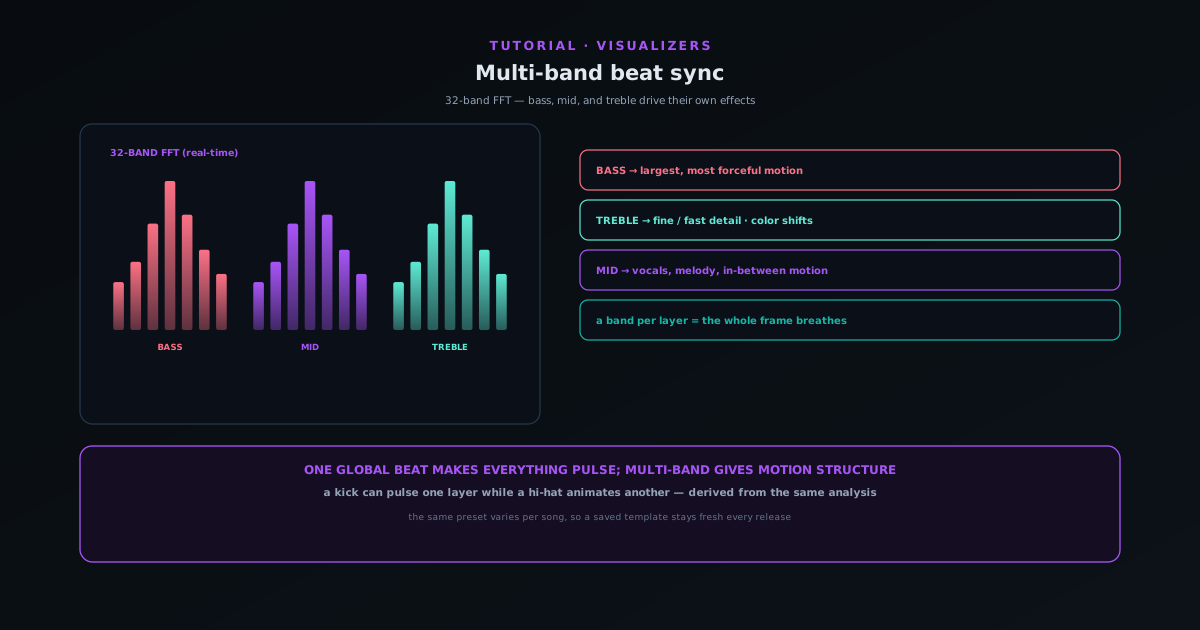
A single global beat makes everything pulse together: kick and hi-hats fire the same trigger, the whole frame strobes, and every song ends up looking the same. Multi-band beat sync fixes that by letting bass, mid, and treble energy each drive their own effects independently.
This tutorial covers how multi-band sync works on top of the real-time 32-band FFT, and how to route frequency bands to layers so the motion follows the arrangement of a track rather than just its downbeat.
Contents
- 1
1. Understand where the bands come from
Novus Visualizers already analyzes your track with a real-time 32-band FFT plus beat, onset, and loudness detection. Multi-band sync uses that same analysis, routing different frequency ranges (bass, mid, and treble) to different elements rather than collapsing everything into one beat.
The frequency information is already there; multi-band sync is about sending it to separate places instead of one global trigger.
- Built on the real-time 32-band FFT.
- Bass / mid / treble routed independently, not one global beat.
- 2
2. Route bass to heavy motion
Bind a heavy element (a shake, a scale pulse, a swell) to the bass band so it pulses with the kick and the low end. This gives the scene a foundation that moves with the track's weight.
Bass-driven motion reads as the "body" of the visual, responding to the parts of the track people feel rather than hear.
- Bass → shake / scale / swell on a heavy element.
- Gives the scene a foundation that moves with the low end.
- 3
3. Send treble to fine detail
Route the treble band to fine details (shimmer, sparkle, glow) so hi-hats and high-frequency content animate the delicate parts of the scene rather than the whole frame. This is what keeps the visual from strobing on every beat.
With bass on the heavy motion and treble on the fine detail, a kick can pulse one layer while a hi-hat animates another, which is the whole point of multi-band sync.
- Treble → shimmer / sparkle / glow on fine details.
- Kick and hi-hat now drive different elements.
Multi-band sync gives each element its own ears: bass, mids, and highs drive different things. - 4
4. Use mid for in-between movement
Assign the mid band to in-between motion: the elements that should respond to vocals, melody, and midrange content. With all three bands assigned, the scene has internal structure: different elements respond to the parts of the track they are meant to.
In a four-layer composition, you can give each layer its own band, so the whole frame breathes with the arrangement rather than pulsing as one.
- Mid → in-between motion for vocals and melody.
- Four-layer comps can assign a band per layer.
- 5
5. Hear the payoff: same preset, different per song
The payoff is motion with internal structure that follows the arrangement, not the downbeat, and because the bands respond to the actual frequency content, the same preset varies from song to song. A bass-heavy track and a bright, percussive track will look different through the same setup.
This is what makes a saved project look fresh on every release rather than identical, which is one of the biggest reasons to build with multi-band sync.
- Motion follows the arrangement, not just the beat.
- The same preset looks different on every song.
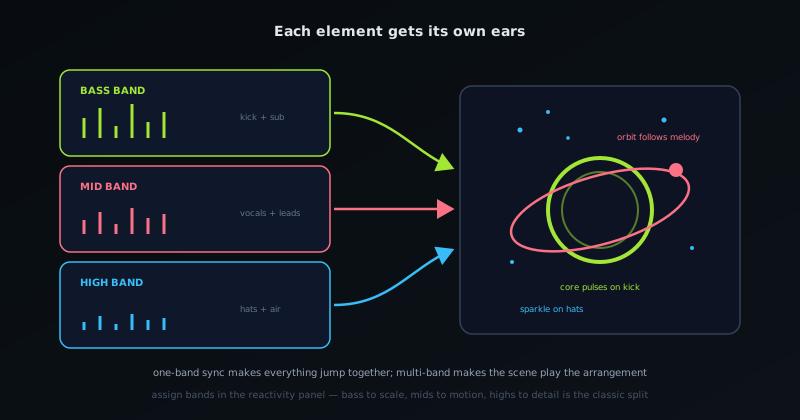
Assign a band per layer
The cleanest way to use multi-band sync in a layered scene is to give each layer its own band: bass to the background or a heavy accent, mid to the reactive midground, treble to the fine detail. The scene then responds to the whole track at once, with each element moving to the part of the music it belongs to.
Frequently asked questions
Quick answers to common questions about this topic.
How do I drive different effects from bass, mid, and treble?
Use multi-band beat sync to route each frequency band to its own layer or property, so a kick can pulse one element while hi-hats animate another, instead of everything reacting to one beat.
Why use multi-band sync instead of a single beat?
It tracks the arrangement of the track, so the motion feels intentional and detailed rather than the whole frame strobing together.
Related workflow
A track to a release-ready visualizer, per platform
Render the visual once, then produce the platform masters from it, instead of re-rendering the whole video for every aspect ratio.
- Render the beat-synced videoNovus Visualizers: Pick the engine and mode against your actual track; the analysis is done on your audio, not on a preset preview.
- Trim or upscale the exportNSS Background Remover: The video utilities handle the tidy-up pass so the render does not have to be repeated to fix ten seconds of it.
- Produce the per-platform mastersNovus Convert: Each destination wants a different container and bitrate; converting the finished render is far cheaper than re-rendering it.
Related troubleshooting
Was this page helpful?
Your answer stays in this browser, it is not sent anywhere and no account or cookie is involved.