2026 · Novus VisualizersAbout 14 min readNovus Stream Solutions
Making a vertical music visualizer for TikTok & Reels
TikTok and Reels are vertical, watched sound-off, and decided in the first second. Here is how to make a 9:16 music visualizer that survives those realities: safe zones, captions, hooks, and the right export.
Contents
- 1.Overview
- 2.The 9:16 vertical frame
- 3.Safe zones: where the platform UI sits
- 4.Designing for sound-off with captions
- 5.The first second is everything
- 6.Length, looping, and pacing
- 7.Exporting for TikTok and Reels
- 8.Working with trends and platform sounds
- 9.Test, watch, and learn what works
- 10.Posting consistently and at volume
- 11.One track, many vertical clips
Overview
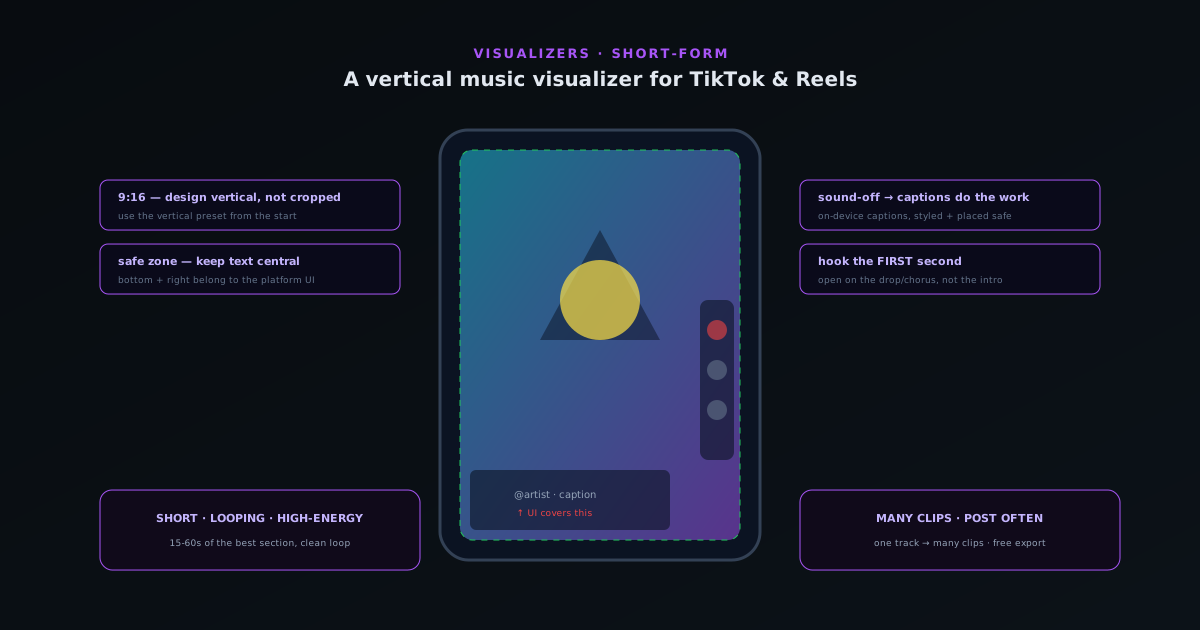
Short-form vertical video (TikTok, Instagram Reels, YouTube Shorts) is where a huge amount of music discovery now happens, and a vertical music visualizer is one of the most effective pieces of content an artist can make for it. But short-form has its own ruthless realities that a visualizer has to respect: it is vertical (9:16), it is watched sound-off by default with captions doing the work, it buries part of the frame under platform UI, and it is decided in the first second, with viewers swiping away instantly if the opening does not hook them. A visualizer made for a horizontal YouTube upload and cropped to vertical without thought will fail these realities; one designed for them lands. This guide covers making a 9:16 visualizer that works on TikTok and Reels (the frame, the safe zones, the sound-off and hook considerations, and the export) all free in Novus Visualizers.
The reason to design specifically for vertical short-form rather than just cropping a horizontal visualizer is that the constraints are real and unforgiving: get the aspect ratio, safe zones, captions, and hook right, and the visualizer can drive genuine discovery; get them wrong, and the clip is swiped past before it has a chance. The good news is that these constraints are well-understood and easy to design for once you know them, and a visualizer tool with vertical presets and caption support handles the technical side. The skill is in respecting the platform realities (composing for the vertical frame and its safe zones, designing for sound-off with captions, and front-loading the hook) which turns a visualizer from a horizontal afterthought into native short-form content.
The 9:16 vertical frame
Short-form video is vertical, in the 9:16 aspect ratio that fills a phone screen held upright, and designing for that frame from the start (rather than cropping a horizontal video to fit) is the foundation of a vertical visualizer that works. A 16:9 horizontal visualizer cropped to 9:16 loses most of its width, often cutting off key elements and leaving a composition that was never meant for the tall, narrow frame. Composing natively for 9:16 means arranging the visual elements for the tall format: the key motion and any text positioned for a vertical viewing experience, using the full height the format provides rather than fighting a horizontal composition squeezed into it.
Novus Visualizers provides vertical presets at visualizers.novusstreamsolutions.com/editor that set up the 9:16 frame directly, so you design for the vertical format from the outset rather than adapting a horizontal one. This matters because the vertical frame changes the composition: elements that sit side by side in a horizontal video stack vertically, the focal point and motion are arranged for a tall view, and the whole layout is built for how the content will actually be seen, on a phone, filling the screen vertically. Starting from the vertical frame is the difference between a visualizer that feels native to short-form and one that feels like a horizontal video awkwardly cropped, which viewers register instantly even if they cannot name why. Composing for 9:16 from the start is the first and most fundamental step in making a vertical visualizer.
Safe zones: where the platform UI sits
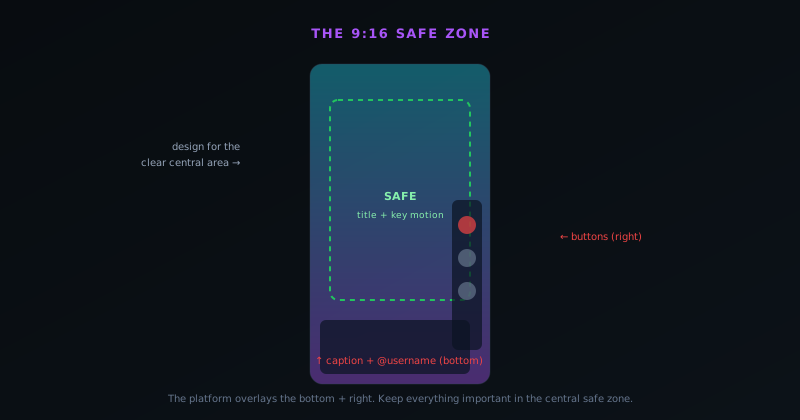
A critical and often-missed reality of short-form platforms is that they overlay the video with their own interface (the caption and username at the bottom, the like/comment/share buttons down the right side, and various other elements) which covers parts of the frame, so anything important placed in those areas is hidden behind the UI. Designing for the safe zone means keeping the key visuals, any text, and the focal point of the composition in the central area of the frame that the platform UI does not cover, away from the bottom and right edges where the interface sits. A visualizer with its title at the bottom or its main element down the right side will have those covered by the platform's buttons and caption.
The safe-zone discipline is to treat the edges of the vertical frame (particularly the bottom portion and the right side) as space the platform will use, and compose so the important content lives in the clear central area. This is why simply taking a composition that fills the whole frame and posting it can fail: the parts near the covered edges are obscured. Keeping titles, key motion, and focal elements in the safe central zone ensures they are visible regardless of the platform UI overlaid on top. The exact safe-zone dimensions vary by platform and change over time, but the principle holds across all of them: design for the central clear area, not the full frame, since the edges belong to the platform. Respecting the safe zones is what keeps a visualizer's important content visible rather than buried under the interface.
Designing for sound-off with captions
A counterintuitive reality of short-form video is that much of it is watched with the sound off, at least initially, as viewers scroll feeds in public or with their phones muted, which is a strange thing for music content, where the sound is the point. The implication is that a vertical music visualizer cannot rely on the audio alone to communicate, especially in the crucial first moment: it needs to be visually compelling enough to stop the scroll without sound, and captions are what carry the words and the hook to a muted viewer. A visualizer that is only interesting with the sound on misses the large share of viewers who encounter it muted.
The practical response is to make the visualizer visually engaging on its own and to use captions (lyrics, the song or artist name, a hook) so that a sound-off viewer gets the message and is enticed to turn the sound on. Novus Visualizers' on-device caption feature generates captions from the audio, which is ideal for short-form where captions are essential, and these can be styled and positioned (within the safe zone) to carry the content to muted viewers. The goal is a visualizer that works sound-off (visually grabbing and captioned) and is even better sound-on, rather than one that depends on audio the viewer may not have enabled. Designing for the sound-off reality, with captions doing the communicating, is what makes a music visualizer effective on platforms where the sound is muted by default despite music being the content.
The first second is everything
Short-form platforms are ruthless about the opening: viewers decide in roughly the first second whether to keep watching or swipe away, and a clip that does not hook immediately is gone before it can deliver anything. This means a vertical visualizer has to front-load its impact: open with the most visually arresting moment, the strongest part of the track, or an immediate hook, rather than building up to something good. A visualizer that opens with a slow, gentle introduction has lost most of its viewers before the interesting part arrives, no matter how good that part is, because the first second did not earn the second second.
Designing for the first-second hook means choosing the opening deliberately: start at the song's hook or its most energetic moment rather than its intro, open on a striking visual rather than a slow build, and make the first frame and first motion immediately compelling. For a music visualizer, this often means starting the clip at the chorus or drop (the most recognizable, energetic part of the track) rather than the beginning, since the goal is to stop the scroll instantly. The whole rest of the visualizer only matters if the first second holds the viewer, so the opening is where the most design attention should go. Front-loading the hook is the short-form discipline that most separates clips that perform from clips that are swiped past, which is why choosing a compelling opening is as important as the visualizer style itself.
Length, looping, and pacing
Short-form clips are short (typically a slice of a song rather than the whole track) and choosing the right length and section is part of making an effective vertical visualizer. Rather than the full song, a short-form clip usually features the most compelling segment: the hook, the chorus, a memorable moment, often in the range of fifteen to sixty seconds depending on the platform and the content. Choosing the section that is most recognizable and engaging, and keeping the clip tight, respects how short-form is consumed and gives every second a job, rather than including slower sections that lose viewers.
Looping also matters because short-form platforms loop clips automatically, replaying them as long as the viewer stays, so a clip that loops cleanly (ending in a way that flows back into its start) can hold a viewer through multiple plays, which the platforms reward. Designing the clip to loop, or at least to end without a jarring stop, extends its watch time. Pacing within the clip should sustain energy throughout, since there is no room for dead time in a short clip competing for attention. The combination (the right short length, the most compelling section, clean looping, and sustained pacing) is what makes a vertical clip hold attention in a feed. Treating the clip as a tight, looping, high-energy slice rather than a shortened full video is the framing that fits how short-form actually works.
Exporting for TikTok and Reels
Once the vertical visualizer is designed, exporting it correctly ensures it looks its best on the platforms, which means using the vertical export preset for the right resolution and format. Novus Visualizers exports vertical 9:16 video at appropriate resolutions for short-form, in formats the platforms accept, via the platform presets that cap the resolution and frame rate to sensible targets. Exporting at the platform-appropriate vertical resolution (high enough to look sharp on a phone screen) and in a compatible format means the clip uploads cleanly and displays at full quality, rather than being re-compressed or letterboxed by a wrong export.
Because the export is client-side and free, with copyright-free output, an artist can produce and export vertical clips for short-form without cost or watermarks, which suits the high-volume, frequent posting that short-form rewards. The clip that comes out is ready to upload directly to TikTok, Reels, or Shorts, in the right aspect ratio and format, having been designed for the vertical frame and its safe zones from the start. This end-to-end path (design vertical, respect safe zones and sound-off, hook the first second, export the right preset) produces a clip that is native to short-form rather than adapted to it. The companion guide at How to make a music visualizer video covers the general visualizer workflow, and this vertical-specific guidance adapts it to the realities of the platforms where short-form music discovery happens.
Working with trends and platform sounds
Short-form platforms are driven heavily by trends (trending sounds, formats, and challenges) and an artist can use this to a music visualizer's advantage by understanding how their music fits the platform's culture rather than posting in a vacuum. While a music visualizer is built around the artist's own track, awareness of what is resonating on the platform (the pacing trends, the visual styles that are catching on, the way successful music content is presented) informs how to present the visualizer so it feels native rather than out of place. The goal is not to chase every trend but to make content that fits the platform's current sensibilities while showcasing the artist's own music.
There is also a strategic question of how the artist's sound itself can travel on the platform, since short-form is a powerful engine for music discovery specifically because tracks become sounds others use. A visualizer that introduces a track compellingly can be part of getting that track noticed and used, which is the discovery flywheel short-form enables for music. Understanding that the platform is not just a place to post a video but an ecosystem where sounds spread shapes how an artist approaches vertical visualizers: as content that can catch on and as an introduction to a track that others might pick up. Engaging with the platform as a music-discovery ecosystem, rather than treating it as a generic video host, is part of using vertical visualizers effectively for the actual goal, which is getting the music heard and spread.
Test, watch, and learn what works
Short-form performance is unpredictable enough that testing and learning beats guessing, and the low cost of producing vertical clips makes it practical to try different approaches and see what resonates. Posting clips with different opening hooks, different sections of a track, different visualizer styles, and different captions, then watching which perform, teaches an artist what works for their specific music and audience far better than any general advice. The platforms provide engagement data (views, watch time, completion, shares) that reveals which clips held attention and which were swiped past, which is the feedback that should guide future clips.
The discipline is to treat each clip as a small experiment and to actually look at the results, learning the patterns in what works rather than posting blindly. Maybe a particular visual style consistently performs better, or opening on the drop reliably beats opening on the verse, or certain captions catch attention: these patterns, visible in the data, are the artist's guide to making better clips over time. Because producing clips is cheap and fast, an artist can iterate quickly, refining their approach based on real performance rather than assumptions. This test-and-learn loop is how an artist develops an effective short-form presence: not by getting it perfect immediately, but by trying, watching, and adapting, using the platform's own feedback to converge on what works for their music. The willingness to experiment and learn from the data is what separates artists who improve at short-form from those who post the same underperforming approach repeatedly.
Posting consistently and at volume
Short-form platforms reward consistency and volume (frequent, regular posting) far more than the occasional polished upload, which has a direct implication for how an artist should approach vertical visualizers: make many, post often, and sustain it. The algorithms favor accounts that post regularly, and the sheer number of attempts matters because short-form performance is unpredictable, so more clips means more chances for one to catch on. An artist who posts one carefully-crafted clip a month is playing a far weaker game than one who posts several clips a week, simply because the latter has many more shots at discovery and feeds the algorithm the consistency it rewards.
This is why the efficiency of producing vertical visualizers matters so much: the ability to make many clips quickly, from one track or several, is what makes the consistent high-volume posting that short-form rewards feasible. A free, fast visualizer tool with templates and vertical presets is what lets an artist sustain the cadence without it becoming an overwhelming workload. The companion guide at Music promotion as a micro-business: a zero-budget content engine for independent artists covers the broader content-engine and cadence approach, but the vertical-specific point is that consistency and volume are the strategy short-form rewards, and the practical enabler is being able to produce vertical clips efficiently enough to sustain them. Treating vertical visualizers as a steady stream of content posted consistently, rather than occasional one-offs, is what aligns an artist's effort with how the platforms actually distribute and reward content.
One track, many vertical clips
The highest-leverage way to use vertical visualizers is not to make one clip per song but to make several, because short-form rewards volume and frequency, and one track can yield many distinct vertical clips featuring different sections, hooks, or visual treatments. From a single song, an artist can produce a clip of the chorus, a clip of a different memorable moment, clips with different visualizer styles or captions, each posted separately to give the track multiple chances to catch on. This multiplies the discovery surface of a single release, which is exactly the kind of zero-budget content leverage that short-form enables for artists.
Producing many clips from one track is efficient because the visualizer setup is largely reusable: once you have a vertical visualizer style dialed in for the track, generating clips of different sections or with variations is fast, especially saving the setup as a template. This turns a single release into an ongoing stream of short-form content rather than a single post, sustaining the frequent posting that short-form algorithms favor, and saving the look as a reusable template at visualizers.novusstreamsolutions.com/editor makes each new clip a matter of minutes. The companion guide at Music promotion as a micro-business: a zero-budget content engine for independent artists covers the broader content-engine approach, but the vertical-clip-specific point is that the real power of vertical visualizers is volume: many clips from each track, posted consistently, giving the music many shots at discovery. Treating each song as a source of multiple vertical clips, rather than one, is what turns vertical visualizers from a single piece of content into a discovery engine for a release.
Frequently asked questions
Quick answers to common questions about this topic.
What aspect ratio should a TikTok or Reels visualizer be?
9:16 vertical, which fills a phone screen held upright. Design natively for the vertical frame using a vertical preset rather than cropping a horizontal video, since cropping loses width and breaks the composition.
What are safe zones in vertical video?
The areas the platform overlays with its own UI: the bottom (caption, username) and right side (like/comment/share buttons). Keep titles, captions, and key visuals in the clear central area so they are not hidden behind the interface.
Why do I need captions on a music visualizer?
Much of short-form is watched sound-off initially, so captions carry the words and hook to muted viewers and entice them to turn the sound on. Novus Visualizers generates captions on-device, which you can style and place within the safe zone.
How long should a vertical music visualizer be?
Short: typically a 15–60 second slice featuring the most compelling section (often the hook or chorus), not the full song. Design it to loop cleanly, since platforms replay clips, and front-load the most arresting moment to hook the first second.
Related workflow
A track to a release-ready visualizer, per platform
Render the visual once, then produce the platform masters from it, instead of re-rendering the whole video for every aspect ratio.
- Render the beat-synced videoNovus Visualizers: Pick the engine and mode against your actual track; the analysis is done on your audio, not on a preset preview.
- Trim or upscale the exportNSS Background Remover: The video utilities handle the tidy-up pass so the render does not have to be repeated to fix ten seconds of it.
- Produce the per-platform mastersNovus Convert: Each destination wants a different container and bitrate; converting the finished render is far cheaper than re-rendering it.
Related troubleshooting
Was this page helpful?
Your answer stays in this browser, it is not sent anywhere and no account or cookie is involved.