Novus Visualizers
Making a vertical visualizer for TikTok, Reels & Shorts
A focused workflow for short-form vertical video: pick an engine and mode that reads at 9:16, keep the motion centered and punchy, add captions, and export with the TikTok/Reels preset.
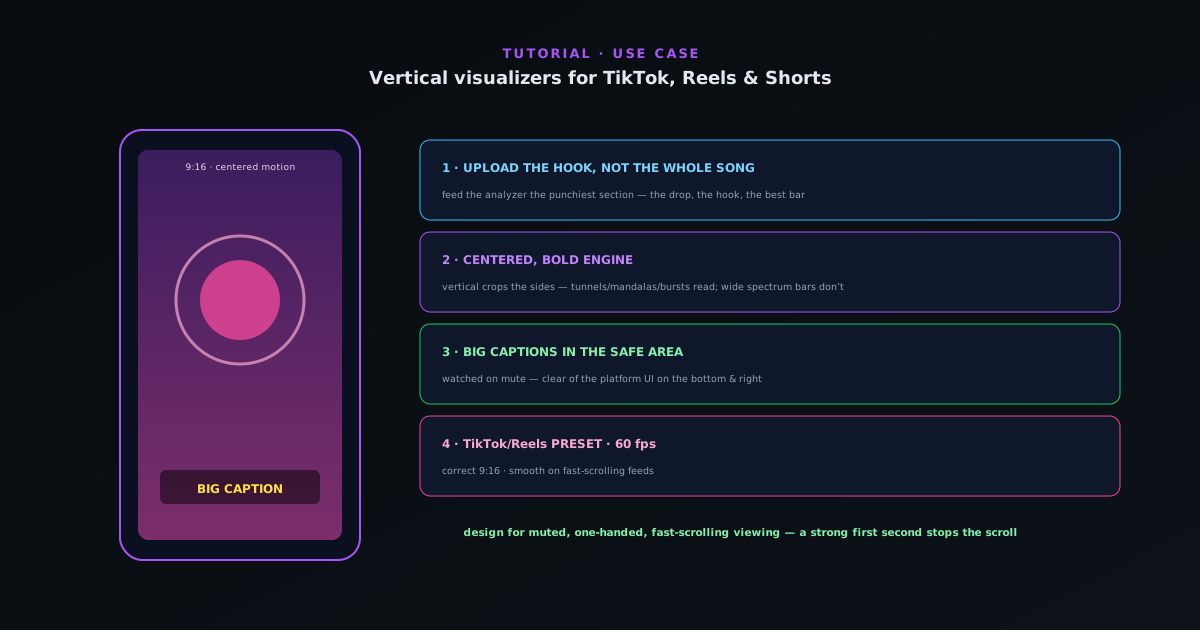
Short-form vertical video has its own rules: a 9:16 frame, motion that reads on a phone, and a hook in the first second. This guide adapts the Visualizers workflow specifically for TikTok, Reels, and Shorts.
Contents
- 1
1. Upload the hook, not the whole song
Short-form lives or dies on the first few seconds, so upload the most arresting part of the track (the drop, the hook, the best bar) rather than the whole song. The analyzer reacts to whatever you give it, so feeding it the punchiest section gives you the punchiest visual.
- 2
2. Choose an engine and mode that reads vertically
Pick an engine whose main motion is centered and bold rather than wide and detailed: vertical frames crop the sides, so spread-out spectrum bars lose impact while a central tunnel, mandala, or particle burst reads strongly. Recolor it to match your track or brand.
- Favor centered, bold motion.
- Avoid wide, detailed layouts that crop badly.
- 3
3. Add big, legible captions
Short-form is watched on mute constantly, so captions matter. Use the AI captions to transcribe the lyric or hook and place large, high-contrast text in the safe area, clear of the platform’s UI overlays on the bottom and right. Keep the beat-sync punchy so the visual still carries when the sound is off and on.
- On-device captions for muted viewing.
- Keep text in the safe area.
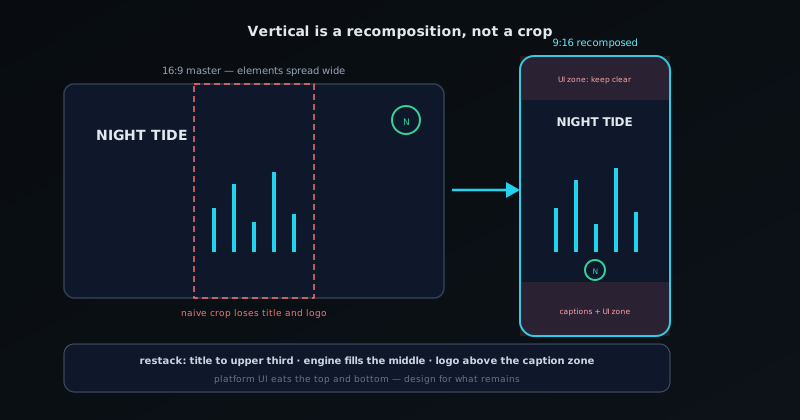
Vertical is a recomposition, not a crop; the safe zones decide what survives. - 4
4. Export with the TikTok/Reels preset
Use the TikTok/Reels platform preset so the output is sized 9:16 correctly, and export at 60 fps for smooth motion on fast-scrolling feeds. The encode is client-side, so you can iterate on several versions quickly and pick the strongest.
- TikTok/Reels preset for correct 9:16.
- 60 fps for smooth feed playback.
Design for the thumb
Assume muted, one-handed, fast-scrolling viewing. Centered motion, big captions, and a strong first second beat-sync are what stop the scroll. Export a few variations from the same project and let the platform tell you which hook works; it is cheap to do because the render is instant and local.
Frequently asked questions
Quick answers to common questions about this topic.
How do I make a vertical visualizer for TikTok or Reels?
Use the 9:16 vertical preset, keep key visuals and text inside the safe zone away from the UI overlays, and export with the platform preset. The whole flow runs in your browser.
What is the safe zone for vertical video?
The central area clear of platform buttons and captions. Keep your title and main motion there so nothing important is hidden behind TikTok or Reels UI.
Related workflow
A track to a release-ready visualizer, per platform
Render the visual once, then produce the platform masters from it, instead of re-rendering the whole video for every aspect ratio.
- Render the beat-synced videoNovus Visualizers: Pick the engine and mode against your actual track; the analysis is done on your audio, not on a preset preview.
- Trim or upscale the exportNSS Background Remover: The video utilities handle the tidy-up pass so the render does not have to be repeated to fix ten seconds of it.
- Produce the per-platform mastersNovus Convert: Each destination wants a different container and bitrate; converting the finished render is far cheaper than re-rendering it.
Related troubleshooting
Was this page helpful?
Your answer stays in this browser, it is not sent anywhere and no account or cookie is involved.