2026 · Novus VisualizersAbout 12 min readNovus Stream Solutions
MP4 vs WebM: which to export for a music video
Both are great video formats, but they are good at different things. A simple guide to choosing MP4 or WebM when you export a visualizer or music video.
Contents
- 1.Overview
- 2.MP4 (H.264): maximum compatibility
- 3.WebM (VP9): efficient for the web
- 4.A simple decision
- 5.What a format and a codec actually are
- 6.H.264 and VP9, compared
- 7.File size at the same quality
- 8.Where MP4 universality comes from
- 9.The transparency exception
- 10.Streaming, downloading, and re-encoding
- 11.Why client-side export lets you have both
- 12.Looking ahead to newer formats
- 13.A default worth committing to memory
- 14.When file size genuinely matters to you
- 15.Resolution and frame rate matter more
Overview
When you export a visualizer from Novus Visualizers at visualizers.novusstreamsolutions.com/editor, you choose a format: MP4 (H.264) or WebM (VP9). Both are excellent, modern video formats: the choice is not about quality so much as about where the video is going and what you need from it. This guide makes the decision simple.
MP4 (H.264): maximum compatibility
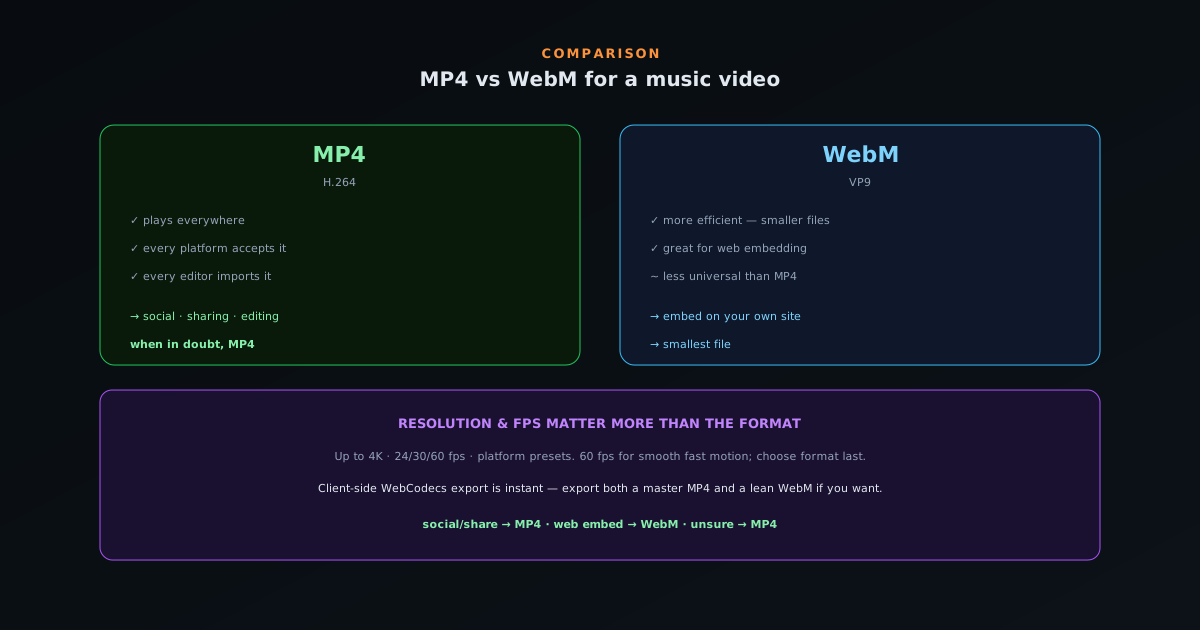
MP4 with H.264 is the most universally supported video format there is. Every platform accepts it, every device plays it, and every editor imports it. If you are uploading to YouTube, TikTok, Instagram, or sending the file to someone, MP4 is the safe choice that will just work everywhere.
It is the right default for almost all music-video use. When in doubt, export MP4.
WebM (VP9): efficient for the web
WebM with VP9 is more efficient (it can deliver similar quality at a smaller file size) and it is excellent for embedding video directly on a website or web app, where modern browsers support it well. If you are hosting a looping background video on your own site, WebM can save bandwidth.
Its tradeoff is compatibility: some older software and a few platforms prefer MP4. So WebM shines specifically for web delivery rather than universal sharing.
A simple decision
Uploading to a social platform or sharing the file? MP4. Embedding the video on your own website and want a smaller file? WebM. Not sure? MP4. That covers the vast majority of cases without overthinking it.
Because Novus Visualizers encodes client-side with WebCodecs, exporting either format happens in seconds with no render queue, so you can even export both from the same project if you want a master MP4 and a lean WebM for your site.
- Social / sharing / editing → MP4 (H.264).
- Web embed / smallest file → WebM (VP9).
- Unsure → MP4.
What a format and a codec actually are
To choose well, it helps to know what you are choosing between, because MP4 and WebM are containers and H.264 and VP9 are codecs, and the distinction clarifies the whole comparison. A codec is the method used to compress the video data: the algorithm that squeezes a sequence of frames down to a manageable file size and decompresses it for playback. A container is the file format that wraps the compressed video and audio together with the information a player needs to read them. MP4 is a container that typically carries H.264-compressed video; WebM is a container that typically carries VP9.
This matters because the properties you care about (compatibility, file size, efficiency) come mostly from the codec inside, while the container determines what software recognizes the file. When people say MP4 is the most compatible format, they really mean that the MP4-plus-H.264 combination is understood by essentially everything, while WebM-plus-VP9 is understood by modern browsers and many but not all platforms. Knowing that the format choice is really a choice of compression method wrapped in a recognized container demystifies why one is universal and the other is efficient-but-less-universal: it is the codec doing the compressing and the container determining who can open it.
H.264 and VP9, compared
The two codecs were designed with different priorities, which is the root of their different strengths. H.264 is older, extraordinarily well-established, and supported in hardware on virtually every device: phones, computers, TVs, and players all have dedicated H.264 decoding, which is why an MP4 plays smoothly everywhere with minimal power draw. Its ubiquity is its defining feature: choosing H.264 means choosing the codec with the broadest, deepest support that exists, the safe option that will simply work on whatever opens it.
VP9 is newer and more efficient, able to deliver similar visual quality at a smaller file size because its compression is more advanced. That efficiency is genuinely valuable for delivering video over the web, where smaller files mean faster loads and less bandwidth. Its trade is that support, while strong in modern browsers, is not as universal as H.264; some older software and certain platforms prefer or require MP4. So the codecs embody the central trade of the whole comparison: H.264 prioritizes universal compatibility, VP9 prioritizes efficiency, and which you want depends on whether your priority is that the file plays everywhere or that it is as small as possible for web delivery.
File size at the same quality
The most concrete practical difference is file size, and it is worth understanding what the efficiency advantage actually buys. Because VP9 compresses more effectively than H.264, a WebM file can reach the same visual quality as an MP4 while taking up less space, or equivalently deliver higher quality at the same size. For a video that will be downloaded once and kept, this difference is minor: storage is cheap and the file is transferred once. For a video served repeatedly over the web, it compounds: every visitor who loads a smaller file uses less bandwidth and waits less time.
This is why the file-size advantage points specifically toward web delivery rather than general use. If you are hosting a looping background video on your own site, or serving a video to many visitors, the smaller WebM reduces your bandwidth costs and speeds up the experience for everyone who loads it, and that benefit scales with traffic. For a video you are uploading to a platform that re-encodes it anyway, or sending to one person, the size difference is largely irrelevant. The efficiency of VP9 is a real benefit, but it is a benefit that matters most in exactly one context, repeated web delivery, which is precisely where WebM is the right call.
Where MP4 universality comes from
MP4 with H.264 earns the title of most-compatible format through a combination of age, standardization, and hardware support that no other option matches. It has been the default for so long that every platform accepts it, every device plays it, every editor imports it, and crucially, the decoding is built into the hardware of essentially all devices, so playback is smooth and power-efficient even on modest phones. When you need a file that will work for certain, with no compatibility question, MP4 is the answer that has the fewest ways to go wrong.
This universality is exactly why MP4 is the right default for almost all sharing and uploading. If you are sending a file to someone whose software you do not know, uploading to a platform, or simply want to not think about whether the recipient can play it, MP4 removes the risk entirely. The efficiency you might gain from WebM is rarely worth the small chance that the file will not play somewhere, when the whole point of sharing is that it plays. For universal delivery, the safe, ubiquitous choice is the correct one, and that is MP4: its compatibility is not a minor edge but the decisive factor whenever the file needs to travel to unknown destinations.
The transparency exception
There is one capability where the format choice is not about compatibility versus efficiency but about possibility: transparency. If you need a video with an alpha channel (a subject on a transparent background, for use as an overlay layered on top of other content), WebM can carry that transparency in a way standard MP4 cannot. This is a genuine functional difference rather than a preference: for a transparent video, WebM is not merely the more efficient choice, it is the one that supports the feature at all.
This exception matters for anyone producing overlay content: a cut-out subject meant to be composited over something else later, a transparent visual element for a stream or another editor. In that specific case, the usual "when in doubt, MP4" guidance is reversed, because MP4 will simply flatten away the transparency you need. Knowing this prevents a frustrating surprise: someone who exports a transparent video as MP4 and finds the background has become solid has hit exactly this limitation. When transparency is part of the requirement, reach for the format that supports it, which is WebM, the one situation where the format decision is driven by capability rather than by where the video is going.
Streaming, downloading, and re-encoding
How a video will be consumed shapes the format choice in ways the simple compatibility-versus-size framing can miss. A video embedded to stream on a web page benefits from WebM's efficiency, because it loads faster for visitors and the modern browsers doing the streaming support it well. A video uploaded to a major platform, by contrast, will be re-encoded by that platform into its own formats regardless of what you upload, which means the efficiency of your source format barely matters: the platform is going to transcode it anyway, so you might as well upload the maximally-compatible MP4 to ensure the upload itself succeeds.
This re-encoding reality is why MP4 is the pragmatic upload choice even though WebM is more efficient: the platform discards your compression and applies its own, so the only thing your format choice affects is whether the upload is accepted smoothly, which favors the universal option. WebM's efficiency pays off when you are the one serving the file directly to viewers (on your own site, your own player) where your compression is what they actually receive. Matching the format to the consumption path, rather than to an abstract notion of which is better, is what gets you the right result: WebM where you serve directly, MP4 where a platform sits in between and re-encodes anyway.
Why client-side export lets you have both
A practical point that dissolves much of the agonizing over this choice is that exporting both formats is essentially free when the encoding happens on your own device. Because the visualizer encodes client-side rather than queuing your video on a server, producing an export takes seconds and costs nothing, so you can export a master MP4 for sharing and uploading and a lean WebM for embedding on your own site from the very same project, without choosing one and forgoing the other. The decision stops being either-or the moment exporting is fast and unmetered.
This is a quiet advantage of local encoding that is easy to overlook. With a server-based tool that queues or meters renders, exporting two formats means waiting twice or paying twice, which pressures you to pick one. With instant on-device export, you simply make both when both are useful (the MP4 for the platforms and the WebM for your website) and use each where it fits. And if you only have one file and need the other, bgremover.novusstreamsolutions.com/tools/format-converter can transcode it without re-rendering. So while the comparison is worth understanding, the practical resolution for many projects is not to choose at all but to export both, which the client-side pipeline makes painless. The format question matters most when exporting is costly; when it is free, you can sidestep it entirely.
Looking ahead to newer formats
It is worth a brief note on where video formats are heading, because the MP4-versus-WebM choice exists within a moving landscape. Newer, even more efficient codecs continue to emerge, promising still smaller files at the same quality, and support for them grows over time as browsers and devices add it. The pattern is the same one that played out with H.264 and VP9: a newer codec offers better efficiency but starts with narrower support, and the compatibility-versus-efficiency trade repeats one generation down.
The lesson for choosing today is that the principle outlasts the specific formats. Whatever the newest efficient codec is at any given moment, the decision framework holds: use the universal, broadly-supported option when the file needs to travel to unknown destinations, and use the newer, more efficient option when you control the delivery and want the smallest file. You do not need to chase every new format to make good choices; you need to understand the trade between compatibility and efficiency, which is stable even as the particular codecs change. Today that trade is well captured by MP4 versus WebM, and the same reasoning will apply to whatever pairing supersedes them.
A default worth committing to memory
For all the nuance, the decision collapses to a simple default that handles the overwhelming majority of cases without thought, and committing it to memory frees you from deliberating each time. If the video is going to a social platform, being shared with someone, or imported into an editor, export MP4: its universal compatibility means it will work, full stop. If the video is being embedded on your own website and you want the smallest file for fast loading, export WebM for its efficiency. If you are unsure, MP4. That short rule resolves nearly every real situation correctly.
The value of having a memorized default is that it prevents the format choice from becoming a source of friction or second-guessing on every export. Most of the time you do not need to think through codecs and containers at all; you need to apply the rule and move on, reserving the deeper consideration for the genuine exceptions: transparency requiring WebM, or direct web serving where efficiency pays off. Treating the format as the easy, last decision, governed by a simple default, keeps your attention on the choices that actually shape the video. The format question feels weighty when you do not have a rule and trivial once you do, and the rule above is enough for almost everything.
When file size genuinely matters to you
It is worth identifying the specific situations where the file-size difference is large enough to drive the decision toward WebM, because outside them the efficiency is a nice-to-have rather than a deciding factor. The clearest case is serving video directly to many viewers from your own infrastructure: a looping background on your site, a self-hosted video player, anywhere you pay for the bandwidth and your visitors wait on the load. There, smaller files reduce your costs and improve everyone's experience, and the benefit scales with how much traffic the video receives, so efficiency becomes a real operational advantage rather than a marginal saving.
Outside of direct, repeated web delivery, the file-size advantage rarely justifies the compatibility trade. A video you keep, send once, or upload to a platform that re-encodes it gains little from being smaller, so the universal format is the better choice despite being larger. The discipline is to ask whether you are the one repeatedly serving the file to viewers; if yes, WebM's efficiency earns its place, and if no, MP4's compatibility wins. Letting the file-size benefit drive the decision only in the situation where it actually pays (your own repeated web delivery) keeps you from trading away compatibility for a saving that does not matter in contexts where it does not apply.
Resolution and frame rate matter more
In practice, your resolution (up to 4K) and frame rate (24/30/60 fps) choices affect the final look more than MP4 vs WebM does. Use 60 fps for smooth fast motion, match the resolution to the destination, and pick the platform preset for correct sizing, then choose the format last.
Format is the easy decision; the look is decided by the settings above it.
Frequently asked questions
Quick answers to common questions about this topic.
Should I export a music video as MP4 or WebM?
Export MP4 (H.264) when you need the broadest compatibility: it plays everywhere and is the safe default for YouTube and social uploads. Choose WebM (VP9) when you want smaller files at similar quality for the web and the destination supports it.
Is WebM higher quality than MP4?
Not inherently; both can look excellent. VP9 (WebM) often achieves a similar look at a smaller file size, while H.264 (MP4) has wider device and platform support. The right choice is driven by where the video will play.
Which format does YouTube prefer?
YouTube accepts both, but MP4 (H.264) is the most universally safe upload. Novus Visualizers can export either, up to 4K, with platform presets for YouTube and social.
Related workflow
A track to a release-ready visualizer, per platform
Render the visual once, then produce the platform masters from it, instead of re-rendering the whole video for every aspect ratio.
- Render the beat-synced videoNovus Visualizers: Pick the engine and mode against your actual track; the analysis is done on your audio, not on a preset preview.
- Trim or upscale the exportNSS Background Remover: The video utilities handle the tidy-up pass so the render does not have to be repeated to fix ten seconds of it.
- Produce the per-platform mastersNovus Convert: Each destination wants a different container and bitrate; converting the finished render is far cheaper than re-rendering it.
Related troubleshooting
Was this page helpful?
Your answer stays in this browser, it is not sent anywhere and no account or cookie is involved.