2026 · Novus VisualizersAbout 15 min readNovus Stream Solutions
Engine and mode starting points: creative control without blank-canvas paralysis
Why Novus Visualizers starts you from an engine and a mode rather than an empty editor: how a working, audio-reactive scene lowers the barrier for first-time creators, what picking a starting point costs in raw flexibility, and why the Studio Workstation is there for when you want more.
Reviewed and updated August 1, 2026. Re-checked against the Novus Visualizers V3 catalog on August 1, 2026. The app now ships ten engines with six modes each, sixty modes in total, so the counts, the engine list, and the mode arithmetic in this article have been corrected. The Logo engine landed after this piece was first published.
Contents
- 1.Overview
- 2.The blank-canvas problem
- 3.A running start from the engine, individuality from the editing
- 4.What it costs in flexibility
- 5.The paradox of choice in creative tools
- 6.Scaffolding, not a straitjacket
- 7.Why the breadth of starting points prevents sameness
- 8.Starting points as a way to learn the tool
- 9.When a freeform tool is genuinely better
- 10.Lowering the barrier without dumbing down
- 11.Why this is the right tradeoff for the audience
Overview
Open a professional motion-graphics tool for the first time and you are met with an empty canvas, a timeline, and a wall of panels. For a specialist, that blankness is freedom. For everyone else (the musician who just wants a video for their release, the creator who needs a branded clip by tomorrow) it is paralysis. The blank canvas does not ask "what do you want to make"; it asks "do you already know how to make everything," and most people do not. Novus Visualizers is built on the opposite premise: you start by picking one of ten engines and one of its six modes, and that choice alone is a working, audio-reactive scene, not an empty editor. You can make that pick at visualizers.novusstreamsolutions.com/editor and immediately be looking at motion that already follows your track. This post is about why that starting point was chosen over a blank one, what it gives up, and why the deeper Studio Workstation is there for when you want more.
The decision is not that a fixed starting point is universally better than freeform editing. It is that for the specific audience and the specific job (getting a non-specialist from a finished track to a finished video quickly), a strong starting point beats a blank one, and the cost in raw flexibility is recovered later, in the Studio Workstation, for anyone who needs it. Understanding that tradeoff honestly is more useful than pretending a starting point has no downside.
The blank-canvas problem
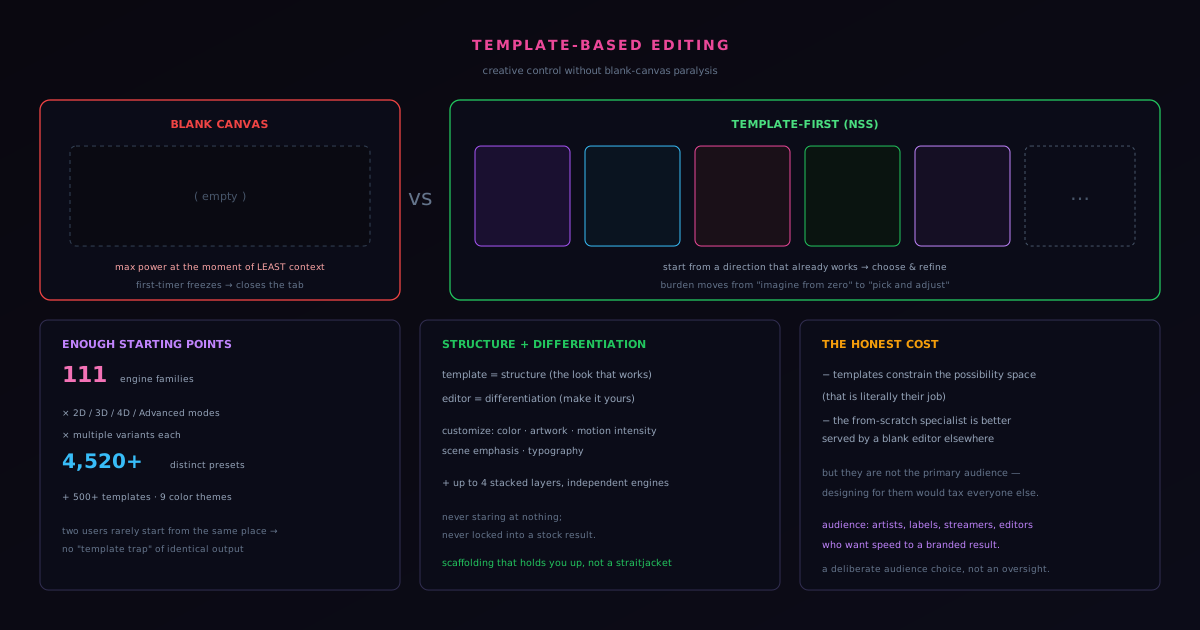
A blank editor optimizes for the wrong moment. It gives maximum power at the exact instant the user has the least context: the very start, before they have made a single decision or seen what is possible. That is backwards for a non-specialist. The hardest part of creative work for most people is not fine-tuning; it is starting, because starting requires imagining the end state from nothing and knowing which of a thousand possible first moves to make. A blank canvas hands that burden to the person least equipped to carry it and calls the result flexibility. For a specialist who already has the end state in their head, that is fine. For a first-time creator, it is the moment they close the tab.
Engine-and-mode starting points invert the order. Each engine is a family of motion and each of its six modes is a specific, already-designed behavior: the overall look, the structure of the movement, and the way the music maps onto it are decided for you as a place to begin, so the user starts from something that already works and makes it theirs from there. The user's first experience is not "stare at nothing and invent," it is "pick a direction I like and adjust it," which is a task almost anyone can do. The creative burden moves from imagining-from-zero to choosing-and-refining, which is dramatically more accessible without being meaningfully less expressive for the job at hand.
A running start from the engine, individuality from the editing
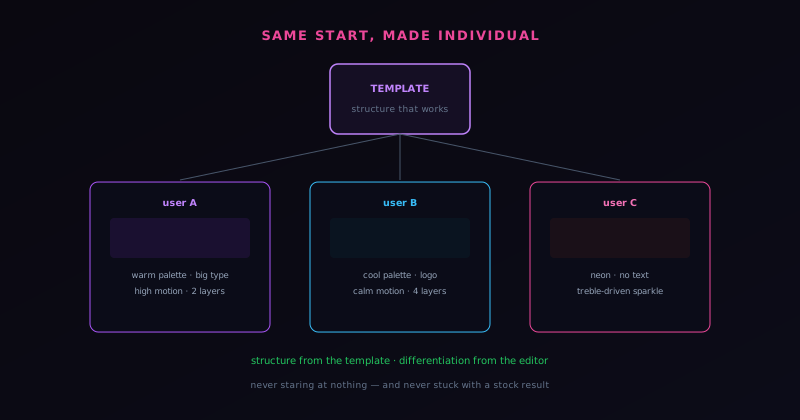
The risk with any shared starting point is the fear that everyone's output looks identical because they all began from the same place. Novus Visualizers answers that with the breadth of the starting points and the depth of the editing on top of them. The starting point is already one of a wide set: ten engines (Particles, Trails, Bloom, Character Motion, Radial, Spectrum, Bars, Tunnel, Waveform, and Logo) each with six distinct modes, which is sixty named starting points before you have changed a thing. Two users rarely begin from the same one. But the more important point is what happens after the start: in the Classic Editor you tune colors, geometry, direction, the audio bindings that decide how energy maps to movement, captions, logos, and overlays, and when you want to go further the Studio Workstation opens ordered layers, a beat-aware timeline, keyframes, masks, and blend modes to compose a look that is genuinely your own.
That two-tier editing is the resolution to the apparent tension between accessibility and originality. The engine-and-mode pick removes the blank-canvas barrier; the customization removes the sameness. A user is never staring at nothing, and they are never locked into a stock result either: the structure is given, the differentiation is theirs. Both editors write to one saved document and render through one deterministic renderer, so whatever you build in either place previews exactly as it will export, and a scene you refine in the Classic Editor is the same scene you can push further in the Studio Workstation. The design philosophy is that a starting point should be a strong place to begin, not a finished product the user is stuck with, and the editing surfaces are what turn the shared start into an individual output.
What it costs in flexibility
Honesty about the tradeoff requires naming what a fixed starting point gives up. A blank freeform editor can, in principle, produce things a menu of engines and modes cannot reach on its own: entirely novel structures, idiosyncratic compositions that no engine anticipated, the specific vision of a specialist who knows exactly what they want and has the skill to build it from scratch. Choosing from a set of starting points constrains the possibility space at the moment of starting; that is literally its function. For the user who is a motion-graphics expert with a precise, unusual vision, being handed a starting point can sometimes feel like it is in the way, because they are the user who actually benefited from the blank canvas.
The judgment Novus Visualizers makes is that this user is not who the opening screen is for, and that most of the flexibility they want is available anyway, one tier down, in the Studio Workstation. Every bit of from-scratch power piled onto the first moment is complexity the first-time creator has to navigate around, so the Classic Editor stays deliberately guided while the Studio Workstation (direct canvas editing, normalized nodes, groups, ranges, and manual 2D and 3D character rigs) is where that deep control lives for the user who reaches for it. The tool optimizes the first moment for the creator who wants a strong result quickly, and keeps the from-scratch control one click away rather than forcing it on everyone. That is a deliberate audience choice, not an oversight, and being clear about which tier serves whom is part of what keeps the guided path uncluttered.
The paradox of choice in creative tools
The blank-canvas problem is a specific instance of a well-known phenomenon: more options can produce less action, not more, because choice itself has a cost. Faced with effectively unlimited possibilities and no guidance, people often freeze rather than create, because the burden of evaluating all the paths is paralyzing and the fear of choosing wrong is real. A blank editor is the maximal version of this (every possibility is open and none is suggested) which is liberating for someone who already knows what they want and overwhelming for someone who does not. The flexibility that looks like a gift is, for the uncertain user, a weight.
Engine-and-mode starting points resolve the paradox by reducing the initial choice to a manageable one: not "create anything from nothing" but "pick one of ten engines, then one of its six modes." Choosing among a curated, named set of good starting points is a task people can do confidently, where inventing from a void is not. Crucially, the reduction is only at the start: once a mode is chosen, the full depth of customization opens up, from the guided controls of the Classic Editor to the layers, timeline, and keyframes of the Studio Workstation, but now in the manageable context of refining something rather than the paralyzing context of inventing everything. This is the design insight the starting points embody: reduce the choice that paralyzes (the blank start) while preserving the choice that empowers (the customization), which is exactly the inverse of what a blank canvas does. Less choice where it overwhelms, full choice where it expresses.
Scaffolding, not a straitjacket
The line between a starting point that helps and one that constrains is the difference between scaffolding and a straitjacket, and it is worth being precise about what separates the two. A straitjacket start is a fixed design with a few superficial knobs (change the text, swap a color) that leaves everyone's output fundamentally the same. Scaffolding, by contrast, is a strong starting structure that supports deep customization on top of it, so the start gives you somewhere to stand while you build something genuinely your own. A single engine mode could be either, depending entirely on how much the editing above it can change.
Novus Visualizers aims squarely at the scaffolding end, and the mechanism is the richness of what happens after the start. A mode provides the structure (the engine, the motion model, the audio relationship), but the editing is deep enough that two users starting from the same mode can produce visibly different results through their color, geometry, layering, motion, and typography choices, and deeper still if they take the scene into the Studio Workstation and rework it on the timeline. The starting point holds you up; it does not hold you in. This is the distinction that determines whether starting from a prepared scene feels empowering or limiting, and it is why the investment in the two editors matters as much as the engines themselves. A starting point without real customization is a straitjacket; a starting point with it is scaffolding, and only the second lowers the barrier without flattening the output.
Why the breadth of starting points prevents sameness
The sameness worry assumes everyone starts from the same place, but that assumption breaks down when the set of starting points is large enough, which is a quieter defense against sameness than the customization but a real one. With ten engines, each offering six modes, there are sixty distinct starting points before any editing begins, and they are not minor variations on one look: Particles building a Starfield is a different animal from Bars driving a Radial Bars scene, a Waveform Oscilloscope, or a Radial Mandala. Depth is not a separate switch either: where a scene needs three dimensions it comes from specific modes, such as Bars building 3D Columns, a Spectrum Spectral Mesh, or a Waveform 3D Surface, so it is one more axis of variety folded into the sixty rather than a multiplier bolted on top. The space of starting points is varied enough that two arbitrary users are unlikely to begin from the same one; sameness requires a small set of starts that everyone converges on, and a varied set of sixty diffuses users across many beginnings before customization even starts.
This breadth works together with the customization to defeat sameness from both ends. The variety of starting points means users diverge before they start editing; the depth of the two editors means they diverge further as they edit. Either alone would help; together they make genuinely identical outputs improbable unless two users deliberately make all the same choices. The numbers (ten engines, six modes each, and the depth added by the timeline, layers, and keyframes above them) are not just a marketing boast but a structural defense against the homogenization a shared start is accused of causing. A tool with three starting points would struggle to avoid sameness no matter how good its editor; a tool with sixty starts and a deep editor makes sameness something a user would have to work to achieve, which is exactly the inversion the design is going for.
Starting points as a way to learn the tool
A benefit of starting from a working engine and mode that is rarely credited is that it teaches the tool, serving as a worked example a user learns from rather than just a shortcut to a result. When a user starts from a mode and begins adjusting it, they see how the pieces fit (how the engine relates to the audio, what the layers do, how the parameters affect the motion) in the context of something that already works, which is a far better way to learn than confronting all the controls cold. The starting scene is an implicit tutorial: by modifying a working example, the user builds a mental model of how the tool behaves without ever reading documentation.
This learning function means starting points do not trap users at a beginner level but actually accelerate them toward competence. A user who starts from a mode and customizes increasingly boldly is learning the tool through use, and the natural next step is the Studio Workstation, where the same scene can be taken apart on the timeline and rebuilt with keyframes and layers. The starting point is training wheels that come off as skill grows, not a permanent limitation, and because both editors act on one saved document, graduating from the Classic Editor to the Studio Workstation does not mean starting over. A blank canvas teaches nothing because it shows nothing; a working starting point teaches constantly because every adjustment is a lesson in cause and effect on something that already runs.
When a freeform tool is genuinely better
Intellectual honesty requires acknowledging the cases where a blank canvas really is the better place to begin, because pretending a fixed start is universally superior would be its own kind of overselling. For a motion-graphics specialist with a precise, unconventional vision and the skill to build it from scratch, an empty freeform editor is genuinely the more natural beginning: they are the user who benefits from unlimited flexibility at the first moment, because they have the context to wield it and a specific end state that no engine mode anticipated. For them, being handed a starting point can feel like an obstacle rather than a help. That user exists and their needs are real.
The point is not that starting points beat freeform editing in general but that they beat it for a specific, large audience doing a specific job (getting a non-specialist from a track to a finished video quickly) while still leaving a from-scratch path open for the specialist. That path is the Studio Workstation: direct canvas editing, normalized nodes, groups, masks, ranges, and manual 2D and 3D character rigs, which is a great deal of freeform control for the user who wants to build up rather than start from a mode. A tool that dropped every user into that depth at the first screen would compromise the experience for the many; a tool that opens with an engine and mode and keeps the workstation one tier down serves the specialist without taxing the first-timer. Choosing the larger, underserved audience for the opening move (and keeping deep control available for those who reach for it) is a deliberate focus, and that focus is what lets the tool be excellent for the people it is actually for rather than mediocre for everyone.
Lowering the barrier without dumbing down
The deepest principle behind starting-point design is that lowering a barrier is not the same as dumbing a tool down, and conflating the two is a common mistake that produces either needlessly hard tools or genuinely limited ones. A barrier is an obstacle that stops capable people from reaching capability they could use; lowering it removes the obstacle without removing the capability. Dumbing down, by contrast, removes the capability itself to make the tool simpler. Engine-and-mode starting points done well do the first: they remove the blank-canvas obstacle while preserving, through the Classic Editor's tuning and the Studio Workstation's depth, the full expressive capability behind it. The user gets past the barrier and still has the power.
This distinction is what separates accessible design from condescending design, and the two-editor split is where Novus Visualizers draws it explicitly. A condescending tool assumes its users cannot handle depth and removes it, leaving everyone with a shallow experience; an accessible tool assumes its users can handle depth once they get to it and simply removes the obstacle to getting there. The Classic Editor is the low barrier (a strong starting point and a focused set of controls) and the Studio Workstation is the preserved ceiling, with ordered layers, a beat-aware timeline, graph curves, clips and loop regions, masks, and full-document undo and redo. A first-timer can begin in the first and a demanding user can push far in the second, because the barrier was lowered without the ceiling being lowered too. Getting that distinction right is the whole craft of accessible creative tools, and it is why the workstation matters as much as the starting points: depth preserved is the proof that the barrier was lowered rather than the tool diminished.
Why this is the right tradeoff for the audience
The test of the starting-point decision is whether it gets the actual users to a result they are happy with, and the structure of the product is built around that test. The independent artist, the small label, the streamer, the editor working fast: these users care about speed to a branded result far more than they care about unbounded flexibility at the first screen. For them, opening with an engine and a mode is not a limitation; it is the thing that makes the tool usable at all. They get to skip the part of creative work that stops most people (the empty start) and spend their effort on the part that actually expresses their taste, which is choosing and refining, with the Studio Workstation waiting for the release that needs more.
There is a deeper principle here about lowering barriers without dumbing things down. A starting point done badly is a creative straitjacket; one done well is scaffolding that holds you up while you build. The difference is whether the customization above it is rich enough to make the output genuinely yours, and that is where the ten engines, the sixty modes, the ordered layers, and the beat-aware timeline earn their place. The companion post on the upload-to-export flow shows how starting from an engine and mode fits into the larger workflow that a first-timer can actually finish, which is the real measure of whether the tradeoff paid off.
Frequently asked questions
Quick answers to common questions about this topic.
Do I have to start from a blank canvas?
No. You start by picking one of ten engines and one of its six modes, which immediately gives you a working scene bound to your track: sixty named starting points in all, not an empty editor. From there you tune it in the Classic Editor, and if you want more control you open the Studio Workstation.
What are engines and modes?
An engine is a family of motion (Particles, Trails, Bloom, Character Motion, Radial, Spectrum, Bars, Tunnel, Waveform, or Logo) and each engine has six modes that shape how it moves, such as Particles → Starfield or Bars → Radial Bars. Picking one engine and one mode is your starting point, and every mode is already reacting to a 32-band FFT, BPM, and onsets.
What if I want more than the starting point gives me?
That is what the Studio Workstation is for. The Classic Editor keeps you close to the engine-and-mode start with guided controls, while the Studio Workstation adds direct canvas editing, ordered layers, a beat-aware timeline, keyframes, masks, and blend modes. Both editors share one saved document and one deterministic renderer, so the preview always matches the export.
Related workflow
A track to a release-ready visualizer, per platform
Render the visual once, then produce the platform masters from it, instead of re-rendering the whole video for every aspect ratio.
- Render the beat-synced videoNovus Visualizers: Pick the engine and mode against your actual track; the analysis is done on your audio, not on a preset preview.
- Trim or upscale the exportNSS Background Remover: The video utilities handle the tidy-up pass so the render does not have to be repeated to fix ten seconds of it.
- Produce the per-platform mastersNovus Convert: Each destination wants a different container and bitrate; converting the finished render is far cheaper than re-rendering it.
Related troubleshooting
Was this page helpful?
Your answer stays in this browser, it is not sent anywhere and no account or cookie is involved.