Novus Visualizers
Working with layers in Novus Visualizers (and which combinations work best)
Stack ordered reactive layers with blend controls to build depth (a calm background engine, a sharp foreground, accents, and text) and learn the layer combinations that read well instead of turning to mush.
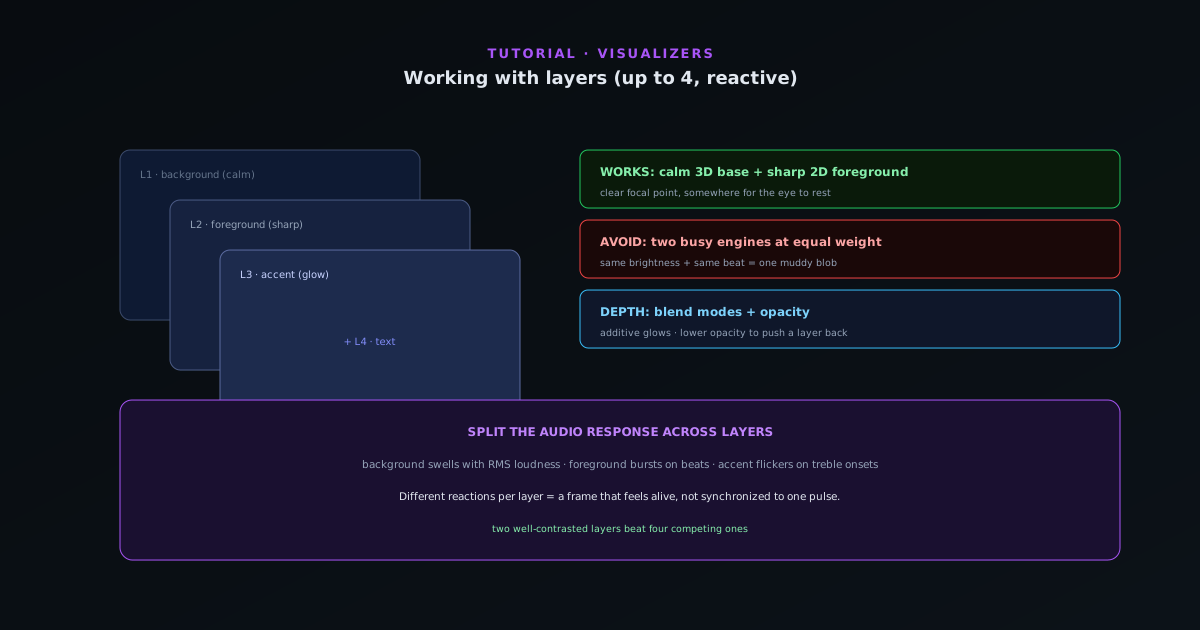
A single engine reacting to your track is good; a few well-chosen layers reacting together is what makes a visualizer feel designed. Novus Visualizers lets you stack ordered layers with blending, and this guide is about using them deliberately, because a stack of busy engines fighting each other looks worse than one good one.
Contents
- 1
1. Think in foreground, background, and accent
The most reliable structure is a quiet background layer (a slow gradient, a soft particle field, a subtle tunnel) with a sharp foreground engine carrying the main motion on top, and at most one accent layer for highlights. That gives the eye a clear focal point and somewhere to rest, which is exactly what a single flat engine cannot do.
Each layer is fully independent and reacts to the audio on its own, so the background can breathe slowly while the foreground hits hard on the beat.
- Ordered, independent, audio-reactive layers.
- A clear foreground/background hierarchy reads best.
- 2
2. Use blend modes and opacity for depth
Layers combine through blend controls. Lighten/additive blending stacks glows without muddying them, ideal for an accent layer of sparks or bloom over a darker base. Lowering a layer’s opacity pushes it back in the depth order. The goal is contrast between layers: if two layers have the same brightness and busyness, they compete; if one is clearly subordinate, they combine.
- Additive/lighten blending for clean glows.
- Opacity to set depth order.
- Contrast between layers, not competition.
- 3
3. Combinations that work, and ones that don’t
Pairs that tend to read well: a Tunnel corridor or particle field behind a flat Spectrum or waveform; a slow mandala behind a sharp geometric engine; a dark gradient base behind anything bright. Combinations to avoid: two high-detail engines at full opacity, two engines using the same color theme at the same brightness, or every layer reacting to the same beat; they pulse as one blob instead of as distinct elements.
- Good: calm background base + sharp reactive foreground.
- Avoid: two busy engines at equal weight.
- Avoid: every layer reacting identically.
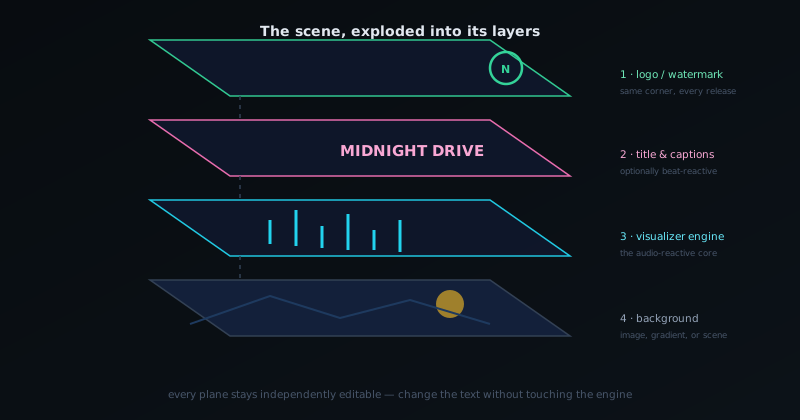
The scene is a stack: background, visualizer, text, and logo stay independently editable. - 4
4. Assign different reactions to different layers
Layers do not have to react to the same thing. Let the background respond to the slow RMS loudness envelope so it swells across a section, while the foreground bursts on detected beats and an accent layer flickers on treble onsets. Splitting the audio response across layers is what makes the whole frame feel alive rather than synchronized to one pulse; more on this in the audio-reactivity tutorial.
Less is usually more
Two well-contrasted layers almost always beat four competing ones. Start with a foreground you like, add a calm background for depth, and only add a third or fourth layer if it has a clear, subordinate job. If the frame ever looks busy or muddy, the fix is almost always to drop a layer’s opacity or remove it entirely rather than adding more.
Frequently asked questions
Quick answers to common questions about this topic.
How many layers can a visualizer have?
As many as you need. A visualizer is built from ordered layers, typically a background field, a reactive midground, an artwork or typography layer, and an accent, composited together for depth.
Which layer combinations work best?
Pair a calm background with one strongly reactive layer and keep artwork/text readable on top. Too many busy reactive layers compete; contrast between roles reads best.
Related workflow
A track to a release-ready visualizer, per platform
Render the visual once, then produce the platform masters from it, instead of re-rendering the whole video for every aspect ratio.
- Render the beat-synced videoNovus Visualizers: Pick the engine and mode against your actual track; the analysis is done on your audio, not on a preset preview.
- Trim or upscale the exportNSS Background Remover: The video utilities handle the tidy-up pass so the render does not have to be repeated to fix ten seconds of it.
- Produce the per-platform mastersNovus Convert: Each destination wants a different container and bitrate; converting the finished render is far cheaper than re-rendering it.
Related troubleshooting
Was this page helpful?
Your answer stays in this browser, it is not sent anywhere and no account or cookie is involved.