2026 · Novus VisualizersAbout 13 min readNovus Stream Solutions
Designing an upload → customize → export flow a first-timer can actually finish
The UX reasoning behind the three-stage Novus Visualizers workflow and the specific friction points removed so a non-technical user gets all the way from a music file to a finished video without getting stuck.
Reviewed and updated August 1, 2026. Re-checked against the Novus Visualizers V3 catalog on August 1, 2026. The app now ships ten engines with six modes each, sixty modes in total, so the counts, the engine list, and the mode arithmetic in this article have been corrected. The Logo engine landed after this piece was first published.
Contents
- 1.Overview
- 2.Why linear, not a sandbox
- 3.Removing friction at the upload handoff
- 4.Removing friction at the customize handoff
- 5.The flow as a funnel
- 6.Where users actually drop out
- 7.The compounding cost of one extra step
- 8.Defaults as the path of least resistance
- 9.Why finishing in one session matters
- 10.Guidance belongs at the moment of action
- 11.Removing friction at the export handoff
Overview
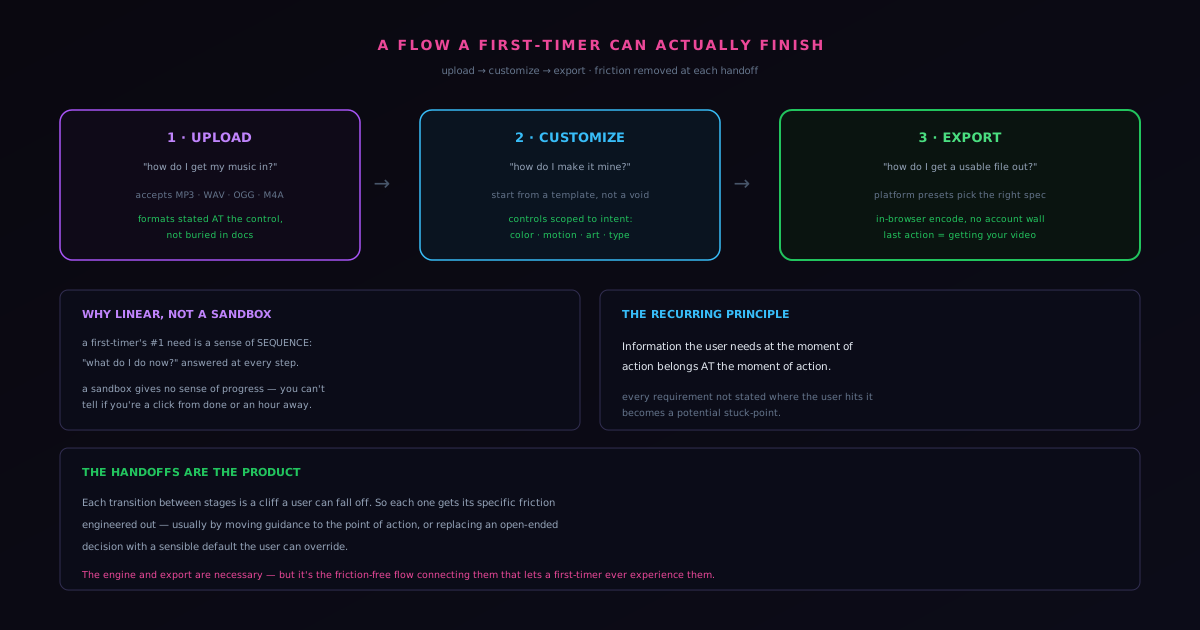
A tool can have a brilliant engine and still fail completely if a first-time user cannot get from the start to a finished result. The measure of Novus Visualizers as a product is not how good the visuals can be in expert hands; it is whether someone who has never seen it can upload a track, make it feel like theirs, and export a video they can post, in one sitting, without help. That is a UX problem as much as an engineering one, and it is solved by the shape of the workflow: a deliberately linear, three-stage flow (upload, customize, export) with the friction systematically removed at each step, the same flow you can start from visualizers.novusstreamsolutions.com/quick-setup. This post is about that design reasoning and the specific stuck-points that were engineered out.
The three stages are not an arbitrary division; they map to the three real questions a creator has, in order: how do I get my music in, how do I make this look the way I want, and how do I get a usable file out. Keeping the flow linear means the user always knows where they are and what comes next, which is exactly the clarity a first-timer needs and exactly what a sprawling all-options-at-once interface destroys.
Why linear, not a sandbox
The instinct in a creative tool is to give users a flexible sandbox where everything is available at once. For a first-time user that flexibility is a liability, because it removes the one thing they most need: a sense of sequence. A linear flow answers "what do I do now" at every moment by making the next step obvious. Upload comes first because nothing else can happen without the audio. Customize comes second because it only makes sense once there is a track to react to. Export comes last because it is the commitment that turns a work-in-progress into a deliverable. That ordering is not a constraint on the experienced user so much as a guardrail for the inexperienced one, and the inexperienced one is who determines whether the product succeeds at its core promise.
Linearity also makes the experience legible in a way that reduces anxiety. A user moving through three labeled stages always knows how far they have come and how much is left, which keeps them oriented and reduces the abandonment that happens when people feel lost. A sandbox, by contrast, gives no sense of progress: you could be a click from done or an hour from it, and you cannot tell, which is its own kind of friction. The linear flow trades some power-user efficiency for a dependable, completable path, and completability is the whole point for the target audience.
Removing friction at the upload handoff
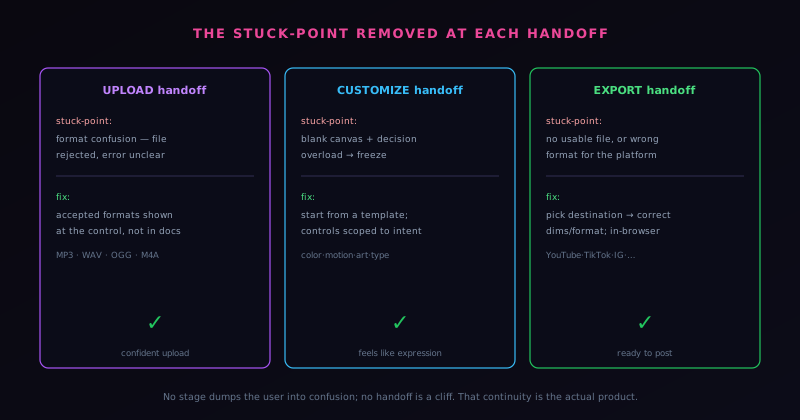
Each transition between stages is a place a user can fall out of the flow, and the handoffs were treated as first-class design problems. The upload stage is the first and most fragile, because a user who cannot get their audio in never reaches anything else. The most common upload failure for any media tool is format confusion: the user has a file, tries to upload it, and hits an error they do not understand. The fix is to be clear about accepted formats at the point of upload rather than burying that information in documentation the user will not read. Novus Visualizers accepts the common audio formats creators actually have (MP3, WAV, OGG, M4A) at visualizers.novusstreamsolutions.com/uploads, and surfacing that expectation where the user is acting, not in a help page, is the difference between a confident upload and a confusing dead end.
This is an application of a broader UX principle that recurs throughout the flow: information the user needs at the moment of action belongs at the moment of action. A first-timer does not arrive with a mental model of what the tool wants; every requirement that is not stated where they encounter it becomes a potential stuck-point. Putting format guidance, expectations, and gentle constraints directly adjacent to the relevant control is what keeps the upload handoff from being the place users quietly give up.
Removing friction at the customize handoff
The customize stage is where the blank-canvas problem would normally strike, and the workflow defuses it with engine-and-mode starting points. Instead of dropping the user into an empty editor, the flow has them pick one of ten engines and one of its six modes, so the customize stage begins with a working, audio-reactive scene rather than a void they have to fill. From there the editing is scoped to the controls that matter most for making the output feel personal (color, geometry, direction, motion intensity, artwork, typography) without burying the user in every possible parameter. The friction removed here is decision overload: a first-timer faced with hundreds of simultaneous controls freezes, while a first-timer who picks an engine and mode and then adjusts a focused set of options stays in motion.
The deeper design move is that the customize stage meets the user where their actual creative input lives. The user does not want to build motion math; they want the visuals to feel like their track and their brand. Scoping the controls to that intent (and letting the underlying engine and audio analysis handle the complexity the user should never have to think about) is what keeps the middle stage from becoming the place the project stalls. The customize stage feels like expression, not configuration, which is what keeps a non-technical user engaged through it.
The flow as a funnel
It is useful to think of the three-stage flow as a funnel, because that framing makes the design priorities sharp. Every user who starts enters at the top (upload) and the goal is for as many as possible to reach the bottom: a finished, exported video. At each stage, some users fall out: they cannot get their audio in, they get lost in customization, they fail to export a usable file. The funnel framing focuses attention on the drop-out points, because the product's real success metric is not how good the tool can be but how many people who start actually finish, and every user lost at a handoff is a failure regardless of how good the stages around it are.
This framing changes what you optimize. A feature-focused view asks "what can the tool do"; the funnel view asks "where do people fall out, and how do we keep them in." Those questions lead to very different work: the funnel view directs effort at the specific transitions where users are lost rather than at adding capabilities the lost users never reach. Designing the flow as a funnel means treating each handoff as a leak to be sealed, which is exactly why the upload, customize, and export transitions each got dedicated attention. The funnel is not a marketing metaphor here but a design discipline: find where users drop, and fix that, because completion is the product.
Where users actually drop out
The drop-out points in a creative flow are predictable, and naming them is the first step to sealing them. The first is the upload, where format confusion or an unclear starting action loses users before they begin. The second is the customize stage, where the blank-canvas problem or an overload of controls causes people to freeze and abandon. The third is the export, where a missing file, a wrong format, or an unexpected account wall snatches failure from success at the last moment. These are not random failures scattered through the experience; they cluster at the transitions, which is why the handoffs, not the stages, are where the design effort concentrates.
Understanding that drop-out clusters at the handoffs is what makes the flow improvable rather than mysteriously leaky. Within a stage, a user who is engaged tends to stay engaged; it is at the moment of moving to the next stage (when a new requirement or a new uncertainty appears) that they are most likely to give up. So the design treats each transition as a fragile moment to be supported with guidance, sensible defaults, and the removal of unexpected obstacles. Mapping where users actually drop out, rather than guessing, is what lets the limited design effort go to the places that determine completion. The stages can be excellent and the product still fail if the handoffs between them are cliffs, which is why the handoffs get first-class attention.
The compounding cost of one extra step
A principle that runs through the whole flow is that every extra step costs more than it appears to, because friction compounds across a sequence. A single additional click, a single extra decision, a single moment of confusion seems trivial in isolation, but each one loses some fraction of users, and those fractions multiply across the steps of the flow. A flow with several small, individually-defensible bits of friction can leak most of its users by the end, not because any one step was bad but because the cumulative drag was high. This is why minimalism in a flow is not aesthetic preference but a completion strategy: every step removed is users retained.
This compounding is the reasoning behind decisions like keeping the export free of an account wall and surfacing format guidance at the point of upload rather than as a separate step. Each of those removes friction at a specific point, and because the effects multiply, removing friction at several points has an outsized effect on how many users finish. The discipline is to scrutinize every step in the flow and ask whether it is truly necessary, because the default tendency is to add steps (a confirmation here, an option there) each of which seems harmless and collectively bleeds users. Treating the addition of any step as a cost to be justified, rather than a neutral choice, is what keeps a flow tight enough that the people who start actually reach the end.
Defaults as the path of least resistance
A powerful tool for reducing friction is the sensible default, because a good default lets a user proceed without making a decision while still allowing them to make one if they want. At each point where the flow could demand a choice (a format, a setting, a parameter) offering a default that works for the common case means the hesitant user can simply continue, carried forward by the path of least resistance, while the user who cares can override it. Defaults convert decisions, which cause hesitation and drop-out, into optional adjustments, which do not. The user is never blocked by a choice they do not know how to make.
The art of defaults is choosing them so that the common case is served without a decision and the uncommon case is still reachable. A default that is wrong for most users forces everyone to engage with the decision anyway; a default that fits the common case lets most users glide past it. The platform presets at export are exactly this: a user picks a destination and the right settings follow, rather than confronting raw resolution and format choices. Throughout the flow, defaulting toward what most users need keeps the path smooth for them while preserving control for the few who want it. Good defaults are how a flow stays simple for the many without becoming limiting for the few, which is the balance that keeps both groups moving toward completion rather than stalling on choices.
Why finishing in one session matters
The benchmark the flow is designed against is completion in a single session, and that specific bar matters more than it might seem, because a creative task abandoned partway is rarely resumed. A user who gets most of the way to a finished video and then gets stuck, sets it aside, and intends to return usually does not: the context is lost, the motivation fades, and the half-finished project joins the pile of things never completed. So a flow that can only be finished across multiple sessions, with the user having to re-engage to push past a stuck point, effectively loses the users who stall, even though they technically could come back.
Designing for single-session completion is therefore designing for the reality of how people actually finish things, which is in one sitting while the motivation lasts. This raises the stakes on every handoff, because a stuck point is not just a delay but a likely abandonment: the user who hits friction is not pausing, they are leaving. The whole emphasis on removing friction at each transition serves this bar: keep the user moving so they reach the end before the session ends. A first-timer who completes the loop in one sitting walks away with a finished video and a positive impression; one who stalls walks away with nothing and does not return. The one-session standard is what makes friction removal urgent rather than merely nice, because in a creative flow, stalled usually means abandoned.
Guidance belongs at the moment of action
A principle that recurs at every handoff deserves to be stated on its own, because it is the most transferable lesson of the whole flow: information a user needs belongs at the moment and place they need it, not in documentation they will not read. A first-timer does not arrive with a mental model of what the tool expects, so every requirement that is stated somewhere other than where the user encounters it becomes a potential stuck-point. Format expectations at the upload, sensible options at the customize stage, destination presets at the export: each piece of guidance sits adjacent to the control it concerns, so the user learns what they need exactly when they need it.
This is the opposite of the common pattern where a tool's requirements live in a help section that assumes the user will go read it before acting. They will not; people act first and seek help only when stuck, by which point the friction has already cost them. Putting the guidance at the point of action means the user never has to get stuck and go looking, because the answer was already there when the question arose. It is a small-seeming discipline with an outsized effect on completion, because it preempts confusion rather than remediating it. Across upload, customize, and export, the consistent placement of guidance at the moment of action is much of what makes the flow finishable by someone seeing it for the first time, and it is the single principle most worth carrying to any other first-timer-facing design.
Removing friction at the export handoff
The final handoff, export, is where a tool can snatch failure from the jaws of success: the user has made something they like and then cannot get a usable file out, or gets one in the wrong format for where they want to post it. The flow removes that friction with platform presets: the user picks where the video is going (YouTube, TikTok, Instagram, and the rest) and the export produces the correct dimensions and format for that destination, rather than handing them a generic file and a specification to decipher. The export also runs entirely in the browser, so there is no account wall or upload step interrupting the moment of completion. The user's last action is getting their video, not navigating an obstacle.
Across all three handoffs the pattern is the same: anticipate the specific point where a non-technical user gets stuck, and engineer that point out, usually by moving guidance to the moment of action or by replacing an open-ended decision with a sensible default the user can override. The result is a flow where the path from a music file to a finished, postable video is continuous: no stage dumps the user into confusion, no handoff is a cliff. That continuity is the actual product. The engine and the export pipeline are necessary, but it is the friction-free flow connecting them that determines whether a first-timer ever experiences any of it. The companion posts go deeper on the customize and export stages this flow is built around.
Frequently asked questions
Quick answers to common questions about this topic.
How long does it take to make a first visualizer?
A first-timer can go from uploading a track to exporting a finished video in minutes, because the flow is linear (upload, pick a starting style, customize, export) with sensible defaults at each step. See the walkthrough at How to make a music visualizer video with Novus Visualizers.
What makes an onboarding flow easy to finish?
Obvious defaults at every stage, clear recovery paths when something fails, and honest progress states. If an upload fails, the flow says why and how to fix it; if export takes time, it shows trustworthy progress rather than a vague spinner.
Do I need an account to finish a visualizer?
No. Uploading, customizing, and exporting all work without signing in. A free account is optional and adds saving, albums, and a community presence at https://visualizers.novusstreamsolutions.com.
Related workflow
A track to a release-ready visualizer, per platform
Render the visual once, then produce the platform masters from it, instead of re-rendering the whole video for every aspect ratio.
- Render the beat-synced videoNovus Visualizers: Pick the engine and mode against your actual track; the analysis is done on your audio, not on a preset preview.
- Trim or upscale the exportNSS Background Remover: The video utilities handle the tidy-up pass so the render does not have to be repeated to fix ten seconds of it.
- Produce the per-platform mastersNovus Convert: Each destination wants a different container and bitrate; converting the finished render is far cheaper than re-rendering it.
Related troubleshooting
Was this page helpful?
Your answer stays in this browser, it is not sent anywhere and no account or cookie is involved.