2026 · Web & UXAbout 13 min readNovus Stream Solutions
Making a browser tool feel instant: the performance budget we hold
Perceived speed is a feature, especially for a free tool a user can abandon in one click. The performance targets the Novus tools hold themselves to, why perceived responsiveness matters more than raw benchmark numbers, and the techniques used to hit it.
Contents
- 1.Overview
- 2.Never block the main thread
- 3.Cache and preload so the second time is instant
- 4.Why a free tool cannot afford to feel slow
- 5.Perceived speed is not actual speed
- 6.Optimistic feedback at the moment of action
- 7.The first-load tradeoff, handled honestly
- 8.Why benchmarks miss the point
- 9.The performance budget as a standing discipline
- 10.Communicate progress so waiting feels like motion
Overview
A free browser tool exists in a brutally unforgiving environment: the user did not pay anything to be there, they have no switching cost, and the exit is one click away. If the tool feels slow (if it hangs, if nothing seems to be happening, if the page stops responding), a meaningful fraction of users are gone before the work even finishes, and they do not come back. This makes perceived speed not a nice-to-have but a survival trait, and it is why the Novus tools hold themselves to a performance budget built around how fast the tool feels rather than what a benchmark says. This post is about that budget: the targets, why perceived responsiveness is the real metric, and the techniques used to hit it.
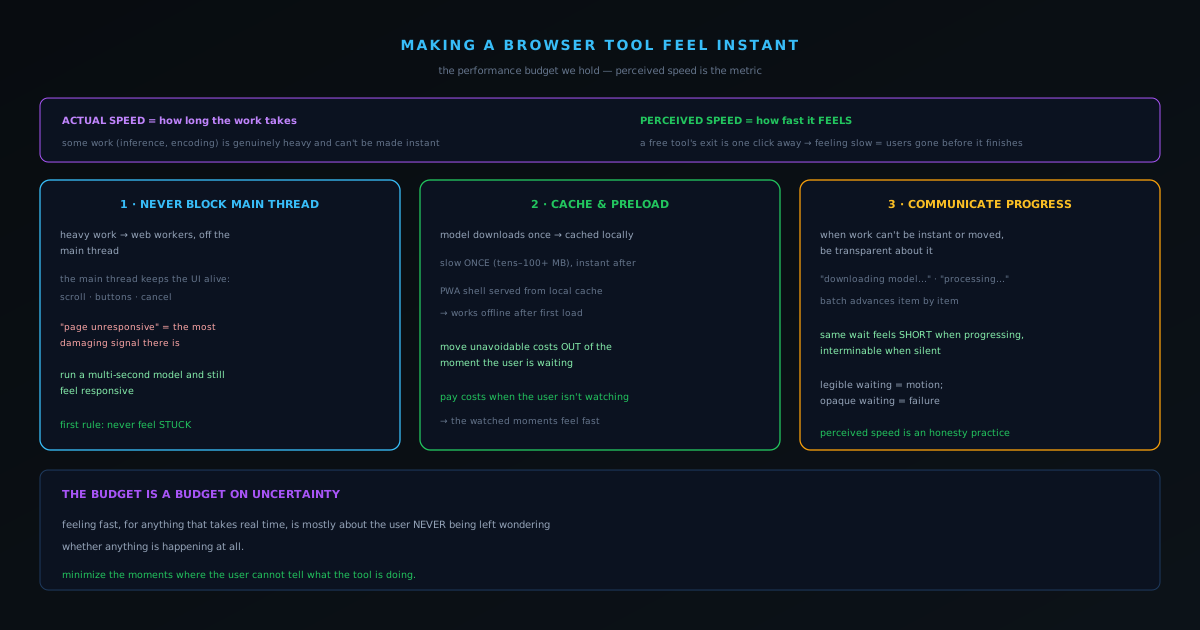
The crucial distinction is between actual speed and perceived speed. Actual speed is how long the work takes; perceived speed is how fast the experience feels, which is related to but not the same as actual speed. A tool can do genuinely heavy work and still feel responsive if the interface stays alive and the user always knows what is happening; a tool can do fast work and feel broken if it freezes the page while doing it. Because some of what these tools do (running a neural network, encoding a video) is genuinely heavy and cannot be made instant, the budget is held primarily in perceived terms: the work may take real time, but the tool must never feel like it has stopped working.
Never block the main thread
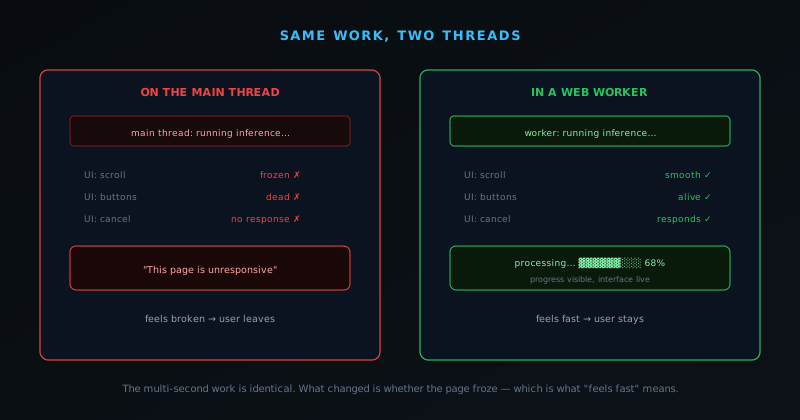
The single most important rule for perceived speed in a browser tool is that the heavy work must not run on the main thread, because the main thread is what keeps the interface alive. When computation runs on the main thread, everything freezes: scrolling stops, buttons do not respond, and the browser eventually warns that the page is unresponsive, which is the single most damaging thing that can happen to perceived speed because it signals "this tool is broken." The Novus tools push their heavy work (inference, encoding, background removal such as bgremover.novusstreamsolutions.com/background-remover) into web workers, off the main thread, specifically so that the interface stays responsive while the work happens. The user can scroll, see progress update, and click cancel, because the thread handling all of that is never blocked by the computation.
This is why a tool can run a multi-second neural network and still feel responsive: the multi-second part is happening somewhere that does not freeze the page. The perceived experience is of a tool that is actively working (progress moving, interface alive) rather than a tool that has hung. Keeping the main thread free is the foundational technique, the one that everything else builds on, because no amount of other optimization rescues a tool that locks up the page while it works. The first rule of feeling instant is to never feel stuck.
Cache and preload so the second time is instant
A large part of perceived speed is making the costs happen when the user is not waiting on them. The Novus tools download their AI models once and cache them locally, so the model-load cost (which is real, the models are tens to over a hundred megabytes) is paid on the first visit and then never again. On subsequent uses, and even on subsequent operations within a session, the model is already there, so the tool can get to work immediately rather than re-fetching. This is the difference between a tool that is slow every time and a tool that is slow once and instant thereafter, and for a tool people use repeatedly, the second profile feels dramatically faster even though the underlying work is identical.
The general principle is to move unavoidable costs out of the moment the user is actively waiting. Caching the model is one application; the progressive-web-app design that lets the tool work offline after the first load is another, because it means the application shell itself is served instantly from the local cache rather than re-downloaded. The user's perception of speed is shaped most by the moments they are waiting on something they care about, so the strategy is to ensure that as few of those moments as possible involve a cost that could have been paid earlier. Pay the costs when the user is not watching, and the moments when they are watching feel fast.
Why a free tool cannot afford to feel slow
The stakes of perceived speed are higher for a free tool than for almost any other kind of software, because of the brutal economics of the situation: the user paid nothing to be there, has no switching cost, and the exit is one click away. A user who paid for software, or who has invested in learning it, has reasons to tolerate a moment of slowness; a user who arrived at a free tool with no commitment has none. The instant the tool feels slow (hangs, freezes, gives no sign of life), a meaningful fraction of users are gone, not because the work was actually too slow but because nothing signaled that it was working, and there was no reason to wait and find out.
This makes perceived speed a survival trait rather than a refinement. For a paid product, poor perceived performance is a complaint; for a free tool competing for users who can leave costlessly, it is fatal, because the users lost at the first hang never come back to discover that the tool was actually good. The unforgiving environment means the tool has to feel responsive from the very first interaction, before the user has any reason to extend patience. This is why the performance budget is held in perceived terms and treated as essential rather than nice-to-have: in the free-tool environment, feeling slow is indistinguishable from being broken, and being broken, even momentarily, costs users permanently. The tool cannot afford a single moment that reads as frozen, because it has no reservoir of user commitment to draw on while it recovers.
Perceived speed is not actual speed
The foundational insight behind the whole performance approach is that perceived speed and actual speed are different things, and for a tool that does genuinely heavy work, perceived speed is the one that matters more. Actual speed is how long the work objectively takes; perceived speed is how fast the experience feels, which depends on whether the interface stays alive, whether the user knows what is happening, and whether the wait is legible, not just on the raw duration. A tool can do heavy, multi-second work and feel responsive if it never freezes and always communicates; a tool can do fast work and feel broken if it locks the page while doing it. The relationship between the two is loose enough that optimizing perceived speed is often a different and more impactful activity than optimizing actual speed.
This distinction is liberating because it means a tool does not have to make genuinely heavy work instant (which is often impossible, since running a neural network or encoding a video takes real time) to feel fast. It has to make the heavy work feel like progress rather than like a freeze, which is achievable even when the underlying duration cannot be reduced. The performance budget is therefore held primarily in perceived terms: the work may take real time, but the tool must never feel like it has stopped. Recognizing that feeling fast and being fast are separable problems, and that the feeling is what retains users, is what directs the performance effort toward the techniques that shape perception (never blocking the interface, caching, communicating progress) rather than only toward raw speed, which for genuinely heavy work has a floor that perception does not.
Optimistic feedback at the moment of action
A powerful perceived-speed technique is to respond immediately to a user's action even when the underlying work has only just begun, so that the interface acknowledges the action instantly rather than appearing to do nothing until the work completes. When a user clicks to process something, the tool can immediately show that the action registered (a state change, a progress indicator appearing, the interface visibly entering a working mode), so that the user gets instant confirmation their click did something, even though the actual computation will take a few seconds. The gap between action and acknowledgment is where the feeling of unresponsiveness lives, and closing it with immediate feedback makes the tool feel reactive regardless of how long the real work takes.
The principle is that the perceived responsiveness of a tool is set by how quickly it reacts to input, not by how quickly it finishes the work, and those are different moments. A tool that instantly acknowledges every action and then shows the work progressing feels responsive throughout, even on long operations; a tool that sits frozen between the click and the result feels unresponsive even if the result comes reasonably quickly, because the user spent the whole interval with no feedback. Designing for immediate acknowledgment at the moment of action (making the interface visibly respond the instant the user does something) is what keeps the tool feeling alive and reactive. The work takes as long as it takes, but the user never experiences a dead interval where their input seemed to vanish, which is the experience that reads as slow.
The first-load tradeoff, handled honestly
On-device tools carry one unavoidable cost that pure speed optimization cannot remove: the first time a user visits, the model has to download, which is a real wait of tens to over a hundred megabytes before the tool can work. This first-load cost is the price of the on-device architecture, and pretending it away would be dishonest. The performance approach does not hide it but handles it: communicating clearly that the model is downloading, showing progress on that download, and ensuring it happens only once because the model is then cached. The first use is slower than the rest, and the tool is upfront about why rather than leaving the user to wonder at an unexplained delay.
The honest framing of the first-load cost is itself a perceived-speed technique, because an explained wait is tolerable where an unexplained one is alarming. A user who sees "downloading model" and a progress bar understands they are paying a one-time setup cost, like installing an application, and waits with that context; a user who sees only an unexplained delay assumes the tool is slow or broken. By being transparent about the first-load cost (what it is, that it is one-time, how far along it is), the tool converts a potentially off-putting initial wait into an understood setup step. And because the cost is genuinely one-time, every subsequent use delivers the instant experience the caching enables, so the honest handling of the first load is what earns the tool the chance to feel fast on every visit after. The first-load tradeoff is real; managing it transparently is how it stops being a reason users leave before they ever see the tool work.
Why benchmarks miss the point
A tempting but misleading way to think about a tool's speed is through benchmarks (raw measurements of how long operations take), but benchmarks systematically miss what actually determines whether a tool feels fast to a user. A benchmark measures actual speed in isolation, under controlled conditions, stripped of the context that shapes perception: whether the interface stayed responsive, whether the user knew what was happening, whether the wait was legible. Two tools with identical benchmark numbers can feel completely different in use if one freezes the page during the operation and the other keeps the interface alive and communicative. The number is the same; the experience is not, because the experience is governed by perceived speed, which benchmarks do not capture.
This is why the performance budget is held in perceived terms rather than benchmark terms. Optimizing for benchmark numbers can even hurt the perceived experience: a tool that shaves a second off raw processing time by doing the work on the main thread, freezing the interface, feels worse than a slightly slower tool that keeps the page alive, despite winning the benchmark. The metric that matters is whether the user feels the tool is responsive and working, which depends on interface liveness, immediate feedback, and clear progress far more than on raw duration. Chasing benchmark numbers optimizes the wrong thing; optimizing the felt experience (never freezing, always communicating) is what actually retains users, even when it does not produce the best benchmark. The point of the performance work is not to win a measurement but to feel fast, and those are not the same target.
The performance budget as a standing discipline
Perceived speed is not achieved once and kept forever; it is a standing discipline, a budget that every change has to respect, because it is easy to erode without noticing. A new feature that does a bit of work on the main thread, a change that adds an unexplained pause, an operation that does not report progress: each is a small regression in perceived speed that, individually, seems minor and, collectively, turns a fast-feeling tool slow. Holding perceived speed requires treating it as a budget that new work is spent against, where the question for any change is not just whether it works but whether it preserves the responsiveness the tool depends on. Speed defended only occasionally is speed that drifts away.
This budget discipline is what keeps a tool feeling fast over time rather than just at launch. The techniques that buy perceived speed (keeping the main thread free, caching costs, communicating progress, acknowledging actions immediately) have to be applied to every new piece of work, not just the original build, because each is a place a regression could creep in. Treating perceived performance as a non-negotiable budget, the same way the build is a non-negotiable gate, is what prevents the slow accumulation of small slownesses that degrades a tool unnoticed. For a free tool whose survival depends on feeling fast, that ongoing discipline is not optional polish but continuous maintenance of a survival trait. The budget is held not because speed is nice but because, in the free-tool environment, feeling slow is fatal, and the only way to keep feeling fast is to defend it against every change that might erode it.
Communicate progress so waiting feels like motion
When work genuinely takes time and cannot be made instant or moved out of the moment, the remaining lever is communication, and it is more powerful than it sounds. A user watching a clear progress indicator on a multi-second operation experiences that wait completely differently from a user staring at a frozen button wondering if the tool is broken. The same elapsed time feels short when it is visibly progressing and interminable when it is silent. The Novus tools communicate render and export progress, show long operations advancing step by step, and surface what is happening ("downloading model," "processing") so that the user always has evidence that the tool is working and a sense of how much longer it will be; even a light tool like bgremover.novusstreamsolutions.com/tools/image-compressor acknowledges the action the instant you start it. Waiting that is legible feels like motion; waiting that is opaque feels like failure.
This is why perceived speed is partly an honesty practice. The tool is not pretending to be faster than it is; it is being transparent about what it is doing and how far along it is, which respects the user's attention and keeps them oriented. A progress indicator that accurately reflects real work converts the anxiety of an unexplained wait into the patience of a visible process. Combined with never blocking the main thread and caching the unavoidable costs, clear progress communication is what lets a tool that does genuinely heavy work still feel fast, because feeling fast, for anything that takes real time, is mostly about the user never being left wondering whether anything is happening at all. The performance budget is ultimately a budget on uncertainty: minimize the moments where the user cannot tell what the tool is doing.
Frequently asked questions
Quick answers to common questions about this topic.
How do you make a browser tool feel fast even when work is heavy?
Keep the main thread free by running heavy work in a Web Worker, show honest progress so a wait never looks like a freeze, and hold a performance budget so the interface stays responsive. Perceived speed comes from feedback as much as raw speed.
What is a performance budget?
A set ceiling on things like load size and interaction latency that the tool refuses to exceed. It turns performance into a constraint you design within rather than an afterthought you patch later.
Why does progress feedback matter so much?
A multi-second operation with no feedback is indistinguishable from a frozen tab. Visible, accurate progress turns a wait into a tool doing its job, which is why worker progress reporting is built in, not bolted on.
Related troubleshooting
Was this page helpful?
Your answer stays in this browser, it is not sent anywhere and no account or cookie is involved.