NSS Background Remover
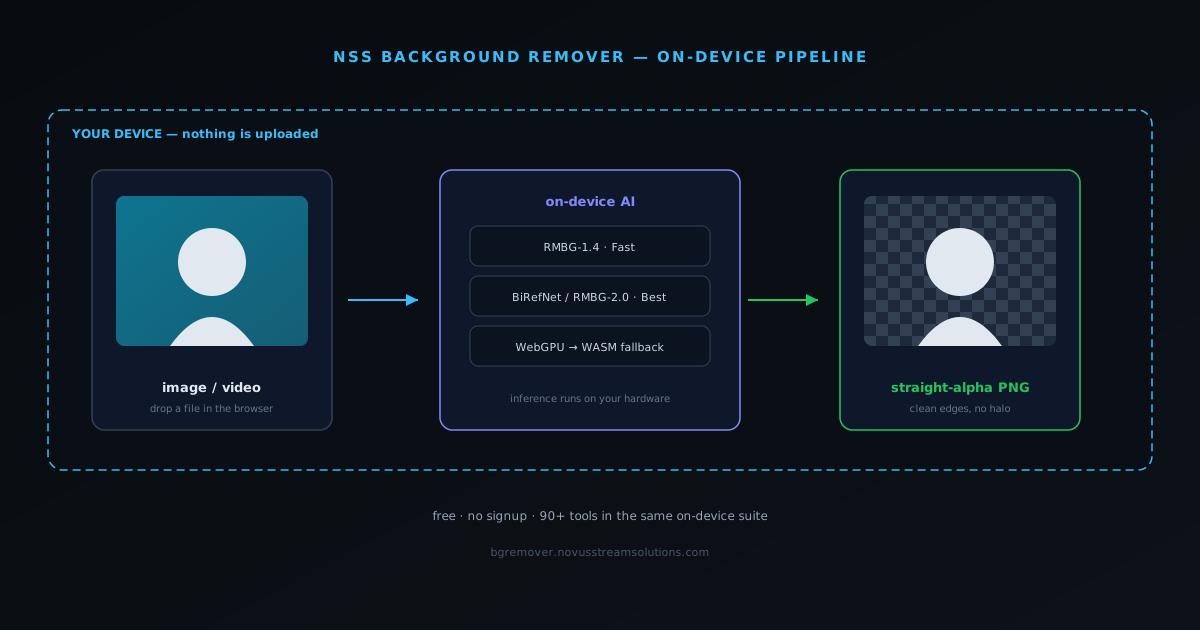
NSS Background Remover is the AI image tool in the Novus Stream Solutions lineup. It runs entirely in the browser at bgremover.novusstreamsolutions.com: no server uploads, no account required, and no usage limits. Two neural network models, RMBG-1.4 for speed and RMBG-2.0 (a BiRefNet-based bilateral reference network) for maximum quality, run locally through Transformers.js via WebGPU with an automatic WebAssembly fallback, stripping image backgrounds and exporting true straight-alpha transparency that renders correctly in Photoshop, design tools, and e-commerce platforms. A built-in brush editor handles edge refinement, and the suite has since grown to include a full image editor and video editor, 2×/4× AI upscaling for images and video, and a utility set that now totals 40 tools across image and video. This page explains what the product is for, why it is built the way it is, and how it fits the Novus ecosystem. For the full build story see novusstreamsolutions.com/product-blog/how-we-built-a-browser-background-remover.
Contents
- 1.What NSS Background Remover is for
- 2.In-browser AI: why it matters and how it works
- 3.Beyond background removal: upscaling and the toolset
- 4.Straight alpha: the technical detail that changes professional results
- 5.Brush editor for manual refinement
- 6.Supported formats and technical limits
- 7.Free model and ad support
- 8.How Background Remover fits the Novus portfolio
- 9.Where to go next
What NSS Background Remover is for
Background removal sounds like a commodity feature, but most existing tools compromise in one of three ways: they send your images to a server, they cap quality behind a paywall, or they export premultiplied alpha that shows black halos in Photoshop and print workflows. NSS Background Remover solves all three problems at once. The AI runs inside the browser using WebAssembly and WebGPU so images never leave the device. The tool is free with non-intrusive ads and has no premium tier. And the export pipeline produces genuine straight-alpha channels that behave correctly across every downstream tool that expects real transparency.
The target users are designers, photographers, e-commerce operators, and content creators who cut out product images, headshots, social media assets, and print graphics on a regular basis. They need a tool that is fast enough for professional volume, accurate enough to skip extensive manual cleanup, and private enough that uploading client images to an unknown server is not a concern. NSS Background Remover is designed for that middle ground between consumer convenience and professional reliability.
In-browser AI: why it matters and how it works
Most AI tools work by uploading your file to a remote model and returning a processed result. That architecture is simple to build but carries real costs for users: the image travels over a network, it may be logged or stored, processing speed depends on server load, and the service cannot function offline. NSS Background Remover inverts this model. When you first load the app, the AI model downloads once to the browser cache. After that, every image you process stays on your device: no uploads, no round trips, no server visibility into your files.
The app offers two model options. The Fast model (~80 MB) is optimized for quick results on standard product photography and headshots. The Best Quality model (~180 MB) uses BiRefNet, a more capable neural network better suited to fine hair detail, complex backgrounds, and edge cases that confuse lighter models. Users working under deadline choose Fast; users preparing final assets for client delivery or print choose Best Quality. Both run locally and both produce straight-alpha output. The same on-device approach powers AI upscaling: an ONNX super-resolution model enlarges an image 2× or 4× through WebGPU, with the WebAssembly fallback, so nothing is sent to a server for enhancement either.
- Models are cached after the first load (IndexedDB / Cache Storage): subsequent sessions work instantly without re-downloading.
- WebGPU is used where available for GPU-accelerated inference; multi- or single-threaded WebAssembly is the automatic fallback. On the Fast model, inference runs roughly 2–5 s on WebGPU and 8–15 s on WebAssembly.
- Chrome, Edge, and Opera (recent versions) provide WebGPU; Firefox and Safari run via WebAssembly. No GPU is required.
- Offline functionality is available after the initial model cache is complete: the tool is a progressive web app. For the detail, see WebGPU vs WASM for client-side ML: what actually changed our inference speed.
Beyond background removal: upscaling and the toolset
NSS Background Remover began as a single cutout tool and has grown into a focused set of client-side tools, all following the same architectural rule: the AI runs on the user's device and the files never leave it. Still-image background removal remains the centerpiece, and around it sit image and video editors, AI upscaling, and a set of image and video utility tools. The organizing idea is to keep the privacy-first, in-browser model while covering more of the image-and-media-preparation jobs that creators and operators actually do, rather than handing the work off to a server.
Two things are worth knowing because they shape what runs locally. The background-removal step ships in model tiers: a Fast model for quick cutouts, a Best model tuned for fine hair and complex edges, and a Glass tier for transparent and glass-like subjects. A recommender sizes the model download to the device, probing for WebGPU and available memory rather than pushing a heavy model onto hardware that cannot run it well (Honest AI tiers: Lite, Standard, Pro: sized in gigabytes, not hype). AI upscaling runs the same way: an ONNX super-resolution model enlarges images 2× or 4× on the device, WebGPU-first with a WebAssembly fallback, so a cutout can be cleaned up and scaled for print or marketplace listings without an upload.
Underneath the features, the toolset has been through a reliability-hardening pass: WebGPU device-lifecycle handling, model-asset integrity checks, result-shape guards, and honest failure messages instead of opaque "[object Object]" errors (Reliability hardening: device lifecycle, model integrity, and honest failures). The sections below describe the core background-removal workflow in detail; the editors, upscaling, and utility tools follow the same in-browser, no-upload model.
- Still-image background removal, exported as true straight-alpha transparency.
- Background-removal model tiers (Fast, Best, and Glass) sized to the device by a WebGPU-and-memory recommender.
- AI upscaling to 2× or 4× on-device (ONNX, WebGPU with a WebAssembly fallback), plus image and video editors and the image and video utility tools: 40 tools in total, including face restore, deblur, and on-device alt text.
- Reliability hardening: device-lifecycle handling, asset-integrity checks, and honest failure messages.
Straight alpha: the technical detail that changes professional results
Transparency in image files is stored in one of two ways: straight alpha or premultiplied alpha. Premultiplied alpha bakes the background color into the pixel values before encoding, which makes compositing faster in some rendering engines but creates visible black or dark fringing when the image is opened in a tool that expects straight alpha. Most AI background removers export premultiplied channels by default, which is why cutting an image in one tool and placing it in Photoshop, Figma, or a print layout often shows unexpected dark edges.
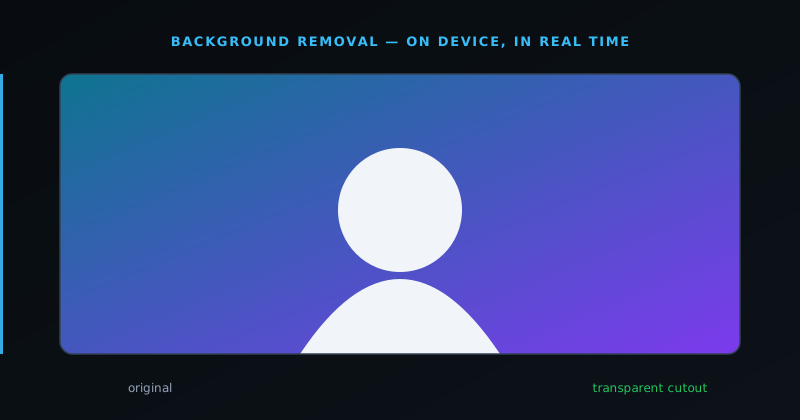
NSS Background Remover explicitly exports straight-alpha channels. The checkerboard pattern you see after removal in the app is real transparency: the same pattern Photoshop shows when a layer has a genuine alpha channel. That means images cut in NSS Background Remover place cleanly into any downstream tool without requiring a cleanup pass to remove fringing or edge artifacts.
Brush editor for manual refinement
AI removal is accurate for the majority of images, but complex subjects (wispy hair, transparent fabric, intricate product packaging) sometimes need manual correction. The built-in brush editor lets users paint inclusion or exclusion masks directly on the output after the AI pass, recovering fine detail the model may have clipped or removing stray areas the model left behind.
The refinement editor is designed as a finishing step, not a full masking workflow. Users should expect to spend a few brush strokes on difficult edges rather than rebuilding the entire mask from scratch. For images where the AI produces a clean result, the editor can be skipped entirely: the output is ready for export immediately after the AI pass completes.
Supported formats and technical limits
The tool accepts PNG, WebP, AVIF, and JPG as input formats and can export results as PNG (recommended for transparency preservation), WebP, or AVIF. Maximum input resolution is 4096×4096 pixels, which covers the vast majority of product photography and content creation workflows without requiring a resize step. Images above that threshold should be downsampled before upload.
JPG export is available for use cases where file size matters more than transparency, but note that JPG does not support alpha channels: the exported file will use a solid background color in place of the transparent region. PNG or WebP are the recommended formats for any workflow where the cut-out will be composited onto another background.
- Input: PNG, JPG/JPEG, WebP, AVIF, and HEIC (iPhone photos), up to 4096×4096 px at full resolution (larger images are downscaled for inference, then the mask is applied back to the full-resolution original).
- Output: PNG (straight-alpha), WebP, or AVIF; JPG is available where transparency is not needed.
- Beyond removal: image and video editors, 2×/4× AI upscaling, and 40 image and video utility tools including GFPGAN face restore, NAFNet deblur, and local alt-text drafting.
- Privacy: all processing is local: no data leaves the device. See Why our background remover never uploads your image, and what that protects.
Free model and ad support
NSS Background Remover is free to use with no premium tier. There are no per-image credits, no export watermarks, no account required, and no artificial limits placed on quality. Non-intrusive display advertising supports the tool while the complete workflow remains available without payment.
Users who find value in the tool and want to support it can do so simply by using it: ad impressions sustain the service without asking for payment. For users in privacy-sensitive environments where ads are blocked by policy, the tool still functions fully; only the ad inventory is affected.
How Background Remover fits the Novus portfolio
NSS Background Remover sits alongside Novus Visualizers, Novus PDF Studio, Novus Convert, and Novus Learn in the Novus Stream Solutions portfolio. The apps share one operating principle: solve a recurring problem well and keep the complete core workflow free to use. Together they cover image preparation, creator video, PDF forms, file conversion, and source-grounded reading.
The in-browser architecture of Background Remover demonstrates the Novus approach to free software: match the architecture to the job instead of defaulting to a centralized service. For privacy-sensitive image work, that means local processing rather than a server-dependent wrapper.
Where to go next
Open bgremover.novusstreamsolutions.com to use the live tool. For the definitive build story, read How we built a background remover that runs entirely in your browser, and what it taught us about client-side AI. The deep-dives go further on each part: the privacy architecture (Why our background remover never uploads your image, and what that protects), the end-to-end pipeline (How in-browser background removal works, end to end), the straight-alpha export detail (Straight alpha vs premultiplied alpha: the export detail that breaks other tools), and the worker-session rebuild (Diagnosing a silent failure: the ONNX worker-session bug that broke tool execution).
For context on how Background Remover sits next to Novus Visualizers, Novus PDF Studio, Novus Convert, and Novus Learn, see Portfolio and Ventures. For the music visualizer documentation, see Novus Visualizers.
Frequently asked questions
Quick answers to common questions about this topic.
Is the NSS Background Remover really free, with no watermark?
Yes. There are no usage limits, no watermarks, no account requirement, and no premium tier: it is free and supported by non-intrusive ads. You can process as many images as you like at full quality.
Does it upload my images to a server?
No. The AI runs entirely on your device through WebGPU (with a WebAssembly fallback), so your images and videos never leave the browser. After the first visit the model is cached locally, which is why the tool can keep working offline.
Why do my transparent PNGs look clean in Photoshop here but not from other tools?
Most free tools export premultiplied alpha, which causes dark or white halos when opened in Photoshop, Figma, or print layouts. NSS Background Remover writes true straight (non-premultiplied) alpha, so cutouts composite cleanly with no fringing. See https://bgremover.novusstreamsolutions.com/help/exporting-with-transparency.
What can it do besides removing image backgrounds?
Alongside still-image background removal, it has a full image editor and video editor, 2×/4× AI upscaling for images and video, and a utility set that now totals ${STAT.bgRemoverTools} tools across image and video (resize, compress, convert, optimize, stabilize, colorize, inspect metadata, and more), all in the browser. Browse the full tool map at Tool maps.
Which browsers and devices does it work on?
Chrome, Edge, and Opera give the best speed via WebGPU; Firefox and Safari run through WebAssembly. No special GPU is required, and it works on modern desktop and mobile browsers. See https://bgremover.novusstreamsolutions.com/help/browser-support.
What image formats and sizes are supported?
Input includes PNG, JPG, WebP, AVIF, and HEIC (iPhone photos); output is PNG, WebP, or AVIF with true straight-alpha. Images up to 4096×4096 are processed at full resolution, and larger images are downscaled for inference before the mask is applied back to the original.
Related workflow
Product photo to a transparent image every channel accepts
One photograph, cut out once, then re-encoded for a storefront, a marketplace listing and a social post without redoing the cutout each time.
- Cut the background out and check the edgesNSS Background Remover: Hair, glass and drop shadows are where automatic cutouts fail. Fix them once, on the master, before anything downstream copies the mistake.
- Re-encode and resize per destinationNovus Convert: Transparency survives PNG and WebP and dies in JPEG. Convert validates the file it hands back, so a listing never rejects a silently broken upload.
Related troubleshooting
Was this page helpful?
Your answer stays in this browser, it is not sent anywhere and no account or cookie is involved.