2026 · NSS Background RemoverAbout 12 min readNovus Stream Solutions
Honest AI tiers: Lite, Standard, Pro: sized in gigabytes, not hype
Most AI tools promise everyone the biggest model and quietly fail on weaker hardware. The NSS Background Remover ships three honest tiers (Lite, Standard, Pro) and probes your device to recommend the highest one it can actually run. Here is how that works and why it matters.
Contents
- 1.Overview
- 2.Three tiers, named in real megabytes
- 3.What actually lives in each tier
- 4.recommendTier(): the tool reads your device first
- 5.How the download itself is handled
- 6.You can see what is cached, and delete it
- 7.Tiers map onto real per-tool model choices
- 8.What it avoids: the silent-downgrade trap
- 9.How honest tiers compare to the cloud default
- 10.Why "verified" is part of the tier, not a footnote
- 11.When to actually reach for the heavier tier
- 12.Naming the size is the whole stance
Overview
There is a quiet dishonesty in how a lot of AI tools present their capability. They advertise the most impressive model they can name, let everyone tap the same button, and then deliver a slow, failing, or downgraded experience to anyone whose device cannot actually run it, without ever saying so. The NSS Background Remover took a different position in its v1.4.0 release: name the real sizes, group capability into explicit tiers, and tell each visitor which tier their hardware can genuinely handle before they commit to a multi-gigabyte download. This post is about why that honesty is a feature, not a limitation.
The framing matters because the tool runs entirely on your device. There is no server quietly absorbing the difference between a powerful machine and a weak one: the model runs in your browser, on your hardware, so the gap between "advertised" and "achievable" lands directly on you. A tool that respects that reality has to be upfront about it.
Three tiers, named in real megabytes
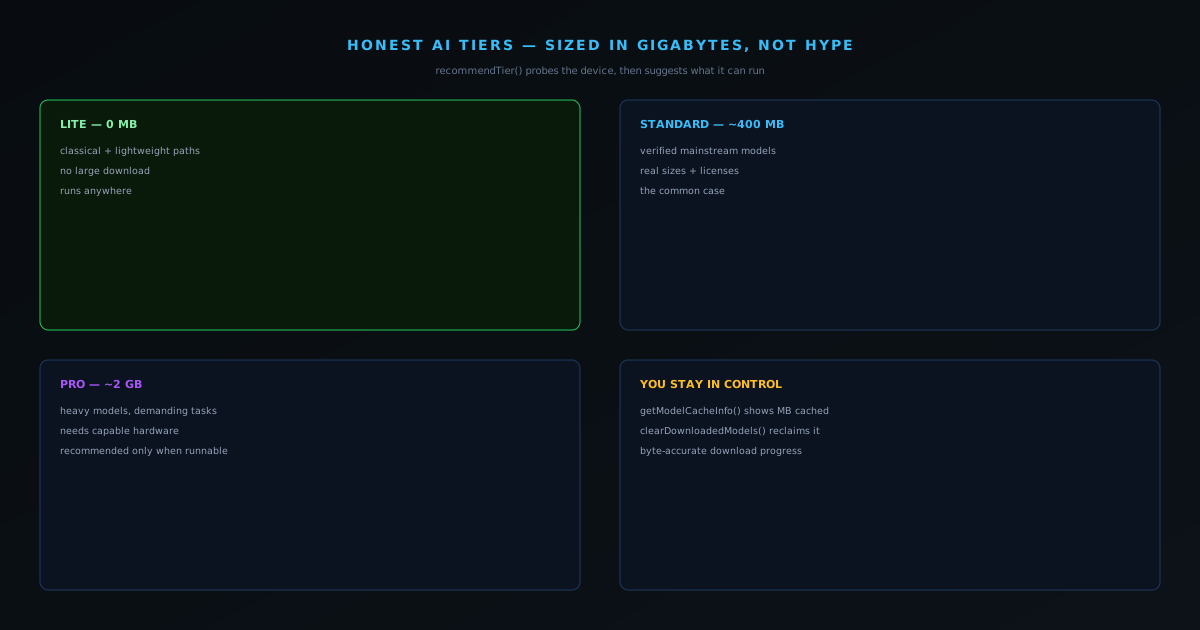
The tier system is deliberately plain. Lite is 0 MB: the classical, algorithmic, and lightweight paths that need no large download at all. Standard is roughly 400 MB of verified models that cover the mainstream AI capabilities. Pro is roughly 2 GB, the heavy models for the most demanding tasks. Each tier carries a TIER_INFO descriptor that states not just the size but the hardware it expects, so the number you see is the number you actually download, not a marketing floor.
Naming the sizes honestly does something subtle: it lets you make an informed choice. A 400 MB download is a real commitment on a phone with a metered connection, and a 2 GB download is a serious one. Hiding those figures behind a single "Enhance with AI" button would make the tool feel magical right up until it stalled. Showing them treats the user as someone capable of deciding whether the quality is worth the bytes for the task in front of them.
What actually lives in each tier
The tiers are not arbitrary size buckets; each one corresponds to a real class of capability. Lite is the home of the classical and algorithmic paths: the fast, dependency-free operations that are honestly labelled as classical baselines rather than dressed up as neural magic. They need no large download because they are not models, and grouping them as Lite is a way of saying plainly that a fast, dependency-free algorithm is doing the work. For a huge share of everyday tasks, Lite is genuinely all a user needs, and presenting it as a legitimate tier rather than a degraded one is part of the honesty.
Standard, in the mid-hundreds of megabytes, is where the verified neural models live: the ones the registry audit confirmed against the Hugging Face API, each with its real size and license attached, like the best-quality segmentation network for hard cutout edges. Pro, larger still, is reserved for the heaviest tasks: the largest models and the most demanding work, such as high-factor upscaling. The jump from Standard to Pro is a real jump in both capability and cost, and naming it in real sizes rather than burying it behind an "ultra" label is the whole ethic of the system: the user always knows what class of model they are reaching for and what it will ask of their machine.
recommendTier(): the tool reads your device first
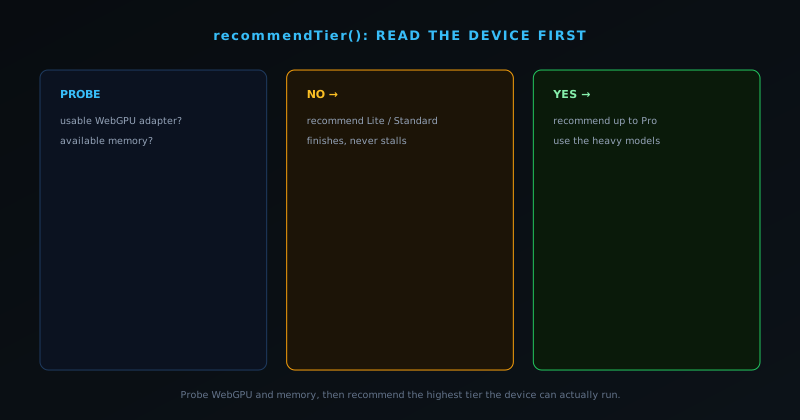
The honesty goes further than labels. A function called recommendTier() probes the actual environment (whether the browser exposes a usable WebGPU adapter and how much memory is available) and recommends the highest tier the device can realistically run, rather than defaulting everyone to Pro. On a capable workstation it will point you at the heavy models; on a modest laptop or phone it will steer you to a tier that will actually finish without exhausting memory. The tool is upfront about exactly what each tier asks of your machine, so the recommendation is a guardrail against the most common AI-tool failure, which is a confident promise the hardware cannot keep.
This builds directly on the capability-detection work that already chooses between WebGPU and a WebAssembly fallback for inference. The same instinct (detect what the device can do and route accordingly) applies to model selection. The user is never asked to understand adapters and memory budgets; they are simply offered a sensible default and the freedom to override it if they know better.
How the download itself is handled
A tier is only as honest as the download experience behind it, because a multi-gigabyte fetch that stalls behind an ambiguous spinner is its own kind of lie. The managed-ONNX loader streams downloads with byte-accurate progress, so a large model coming down is something you watch advance rather than a frozen bar you have to guess about. That matters most on the Pro tier, where the difference between "this is downloading two gigabytes and here is exactly how far along it is" and "this might be stuck" is the difference between a user who waits patiently and a user who reloads, corrupts a partial cache, and concludes the tool is broken.
There is an efficiency detail underneath that is easy to miss but typical of the care here: the managed loader reuses the bundled onnxruntime-web rather than pulling a second copy of the runtime, so the bytes you download are model weights and not a duplicated framework. Combined with the integrity checks that verify byte-length and catch truncation, the result is a download path that is transparent about its progress, economical about what it transfers, and verified about what it produces. The tier system is the visible promise; this loader is the machinery that makes the promise true at the moment it matters most.
You can see what is cached, and delete it
A tool that downloads gigabytes of weights to your device owes you control over them. v1.4.0 added getModelCacheInfo() to size the cached models and a Tier Manager that shows "Downloaded models: N MB across X files" with a delete button. clearDownloadedModels() removes the downloaded weights and tears down any resident sessions. Nothing accumulates silently on your machine without a way to see it and reclaim the space.
This is the same philosophy that drives the no-upload architecture, applied to storage instead of network. Because the models live on your device rather than a server, the honest move is to make that storage visible and reversible. The managed-ONNX loader even streams downloads with byte-accurate progress, so a large model download is a thing you watch and understand rather than a spinner that might be frozen.
Tiers map onto real per-tool model choices
The tier system is not just a gate in front of a download; it flows into the actual model a given tool uses. The quality preference is exposed through a modelQuality setting that supports auto, fast, balanced, and best, both globally and per tool, so a user can run most things on a light setting and reach for the heavy model only where it earns its cost. The background remover makes this concrete: it loads the lighter Fast model on modest hardware and the heavier Best model where the device can carry it, so the same tool delivers a quicker result on a phone and a more detailed one on a workstation. The choice is real and visible rather than hidden, and it defaults sensibly so most users never have to think about it.
This is the same honest-about-the-machine philosophy that the Background Remover applies to its two segmentation models, where the guidance is explicit that most clean-background product and headshot work does not need the heaviest model and reaching for it by default just makes things slower for no visible gain. A tier system that quietly always used the biggest model would waste time and memory on tasks that did not need it; one that maps quality preferences onto per-tool model choices lets the user spend capability where it matters. Honest tiers are not only about download size: they are about not making every task pay the cost of the hardest one.
What it avoids: the silent-downgrade trap
The failure mode all of this is designed to avoid is the silent downgrade, which is endemic to AI tools that promise everyone the same impressive model. On a device that cannot really run it, those tools do one of three bad things: they stall until the user gives up, they crash the tab outright, or (worst, because it is invisible) they quietly fall back to something weaker while still presenting the premium label, so the user gets a worse result and never knows the advertised model was not the one that ran. Each of those erodes trust, and the third does it most insidiously because the gap between the claim and the reality is hidden from the person it affects.
Honest tiers plus a device probe close all three exits. The probe steers a weak device toward a tier it can actually complete, so it does not stall or crash; the tier labels are truthful about size and requirement, so there is no premium claim quietly betrayed by a fallback; and the visible cache and byte-accurate progress mean the user can always see what is really on their machine and how a download is going. The user who knows their device can run Standard, and gets a clean Standard result, ends up trusting the tool more than the user who was promised Pro and handed a stalled tab or a silent downgrade. That trust is the entire return on the honesty.
How honest tiers compare to the cloud default
The mainstream alternative to all of this is to run the model on a server and let the browser be a thin client, and it is worth being fair about what that buys: a fixed, known GPU delivering consistent timing to everyone, and no model download at all. But it buys that consistency by taking two things from the user: their data, which has to be uploaded to be processed, and a recurring cost, since someone is paying per inference, which at scale becomes a meter, a quota, or a paywall. The hardware variance simply moves out of sight; it does not disappear. The user trades a download they can see for an upload they cannot audit.
On-device tiers make the opposite trade and are honest about it. The cost of capability is paid in a one-time download and the user's own hardware rather than a per-call bill, which is exactly why the tool can be free and unlimited with no quota to hit. The privacy is structural because the data never leaves the device. And the hardware reality, instead of being hidden behind a server, is surfaced and managed: named sizes, a device probe, a visible cache. Neither model is universally right, but for a free tool serving people with sensitive images and no appetite for a subscription, putting the choice and the cost honestly in front of the user beats hiding them behind an endpoint.
Why "verified" is part of the tier, not a footnote
The honesty of the sizes rests on the honesty of the models, which is why the tier system and the model-registry audit are two halves of one idea. A tier that advertised "~400 MB of models" while some of those model IDs could not actually be confirmed to exist and load would be fiction dressed as precision. Because the registry was audited against the Hugging Face API and Transformers.js, every model named in a tier is one that genuinely loads, at the size stated, under the license stated, and that last point is not academic. A creator using these tools commercially needs to know a model's license, and attaching the real license to the real model is part of treating the user as someone making informed decisions rather than trusting a black box.
This is the compounding nature of honesty in practice. You verify the models, which lets you state their real sizes, which lets you group them into tiers a user can reason about, which lets a device probe recommend a tier that will actually run, which lets the whole suite claim to be dependable without a single inflated word. Pull the verification out from under it and the entire edifice becomes marketing. The tier you pick is trustworthy precisely because the models inside it were checked.
When to actually reach for the heavier tier
Honest tiers are only useful if you know when to climb them, and the practical guidance is less aggressive than most tools imply. For the bulk of routine work (a clean product shot, a standard headshot, a straightforward tag or categorization) the lighter paths are not a compromise, they are the correct choice, because the heavier model would spend more time and memory to produce a result the eye cannot distinguish. The signal to step up is specific difficulty, not ambition: fine hair or fur against a busy background, a transparent or reflective object, an edge case where the lighter pass visibly struggles. That is when the extra capability of a heavier tier earns the download and the wait it costs.
This reframes the tiers from a quality ladder you should always climb to a set of tools matched to tasks of different difficulty. The recommendation the device probe gives you is a ceiling (the most your hardware can run) not a target you should always max out. A user on capable hardware can absolutely keep everything on the heavy setting if they prefer consistency over speed, but the honest default is to let most tasks run light and reserve the heavy tier for the work that genuinely needs it. Spending capability deliberately, where the difficulty actually lives, is the whole reason a tiered system beats a single one-size model in the first place.
Naming the size is the whole stance
It would be easy to read tiers and device probes as the tool being modest about itself. The opposite is true. Quietly degrading on weak hardware while advertising the moon is what amateur tools do; telling the truth about sizes, requirements, and what your specific device can run is what a tool meant for real work does. The user who knows their machine can only handle Standard, and gets a great Standard result, trusts the tool more than the user who was promised Pro and got a stalled tab.
The broader pattern across the product is "honest about the machine." Honest model sizes, an honest tier recommendation, a visible and deletable cache, byte-accurate download progress: each is a small refusal to paper over the realities of on-device AI. Together they are why the tool can claim to be enterprise-grade without a sales tier: it earns the word by being trustworthy about what it does and does not do on the hardware in front of it. The companion registry-audit post covers how the models themselves were verified, and the docs list the current model lineup in reference detail.
Frequently asked questions
Quick answers to common questions about this topic.
What are the Lite, Standard, and Pro AI tiers?
They group the on-device AI features by their real model download size: Lite (0 MB, classical/lightweight paths), Standard (~400 MB of verified models), and Pro (~2 GB for the heaviest tasks), so you know the cost before you commit.
Which AI tier should I use?
A built-in recommender probes your device (WebGPU support and available memory) and suggests the highest tier it can actually run well, rather than pushing the biggest model onto every device.
Can I see and delete the downloaded AI models?
Yes. The cached model data is visible and clearable, so the local footprint is transparent and you can free the space whenever you want.
Related workflow
Product photo to a transparent image every channel accepts
One photograph, cut out once, then re-encoded for a storefront, a marketplace listing and a social post without redoing the cutout each time.
- Cut the background out and check the edgesNSS Background Remover: Hair, glass and drop shadows are where automatic cutouts fail. Fix them once, on the master, before anything downstream copies the mistake.
- Re-encode and resize per destinationNovus Convert: Transparency survives PNG and WebP and dies in JPEG. Convert validates the file it hands back, so a listing never rejects a silently broken upload.
Related troubleshooting
Was this page helpful?
Your answer stays in this browser, it is not sent anywhere and no account or cookie is involved.