2026 · NSS Background RemoverAbout 12 min readNovus Stream Solutions
WebGPU vs WASM for client-side ML: what actually changed our inference speed
The real tradeoff between WebGPU and a WebAssembly fallback for in-browser AI, how the NSS Background Remover detects capability, and the graceful-degradation path that keeps it working on browsers without WebGPU, with the actual measured timings.
Contents
- 1.Overview
- 2.What WebGPU and WASM actually are here
- 3.Detecting capability so the user never has to
- 4.The failure case people forget: WebGPU that breaks mid-job
- 5.What the GPU is actually doing here
- 6.The cross-origin isolation requirement for WASM threads
- 7.Memory limits differ between the backends
- 8.Knowing which backend really ran
- 9.Model loading and caching across backends
- 10.A capability-detection policy that ages well
- 11.When the speed difference actually matters
Overview
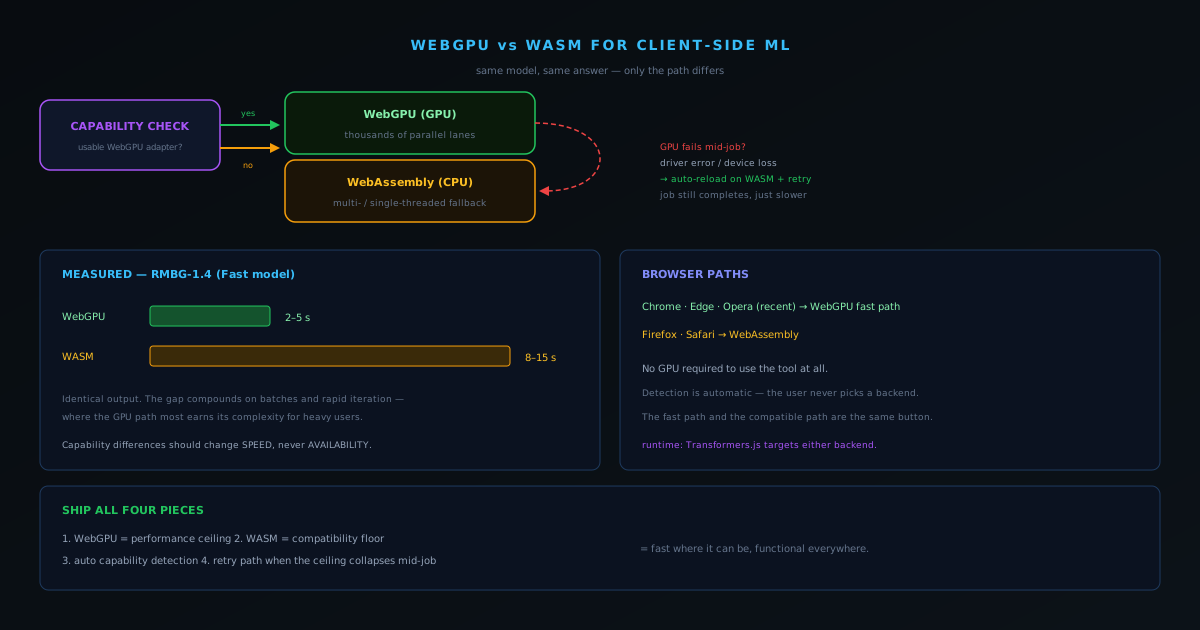
When people hear that a real neural network runs inside a browser tab, the first question is "how slow is it?" The honest answer is "it depends entirely on whether the browser can use the GPU," and the gap is large enough to matter. For the NSS Background Remover's Fast model (RMBG-1.4), inference runs in roughly two to five seconds on WebGPU and roughly eight to fifteen seconds on WebAssembly. That is the difference between a tool that feels responsive and one that feels like it is thinking, and crucially, the tool has to be good on both paths, because not every browser the visitor brings supports WebGPU. This post is about how a client-side AI tool actually uses these two backends, how it chooses between them, and what the choice costs and buys.
The short version of the strategy: use WebGPU where it exists for speed, fall back to WebAssembly everywhere else for universality, detect which is available automatically so the user never has to think about it, and (the part that is easy to forget) handle the case where WebGPU claims to be available but then fails mid-job. Each of those is a real piece of engineering, and skipping any of them produces a tool that is either slow for everyone or broken for someone.
What WebGPU and WASM actually are here
Both WebGPU and WebAssembly are ways to run the model's computation in the browser, but they use different hardware. WebGPU is a modern browser API that gives JavaScript access to the device's graphics processor, which is built for exactly the kind of massively parallel arithmetic that neural-network inference consists of. When it is available, running the model on the GPU is dramatically faster because the GPU does thousands of multiply-add operations in parallel. WebAssembly runs the same computation on the CPU instead: it is a fast, low-level execution format, and the runtime can use multiple threads where the browser allows it, but a CPU simply has far fewer parallel lanes than a GPU for this kind of work. That architectural difference is the entire source of the speed gap.
The runtime tying these together is Transformers.js, which can target either backend. The model itself is the same; what changes is where the math executes. This is why the same tool can deliver a two-to-five-second result on a recent Chrome with WebGPU and an eight-to-fifteen-second result on a browser limited to WebAssembly, without any difference in output quality: the answer is identical, only the path to it differs.
Detecting capability so the user never has to
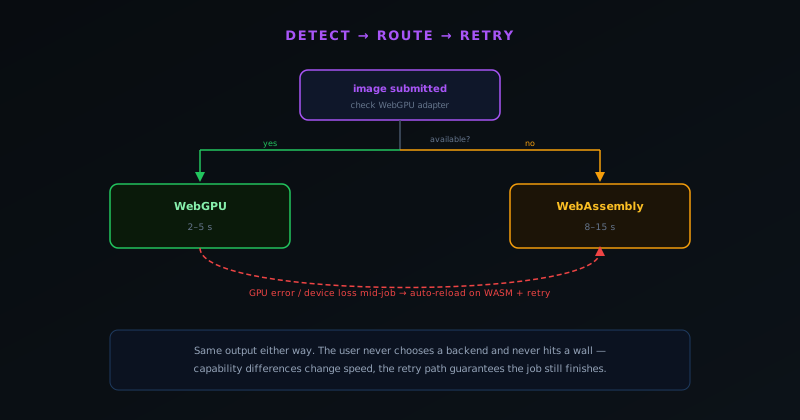
A tool that asked users to pick a backend would be a tool that confused most of them. Capability detection is automatic: the application checks whether the browser exposes a usable WebGPU adapter and, if so, runs inference on the GPU; if not, it falls back to WebAssembly, choosing multi-threaded execution where the browser supports the necessary features and single-threaded where it does not. The user selects an image and gets the fastest path their browser can offer, with no setting to find and no decision to make. The fast path and the compatible path are the same button.
This maps onto the browser landscape in a predictable way. Chrome, Edge, and Opera in recent versions provide WebGPU and therefore the fast path. Firefox and Safari work through WebAssembly. A GPU is not required to use the tool at all: WebGPU makes it faster where present, and the WebAssembly fallback guarantees the tool functions everywhere else. The design principle is that capability differences should change speed, never availability: nobody should hit a wall because their browser is a year behind on a graphics API.
The failure case people forget: WebGPU that breaks mid-job
Detecting WebGPU and using it is the easy 90%. The hard 10% is that WebGPU can be present, pass detection, and then fail during actual inference: a GPU driver error, a device loss when the OS resets the graphics context, a hardware quirk on a specific configuration. A naive implementation that committed to the GPU path at detection time would simply break for those users, producing exactly the kind of inconsistent, machine-specific failure that is miserable to support. The tool handles this by treating a WebGPU inference failure as a recoverable event: when GPU inference fails with a driver error or device loss, it automatically reloads onto the WebAssembly path and retries, so the job still completes, just more slowly. The model cache is evicted and re-fetched where the failure suggests a corrupted load.
This matters because it changes the guarantee the tool can make. Without the retry path, the promise is "fast if your GPU cooperates, broken if it does not." With it, the promise is "fast where WebGPU works, automatically a little slower where it does not, and functional in both cases." For a tool that has to run across the entire messy diversity of real consumer hardware and drivers, that graceful degradation is not a nicety; it is the difference between a tool that works and a tool that works on the developer's machine.
What the GPU is actually doing here
It is worth being concrete about why the GPU path is so much faster, because the reason is structural rather than incidental. Neural-network inference is dominated by matrix multiplications (vast numbers of multiply-and-add operations with no dependency between them) which is precisely the workload a GPU is built to chew through, executing thousands of these operations in parallel across its many cores. WebGPU exposes that parallel hardware to the browser for general computation, so the runtime can dispatch the model's matrix math as GPU work and have thousands of lanes grinding on it simultaneously. The CPU, by contrast, has far fewer cores and executes far fewer of these operations at once, which is the entire source of the multiple-times speed gap.
This also explains why the gap is not uniform across all models and operations. Work that parallelizes cleanly benefits most from the GPU; work with more sequential dependencies or smaller tensor sizes benefits less, because there is less parallelism to exploit. For the segmentation models the tool runs, the workload is heavily parallel, so the GPU advantage is large, but understanding that the speedup comes specifically from parallelism clarifies why it varies and why some operations are closer between the backends than others. The GPU is not magically faster at everything; it is faster at exactly the kind of massively-parallel arithmetic that neural inference happens to be made of, which is why it transforms the experience for this particular workload.
The cross-origin isolation requirement for WASM threads
A practical wrinkle that catches many developers is that getting the most out of the WebAssembly fallback requires multi-threading, and multi-threaded WebAssembly depends on a feature (shared memory across threads) that browsers gate behind specific security requirements. To use it, the page must be cross-origin isolated, which means serving particular HTTP headers that opt the page into a stricter security context, and that requirement can ripple into how other resources and embeds on the page behave. So the WASM path is not simply "the CPU fallback"; getting its multi-threaded, faster variant working involves real deployment configuration that the single-threaded fallback does not.
This is the kind of detail that separates a working client-side ML deployment from a demo, because the difference between multi-threaded and single-threaded WebAssembly is substantial for inference speed on the fallback path. A tool that does not set up cross-origin isolation correctly falls back to single-threaded execution and is slower than it needs to be on every device without WebGPU, which is a meaningful share of users. Handling this properly means treating the deployment configuration as part of the performance work, not just the code, and accepting the constraints that cross-origin isolation imposes in exchange for the faster fallback. It is one more place where shipping client-side ML well requires attention beyond the model itself, reaching into how the page is served.
Memory limits differ between the backends
Beyond speed, the two backends differ in their memory characteristics, which affects what each can handle and how the tool has to manage resources on each path. The amount of memory available to a computation, and how that memory is allocated and freed, is not identical between running on the GPU and running in WebAssembly on the CPU, so a workload that fits comfortably on one path may press against limits on the other. This means the capability detection that chooses a backend is implicitly also choosing a memory regime, and the pipeline has to be robust to both rather than tuned for one.
In practice this reinforces why graceful degradation has to be real rather than nominal. It is not enough to fall back from GPU to CPU and assume everything else holds; the fallback path may have different memory headroom, which is part of why heavy operations need the same disposal discipline and bounded working sets on every backend. A tool that only tested its memory behavior on the GPU path could fall back to WebAssembly and hit limits it never saw in development. Treating each backend's resource characteristics as something to design around, rather than assuming they are interchangeable, is part of making the dual-path strategy genuinely reliable instead of merely functional on the developer's preferred path.
Knowing which backend really ran
A subtle operational point is that, in a system with automatic capability detection and a fallback path, you do not actually know which backend executed a given job unless you measure it, and that knowledge turns out to matter for understanding real-world performance. A user reporting that the tool is slow could be on the WebAssembly path because their browser lacks WebGPU, or on a WebGPU path that fell back mid-job after a failure, and those are different problems with different fixes. Without recording which execution provider actually bound for each run, you are reasoning about performance from assumptions rather than facts.
This is why instrumenting the real backend distribution is worthwhile: it tells you what fraction of actual users are getting the fast path versus the fallback, which is the difference between an optimization that helps most people and one that helps the few on the developer's configuration. It also surfaces cases where WebGPU was detected but failed in practice, which the retry path handles functionally but which you would want to know about for diagnosis. Measuring the ground truth of which backend ran, rather than assuming the intended one did, is what lets performance work be driven by how the tool actually behaves across the user base rather than by how it behaves on one machine. The capability path is invisible to the user by design, but it should not be invisible to the developer.
Model loading and caching across backends
A cost that the speed comparison can obscure is that loading the model (getting the weights from cache into a form the backend can execute) is itself work, and it is paid before any inference happens. The first time a model is used in a session, it has to be fetched from the browser cache and initialized for the chosen backend, which adds latency to that first run that later runs do not pay. This is why the first cutout of a session feels slower than subsequent ones regardless of backend: you are amortizing the load cost over the first inference. Designing for this means warming the model when sensible and being clear in the interface that the first run includes setup the rest do not.
The caching that backs this is part of why the tool can be fast and offline-capable: the model weights are stored locally after the first download, so loading is reading from local storage rather than re-fetching across the network. But the initialization for a backend is still computation, and a tool that switches backends (for instance, falling back from WebGPU to WebAssembly after a failure) pays a re-initialization cost on the new path. Accounting for model loading as a distinct, real cost separate from inference is part of understanding client-side performance honestly, because a benchmark that measures only steady-state inference misses the setup the user actually experiences on their first interaction of a session.
A capability-detection policy that ages well
The logic that decides between WebGPU and WebAssembly is small but consequential, and writing it to age gracefully matters because the browser landscape keeps shifting. The robust policy is to check for a genuinely usable WebGPU path rather than merely the presence of the feature, prefer it when it is real, fall back to the best available WebAssembly configuration otherwise, and (crucially) treat a WebGPU failure during actual inference as a recoverable event that triggers a fallback rather than a fatal error. That last clause is what keeps the policy robust against the reality that feature detection and feature reliability are not the same thing.
Writing the policy this way means it does not have to be rewritten every time browser support changes, because it adapts to what is actually available and working rather than encoding assumptions about specific browsers. As more browsers ship reliable WebGPU, more users transparently get the fast path without any code change, and as edge-case failures surface, the retry path absorbs them. A capability-detection policy that is defensive about real usability, rather than trusting nominal feature presence, is what lets a tool ride the improving browser landscape automatically while staying functional on the trailing edge. The goal is a policy you set up once and that keeps making the right choice as the environment evolves, which is exactly what treating detection as "is this genuinely usable and working" rather than "does this exist" achieves.
When the speed difference actually matters
It is worth being honest about when the WebGPU advantage is decisive and when it is not. For a single image on a clean background, even the eight-to-fifteen-second WebAssembly path is perfectly usable: you ask for a cutout, you wait a moment, you get it. Where the gap compounds is volume and iteration. In a batch of a hundred images processed sequentially, the per-image difference multiplies into minutes versus tens of minutes. When a user is iterating (trying the Fast model, refining edges, re-exporting) the responsiveness of the fast path is what keeps the tool feeling like a tool rather than a submission form. So the WebGPU path earns its complexity most clearly for the heavy users, which are exactly the users a tool most wants to keep.
The broader lesson for anyone building client-side ML is that the two backends are not competitors to choose between but a pair to use together. WebGPU is the performance ceiling; WebAssembly is the compatibility floor; capability detection picks between them invisibly; and a retry path catches the case where the ceiling collapses mid-job. Ship all four and you get a tool that is fast where it can be and functional everywhere, which is the actual goal. The companion piece on how the full pipeline works shows where this inference stage fits, and the case study on the worker-session bug covers a different failure mode in the same layer.
Frequently asked questions
Quick answers to common questions about this topic.
Is WebGPU faster than WebAssembly for in-browser AI?
Yes, substantially. For the Fast model, inference runs roughly 2–5 seconds on WebGPU versus 8–15 seconds on WebAssembly, because the GPU runs the model's parallel matrix math across thousands of lanes. The output is identical on both paths.
Do I need a special GPU to use the background remover?
No. WebGPU makes inference faster where the browser supports it (Chrome, Edge, Opera), and the tool automatically falls back to WebAssembly on Firefox, Safari, or any device without WebGPU. Capability is detected for you; there is no setting to choose.
What happens if WebGPU fails during a job?
A WebGPU failure mid-inference (a driver error or device loss) is treated as recoverable: the tool reloads onto the WebAssembly path and retries, so the job still completes, just more slowly. That graceful degradation keeps it working across real consumer hardware.
Related workflow
Product photo to a transparent image every channel accepts
One photograph, cut out once, then re-encoded for a storefront, a marketplace listing and a social post without redoing the cutout each time.
- Cut the background out and check the edgesNSS Background Remover: Hair, glass and drop shadows are where automatic cutouts fail. Fix them once, on the master, before anything downstream copies the mistake.
- Re-encode and resize per destinationNovus Convert: Transparency survives PNG and WebP and dies in JPEG. Convert validates the file it hands back, so a listing never rejects a silently broken upload.
Related troubleshooting
Was this page helpful?
Your answer stays in this browser, it is not sent anywhere and no account or cookie is involved.