2026 · NSS Background RemoverAbout 14 min readNovus Stream Solutions
How we built a background remover that runs entirely in your browser, and what it taught us about client-side AI
The definitive story of the NSS Background Remover: why it runs fully on-device, how a real segmentation model ended up in a browser tab, the export detail that makes the output professional, the rebuild that reshaped how we engineer, and what the whole thing taught us about client-side AI.
Contents
- 1.Overview
- 2.The problem: free background removers are either insecure, limited, or broken
- 3.The privacy decision: no server to upload to
- 4.Getting a real model into the browser
- 5.The pipeline, and the detail that makes the output professional
- 6.The rebuild that taught us the most
- 7.What it grew into
- 8.The trilemma most tools resolve by dropping one
- 9.Refinement: where the human still belongs
- 10.Coherence under growth
- 11.What client-side AI taught us
Overview
This is the full story of the NSS Background Remover: not the launch announcement, but the actual account of why it is built the way it is, what it took to get a real AI model running inside a browser tab, the detail that separates its output from the free-tool crowd, the rebuild that changed how we engineer everything, and the lessons that came out of shipping genuine client-side AI. It is the definitive version, and it is meant to be read alongside the deeper companion posts that take each piece further. If you only read one thing about the tool, read this; if you want the depth on any one part, the companions are linked throughout.
The product, at bgremover.novusstreamsolutions.com, is free, runs entirely in your browser, and exports professional-grade cutouts. Each of those three things (free, in-browser, professional) is the result of a deliberate decision with real engineering behind it, and the interesting part of the story is how those decisions connect. The privacy stance, the model architecture, the export pipeline, and the cost model are not separate features; they are one coherent design, and seeing how they fit together is seeing what building real client-side AI actually involves.
The problem: free background removers are either insecure, limited, or broken
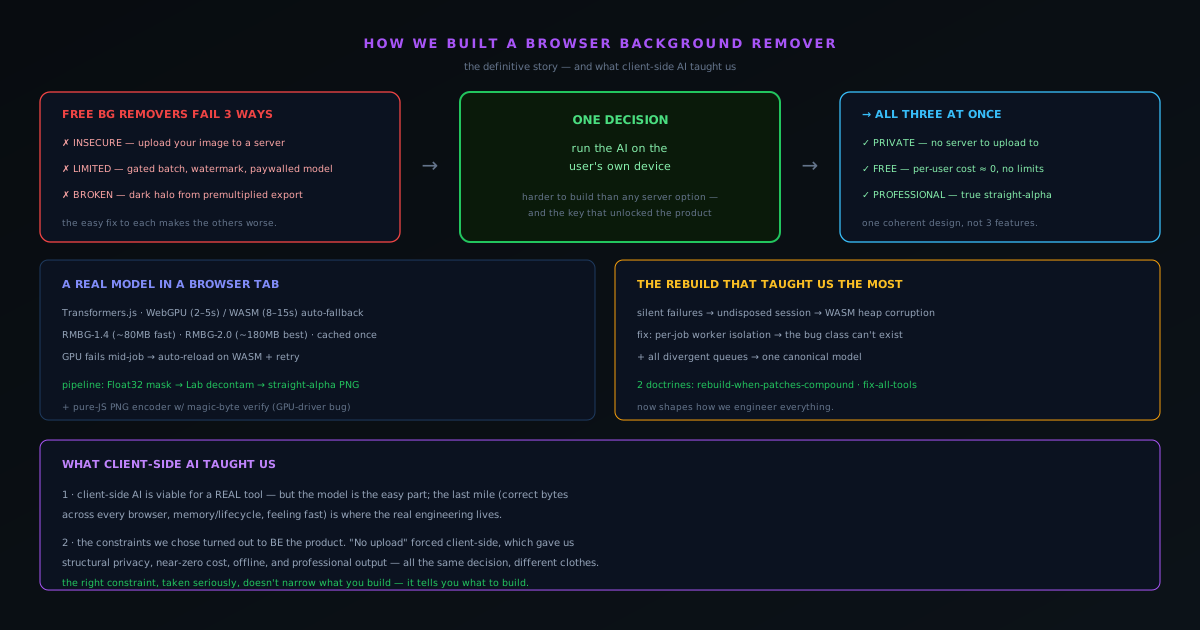
The category we entered was crowded, and it was crowded with tools that each failed in one of three ways. Some upload your image to a server, which is fine for a meme and unacceptable for a client deliverable under NDA, an unreleased product render, or a document with personal information. Some are free only up to a limit, then gate batch processing, watermark the output, or reserve their best model for paying users. And a startling number export technically-transparent files that show a dark halo the moment a professional opens them in Photoshop, because they got the alpha encoding wrong. The opportunity was not to build another background remover; it was to build one that did not fail in any of those three ways at once: private, genuinely free, and professional in its output.
Solving all three simultaneously is harder than solving any one, because the easy solution to each makes the others worse. The easy way to be professional is to run a big model on a server, which breaks privacy. The easy way to be free is to limit usage or show aggressive ads, which breaks the experience. The decision that made all three possible at once was to move the processing into the browser, onto the user's own device, a decision that was harder to build than any server-side alternative and that turned out to be the key that unlocked the whole product. Almost everything distinctive about the tool follows from that one choice.
The privacy decision: no server to upload to
Running the AI in the browser means there is no backend image-processing server, which means there is no upload, which means the privacy promise is structural rather than a policy you have to trust. The model runs on your device; your image never leaves it; you can confirm this yourself by watching your browser's network activity and seeing that no request carries your file anywhere. This is the difference between "we delete your uploads" (an assertion about a server you cannot see) and "there is no upload" (a property of an architecture with no server in the path). For the professional users who have the most sensitive images and the most reason to care, that distinction is the entire reason the tool is usable for real work.
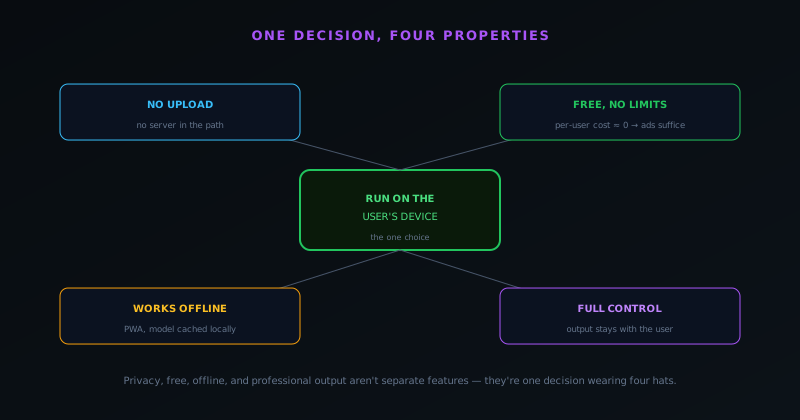
The privacy property also turned out to be a cost property, which is the first hint that the design is more unified than it looks. Because the processing happens on the user's device, the marginal cost of someone removing a thousand backgrounds is paid by their hardware, not by a server bill we have to cover, which is exactly what makes "genuinely free, no limits" affordable. A server-side free tool at scale bleeds money on every use and is pushed toward limits and paywalls to stop the bleeding; a client-side free tool does not have that pressure. The no-upload decision and the no-limits decision are the same decision viewed from two angles. The full privacy argument is in the dedicated companion post.
Getting a real model into the browser
The technical heart of the project was getting a genuine segmentation model to run, fast enough to be useful, inside a browser tab. The runtime that makes this possible is Transformers.js, which can execute models in the browser against either the GPU via WebGPU or the CPU via WebAssembly. The tool ships two models: a Fast model, RMBG-1.4 at about 80 MB, optimized for product shots and portraits with clean edges, and a Best Quality model, RMBG-2.0 (a bilateral reference network built for the hard cases like hair, fur, and transparent objects) at about 180 MB. Both download once and are cached locally, so the size cost is paid on the first visit and never again. On a browser with WebGPU, the Fast model runs in roughly two to five seconds; on the WebAssembly fallback, roughly eight to fifteen.
Making this robust across the messy reality of real devices was most of the work. The tool detects whether WebGPU is available and uses it for speed, falling back to multi-threaded or single-threaded WebAssembly automatically where it is not, so the user never picks a backend and never hits a wall: capability differences change the speed, never the availability. You can see the model tiers and what each device needs on the live tool at bgremover.novusstreamsolutions.com/how-it-works. And because WebGPU can pass detection and then fail mid-job on a particular driver or hardware configuration, a GPU failure triggers an automatic reload onto the WebAssembly path and a retry, so the job still completes. That graceful degradation is the difference between a tool that works in a demo and a tool that works on the actual diversity of machines people bring. The WebGPU-versus-WASM tradeoff has its own deep-dive companion.
The pipeline, and the detail that makes the output professional
Between selecting an image and downloading a cutout, the pixels move through a real pipeline. The image is decoded and validated by its actual file signature (HEIC included, via a WebAssembly decoder, because iPhone photos matter); images above 4096×4096 are downscaled for inference while the full-resolution original is kept so the mask can be applied back at full size. The model produces not a binary cutout but a Float32 alpha mask (every pixel an opacity between 0.0 and 1.0), which is what preserves soft hair, motion blur, and semi-transparent edges that a hard yes/no mask destroys. An automatic Lab-color-space decontamination pass then pushes the semi-transparent edge pixels away from the color of the removed background, killing the color spill that would otherwise tint the edges.
The final stage is where most free tools quietly fail and where this one earns the word "professional": the export writes true straight (non-premultiplied) alpha. The RGB of transparent and semi-transparent pixels is preserved rather than multiplied into black, so the file opens cleanly in Photoshop, Figma, and print software without the dark halo that premultiplied exports produce. There is even a last-mile reliability detail behind that: on some Windows/Chromium GPU configurations, the browser's canvas export could emit JPEG bytes inside a file labeled PNG, silently destroying the transparency, so export routes through a CPU path with a pure-JavaScript PNG encoder that writes the exact PNG signature and verifies it before the download starts, aborting rather than handing you a corrupt file. The end-to-end pipeline and the straight-alpha detail each have a dedicated companion post.
The rebuild that taught us the most
The most formative episode in the tool's history was not a feature but a bug, and the rebuild it forced. As the tool grew, a class of failure appeared that presented in the worst possible way: silently. Tools would simply stop producing output, with no crash and no error. The cause turned out to be a model session that was not being disposed, corrupting the WebAssembly heap so that a later, unrelated operation misbehaved, which is why there was no useful stack trace, because the cause and the visible effect were separated in time. The local fix was to dispose the stale session, but the real lesson was that the pattern of hand-managing session lifecycle existed everywhere a model ran, across several queue implementations that had drifted apart over time.
So instead of patching the one reported spot, we rebuilt the execution model: every job now runs in a fresh worker that is hard-terminated when it finishes, so there is no shared session to leave stale and the entire bug class becomes impossible, and all the divergent queues were reconciled to one canonical state machine. That episode produced two doctrines that now shape how we build everything. When patches start compounding, rebuild the approach rather than adding another special case. And when you fix a class of bug, audit every tool that shares the pattern, not just the one that reported it, because a bug that surfaced in one place almost always lives in several. The bug case study, the rebuild retrospective, and the all-tools doctrine are each explored in their own companion posts.
What it grew into
What started as a background remover became, over a series of releases, a much larger suite: image and video editors with layers; image and video upscaling; and a broad set of on-device utilities you can browse at bgremover.novusstreamsolutions.com/tools. That growth was not feature creep in the bad sense, because each capability that earned its place did so on the strength of the same client-side foundation: it runs on the device, it is free, and it follows the same patterns the rebuild made consistent. The breadth is real, but the core promise never changed, and the video editor and upscalers, running heavy work in isolated workers on the same canonical pipeline, are a good example of that foundation paying off at scale.
Restraint still applies even amid that growth, which is the productive tension at the center of the operating model. Each tool stays as single-purpose as it can while the suite as a whole gets broader: the answer to "can it also do X" is often a new focused tool rather than a heavier existing one. That keeps each piece fast and clear even as the overall capability expands. The feature-creep discipline that governs this is its own companion post, and it is the same instinct that kept the original background remover sharp while everything grew around it.
The trilemma most tools resolve by dropping one
It helps to frame the whole project as a response to a trilemma: free, private, and professional are three properties that background-removal tools tend to treat as a pick-two, because the obvious way to get any one of them undermines another. The straightforward route to professional output is a powerful model on a server, which sacrifices privacy. The straightforward route to free is to limit usage or cut quality, which sacrifices professional output. The straightforward route to private is to keep things on the device, which historically meant sacrificing the model power that professional output requires. Each pair is easy; all three at once is the hard problem, and most tools resolve it by quietly dropping whichever of the three matters least to their business.
The on-device decision is what collapses the trilemma into something achievable rather than a forced choice. Running a real model in the browser delivers privacy structurally, because nothing is uploaded; it delivers free sustainably, because the per-user cost is near zero; and it delivers professional output, because a genuine segmentation model with correct straight-alpha export runs locally just as well as it would on a server. The single architectural choice that seemed to be only about privacy turns out to satisfy all three corners of the trilemma at once, which is why the tool does not have to drop any of them. Seeing the product as a trilemma resolved rather than a feature list assembled is the clearest way to understand why the on-device decision was so pivotal: it is the one move that lets free, private, and professional coexist instead of competing.
Refinement: where the human still belongs
A part of the tool that gets less attention than the AI but matters for professional output is the manual refinement layer, because even an excellent model occasionally needs a human touch on the hardest edges. After the automatic pass, a brush lets the user paint the subject back in or erase stray background, a magic-wand selection picks up leftover background by similarity in one click, and a selection can constrain edits so a stroke does not bleed where it should not. This is the human-in-the-loop finish: the AI handles the overwhelming majority of the work, and the user has precise tools to perfect the small fraction where their judgment beats the model's, particularly on wispy hair or ambiguous boundaries.
Including real refinement tools reflects an honest stance about what AI does and does not do. A tool that pretended the model was perfect would leave users stuck whenever it was not; a tool that provides good manual finishing acknowledges that the model is excellent but not infallible, and gives the user agency over the result rather than forcing them to accept whatever the automatic pass produced. For professional work, where the output has to be exactly right rather than approximately right, that final degree of control is what makes the difference between a cutout that is good enough for casual use and one a professional can ship. The refinement layer is the recognition that the goal is the best possible cutout, not the most fully-automated one, and that for the hardest cases the best result still comes from pairing the model's speed with a human's judgment on the edges that matter.
Coherence under growth
One of the less obvious achievements of the project is that the tool grew from a single background remover into a broad suite without fragmenting into an unmaintainable tangle, and the reason traces directly back to the rebuild. By bringing the execution model to per-job worker isolation and reconciling the divergent queues to one canonical state machine, the rebuild established consistent patterns that every subsequent tool could follow, so adding the video editor, upscaling, the in-editor utilities, and the rest meant extending a coherent foundation rather than bolting on more divergent implementations. The consolidation that fixed a bug also created the consistency that made growth sustainable.
This is a quiet but important lesson about how a small operation can build breadth without drowning in maintenance. Growth tends to fragment a codebase, with each new feature adding its own slightly-different way of doing shared things, until the whole becomes too inconsistent for a small team to maintain well. The discipline that resists this is exactly the all-tools, one-canonical-pattern instinct the rebuild instilled: new capabilities conform to the established patterns rather than inventing their own, so the suite stays coherent as it grows. The breadth the tool achieved is real, but it was only sustainable because the underlying patterns stayed consistent, which is why the rebuild was not just a bug fix but the foundation that made the later growth possible without the fragmentation that usually accompanies it. Coherence under growth is the payoff of having consolidated when the patches started to compound.
What client-side AI taught us
The biggest lesson is that client-side AI is genuinely viable for a real tool, not just a demo, but that the model is the easy part and the last mile is where the real engineering lives. Getting a model to run in a browser is, in 2026, a solved problem you can reach with Transformers.js and a WebGPU-with-WASM-fallback path. Getting it to run reliably across every device, produce correct bytes on disk across every browser and driver, survive the memory and lifecycle pitfalls of running models in WebAssembly, and feel fast while doing heavy work: that is the part that separates something convincing in a demo from something people trust daily. We budgeted for the model and were surprised by how much of the work was everything around it.
The second lesson is that the constraints we chose turned out to be the product. "No upload" forced client-side processing, which forced us to solve the hard problems of in-browser ML, and in solving them, we got privacy that is structural, costs that are near-zero per user, a tool that works offline, and output that is fully under the user's control. The constraint did not limit the product; it defined it. The privacy stance, the free model, the offline capability, and the professional output are all the same decision wearing different clothes, which is the deepest thing building this taught us: the right constraint, taken seriously, does not narrow what you can build; it tells you what to build. To use the tool, visit bgremover.novusstreamsolutions.com/background-remover; for the reference detail on formats, models, and limits, see the Background Remover documentation at NSS Background Remover; and for the depth on any part of this story, follow the companion posts linked throughout.
Frequently asked questions
Quick answers to common questions about this topic.
Can you really build a background remover that runs entirely in the browser?
Yes. The NSS Background Remover runs a real segmentation model locally via Transformers.js on WebGPU (with a WebAssembly fallback), so images are processed on the device with no server. The build story covers how each piece fits together.
What is the hardest part of client-side AI?
Not the model. It is the last mile: managing the model download and cache, keeping memory bounded in a tab, handling the browser/device matrix, and guaranteeing correct output bytes across drivers. That reliability work is where most of the effort goes.
Where can I read the technical deep-dives?
See the pipeline walkthrough at How in-browser background removal works, end to end, the privacy architecture at Why our background remover never uploads your image, and what that protects, and the WebGPU/WASM tradeoff at WebGPU vs WASM for client-side ML: what actually changed our inference speed.
Related workflow
Product photo to a transparent image every channel accepts
One photograph, cut out once, then re-encoded for a storefront, a marketplace listing and a social post without redoing the cutout each time.
- Cut the background out and check the edgesNSS Background Remover: Hair, glass and drop shadows are where automatic cutouts fail. Fix them once, on the master, before anything downstream copies the mistake.
- Re-encode and resize per destinationNovus Convert: Transparency survives PNG and WebP and dies in JPEG. Convert validates the file it hands back, so a listing never rejects a silently broken upload.
Related troubleshooting
Was this page helpful?
Your answer stays in this browser, it is not sent anywhere and no account or cookie is involved.