2026 · NSS Background RemoverAbout 12 min readNovus Stream Solutions
Why our background remover never uploads your image, and what that protects
The NSS Background Remover processes images entirely in your browser. There is no backend, no upload, and no server-side copy of your file. Here is exactly how that works, what it protects, and what it cost us to build it that way.
Contents
- 1.Overview
- 2.What "no upload" actually means here
- 3.Verify it yourself: the thirty-second test
- 4.What that actually protects
- 5.The engineering bill we paid for it
- 6.The two caches that hold the model
- 7.What the consent-gated analytics can and cannot see
- 8.What having no backend frees the operation from
- 9.Why a free tool, of all things, is built this way
Overview
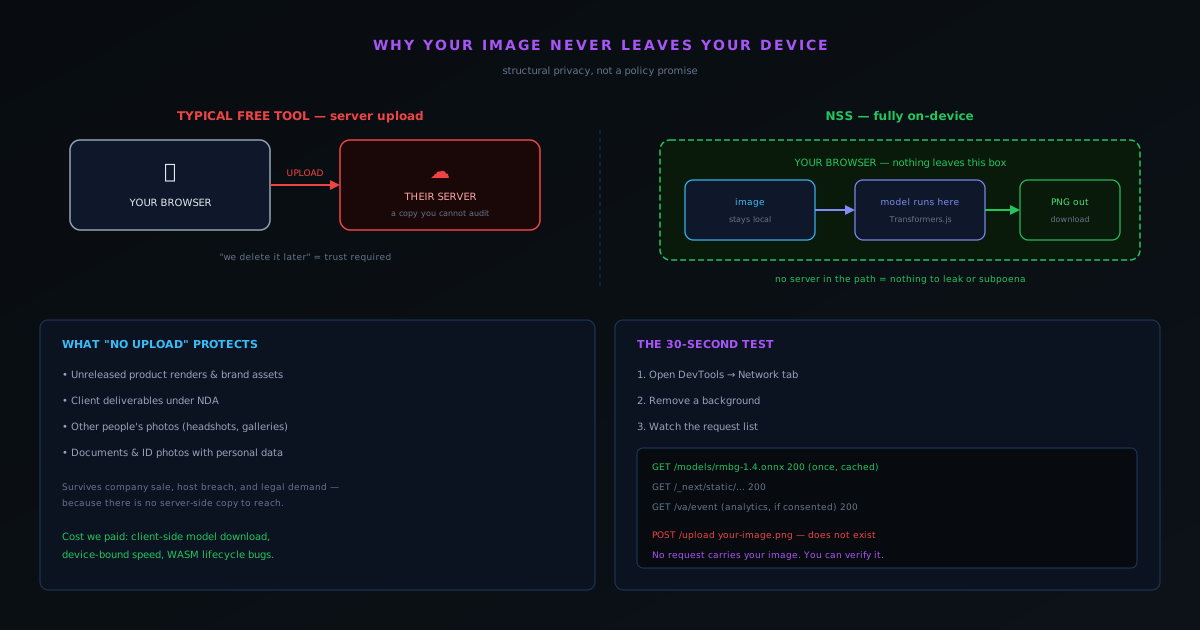
Open almost any free background-removal tool and the same thing happens behind the scenes: your image is uploaded to a server, processed there, and the result is sent back. That architecture is the default because it is the easy one: you put the model on a machine you control, expose an endpoint, and every browser becomes a thin client. It is also the architecture we deliberately refused to build. The NSS Background Remover at bgremover.novusstreamsolutions.com/background-remover has no backend image-processing server at all. There is no API call that sends your image anywhere. The AI model runs inside your browser tab, on your device, and the picture you drop in never leaves the machine you dropped it on.
This is not a privacy policy we are asking you to trust. It is a property of how the application is built, and it is one you can verify yourself in about thirty seconds. That distinction (between a promise and a structural guarantee) is the entire point of this post. We want to walk through what "no upload" actually means at the level of code and network traffic, what it protects that a server-side tool cannot, the specific engineering price we paid to make it true, and why we decided that price was worth paying for a free tool.
What "no upload" actually means here
When you load the Background Remover for the first time, the application does download something: the neural network weights. The Fast model (RMBG-1.4) is roughly 80 MB and the Best Quality model (RMBG-2.0, the BiRefNet-based bilateral reference network) is roughly 180 MB. Those files come down once, from a content host, and are cached in your browser using IndexedDB and the Cache Storage API. That is the only meaningful network transfer the tool makes, and it flows in the opposite direction from an upload: the model comes to your image, not the other way around.
After that download, every operation is local. You select a file, the browser decodes it, the model runs against the pixels using Transformers.js as the runtime, and the output is composited and handed back to you as a download. At no point in that sequence is there an HTTP request carrying your image to a Novus server, because there is no Novus server in the path. The app is a progressive web app backed by a service worker that caches both the application shell and the model weights, which is why (and this is the part that surprises people) once the cache is warm, you can turn off your internet connection entirely and the tool keeps working. A feature that depended on a server could not do that.
It is worth being precise about the one thing we do collect, because honesty about the exceptions is what makes the rule credible. With your consent, the site records anonymous page-view counts through Google Analytics 4, with IP anonymization enabled. Without consent the analytics script is never loaded, and nothing is recorded beyond the standard HTTP headers any web server receives. Neither of those touches the content of your images. The boundary is clean: usage analytics about pages, never the pixels you process.
Verify it yourself: the thirty-second test
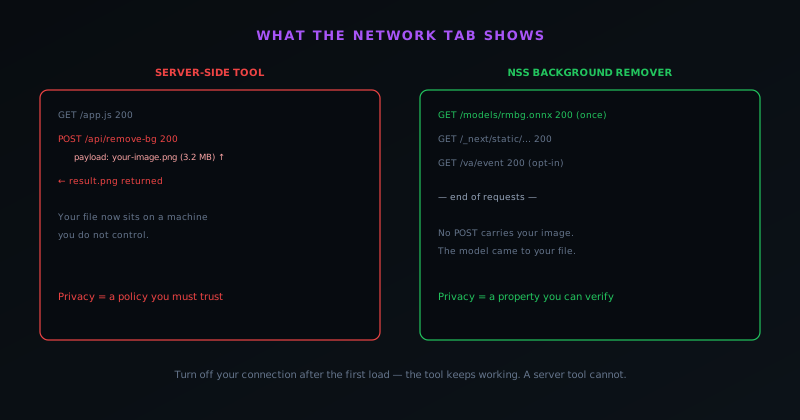
The reason we keep emphasizing "structural, not policy" is that you do not have to take our word for any of this. Open the tool, then open your browser developer tools and select the Network tab. Remove the background from an image and watch the request list. You will see the one-time model download (or nothing, if it is already cached), the static assets that make up the page, and the analytics ping if you consented to it. What you will not see is a request whose payload is your image being POSTed to a processing endpoint, because that request does not exist.
This is the difference that matters when the claim is "your files stay private." With a server-side tool, "we delete your uploads after processing" is something you have to believe. There is a copy of your file on a machine you do not control, governed by a retention policy you cannot audit, exposed to whatever happens to that machine. With a client-side tool, there is simply no server-side copy to delete, retain, leak, or subpoena. The privacy guarantee survives a change of company ownership, a data breach at a hosting provider, and a legal demand for stored user data, because none of those things can reach a file that never left your laptop.
What that actually protects
For a casual user cropping a pet photo, the privacy properties are a nice-to-have. For a large category of professional users, they are the whole reason a tool is usable at all. Designers regularly cut out unreleased product renders, brand assets under embargo, and client deliverables covered by confidentiality agreements. Photographers process headshots and event galleries that belong to other people. Small e-commerce teams prepare product imagery they would rather competitors not see early. People remove backgrounds from documents and ID photographs that contain personal information. In every one of those cases, uploading the source image to an opaque third-party server is a decision with real downside, and "we promise we delete it" does not eliminate that downside; it just relabels it.
A client-side tool removes the decision entirely. There is no upload to weigh, no retention policy to read, no question about which jurisdiction the processing server sits in or who has access to it. The sensitive frame is processed in the same browser sandbox that already holds your email and your banking session, and it is gone when you close the tab. For anyone whose work involves images they are contractually or ethically obligated to protect, that is not a feature comparison; it is the line between "I can use this" and "I cannot."
There is a quieter benefit too: speed of trust. A first-time visitor who reads "no upload, runs in your browser" and then confirms it in the network tab does not have to extend any trust to us as a company to start using the tool safely. The architecture does the trusting for them. For a small, relatively unknown operation, that is worth more than any amount of reassurance copy, because it lets the product earn adoption on a verifiable claim rather than on reputation we have not yet built.
The engineering bill we paid for it
None of this is free to build, and pretending otherwise would undercut the point. Running a 180 MB neural network inside a browser tab is meaningfully harder than calling a model that sits on a server you provisioned. The first cost is the model download itself: a server-side tool ships a tiny client and does the heavy lifting remotely, while we have to deliver the weights to the device and manage caching so that the cost is paid once rather than on every visit. That is why model caching in IndexedDB and Cache Storage, and the service worker that backs offline use, are core infrastructure for us rather than an afterthought.
The second cost is that performance is bound by the user's hardware. A server-side tool can run on a fixed, known GPU and deliver consistent timing to everyone. We run on whatever device the visitor brings, which ranges from a high-end workstation to a budget phone. That forced us to build a two-tier capability path (WebGPU acceleration where the browser supports it, with an automatic fall back to multi-threaded or single-threaded WebAssembly where it does not) so that the tool degrades gracefully instead of failing on weaker hardware. It also forced a real focus on keeping the interface responsive while heavy computation runs in the same environment as the UI, which is a problem a server-side tool never has to solve.
The third cost is subtler and showed up in production: running models in WebAssembly surfaces a class of memory and lifecycle bugs that a managed server runtime would handle for you. We hit exactly that (a stale model session that was not being disposed corrupted the WebAssembly heap and caused tools to fail silently) and fixing it correctly meant rebuilding how jobs are isolated so that every job runs in a fresh, hard-terminated worker. That is a real tax you pay for moving computation to the client. We considered it acceptable because it buys a property that a server architecture fundamentally cannot offer at any engineering budget: the guarantee that the image was never anywhere we could see it.
The two caches that hold the model
The mechanics of how the model persists locally are worth spelling out, because they are what make the no-upload architecture practical rather than punishing. The downloaded weights are stored using the browser's client-side storage (IndexedDB and the Cache Storage API) so that the substantial one-time download is paid once and then reused on every subsequent visit. Without this caching, the architecture would re-download the model on every use, which would be intolerable; with it, the model becomes a local asset the tool reads from storage rather than fetching anew. The caching layer is therefore not an optimization detail but a load-bearing part of what makes "the model comes to your device once" a usable design.
These caches are also what underpin the offline behavior, because a model read from local storage does not need the network. The combination of the cached weights and the cached application shell means the tool can run with no connection at all once it has been loaded once, which is both a convenience and the clearest demonstration that nothing is being uploaded. The storage is on the user's own device, under the browser's control, and (as covered in the model-management features) visible and clearable by the user, so the local footprint is transparent rather than hidden. Treating client-side storage as core infrastructure rather than an afterthought is part of what it takes to build a no-upload tool that is also pleasant to use repeatedly.
What the consent-gated analytics can and cannot see
Honesty about the no-upload claim requires being precise about the one thing the tool does collect, because a credible privacy guarantee names its exceptions rather than hiding them. With the user's consent, the site records anonymous page-view counts through privacy-respecting analytics; without consent, nothing beyond the standard HTTP headers any web server necessarily receives. Crucially, neither of these touches the content of the images being processed: the analytics is about page usage, not about the pixels. The distinction is sharp and deliberate: the tool measures that a page was visited, never what a user did to their image on it.
This boundary is what keeps the privacy claim honest rather than absolutist in a way that would be untrue. Almost any web page receives some standard request metadata simply by being loaded, and being upfront that anonymous, consent-gated page analytics exist is more credible than claiming a perfect void of all data. The line that matters (the one the architecture actually enforces) is that the image content never leaves the device, and that line holds regardless of the analytics. Naming the exception precisely, and showing that it falls entirely outside the sensitive category, is what lets the no-upload guarantee be both truthful and strong: the pixels are private structurally, and the only thing measured is page-level usage with consent.
What having no backend frees the operation from
The no-upload architecture protects the user, but it also has a quieter benefit for the operation running the tool, which is worth naming because it explains how the tool stays free and sustainable. A tool with no image-processing backend has no servers to provision, scale, secure, or pay for per image: the user's device does the work, so the marginal cost of someone removing a thousand backgrounds is borne by their hardware, not by an infrastructure bill. This is the operational mirror of the privacy benefit: the same absence of a server that means no copy of your image also means no server cost to recover, which is what makes unlimited free use economically possible.
This freedom from per-use infrastructure cost is not incidental to the free model; it is its foundation. A server-side free tool at scale is a growing cost center that pressures the operator toward limits, watermarks, or a paywall to cover the bill, because every free image costs them money. A client-side tool inverts that pressure: more usage does not mean more cost, so there is no economic force pushing toward gating the output. The architecture that gives the user privacy gives the operator a sustainable zero-marginal-cost model, and those two benefits are the same structural fact viewed from opposite sides. Having no backend is not only a privacy stance but the economic precondition for a genuinely free, unlimited tool, which is why the two so often go together.
Why a free tool, of all things, is built this way
It would be reasonable to expect the privacy-first, no-upload architecture to be the premium tier of a paid product, with the free tier shipping your images to a server. We inverted that. The Background Remover is free, supported by non-intrusive display advertising, with no usage limits, no watermarks, and no premium tier, and it is the free product that runs entirely on your device. The reason is partly economic and partly principled. Economically, client-side processing means the marginal cost of someone removing a thousand backgrounds is paid by their hardware, not by a server bill we would have to cover for every free user. A server-side free tool at scale is a cost center that pressures you toward limits, watermarks, or a paywall; a client-side free tool is not.
Principally, we think "no upload" is the kind of promise that should not be reserved for people who pay. The users with the most sensitive images (the freelance designer under NDA, the small shop protecting unreleased product shots) are frequently the ones least able to justify a subscription for a utility task. Building the privacy guarantee into the free tier, structurally, is how the tool stays genuinely useful to them. If you want the deeper mechanics of how the pixels actually become a transparent cutout, the companion piece walks through the full pipeline end to end, and the product documentation covers formats, limits, and browser support in reference detail.
Frequently asked questions
Quick answers to common questions about this topic.
Does the NSS Background Remover upload my images to a server?
No. There is no backend image-processing server and no API call that sends your image anywhere: the AI model runs inside your browser tab, so the picture never leaves your device. You can confirm it in the browser Network tab: there is no request carrying your image off the machine.
How can I verify that nothing is uploaded?
Open your browser developer tools, choose the Network tab, and remove a background. You will see the one-time model download and static assets, but no request POSTing your image to a processing endpoint, because that request does not exist.
Does the background remover work offline?
Yes. It is a progressive web app that caches the model weights and app shell after the first visit, so once the cache is warm you can disconnect from the internet entirely and keep removing backgrounds.
Is a private, no-upload background remover really free?
Yes: free with non-intrusive ads, no account, no watermark, and no usage limits. Because your own device does the processing, there is no per-image server cost, which is what makes unlimited free use sustainable.
Related workflow
Product photo to a transparent image every channel accepts
One photograph, cut out once, then re-encoded for a storefront, a marketplace listing and a social post without redoing the cutout each time.
- Cut the background out and check the edgesNSS Background Remover: Hair, glass and drop shadows are where automatic cutouts fail. Fix them once, on the master, before anything downstream copies the mistake.
- Re-encode and resize per destinationNovus Convert: Transparency survives PNG and WebP and dies in JPEG. Convert validates the file it hands back, so a listing never rejects a silently broken upload.
Related troubleshooting
Was this page helpful?
Your answer stays in this browser, it is not sent anywhere and no account or cookie is involved.