2026 · Stack & engineeringAbout 13 min readNovus Stream Solutions
Reliability hardening: device lifecycle, model integrity, and honest failures
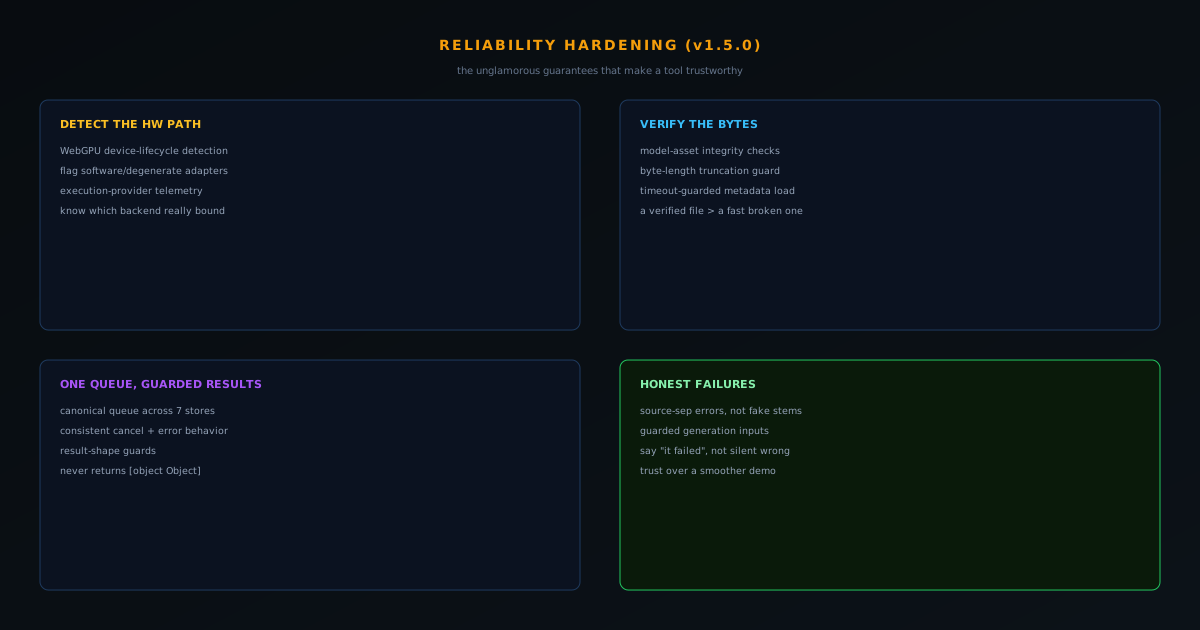
The most enterprise-grade release in the NSS Background Remover run is also the least flashy: v1.5.0, a reliability-hardening pass. Device-lifecycle detection, model-asset integrity checks, a canonical queue across seven stores, result-shape guards, and errors that tell the truth. Here is what each one buys.
Contents
- 1.Overview
- 2.Detecting the hardware path before trusting it
- 3.Verifying the bytes, in and out
- 4.One queue, and results that are never garbage
- 5.Why on-device AI needs more hardening, not less
- 6.The software-adapter problem, concretely
- 7.Knowing which backend actually ran
- 8.The all-tools doctrine, applied to the queue
- 9.A short taxonomy of the honest-failure fixes
- 10.Why [object Object] is the symptom worth obsessing over
- 11.Both apps reaching this stage at once
- 12.What this reliability feels like to a user
- 13.Honest failures over silent wrong answers
Overview
Ask someone what "enterprise-grade" means and they will usually describe features: SSO, audit logs, a sales call. For a free, on-device tool, it means something more fundamental and far less marketable: the tool detects bad conditions, verifies its own work, behaves consistently, and tells you the truth when it fails. The NSS Background Remover's v1.5.0 release is a reliability-hardening pass made entirely of those unglamorous guarantees, and it is arguably the most enterprise-grade release in the whole run precisely because none of it is a feature you can demo. This post walks through what it actually changed.
The connecting thread is honesty about failure. A tool that fails loudly and clearly is more trustworthy than one that quietly returns something wrong, and most of v1.5.0 is in service of that principle at different layers of the stack. Deciding how much hardening a tool at this scale actually warrants is a separate, operating-side question: the one I answer with an error budget in Error budgets for tiny teams: reliability without an SRE org.
Detecting the hardware path before trusting it
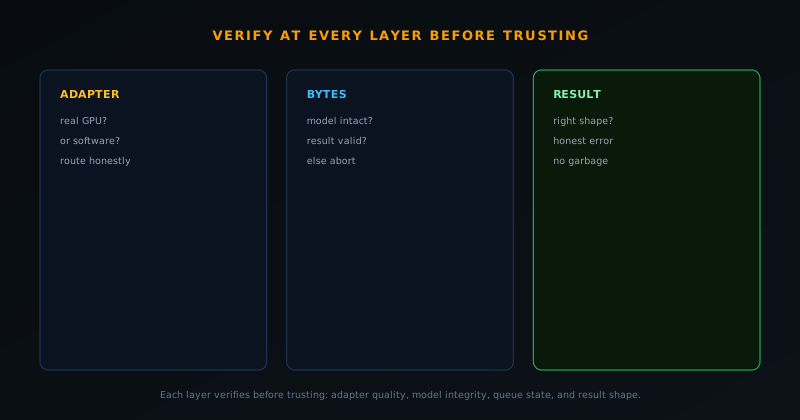
On-device AI runs on whatever hardware the visitor brings, and not all of it is what it claims. v1.5.0 added WebGPU device-lifecycle and quality detection that recognizes when the browser exposes a software or degenerate adapter rather than real GPU acceleration, instead of trusting the adapter blindly and then delivering a confusingly slow or broken experience. Alongside it, execution-provider telemetry records which backend actually bound for a job, so the system knows whether a run truly used WebGPU or quietly fell back, rather than assuming.
This closes a nasty gap. A browser can present a WebGPU adapter that is really a slow software emulation, and a naive tool will commit to it and look broken. Detecting that case lets the tool route honestly, and is the kind of edge that only shows up across the messy diversity of real consumer hardware, which is exactly where reliability work earns its keep.
Verifying the bytes, in and out
A tool that downloads large model files and produces image and video files has two places where bad bytes can ruin everything: a truncated or corrupted model coming in, and a malformed result going out. v1.5.0 hardened both. Model-asset integrity checks verify byte-length and catch truncation, so a partial download does not silently become a broken model that fails mysteriously later. Encode and decode reliability was tightened, including a timeout-guarded video metadata load so a malformed file cannot hang a job indefinitely.
This is the same instinct that produced the earlier pure-JavaScript PNG encoder that verifies its magic bytes before allowing a download. The philosophy is consistent: do not trust that the bytes are correct because the happy path usually produces correct bytes; verify them, and fail clearly when they are wrong. A verified file is worth more than a fast one that might be corrupt.
One queue, and results that are never garbage
Consistency across the suite was tightened with a canonical queue state machine unified across seven queue stores, continuing the earlier all-tools rebuild so every tool's queue handles processing, cancellation, and errors the same way rather than each drifting into its own behavior. On top of that, result-shape guards prevent a tool from ever handing back a useless [object Object], the classic symptom of a result that was not the shape the UI expected. If a result is malformed, the guard catches it instead of letting nonsense reach the user.
A unified queue is the kind of investment that pays off invisibly forever: a fix or improvement to queue behavior now applies once, everywhere, instead of being reimplemented per tool with subtle differences. It is the structural opposite of the compounding-patch trap that the earlier rebuild was designed to escape.
Why on-device AI needs more hardening, not less
A reasonable assumption is that running everything on the user's device, with no backend, means fewer things to harden, but the opposite is true, and understanding why frames the whole release. A server-side tool runs on a fixed, known machine the operator controls: one GPU, one driver, one runtime, all tested. An on-device tool runs on whatever the visitor brings, which is the entire chaotic spectrum of consumer hardware, browsers, drivers, and memory budgets. There is no server to absorb that variance or to be the single tested environment; the tool has to be correct across all of it, which is a far harder reliability problem than a controlled backend faces.
That is why v1.5.0's hardening is not over-engineering but a necessity that the architecture creates. Every guarantee a server-side tool gets for free from its controlled environment (a known-good GPU, a verified runtime, predictable memory) the on-device tool has to establish defensively at runtime on a machine it has never seen. Detecting a bad adapter, verifying downloaded bytes, guarding result shapes, and unifying behavior across tools are all responses to the fact that the execution environment is unknown and untrusted. The privacy and cost benefits of on-device computing are real, and this hardening is the engineering price of earning them without sacrificing reliability.
The software-adapter problem, concretely
One specific hazard the release addresses is worth unpacking because it is so counterintuitive: a browser can offer a WebGPU adapter that is not real GPU acceleration at all, but a slow software emulation or a degenerate device. A naive tool checks "is WebGPU available?", gets a yes, commits to the GPU path, and then delivers an experience that is mysteriously slow or broken, because the adapter it trusted was not the hardware acceleration it assumed. The detection added in v1.5.0 recognizes these software or degenerate adapters specifically, so the tool can make an informed decision instead of trusting a yes that does not mean what it appears to.
This kind of bug is the worst sort to support, because it only manifests on certain machines and looks like the tool is simply bad rather than like a specific, diagnosable fault. A user on such a configuration experiences inexplicable slowness with no error, concludes the tool does not work, and there is nothing in a naive implementation to tell anyone otherwise. Detecting the adapter's real quality up front converts an invisible, machine-specific failure into a known condition the tool can route around, and it is exactly the kind of edge that never appears on a developer's machine and only emerges across the real diversity of users, which is where on-device reliability work earns its keep.
Knowing which backend actually ran
Alongside detection, the release added execution-provider telemetry that records which backend actually bound for a given job. This closes a gap between assumption and reality: without it, the tool assumes a job ran on the backend it intended, but an automatic fallback or a quiet failure could mean the real execution path differed from the planned one. Recording what truly bound (WebGPU, a particular WebAssembly configuration, or a fallback) means the system knows the actual conditions of each run rather than guessing, which is the prerequisite for diagnosing performance and correctness issues that depend on the execution path.
This matters because so many on-device problems are path-dependent. A result that is fine on one backend and wrong on another, or fast on the GPU and slow on the CPU fallback, can only be understood if you know which path actually executed. Telemetry that captures the real binding turns "the tool was slow for this user" from an unfalsifiable complaint into a specific, investigable fact: it ran on the fallback because the GPU path was unavailable, say. Knowing ground truth about execution is unglamorous infrastructure, but it is what lets reliability work be driven by reality rather than by assumptions about how the code was supposed to behave.
The all-tools doctrine, applied to the queue
The canonical queue state machine unified across seven queue stores is the continuation of a doctrine the product learned earlier the hard way: when you fix a class of problem, fix it across every tool that shares the pattern, not just the one that reported it. The suite had grown several queue implementations over time (for the main flow, the editors, video, upscaling, and more) and left to drift they each handled processing, cancellation, and errors in their own slightly different way, which is a standing invitation for the same bug to hide in whichever one had not been touched. Bringing all seven to one canonical state machine is the structural cure for that drift.
The payoff of one queue is that improvements and fixes apply once, everywhere, instead of being reimplemented per tool with subtle variations. A change to how cancellation behaves, or a new guarantee about error handling, lands in the single canonical model and is immediately true across every tool, rather than requiring the same edit in seven places with the risk of missing one. This is the opposite of the compounding-patch trap, where divergent implementations multiply the cost of every fix; consolidation makes the queue cheaper to maintain and more consistent for users at the same time. Reliability at the system level often looks like this: not a clever fix, but the elimination of needless divergence.
A short taxonomy of the honest-failure fixes
The release's commitment to honest failure was not a slogan but a set of specific, concrete fixes, and listing a few makes the principle tangible. Source separation, which splits audio into stems, was fixed to surface a real error when it cannot do the job rather than handing back the input as both stems and pretending it succeeded: a particularly insidious false success because the output looks plausible. Audio-from-video decoding was hardened so a malformed file fails cleanly rather than hanging or producing garbage. Generation inputs were guarded against empty values, so a tool does not silently proceed with nothing to work from.
What unites these is a single editorial stance toward failure: when the tool cannot do the thing, it should say so, not produce something shaped like success. Each fix replaces a specific way the tool could quietly mislead the user with a specific honest signal. The reason this is worth cataloguing rather than summarizing is that honest failure is built case by case: every tool has its own ways of failing silently, and hardening means hunting each one down and replacing it with a truthful error. The taxonomy is the work; "honest failures" is just the name for having done it across the suite.
Why [object Object] is the symptom worth obsessing over
The result-shape guards that prevent a tool from ever returning a useless [object Object] might sound like a trivial cosmetic fix, but the symptom points at something deeper. That string is what appears when a result was not the shape the interface expected and got coerced into nonsense on its way to the screen: it is the visible tip of a contract violation between what a tool produced and what the UI assumed. Guarding against it is not about hiding an ugly string; it is about catching the underlying mismatch before it reaches the user as garbage, and ideally surfacing a real error instead.
Obsessing over this particular symptom is justified because it is a reliable tell of an unhandled case. Wherever [object Object] can appear, there is a path where a malformed or unexpected result is not being checked, and that same gap could just as easily surface as a subtly wrong output that is harder to notice. Adding result-shape guards turns "the tool sometimes shows gibberish" into "the tool validates its results and fails honestly when they are malformed," which closes not just the cosmetic problem but the class of unhandled-result bugs it signals. The small symptom is worth chasing because fixing it properly means hardening the boundary where results meet the interface.
Both apps reaching this stage at once
There is a signal in the timing worth naming: the Background Remover's v1.5.0 hardening and the Visualizers' v1.20 reliability pass landed together, and that simultaneity says something about where the whole ecosystem is. Early in a product's life, releases add capability (new tools, new engines, new features) because the surface area is still being built. A reliability-focused release, where the work is protecting and verifying what already exists rather than extending it, is a marker of maturity: it means the products have enough capability that the priority has shifted to making that capability dependable.
Seeing both apps reach that stage at the same time is the strongest evidence that the ecosystem has moved past the build-it-out era and into the keep-it-dependable era. The two products share a philosophy and a discipline, and they are maturing in step: both deciding, at the same moment, that the next most valuable thing was not another feature but a harder guarantee. For users, that convergence is reassuring: it means the tools they rely on are being treated as things to be made trustworthy for real work, not just demos to be expanded. Maturity is not a feature you can screenshot, but a reliability release in both apps at once is what it looks like.
What this reliability feels like to a user
All of this hardening is invisible when it works, which is the point, but it is worth describing what its absence and its presence feel like from the user's side. Without it, a user on unlucky hardware gets mysterious slowness, an occasional corrupted export, a tool that sometimes shows gibberish, and operations that fail without explanation: an experience that reads as "this tool is flaky" even though each underlying cause is specific and fixable. With it, the same user on the same hardware gets a tool that detects its conditions, verifies its work, behaves consistently, and tells them clearly when something genuinely cannot be done. The difference is the felt sense of whether the tool can be trusted.
That felt trust is the real product of a reliability release, and it compounds in a way features do not. A user who has never been silently handed a broken file or an inexplicable failure develops confidence that the tool will either do the job or say why it could not, and that confidence is what lets them rely on it for work that matters. Features attract users; reliability keeps them, because the moment a tool produces a silent wrong answer on something important, the trust is hard to win back. v1.5.0 is an investment in that retention-grade trust: the unglamorous foundation that makes every visible feature worth using in the first place.
Honest failures over silent wrong answers
The most telling change is the smallest-sounding. Several tools were fixed to surface honest errors instead of plausible-looking wrong output. Source separation, for example, now returns a real error when it cannot do the job rather than handing back the input as both stems and pretending it worked. Per-tool fixes hardened audio-from-video decoding and guarded generation inputs against empty values. The pattern everywhere is the same: when the tool cannot do the thing, say so, rather than producing something that looks like success and is not.
This is the heart of what makes a tool trustworthy for real work. A clear error says "this specific thing went wrong, here is what to do"; a silent wrong answer says "this worked" when it did not, and the user only discovers the lie downstream when it is expensive. Choosing honest failure is choosing the user's trust over a momentarily smoother demo. Across device detection, byte verification, a unified queue, result guards, and truthful errors, v1.5.0 is that choice made five times, which is what enterprise-grade actually looks like under the hood. The earlier rebuild post covers the queue foundation, and the registry-audit post covers the same honesty applied to the models themselves.
Frequently asked questions
Quick answers to common questions about this topic.
What does reliability hardening involve for browser AI?
Handling the WebGPU device lifecycle (including loss and recovery), verifying model-asset integrity before use, guarding result shapes, and replacing cryptic errors with honest, specific failure messages.
Why are honest failure messages important?
A silent failure or an opaque "[object Object]" error makes a tool feel broken and untrustworthy. A clear message that says what went wrong and what to do preserves trust even when something fails.
How does this make the tool more reliable?
By catching the failure classes specific to client-side ML (device loss, corrupted model loads, unexpected shapes) and recovering or reporting them cleanly, so problems are handled rather than surfacing as mysterious breakage.
Related troubleshooting
Was this page helpful?
Your answer stays in this browser, it is not sent anywhere and no account or cookie is involved.