2026 · Sonic WeaverAbout 14 min readNovus Stream Solutions
Why we render 4K in your browser, and why there is no export quota
Sonic Weaver encodes finished video entirely in your browser with WebCodecs (MP4 or WebM up to 4K), so every export costs us nothing to produce. That single architectural choice, not generosity, is what makes unlimited, watermark-free, private export sustainable.
Contents
- 1.Overview
- 2.Every server-rendered export has a bill attached
- 3.Moving the encode to your device moves the bill with it
- 4.How the browser encodes 4K without a server
- 5.4K is exactly the export a server hates most
- 6.A watermark is usually a bill in disguise
- 7."No quota" is a property, not a promotion
- 8.The same architecture keeps your track private
- 9.The honest cost: your device does the work
- 10.Why credit-metered tools work the way they do
- 11.MP4 or WebM: both encoded the same local way
- 12.Why this is the only way free stays free
Overview
The export button is where free video tools usually reveal their real business model. You make something you like, you press export, and then you meet the watermark, the 720p ceiling, the "three exports left this month" counter, or the upgrade modal. Sonic Weaver exports MP4 and WebM up to 4K, with no watermark and no quota, and that is not a promotional gesture we will quietly walk back once usage grows. It is a consequence of a single architectural decision: the video is encoded on your device, in your browser, instead of on a server we pay to run. This post is about how that works, and why it is exactly what makes unlimited free export sustainable rather than a slow-motion bait and switch.
The claim worth stating plainly is that "free, unlimited, watermark-free 4K export" and "we render it for you on our servers" are close to incompatible at any real scale, and most free tools that promise the first quietly depend on the second, which is why the limits show up eventually. We took the harder engineering path specifically so we would never have to add those limits. The encode happens client-side through the browser's WebCodecs API, which means every export you run costs us nothing and reveals nothing about your track. Understanding why is mostly a matter of following the money and following the frames, and the two lead to the same place.
Every server-rendered export has a bill attached
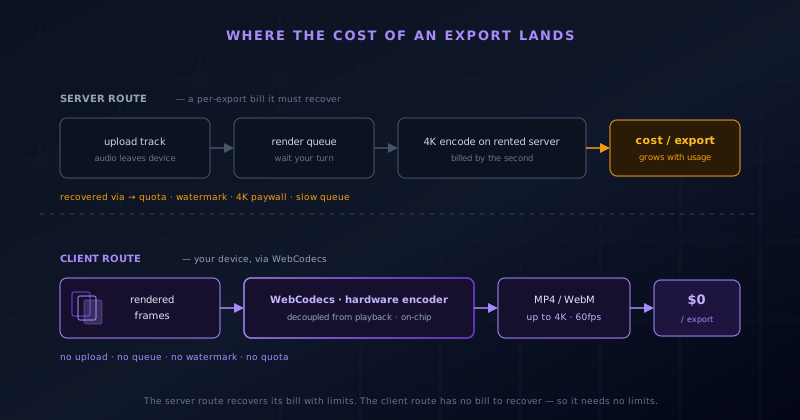
Start with the thing most feature lists never mention: rendering video is expensive to do on a server, and the expense is per export, not a fixed one-time cost. When a tool encodes your video in its own cloud, it rents a machine with enough CPU, memory, and often a hardware encoder to turn a few minutes of 4K frames into a compressed file. That machine is billed by the second, and a 4K encode is one of the heavier things you can ask a general-purpose server to do. Multiply it by every user pressing export, several times each, and the cost is not a rounding error; it is the single largest variable line item a browser-based video tool has.
This is the number that quietly shapes the whole product. A tool that pays real money every time someone exports has to get that money back somewhere, and the levers are familiar: cap how many exports a free user gets, stamp a watermark on free output so it advertises the paid tier, hold 4K and 60fps behind a subscription, or throttle free renders into a slow queue behind paying customers. None of those are villainy; they are rational responses to a cost that scales linearly with success. The more a server-rendered free tool is used, the more it costs its operator, which is a deeply uncomfortable shape for anything meant to be free, because popularity becomes a liability instead of an asset.
Moving the encode to your device moves the bill with it
Client-side export inverts that cost structure. Instead of shipping your rendered frames up to a server to be encoded, Sonic Weaver hands them to the encoder built into the browser on the machine you are already using. The compute that turns frames into an MP4 is spent by your device, not rented from a cloud provider by us. From our side, the marginal cost of your export (the extra money it costs us specifically because you pressed export rather than not) is essentially zero. We serve the app once, as static files and code; after that, your first export and your thousandth cost us the same nothing, because we are not in the encoding loop at all.
That single change is what makes the rest of the promises structurally honest instead of temporarily generous. When an export costs the operator nothing, there is no bill to recover, and the reasons to meter, to watermark, or to gate 4K simply evaporate. Unlimited export is not us heroically absorbing a growing cost out of goodwill; there is no cost to absorb. This is why we treat "no quota" as a property of the architecture rather than a line in a pricing table: a pricing decision can be reversed next quarter, but the fact that your device does the encoding is baked into how the tool is built. The generosity, if you want to call it that, is structural rather than discretionary.
How the browser encodes 4K without a server
The capability that makes this possible is WebCodecs, a browser API that exposes the device's real media encoder to a web page. Before it existed, browser tools that wanted a video file had to record the canvas as it played (essentially filming the screen in real time), which was slow, bound to playback speed, and prone to dropping frames the moment the tab got busy. WebCodecs replaces that with direct access to the same hardware-accelerated encoder native apps use. Sonic Weaver takes each rendered frame from the visual engine (the exact frame the audio analysis produced for that timestamp) and feeds it straight into the encoder, which returns compressed H.264 or VP9 data ready to be written into a container.
Two properties of that path matter for 4K specifically. First, it is decoupled from playback: frames are pushed to the encoder as fast as your device can render and compress them, so a three-minute video does not take three minutes to export; it takes as long as the machine needs, often far less. Second, it rides the hardware encoder, the dedicated silicon most modern phones and laptops include precisely because encoding video in general-purpose code is punishingly slow. That hardware is why a 4K export on a capable device finishes in seconds rather than the long grind a software-only browser encode would require. WebCodecs is the bridge between the tab and that silicon, and it is a fairly recent arrival: practical client-side 4K simply was not possible before it.
4K is exactly the export a server hates most
It would be easy to offer client-side export for small files and quietly route 4K to a server, so it is worth being clear that 4K is precisely the case where the local approach pays off most. A 4K frame has four times the pixels of 1080p, which means four times the data to encode and far more memory and compute spent per frame. On a server, that is where the per-export bill spikes hardest; it is the resolution most likely to be gated behind a paywall for exactly that reason. Handing it to the user's own hardware encoder is what lets us offer 4K as a normal option rather than a premium one, because the resolution that would cost us the most centrally costs us nothing when it runs on your device.
The frame rate compounds this. A 4K export at 60fps is the heaviest thing the pipeline produces (twice the frames of 30fps, each of them large), and it is the combination server tools are most eager to restrict. Because our encode is local and hardware-accelerated, 24, 30, and 60fps are all available at every resolution up to 4K without a tier attached. The platform presets exist not to ration capability but to match dimensions and frame rate to where the video is going, so a vertical short for Reels or a Spotify Canvas loop comes out correct without you memorizing the spec. The heaviness of 4K60 is a reason to lean on local encoding, not a reason to withhold it.
A watermark is usually a bill in disguise
It helps to be honest about what a watermark actually is. Framed generously, it is a free advertisement for the tool; framed accurately, it is a tax the free user pays so the operator can recover the cost of the render and pressure an upgrade. The watermark exists because the export cost real money and the business needs that money back, either as marketing reach or as a nudge toward the paid tier that removes it. It is the visible surface of the same server-cost problem, printed onto your video. Where there is no per-export cost, that entire justification disappears, and with it the reason to brand your work with ours.
This is why Sonic Weaver exports are clean. The video that comes out is yours, uncredited to us, because we have no cost to recover by stamping it and no server render to advertise. A creator posting a music video does not want a corner logo announcing which free tool made it, and we have no economic reason to insist on one. The watermark, the export counter, and the resolution paywall are three faces of the same underlying pressure, and removing the pressure at its source (the per-export cost) is what lets us remove all three at once rather than choosing which limitation to keep. You get the file you actually made, not a demo of it.
"No quota" is a property, not a promotion
Free tiers with export counters are so common that "unlimited" reads as a marketing word people have learned to distrust, usually with good reason: it tends to mean "unlimited until the terms change." The distinction worth drawing is between a limit that is chosen and a limit that does not exist to begin with. A server-rendered tool that offers unlimited free export is choosing, every month, to absorb a cost that grows with its own popularity; that choice is always one budget review away from becoming a quota. Nothing structural is preventing the limit, so the limit tends to arrive the moment the tool succeeds enough to feel the cost.
When the encode runs on your device, there is no meter to read and nothing accumulating on our side to cap. We could not enforce a per-user export quota without adding tracking that does not currently exist, because we are not involved in the export at all; it happens between your visual engine and your browser's encoder. "Unlimited" here is not a promise we are choosing to keep against mounting pressure; it is a description of a system that has no natural place to put a limit. That is a meaningfully stronger guarantee than a generous pricing page, because it does not depend on our continued willingness to eat a cost. There is no cost, so there is nothing to stop eating.
The same architecture keeps your track private
A quieter benefit falls out of the same decision: because the encode is local, your audio and your finished video never leave your machine. There is no upload step, so the unreleased track you are making a visualizer for is not sitting on a processing server, not passing through our infrastructure, and not lingering in a queue. The Web Audio analysis that drives the motion runs in your browser, the frames are rendered in your browser, and the encode happens in your browser; the whole pipeline is local, from the file you drop in to the file you save out. For a musician working on something that has not come out yet, that is not a nice-to-have; it is often the difference between using a web tool and refusing to.
This is worth naming because privacy and cost usually trade against each other, and here they do not. A server-rendered tool has to receive your audio to encode it, which means your unreleased music is on someone else's computer at least briefly, and it means that operator carries the cost of handling it. The client-side path removes both at once: nothing is uploaded, so nothing is exposed, and nothing is processed centrally, so nothing is billed. The property that makes the tool cheap for us to run is the same property that makes it private for you. One architectural choice satisfies two goals that ordinarily pull in opposite directions, which is usually a sign the choice is the right one.
The honest cost: your device does the work
None of this is free of tradeoffs, and it would be dishonest to pretend otherwise. The obvious one is that export performance is bound by your hardware. A server farm gives every user the same encode speed regardless of their machine; we give you the speed of whatever you brought. A recent laptop or phone with a strong hardware encoder finishes a 4K render quickly, while an older or lower-powered device takes longer on the same scene. We chose to accept that variability rather than smooth it out with a server, because the alternative reintroduces the upload, the queue, the cost, and the limits we specifically built the tool to avoid in the first place.
The second tradeoff is reach: WebCodecs and the surrounding APIs are modern browser features, so the client-side path needs a reasonably current browser to work. A remote render pipeline would have sidestepped that by doing the encoding elsewhere. We judged it worth it because the browsers creators actually use for this kind of work support what the pipeline needs, and because the properties on the other side of the trade (no cost, no watermark, no quota, no upload, and instant local iteration) are the ones that define the product. Clear, accurate export progress is part of how we handle the variability honestly, so a longer encode on a modest device reads as "working" rather than "frozen."
Why credit-metered tools work the way they do
Put the two models side by side and the contrast is clean. A tool that encodes on its servers has a real, per-export cost, and it has to reconcile that cost with wanting to offer a free tier. The reconciliation is always some mix of the same instruments, and once you know the cause you can read the menu on sight; every item on it is a way to recover money the encode already spent:
Every item on that list is a rational way to recover a per-export server cost, which is why the same list appears across so many otherwise different tools; they share the same underlying economics. A client-side tool has no per-export cost to recover, so it has no reason to reach for any of those instruments, which is why our menu looks so different. This is not a claim that we are more generous than those teams; it is a claim that we made an architectural choice that removed the pressure they are responding to. When you see a familiar mix of counters, watermarks, and resolution gates on a free video tool, you are usually looking at the shadow of a server render bill.
- A monthly export count on the free plan, after which you pay or wait.
- A watermark on free output, removed only by upgrading.
- Resolution and frame-rate caps that hold 4K or 60fps for paid users.
- A render queue where free jobs sit behind paying ones.
- Time-limited "credits" that meter renders directly.
MP4 or WebM: both encoded the same local way
The client-side pipeline produces two formats, and which one to reach for is worth a note because both come out of the same local encode. MP4 with the H.264 codec is the universally safe choice: every platform, player, and phone accepts it, so it is the right default for uploading to YouTube, TikTok, or Instagram, or for handing a file to someone else. WebM with the VP9 codec is the more efficient modern option, often producing a smaller file at similar quality, which is useful when file size matters or the destination is a web context that prefers it. Both are encoded by your device's hardware where available, and both are muxed with your audio into a complete, self-contained file.
The point for this post is that the choice of format changes nothing about the economics or the privacy. H.264 and VP9 are both encoded locally through WebCodecs, both cost us nothing per export, both come out without a watermark, and both keep your audio on your machine. The format is a compatibility decision for you, not a tier we sell; there is no "premium codec" behind a paywall, because there is no per-export cost that a paywall would exist to recover. Pick MP4 when you want maximum compatibility and WebM when you want efficiency, export as many of either as you like, and the underlying deal is identical for both files.
Why this is the only way free stays free
The through-line is simple once the money and the frames line up. Server-rendered video has a per-export cost that scales with use, and that cost is the source of nearly every limitation free video tools impose: the quotas, the watermarks, the resolution gates, the queues. Move the encode onto the user's device with WebCodecs and that cost goes to zero for the operator, which removes the reason for all of those limits at the same time. Unlimited, watermark-free, private 4K export is not a feature we are being generous about; it is what naturally remains once the per-export cost that forces the limits is gone. The hard engineering buys the sustainable economics, and the economics buy the freedom.
That is why we are comfortable stating "no export quota" without an asterisk. It is not a promotional rate that expires when usage climbs; it is a description of a system with no place to put a meter and no bill to recover. The tradeoff we accepted (your device does the encoding, so a modest machine takes a little longer) is the price of a promise we can actually keep. You can open the editor, drop in a track, and export a 4K video right now, as many times as you want, and the reason that stays true is the same reason it costs us nothing to let you. Follow the money and you arrive at the frames, and the frames are on your machine.
Frequently asked questions
Quick answers to common questions about this topic.
Is there really no limit on how many videos I can export?
Yes. The encode runs in your browser on your own device, so each export costs us nothing to produce and there is no meter on our side to cap. "No export quota" describes how the tool is built, not a promotional tier that expires; there is no natural place in the architecture to put a limit.
Why can you offer watermark-free 4K export for free when other tools charge for it?
Because those tools usually encode on their own servers, where every 4K export has a real per-second cost they need to recover through watermarks, quotas, or paywalls. Sonic Weaver encodes on your device via WebCodecs, so that per-export cost never exists, and neither do the limits it would otherwise fund.
Does my audio or video get uploaded to encode it?
No. Everything (the audio analysis, the rendering, and the final MP4 or WebM encode) happens in your browser. Your track and the finished video never leave your machine, which is why an unreleased song is safe to work on here.
Why does a 4K export take longer on some devices?
Because the encode runs on your hardware, not ours. A device with a strong hardware encoder finishes a 4K render in seconds, while an older one takes longer on the same scene. That is the tradeoff we accept in exchange for no uploads, no cost, and no export limits.
Related troubleshooting
Was this page helpful?
Your answer stays in this browser, it is not sent anywhere and no account or cookie is involved.