2026 · Sonic WeaverAbout 20 min readNovus Stream Solutions
A field guide to the ten Sonic Weaver engines
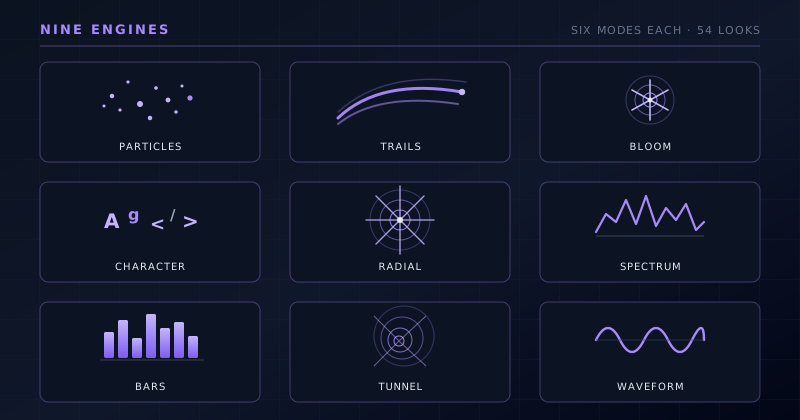
Sonic Weaver ships ten engines, each with six modes, sixty distinct looks in all. This field guide walks through every engine: what it renders, the music it flatters, and when to choose it over the others.
Reviewed and updated August 1, 2026. Re-checked against the Sonic Weaver V3 catalog on August 1, 2026 and extended: the roster is now ten engines and sixty modes, and a full section on the tenth engine, Logo, has been added. This article keeps its original URL from when the roster was nine, so the address still reads “nine-engines”; the content is current.
Contents
- 1.Overview
- 2.Engines, modes, and one renderer
- 3.Particles: motion made of many small things
- 4.Trails: motion that leaves a mark
- 5.Bloom: organic growth and spreading
- 6.Character Motion: type and figures that move
- 7.Radial: symmetry around a center
- 8.Spectrum: the frequency picture itself
- 9.Bars: the equalizer, done properly
- 10.Tunnel: forward motion and depth
- 11.Waveform: the shape of the sound
- 12.Logo: brand-first scenes built around your artwork
- 13.Choose by energy, not by genre
- 14.Layering engines, and how to audition
Overview
The single decision that shapes a Sonic Weaver video more than any color, caption, or export setting is which of the ten engines you build on. An engine is a whole way of turning the analyzed track into motion, and the ten are genuinely different instruments rather than skins over one effect: particles behave nothing like bars, and a tunnel rushing toward you has little in common with a waveform tracing across the frame. Each engine then splits into six modes, so the full palette is sixty distinct looks. That is a lot of ground, and it is easy to open the editor, click through a few, and settle for whatever happened to look decent instead of the one the song actually wanted.
This guide is meant to fix that. It walks through all ten engines in turn (Particles, Trails, Bloom, Character Motion, Radial, Spectrum, Bars, Tunnel, Waveform, and Logo) and for each one describes what it renders, the six modes inside it, the kind of music and energy it flatters, and the moment to reach for it over the others. The recommendations are opinionated on purpose; a field guide that refuses to say 'use this for that' is just a list. Everything here applies whether you build in the guided Classic Editor or the node-based Studio Workstation, since both draw from the same ten engines and the same audio analysis.
Engines, modes, and one renderer
It helps to be precise about the vocabulary. An engine is the family (the fundamental behavior, like particles or bars), and a mode is a specific variant within that family, a particular way that behavior is arranged and drawn. Ten engines times six modes is the sixty total, and every one of them reads the same underlying signal: a 32-band FFT for the spectrum, plus BPM and onset detection for the beat. Switching engines changes the whole character of the motion; switching modes within an engine changes its arrangement while keeping the family's DNA intact. There is no separate template or preset library sitting on top of this: the engine-and-mode pair is the starting point, and you shape it from there with colors, geometry, direction, audio bindings, captions, and logos.
One point trips people up, so it is worth stating plainly: there is no global 2D/3D switch. Depth is not a toggle laid over everything; it lives inside specific modes that were built dimensional: Bars' 3D Columns, Spectrum's Spectral Mesh, Waveform's 3D Surface, Character Motion's 3D Performer, and the tube modes in Tunnel. If you want a scene with real depth, you choose one of those modes, not a setting. The other thing both editors share is one saved document and one deterministic renderer, which is why the preview matches the export frame for frame. Choosing an engine is choosing the language the video speaks; choosing a mode is choosing the dialect it speaks in.
Particles: motion made of many small things
Particles builds the frame out of many small points (dust, sparks, stars) that move as a system, and its appeal is that the motion looks emergent rather than drawn. Nothing in a particle scene is a single deliberate shape; the image is the sum of hundreds of tiny elements responding together, which reads as weather, swarm, or galaxy depending on how they are tuned. Because each point is small, the engine excels at texture and atmosphere, and it reacts beautifully to the high end: assign the treble energy and a field of particles shimmers with every hi-hat and cymbal while the bass drives the overall density or gravity. It is the most ambient of the ten in feel, closer to a mood than a graphic.
Reach for Particles when the track is atmospheric, spacious, or building (ambient, downtempo, cinematic scoring, the quiet intro before a drop) where you want motion that feels alive without demanding attention or spelling out the beat. Its six modes cover a wide swath of that territory, from the diffuse haze of Dust Storm to the deliberate points of light in Constellation. It is less suited to punchy, rhythm-forward music that wants a hard, legible hit on every beat; particles can pulse, but their strength is the slow swell and the shimmer, not the sharp accent. When you want the background to breathe and the motion to feel like weather rather than a graph, this is the engine to start from.
- Dust Storm: a diffuse, drifting haze of fine particles for atmosphere
- Waterfall: particles falling in a continuous, gravity-led stream
- Starfield: points of light receding into depth, like flying through space
- Fountain Burst: particles thrown upward and out, punchy on the beat
- Orbit Swarm: a cloud circling a center, swarming with the energy
- Constellation: sparser points linked into slowly shifting shapes
Trails: motion that leaves a mark
Trails is Particles' expressive cousin: instead of points that simply exist, its elements leave persistent streaks behind them, so the frame fills with the history of motion rather than its instant. A comet is not a dot but a bright head dragging a fading tail; a ribbon is a continuous painted stroke that curls through the frame. This persistence is what makes Trails feel fluid and gestural: the image records where energy has been, which gives even simple movement a sense of flow and calligraphy. The tails naturally lengthen and brighten with the music, so a swell in the track pulls longer, more luminous streaks across the frame, and a quiet passage lets them thin out and settle.
Reach for Trails when you want elegance and flow: melodic electronic, synthwave, and anything with long phrases and a sense of movement rather than blunt impact. It suits music that curves more than it hits: arpeggios, pads, basslines that glide. The six modes span from the scattered drama of Comet Shower to the structured motion of Orbit Trace and the algorithmic drift of a Flow Field. It is a poor fit for sparse, percussive tracks where you want each hit isolated and clean, because the persistence that makes Trails beautiful also fills the frame; on the right music that fullness reads as motion, on the wrong music it reads as clutter. Match it to melody, not to percussion.
- Comet Shower: bright heads dragging fading tails across the frame
- Ribbon Flow: continuous painted ribbons curling with the melody
- Snake / Braid: interwoven strands that weave together and separate
- Orbit Trace: elements tracing looping orbital paths over time
- Flow Field: particles drifting along an invisible vector field
- Echo Streaks: motion echoed as receding, fading after-images
Bloom: organic growth and spreading
Bloom is the engine of growth. Its forms expand, spread, and unfold from seeds (petals opening, ink diffusing into water, cells dividing, vines creeping outward) so the motion has a botanical, living quality unlike anything else in the set. Where Particles and Trails are made of many small movers, Bloom is about a few structures that develop over time, growing on the swells and settling in the quiet passages. The reactivity tends to drive growth rate and scale, so the music literally makes the forms bloom: a rising phrase pushes petals open or sends a crystal branching, and a drop can burst the whole structure into flower. It is slow, deliberate, and unmistakably alive.
Reach for Bloom when the music is organic, patient, or lush: neo-soul, acoustic-electronic, ambient with a pulse, meditative or spa-adjacent material, anything where you want beauty that unfurls rather than strikes. It rewards tracks with dynamics and space, because the growth needs room to read; on a wall-of-sound track that never lets up, the forms have nowhere to breathe. The six modes range from the literal flowering of Petal Bloom and Ripple Blossom to the eerie spread of Ink Diffusion and the fractal creep of Vine/Mycelium and Crystal Growth. It is the most distinctive engine for a certain mood (few visualizers offer growing, living structure) and the wrong choice when you need sharp, rhythmic punch.
- Petal Bloom: flowers opening and closing with the dynamics
- Ink Diffusion: pigment spreading and blooming through water
- Cellular Growth: dividing, multiplying cell-like forms
- Vine / Mycelium: branching tendrils creeping across the frame
- Crystal Growth: angular crystalline structures accreting outward
- Ripple Blossom: concentric blossoming ripples on each hit
Character Motion: type and figures that move
Character Motion is the outlier of the ten, and the most useful when a video needs to carry meaning, not just mood. Instead of abstract forms it animates characters (letters, glyphs, ASCII, and actual figures) so the frame can spell something or perform. At one end it is typographic: fields of glyphs, words riding the audio like a wave, cascading ASCII rain. At the other it is figurative: a jointed 2D puppet, a dimensional 3D Performer, a crowd of clones moving in unison. This is the engine to reach for when the track has a title, a lyric, a name, or an identity that should be present in the picture rather than added as a caption on top of something abstract.
Reach for Character Motion when the content is the point: lyric-forward songs, hip-hop and spoken word where the words matter, brand or artist pieces that need a name on screen, or anything that wants a figure performing to the music. The typographic modes suit sharp, rhythmic, verbal material; the figurative modes, including the depth-based 3D Performer, suit tracks that want a subject or a mascot moving in time. It is not the engine for pure ambient wash; using letters where you want atmosphere fights the mood. But when a video needs to say something, no amount of particles will do what a field of reactive glyphs or a performing figure does directly and legibly.
- Glyph Field: a field of characters reacting across the frame
- Word Wave: words riding and rippling on the audio
- ASCII Cascade: cascading ASCII rain, terminal-flavored
- 2D Puppet: a jointed flat figure animated to the beat
- 3D Performer: a dimensional figure performing in depth
- Crowd / Clone: many copies moving in unison or canon
Radial: symmetry around a center
Radial organizes everything around a single center point, which gives it a focused, iconic, almost ceremonial quality. Rings pulse outward, mandalas rotate, sunbursts fan, an orb throbs at the middle of the frame; the symmetry pulls the eye straight to the center and holds it there. This makes Radial the natural home for anything that should feel like a logo or an emblem: the Logo Crown mode is built precisely to ring a mark with reactive geometry, and the centered composition means a title or artwork placed in the middle sits inside the motion rather than fighting it. Radial reactivity usually drives pulse and rotation, so the whole figure breathes and turns with the beat.
Reach for Radial when you want a strong, centered focal point: a single-track cover loop, a podcast or DJ-mix backdrop, a branded piece built around a logo, or club-ready music that wants a hypnotic centerpiece. Its symmetry reads as polished and intentional, which flatters electronic and dance material and anything meant to loop cleanly. The six modes go from the simple throb of Pulse Orb to the intricate rotation of Mandala and the brand-focused Logo Crown. Its limitation is the flip side of its strength: everything points at the center, so Radial is less suited to sprawling, evolving scenes where you want the eye to wander. When you want one thing at the heart of the frame, this is it.
- Pulse Orb: a central orb throbbing with the beat
- Concentric Rings: rings pulsing outward from the center
- Mandala: intricate rotational symmetry, kaleidoscopic
- Sunburst: rays fanning out and retracting with the energy
- Orbit Halo: elements circling a bright central core
- Logo Crown: reactive geometry ringing a placed logo or mark
Spectrum: the frequency picture itself
Spectrum draws the sound directly. Where most engines translate the audio into something metaphorical, Spectrum renders the frequency data itself (the 32-band FFT made visible) as a line, an area, a ridge, or a surface that maps the actual distribution of energy across the spectrum, from bass on one side to treble on the other. The result is precise and technical in the best sense: what you see is literally what the track is doing, low end on the left rising and falling, highs on the right flickering. That honesty is the appeal. A Spectrum scene feels engineered and exact, and it reads instantly to anyone who has ever watched an analyzer in a DAW.
Reach for Spectrum when accuracy and a produced, technical aesthetic serve the music: electronic, bass, and dance genres where the frequency content is the story, gear and studio content, or any release that wants to look precise rather than painterly. The six modes climb from the clean Line Spectrum and Mirrored Area to the time-scrolling Spectrogram Waterfall and the depth-based Spectral Mesh, which lifts the frequency picture into a rolling three-dimensional terrain. It is the most literal engine, which is exactly why it can feel cold on organic, acoustic material that wants warmth over precision. But for music built in a DAW and proud of its own sound design, nothing represents the track more truthfully.
- Line Spectrum: a single reactive line tracing the frequency bands
- Mirrored Area: a filled spectrum mirrored top and bottom
- Ribbon Surface: the spectrum drawn as a flowing ribbon
- Spectrogram Waterfall: frequency scrolling over time as a heatmap
- Frequency Ridge: bands raised into a mountainous ridge line
- Spectral Mesh: the spectrum lifted into a rolling 3D terrain
Bars: the equalizer, done properly
Bars is the visualizer everyone already pictures (the equalizer, columns rising and falling with the music), and its value is that it is the most immediately legible of the ten. There is no ambiguity about what a bar graph is doing; the eye reads it as sound at a glance, which is why it has been the default music visual for decades. Sonic Weaver treats it seriously rather than as a cliché, giving it six arrangements that stretch the idea well past the flat row: mirrored, stacked into colored bands, wrapped into a circle, raised into 3D columns, or laid out as a piano-style step grid. Each bar maps to a frequency band, so the whole graph is a direct, punchy readout of the mix.
Reach for Bars when you want clarity and rhythm you can see: pop, hip-hop, EDM, any beat-driven track where a hard, obvious response on every hit is a feature, not a compromise. It is the safe, strong default when you are not sure what else to use, because it always reads and always feels tied to the music. The six modes let you keep it classic with a Linear Equalizer or push it toward spectacle with Radial Bars and the depth-based 3D Columns. Its honesty is also its ceiling: Bars rarely surprises, and for atmospheric or organic music it can feel mechanical. But when the brief is to make it obviously react to the beat, Bars is the most reliable answer in the set.
- Linear Equalizer: the classic row of frequency bars
- Center Mirror: bars mirrored out from the middle
- Stacked Bands: segmented bars stacked in colored bands
- Radial Bars: the equalizer wrapped into a circle
- 3D Columns: bars raised into a dimensional column field
- Piano / Step Grid: a gridded, sequencer-style bar layout
Tunnel: forward motion and depth
Tunnel is the engine of travel. It builds a sense of rushing through space (rings, corridors, and tubes receding toward a vanishing point) so the dominant feeling is forward momentum, of being pulled into the frame. This is the most immersive and kinetic of the ten, and several of its modes are genuinely dimensional: the Spectrum Tube and Waveform Tube wrap the frequency and waveform data around the inside of a tube you fly down, and the Particle Vortex spirals points into a whirlpool of depth. The speed of travel tends to track the music's energy, so a build accelerates the rush and a drop launches you down the corridor, which makes a Tunnel scene feel less like a backdrop and more like a ride.
Reach for Tunnel when the music has drive and you want the visual to move with it: driving techno, trance, drum and bass, psytrance, high-energy electronic where relentless forward motion matches relentless rhythm. It is the engine that most creates a sense of journey, ideal for long-form mixes and hypnotic sets where you want to pull a viewer in and keep them. The six modes range from the structured Corridor Grid to the chaotic Warp Field and the data-wrapped tubes. Its intensity is the caveat: Tunnel is a lot, and on calm or sparse music the constant rush overwhelms the track rather than serving it. Save it for music that genuinely moves forward.
- Concentric Rings: rings rushing toward a vanishing point
- Corridor Grid: a gridded corridor you travel straight down
- Warp Field: a chaotic, warping rush of depth
- Spectrum Tube: the frequency spectrum wrapped around a tube
- Waveform Tube: the waveform wrapped inside a flown corridor
- Particle Vortex: particles spiraling into a whirlpool of depth
Waveform: the shape of the sound
Waveform draws the other honest picture of audio: not the frequency distribution but the amplitude over time, the literal oscillation of the signal that everyone recognizes from an audio editor. A waveform line jumps and settles exactly with the loudness of the track, so the connection between what you hear and what you see is total and immediate: the line is the sound. It is clean, minimal, and unmistakably musical, which is why it is a favorite for tasteful, understated pieces. The six modes take the single line and vary it: filled solid, mirrored, thickened into a ribbon, thrown into an oscilloscope's Lissajous curves, or lifted into a 3D surface that rolls with the signal.
Reach for Waveform when you want restraint and a direct, elegant tie to the audio: singer-songwriter and acoustic material, podcasts and voice, minimal electronic, or any release where a clean, sophisticated look beats a busy one. The Oscilloscope/Lissajous mode is a particular treat for anyone who loves the look of stereo phase curves, and the 3D Surface mode gives the humble line real dimensional presence. Waveform's weakness is that it can be too simple for high-energy spectacle; a festival banger may want the density of Tunnel or the punch of Bars rather than a single tracing line. But for anything that values taste over intensity, the waveform is the most honest and quietly beautiful representation of the sound in the set.
- Line: a single clean waveform line tracing the signal
- Mirrored: the waveform reflected symmetrically
- Filled: the area under the waveform filled solid
- Ribbon: the line thickened into a flowing ribbon
- Oscilloscope / Lissajous: stereo phase curves, scope-style
- 3D Surface: the waveform raised into a rolling surface
Logo: brand-first scenes built around your artwork
Logo is the tenth engine and the one with the clearest brief: it is the only engine whose whole job is to make your artwork the subject rather than the wallpaper. Every other engine fills the frame and leaves you to place a mark somewhere it will survive; Logo inverts that. It arranges reactive geometry around a centred image and keeps the middle deliberately clear, so a cover, a wordmark, or a channel avatar stays legible for the entire run rather than being swallowed the moment the track gets busy. The engine's own description is blunt about it (reactive geometry arranged around your artwork, never over it), and that constraint is what makes the results usable straight out of the editor instead of needing a manual safe-area fight.
Reach for Logo when the video exists to carry a brand: release announcements and pre-saves, label or podcast idents, stream starting-soon and be-right-back cards, merch drops, and any square or vertical cut where the artwork is the message and the music is the accompaniment. Its six modes vary how the surrounding motion behaves without ever crowding the centre: a ring that bends the time-domain trace around the mark, concentric arcs each carrying their own frequency band, a full equalizer ring in orbit, a breathing particle halo, a rectangular badge frame built for square and vertical formats, and a kinetic reveal that lights wedges in turn so the mark assembles across a bar. Logo's limit is the mirror image of its strength: with nothing in the middle to protect it has less to say than the engines that fill the frame, so for a pure listening video without artwork one of the other nine will usually give you more.
- Waveform Ring: the time-domain trace bent into a ring around your logo
- Spectrum Halo: concentric arcs, each carrying its own frequency band
- Orbiting Bars: a full equalizer ring orbiting the artwork
- Particle Aura: a drifting particle halo that breathes with the mix
- Pulse Frame: a rectangular badge frame, built for square and vertical formats
- Kinetic Reveal: wedges light in turn so the mark assembles across a bar
Choose by energy, not by genre
Genre is a rough guide, but the sharper question is energy. Sort the ten engines by how hard they hit and a clear spectrum appears. At the punchy, legible end sit Bars and Tunnel, which spell out the rhythm and drive forward; near them, Radial and Spectrum give centered or technical impact. In the middle, Particles and Trails offer atmosphere with motion: reactive but not blunt. At the gentle, organic end, Bloom grows and Waveform traces, both favoring beauty over force. Character Motion and Logo both sit apart on their own axes (one chosen for meaning, the other for branding) rather than for energy at all. Match the engine's position on that scale to the track's energy, and the video almost always feels right; mismatch them and even a clean render feels subtly off.
In practice the fastest way to choose well is to name the track's dominant quality in a single word (driving, atmospheric, organic, verbal, precise, elegant) and let that word point at the engine before you audition modes. A relentless techno cut says driving, so start at Tunnel or Bars; a spacious ambient piece says atmospheric, so start at Particles or Bloom; a lyric-heavy song says verbal, so start at Character Motion. You will still try several, and a track can surprise you, but starting from the energy rather than clicking through all sixty in order turns an overwhelming menu into two or three sensible candidates. The mode then fine-tunes the arrangement once the family is right.
Layering engines, and how to audition
None of this is a rule that limits you to one engine per video. In the Studio Workstation, engines become ordered layers, so you can stack a Waveform line over a Particle field, ring a Radial Logo Crown around a Bars readout, or float Character Motion titles above a Tunnel, each layer with its own blend mode and its own slice of the audio. The field-guide recommendations are starting points for a base layer; the richest videos often pair a quiet atmospheric engine behind a legible rhythmic one, letting one carry the mood while the other carries the beat. The single shared document and deterministic renderer mean all of it previews and exports as one coherent scene.
The honest final advice is to audition against your own track, not against a demo. Because every engine reads the same 32-band FFT, BPM, and onset signal, the only way to know how a given mode responds to your particular mix is to drop the file in and watch it move: a mode that looks generic on a demo can come alive on the right song. Use this guide to narrow the ten down to a likely two or three, try their modes against the actual audio, and pick the one that makes you feel the music more. Then take it to export: client-side, up to 4K, with no watermark and no quota, so trying, discarding, and re-rendering costs nothing but your attention.
Frequently asked questions
Quick answers to common questions about this topic.
How many visualizer styles does Sonic Weaver have?
Ten engines, each with six modes, for sixty distinct looks in total. An engine is the family of motion (like Particles or Bars), and a mode is a specific variant within it. Every mode reads the same audio signal, so switching between them changes the look, not the reactivity.
Which engine is best for bass-heavy or EDM music?
For hard, legible rhythm reach for Bars or Tunnel: Bars spells out the beat as rising columns, and Tunnel turns the drive into forward motion. Spectrum suits electronic tracks that want a precise, technical readout of the frequency content, and Radial works well for club music that wants a hypnotic centered focal point.
Is there a separate 3D mode or a 3D toggle?
No. There is no global 2D/3D switch. Depth lives inside specific modes that were built dimensional: Bars 3D Columns, Spectrum Spectral Mesh, Waveform 3D Surface, Character Motion 3D Performer, and the tube modes in Tunnel. To get real depth you choose one of those modes rather than flipping a setting.
Can I combine more than one engine in a single video?
Yes. In the Studio Workstation, engines become ordered layers, so you can stack a Waveform line over a Particle field or ring a Radial Logo Crown around a Bars readout, each layer with its own blend mode and audio binding. Everything previews and exports as one coherent scene from the shared renderer.
Related troubleshooting
Was this page helpful?
Your answer stays in this browser, it is not sent anywhere and no account or cookie is involved.