2026 · Novus VisualizersAbout 15 min readNovus Stream Solutions
One analysis, many engines: keeping beat sync consistent
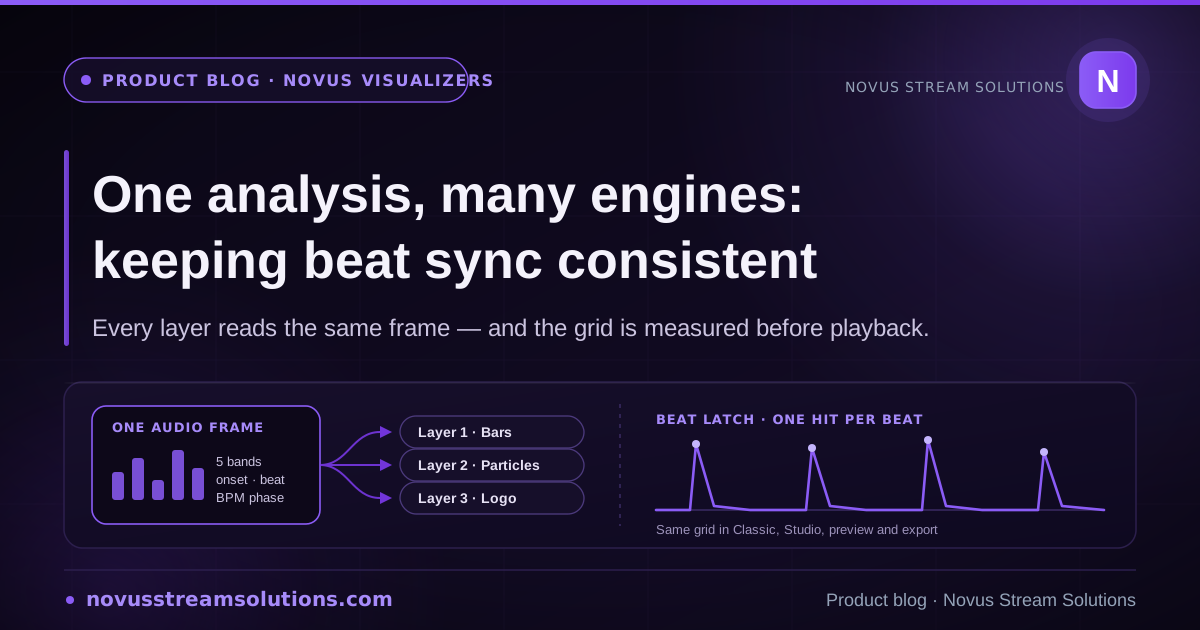
A visualizer with several stacked layers has to make them agree about the music. Novus Visualizers does that by analysing the track once per frame and handing the same result to every engine, and by measuring the beat grid across the whole file before playback rather than discovering it as the song goes. Here is how that works, what it fixed, and what it still cannot do.
Contents
- 1.Overview
- 2.One frame per render, read by every layer
- 3.The beat grid belongs to the file, not to the screen
- 4.From a continuous signal to a hit you can see
- 5.Two controls that moved and did nothing
- 6.The clamp that made everything pulsate
- 7.Making "it feels off" into a number
- 8.Why the preview matches the export
- 9.What this does not do
Overview
A music visualizer with one full-frame effect has an easy job: whatever it thinks the beat is, that is the beat, because nothing else is on screen to contradict it. The moment a scene has layers (a waveform line over a particle field, a logo ring around a bar readout), the problem changes shape. Now several independent pieces of code are each forming an opinion about the same song, and any disagreement between them is visible as a smear rather than a hit. A frame of drift between two layers is not subtle; it is the difference between a video that feels locked to the music and one that feels approximately near it.
Novus Visualizers answers that with two decisions that are easy to state and were not obvious to arrive at. The audio is analysed once per rendered frame and the same result is handed to every layer, so no engine forms its own opinion. And the beat grid itself is measured from the whole decoded file before playback rather than discovered as the track goes by. This article is about both, and about the two bugs that proved they were the right calls. The product is live at visualizers.novusstreamsolutions.com and still being worked on: the 23-engine catalogue keeps growing, and so does the list below of things this system does not yet do.
One frame per render, read by every layer
Each time the renderer draws, a single audio frame is constructed and passed down. It is a plain object and its contents are worth listing, because they are the whole vocabulary every engine has for talking about the music: a downsampled waveform, a set of FFT bins, named frequency bands running bass, low-mid, mid, high-mid and treble, an RMS and a peak level, an onset strength, a beat intensity, flags for whether a beat subdivision was crossed, the current position within the beat expressed as a phase from zero to one, and, when the track is clearly in a buildup or a drop, a section marker.
That object is then given to each layer in turn as it renders. Not a copy per engine, not a fresh read from the analyser per engine: the same frame. It sounds almost too simple to be a design decision, but the alternative is what most systems drift into, where each effect politely asks the analyser for what it needs at the moment it needs it. Those reads happen at slightly different points, against a signal that is moving, and the layers begin to disagree. Sharing the frame makes disagreement structurally impossible rather than merely unlikely.
The bands in that frame are normalised per band against their own long-term average, which has a consequence worth knowing about as a creator: loudness does not leak into the visuals. A quietly mastered track and a brick-walled one drive the same motion, because each band is judged against its own history rather than against an absolute level.
What layers are still free to differ on is response, and they should be. Each layer picks its own primary audio source, its own contribution ceiling, and its own attack and release in milliseconds. The point of the shared frame is not to make every layer behave identically. It is to make sure that when a layer chooses to hit, it hits on the same instant as every other layer that chose to.
The beat grid belongs to the file, not to the screen
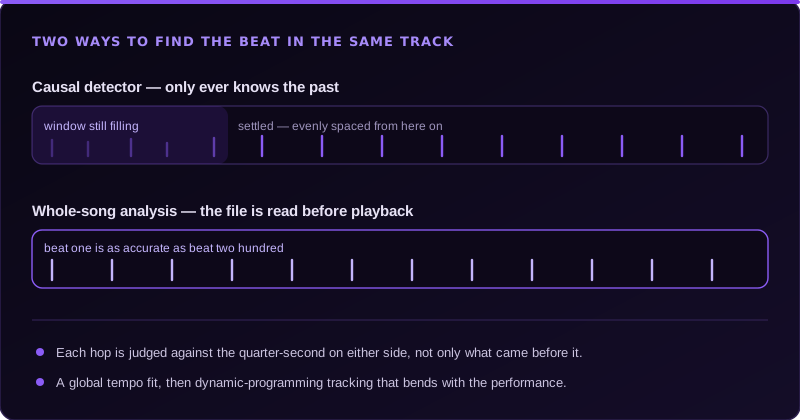
A live beat detector is causal: at any instant it knows only what has already played. That is an honest constraint, and it has a cost that was measured rather than guessed here: the autocorrelation window needs roughly twelve and a half seconds to fill before its tempo estimate is trustworthy. For a visualizer that means the opening of every track is the part most likely to look loose, which is precisely the part a viewer forms an opinion on. Nobody watches the last twenty seconds of a music video to decide whether the sync is good.
So the file is analysed up front instead. Two things become possible off the critical path that are impossible live. The first is a centred adaptive threshold: rather than comparing each moment against the half-second that preceded it, each one is judged against the quarter-second on either side, so a note is measured against its own musical context. The second is a global tempo and phase fit followed by dynamic-programming beat tracking across the entire onset envelope, which trades off landing on real onsets against holding a steady interval. That is what handles drift. A rigid grid laid down at a fixed BPM slides out of alignment on anything that was played rather than programmed; a tracked one bends with the performance.
Because the result is a property of the audio file and not of whichever surface is showing it, it is cached against the file itself and shared. The music editor, the Studio workstation, and the exporter all draw on the same analysis rather than each deriving their own and drifting apart. Analysis runs in a worker, and the decoded samples are transferred rather than copied because four minutes of audio is tens of megabytes of float data. There is a handshake before that transfer, for a specific and slightly painful reason: a worker can fail after it has been constructed (a cross-origin isolation header mismatch will do it, reported as an error event with an empty message), and once the buffer has been transferred it is gone, so the main-thread fallback would have nothing left to work with.
The whole path is built to degrade rather than break. If the worker will not start, analysis happens inline: slower, never wrong. If the file cannot be decoded, or fewer than four beats come back, the result is simply no grid, and the live detector carries on as it always did. Failing to find the beat has to make the visuals worse, not stop the music.
From a continuous signal to a hit you can see
A beat intensity that slides smoothly between zero and one is useful for driving a swell, and useless for making something land. Visuals need a discrete event: this frame, right now, is a beat. Converting one into the other is its own small piece of machinery, shared by every engine so that a hit means the same thing everywhere.
It latches on either of two conditions (the beat phase wrapping past the top of the bar, or the continuous beat scalar rising through a threshold), and then refuses to latch again for two hundred milliseconds, which stops a single strong transient registering as three. There is a silence guard as well, so a quiet passage cannot produce phantom beats out of noise. Once latched, the hit becomes an envelope with a peak that only ever rises on a latch, never falls to meet a weaker one. That detail matters more than it sounds: without it, a soft beat arriving while a loud one is still ringing would cut the loud one short, and the scene would appear to stumble on exactly the fills a drummer put there to be interesting.
The envelope then decays exponentially, with a floor taken from the continuous beat signal so sustained bass still breathes between latches instead of flatlining. A second, faster envelope tracks onsets, so percussive detail gets its own shorter response rather than being folded into the beat pulse. Four controls shape all of this and they separate cleanly: beat response sets how tall the hit is, while smoothing, attack and release set its shape. Attack is capped well below the two-hundred-millisecond lockout, because a swell slow enough to still be rising when the next beat lands would swallow the very thing it was animating.
Two controls that moved and did nothing
Beat smoothing shipped as a slider long before it did anything, and the reason it did nothing is a useful piece of engineering embarrassment. The smoothing maths lived in a helper function that no engine had ever called, so moving the slider adjusted a number on a path that never reached a pixel. Worse, the control itself was declared in a list that neither editor read when building its inspector, so in some builds it was not even rendered. Two independent failures, both silent, both producing the same user-visible symptom: smoothing does not smooth. From the outside that is indistinguishable from a broken product.
The fix was structural rather than a patch. The envelope shape now lives on the path that every engine actually renders through, and the control is declared in the one shared list both editors build their inspectors from. Two gates were added so the class of bug cannot come back quietly. One fails the build if a declared control stops being read anywhere. The other renders each control at its default and again perturbed, and compares the pixels, so a control that has no visible effect is caught by a machine rather than by a user wondering whether they imagined the difference.
That audit also produced an uncomfortable list, and the honest response was to split it in two. Controls that are structurally meaningless on a given engine (a bloom amount on an engine that draws no bloom, an emitter direction on something with no emitter) are now scoped out and simply not shown, because a slider that cannot possibly matter is worse than an absent one. But controls that are inert and should not be are deliberately left visible in the source as a wiring queue rather than hidden behind the same mechanism. Hiding them would have made the audit look cleaner and the product no better.
The clamp that made everything pulsate
The second bug is the one worth remembering, because of how it presented. Users reported that every engine looked the same: whatever the track, whatever the settings, the picture just pulsated. That is a vague complaint and easy to file under taste. The cause was one clamp. The band values in the shared frame were being read from accessors that return a level on a nought-to-two-hundred-and-fifty-five scale, and then clamped to a maximum of one. So the instant any audio at all was playing, every band read exactly one. Not approximately, not sometimes: exactly one, constantly.
Every consequence follows from that single line. No engine was band-reactive, because there was no variation left in the bands to react to. The small, medium and large particle layers, bound respectively to treble, mid and bass, were bound to three copies of the same constant and therefore moved identically. The only dynamics that survived anywhere in the system came from the beat envelope, which is a single global pulse. Everything pulsating was not a vague impression. It was a precise and complete description of what the code was doing.
A related mistake sat next to it in the subdivision handling. Whether a beat subdivision had been crossed was answered by testing whether the phase was near zero, and at an eighth-note subdivision and a hundred and twenty beats per minute that window is roughly six milliseconds, narrower than a single frame at sixty frames per second. Most eighth-note hits were simply stepped over between frames. With a beat grid available the question became an interval instead: how many ticks did the playhead cross since the last frame? An interval cannot miss one, at any frame rate. Both bugs share a moral. A defect that makes a visualizer stop is reported in an hour; a defect that makes it look busy in the wrong way can survive for months, because it does not look like a failure.
Making "it feels off" into a number
The reason that clamp survived as long as it did is that the argument about it was aesthetic. Someone says the sync feels loose on a particular song, someone else watches it and thinks it looks fine, and there is nowhere for the disagreement to go. So beat tracking here is evaluated with the published metrics from the beat-tracking literature rather than an in-house score, which means a result is comparable to work outside this codebase and not only to our own previous run.
The convention is that a detected beat counts if it lands within seventy milliseconds of an annotated one, and the matching between detections and annotations is one-to-one. That second part is the one that earns its keep. Without it, a detector that fires a burst of five beats inside a single tolerance window scores perfect recall, when a burst of five is exactly the jitter failure the metric is supposed to catch. The measurement has to be at least as suspicious as the person reading it.
A hit rate on its own still misses the failure that annoys people most, so two continuity scores sit beside it. Both ask not merely whether beats were hit but whether they were hit consecutively, judged against the local gap between annotations rather than a fixed window. The first insists on the correct metrical level. The second deliberately forgives half tempo, double tempo, and landing consistently on the offbeat. Reading them together is what makes a result diagnostic rather than just a grade: a detector that tracks cleanly for ten seconds and then settles onto the offbeat keeps a respectable hit rate, because it is still hitting things, while the strict continuity score collapses and the forgiving one does not. That gap between the two numbers names the failure. It is also the failure a viewer describes as the video losing the plot halfway through, which is where this started, an aesthetic complaint that now has somewhere to go.
Why the preview matches the export
All of this would be worth much less if the finished file behaved differently from the preview you approved. Two rules keep them together. First, nothing on the render path reads a wall clock or a random number generator. Per-beat variation (the direction a frame kicks on a hit, the scatter in a particle burst) comes from a deterministic hash keyed to the beat count, so a scene rendered twice is rendered identically, and the frame kicks once per beat and settles rather than jittering every frame from fresh randomness. Second, all state advances from frame time and frame audio only, so an offline export stepping through frames faster than real time produces the same envelopes as a live preview stepping through them slower.
The exporter analyses the whole decoded track rather than only the range being exported. That is deliberate and slightly counter-intuitive: exporting a twenty-second clip from the middle of a song means analysing four minutes of audio for it. The reason is that the preview had the whole track for context, and a trimmed export analysed in isolation would disagree with it. A few hundred milliseconds on an operation already measured in minutes is a cheap price for the two matching. And if analysis fails during an export, it falls through to live detection rather than failing an export somebody has been waiting on.
What this does not do
The timing is not yours to correct, and the shape of that gap is worth stating precisely, because a quick look at the Studio inspector suggests otherwise. There are fields there for BPM, a grid offset, and a time signature. They are real and they do something: they lay out the ruler on the timeline, which is what you snap keyframes against, and the BPM value also drives a synthetic pulse when no track is loaded yet so the canvas is not dead while you build. What they do not do is re-time the grid that reaches the engines. That grid comes from the analysis of the decoded file, and no field in the interface overrides it.
So the controls shape the response (how hard, how fast, how long) but not the timing. On a rubato performance, a track with no percussion, or anything the tracker reads at half or double the real tempo, you can soften the reaction so a wrong grid is less obvious, and you cannot correct it. There is no tap-tempo control either: the composition format has a slot recording whether a tempo was detected, tapped, or set by hand, and nothing in the interface has ever written "tapped" into it. The same is true one level down, where the format can hold individual beat markers with a flag for whether a human moved them, and no editor edits them. The model anticipated this work; the interface has not caught up. That is the largest honest gap in this area of the product.
The analysis cache is in memory only, and deliberately so: a decoded analysis is cheap to recompute, well under a second for a four-minute track, whereas persisting it would mean versioning the signal processing alongside every stored project so that an old cached grid could never be replayed by newer code. The visible cost is that reloading the page re-analyses the track. Below four detected beats there is no grid at all and the live detector takes over, warm-up and all.
None of this is finished work. Novus Visualizers is live, it is free to use in the browser, and it is being actively built: twenty-three engines (Particles, Trails, Bloom, Character Motion, Radial, Spectrum, Bars, Tunnel, Waveform, Logo, Lattice, Terrain, Stage Lights, Harmonic Constellation, Chladni Resonance Plate, Voronoi Stained Glass, Procedural Night City, Spectral Topography, Fluid Ink Feedback, Arrangement Tunnel, Cover-Art Relief, Kinetic Lyric Typescape, and Stereo Phase Garden) with six modes each today, more later, with the same shared frame underneath all of them. Classic lives at /editor and Studio at /studio; they open the same document. The parts described here are the parts we are confident enough about to explain in detail. The gaps above are named because a visitor who arrives expecting a tap-tempo control and does not find one has been misled, and we would rather lose that visitor at the sentence than at the editor.
Frequently asked questions
Quick answers to common questions about this topic.
Why does the visualizer analyse the whole track before it starts playing?
Because a detector that only knows the past has to wait for its own history to fill before it trusts a tempo, measured at roughly twelve and a half seconds in this codebase. That would make the opening of every track the least accurate part, which is exactly the part a viewer judges the video on. Reading the decoded file up front removes the warm-up, so the first beat is as accurate as the two hundredth.
Can layers fall out of sync with each other?
Not by design. One audio frame is built per rendered frame and the same object is handed to every layer, so two engines cannot disagree about where the beat was. What they can legitimately differ on is how they respond to it, because each layer has its own audio source, contribution, and envelope settings.
What happens if it gets the tempo of my song wrong?
You can change how hard and how long the visuals react: beat response, smoothing, attack, and release all shape the envelope. What you cannot currently do is re-time the grid the engines read. The Studio inspector does expose BPM, a grid offset, and a time signature, but those drive the timeline ruler you snap keyframes against; they do not override the analysis that feeds the shared audio frame. There is no tap-tempo control. If fewer than four beats are found, no grid is used at all and the live detector takes over rather than the track failing to play.
Will the exported video react the same way as the preview did?
That is the intent, and it is enforced rather than hoped for. Nothing in the render path reads a wall clock or a random number generator (per-beat variation comes from a deterministic hash keyed to the beat count), and the exporter analyses the entire decoded track rather than only the range being exported, so a clip cut from the middle of a song still carries the same grid the preview had.
Does a loudly mastered track make the visuals react harder?
No, and that is deliberate. Each band in the shared frame is normalised against its own long-term average, so the same song at two mastering levels drives the visuals the same way. Overall intensity is something you set with the controls, not something the master bus decides for you.
Related workflow
A track to a release-ready visualizer, per platform
Render the visual once, then produce the platform masters from it, instead of re-rendering the whole video for every aspect ratio.
- Render the beat-synced videoNovus Visualizers: Pick the engine and mode against your actual track; the analysis is done on your audio, not on a preset preview.
- Trim or upscale the exportNSS Background Remover: The video utilities handle the tidy-up pass so the render does not have to be repeated to fix ten seconds of it.
- Produce the per-platform mastersNovus Convert: Each destination wants a different container and bitrate; converting the finished render is far cheaper than re-rendering it.
Related troubleshooting
Was this page helpful?
Your answer stays in this browser, it is not sent anywhere and no account or cookie is involved.