2026 · Sonic WeaverAbout 16 min readNovus Stream Solutions
The Character Motion engine: turning words into performance
Character Motion is the Sonic Weaver engine whose raw material is legible: letters, words, and figures instead of abstract particles. This guide walks its six modes, from Glyph Field to Crowd/Clone, and where each one earns its place.
Reviewed and updated August 1, 2026. Re-checked against the Sonic Weaver V3 catalog on August 1, 2026. The app now ships ten engines with six modes each (sixty modes in total), so the counts, the engine list, and the mode arithmetic in this article have been corrected. The Logo engine landed after this piece was first published.
Contents
- 1.Overview
- 2.What changes when the visuals are legible
- 3.The six modes at a glance
- 4.How Character Motion reads the music
- 5.Glyph Field: a lattice of characters that breathes
- 6.Word Wave: phrases that ride the beat
- 7.ASCII Cascade: the terminal aesthetic
- 8.A rigged figure that performs
- 9.3D Performer: character motion with real depth
- 10.Crowd/Clone: many from one
- 11.Tuning Character Motion in the Classic Editor
- 12.Directing it in the Studio Workstation
- 13.Choosing a mode, and getting the file out
Overview
Most of the ten engines in Sonic Weaver treat the frame as weather. Particles drift, Bloom spreads, Bars jump, Tunnel pulls the eye through space: abstract motion that reacts to sound without ever meaning anything in particular. Character Motion is the exception. It is the engine whose raw material is legible: letters, words, and figures that a viewer reads as well as watches. When a track is built around a vocal, a spoken hook, a title that deserves to be seen, or a character that belongs to the artist, an abstract field of dust is the wrong tool. Character Motion exists for the songs where the meaning is carried by something you can name.
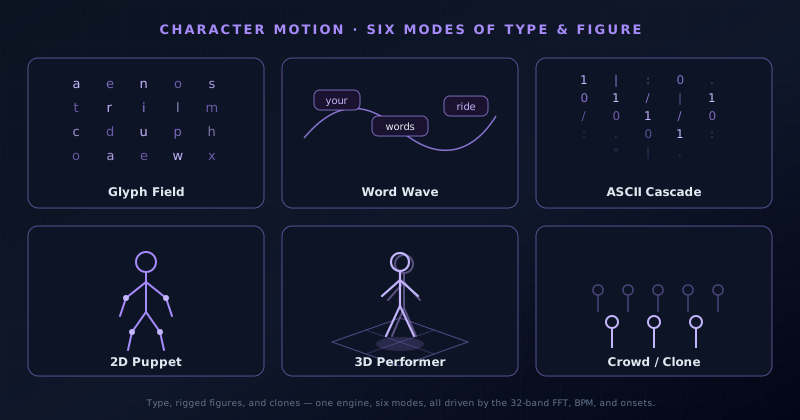
Character Motion is one of the ten engines in the app, and like every engine it ships with six modes: Glyph Field, Word Wave, ASCII Cascade, 2D Puppet, 3D Performer, and Crowd/Clone. Those six split cleanly into two families. The first three are typographic; they make motion out of characters and text. The last three are figural; they animate a rigged body, in two dimensions, in three, or multiplied into a crowd. One engine covers both because the underlying job is the same: take something with identity, bind it to the audio, and let the music move it. This post walks each mode and where it earns its place.
What changes when the visuals are legible
Reaching for a typographic or character engine changes the brief in a specific way: the viewer now reads the frame, not just feels it. An abstract particle field can be busy, off-beat, or slightly wrong and still work as texture, because nobody is parsing it for meaning. The moment a word or a figure is on screen, attention snaps to it and holds it to a higher standard. Letters have to stay readable through their motion. A rigged body has to move like a body and not a marionette with cut strings. This is why Character Motion is treated as its own engine rather than a decoration layered onto the others: legibility is a discipline, and the modes are built to protect it while still reacting hard to the audio.
The six modes divide along that legibility line. Glyph Field, Word Wave, and ASCII Cascade are typographic: their unit is the character, and their motion is the arrangement, density, and timing of type. 2D Puppet, 3D Performer, and Crowd/Clone are figural: their unit is a rigged form, and their motion is pose, gesture, and repetition. Knowing which family a song wants is usually the fastest decision in the whole build. A lyric-forward track, a spoken-word intro, or a strong title card points at the typographic three. A track with a character, a mascot, or a dancer-like energy points at the figural three. Everything after that is tuning.
The six modes at a glance
Before going mode by mode, it helps to see the whole set at once, because the six are deliberately arranged from simplest to most involved. Glyph Field is the lightest: atomized characters with almost no structure to fight. Word Wave adds grammar: words instead of letters, placed along a path. ASCII Cascade commits to a single strong aesthetic. Then the figural three step up in production weight: a flat puppet, a dimensional performer, and finally a crowd built from either. You do not have to climb that ladder in order, but understanding the gradient makes it obvious why a two-minute loop and a full lyric video reach for different rungs.
The modes also share everything below the surface. All six run on the same audio analysis, sit inside the same ordered-layer system, and render through the same deterministic pipeline that both editors drive, so a Glyph Field behind a 3D Performer behind a caption is a normal stack rather than a special case. That shared foundation is what lets you combine modes without them fighting each other, and it is why the preview you scrub in the editor is the frame that comes out of the exporter. The list below is the short version; the sections after it are where each mode actually earns its keep.
- Glyph Field: a lattice of individual characters that pulse, scatter, and settle with the mix.
- Word Wave: whole words and short phrases that ride a moving curve, triggered on the beat.
- ASCII Cascade: columns of monospace characters falling in a terminal, matrix-style stream.
- 2D Puppet: a flat rigged figure whose joints move in time with the music.
- 3D Performer: the same idea with real depth: a dimensional figure staged in space.
- Crowd/Clone: one form multiplied into a synchronized or staggered crowd.
How Character Motion reads the music
Every mode here is driven by the same real-time analysis that powers the rest of the app: a 32-band FFT that splits the spectrum into frequency bins, a BPM estimate that tracks tempo, and onset detection that catches the sharp attacks of hits and consonants. In a typographic mode, those signals control things like how densely characters populate the field, how far a word displaces from its curve, and which glyphs light up on a given frame. In a figural mode, the same numbers push a rig: a bass onset can drop a puppet into a crouch, a snare can throw an arm out, a swelling pad can widen a crowd. The mapping differs by mode, but the source is always the audio itself, read on the viewer's own machine.
The distinction that matters most in practice is onset versus sustained energy. Onsets are punctual (they fire on a kick, a clap, a plosive), and they are what make a figure hit a pose or a word snap into place exactly on the beat. Sustained band energy is continuous, and it is what makes a glyph field breathe or a performer sway across a held note. Good character scenes use both: the sustained signal shapes the resting motion, and onsets punctuate it. Because the renderer is deterministic, the same track and the same settings produce the same frames every time, which is why the preview and the export match to the pixel and why timing you dial in survives all the way to the file.
Glyph Field: a lattice of characters that breathes
Glyph Field is the most abstract of the typographic modes and the easiest to live with. It fills the frame with individual characters arranged as a loose lattice, then lets the audio scatter, brighten, and resettle them. Nothing here has to be read as a sentence, which frees it to react hard without ever becoming unreadable: a wrong-looking letter is just texture. That tolerance makes it the safe typographic choice for instrumental tracks, ambient passages, and anything where you want the flavor of type without committing to specific words. It reads as language from a distance and as motion up close, which is a useful ambiguity for backgrounds and loops that need to stay interesting without demanding to be parsed.
In a real build, Glyph Field earns its place as a base layer. Set it behind a title card or a spectrum and it gives the frame a coded, data-like texture that suggests meaning without stealing focus. Because the characters respond to band energy, a quiet verse leaves the field sparse and calm while a loud chorus packs and agitates it, so the layer carries dynamics on its own. It also pairs well with a restrained palette: a single accent color on a dark ground keeps it legible-adjacent rather than noisy. When a track does not have obvious words to feature, Glyph Field is how you keep type in the picture anyway, and it is a forgiving place to start learning the engine.
Word Wave: phrases that ride the beat
Word Wave is the mode for songs that have something to say. Instead of loose characters, it works with whole words and short phrases, placing them along a moving curve and triggering their entrances on the beat. This is where a hook, a repeated line, or a title stops being a caption and becomes the animation itself. The words move as a group, so a phrase reads as a phrase even as it rides the wave, and onsets can snap each word into place so the text lands with the rhythm rather than floating over it. For a chorus that everyone is meant to remember, putting the exact words on the beat is a direct, unpretentious way to make them stick.
Word Wave sits naturally next to the app's caption and lyric tooling without being the same thing. The on-device Whisper transcription and the Lyric Video Creator handle full, per-word-timed lyric passes; Word Wave is the visual mode you reach for when you want a curated set of words treated as a designed element rather than a running transcript. In practice you feed it the lines that matter (the title, the hook, a tagline) and let the longer transcript live in a caption layer if you want both. Keeping the featured phrases short is the main craft here: a wave of three or four strong words reads instantly, while a full sentence on the curve fights its own motion.
ASCII Cascade: the terminal aesthetic
ASCII Cascade commits to a single, unmistakable look: columns of monospace characters falling down the frame like a terminal readout or a code rain. It is the most stylistically opinionated mode in the engine, and that is the point: some tracks want that specific hacker, glitch, or retro-computing flavor, and nothing approximates it as cleanly as actual streaming characters. The cascade reacts to the audio in its flow: onsets can accelerate the fall, band energy can thicken or thin the columns, and brighter characters can lead the stream so the leading edge pulses with the mix. Against a dark ground with a single accent color, it reads as a living screen rather than a static graphic.
The mode fits a narrower band of music than the others, and that focus is a feature. Electronic, industrial, phonk, drum-and-bass, and anything with a digital or dystopian identity all sit comfortably inside a character rain. It also works as a transitional or intro texture: a few bars of cascade before the scene resolves into something else gives a track a cold-open feel. Because the characters are monospace and uniform, ASCII Cascade stays legible-as-texture even at high density, so you can push its reactivity harder than you could a proportional font. When a song's world is a screen, this is the mode that builds it, and it costs almost nothing to layer under something warmer later.
A rigged figure that performs
2D Puppet is the first of the figural modes and the entry point into character animation inside the engine. It drives a flat, rigged figure (a body with jointed limbs) whose pose responds to the music. Rather than an abstract shape reacting to sound, you get something a viewer reads as a performer: it can bob, step, throw its arms, and hit poses in time with the beat. That legibility as a body is exactly why it is powerful and why it is demanding. A puppet that moves convincingly sells a track's energy in a way no particle system can, but a puppet whose motion feels wrong is more distracting than any abstract glitch, because viewers know instinctively how a body should move.
The 2D framing keeps it approachable. A flat rig has fewer ways to look broken than a dimensional one, and its silhouette stays clean against a simple background, so it holds up in short-form verticals where the figure is the whole point. It suits playful, character-led music: a mascot for an artist, a dancing figure for an upbeat single, a simple avatar that gives a faceless producer a face. Because the rig is manual in the Studio Workstation, you decide how far each joint travels and which part of the mix drives it, so the same figure can nod gently through a verse and go full-body on the drop without ever leaving the frame or breaking its silhouette.
3D Performer: character motion with real depth
3D Performer is where character motion gains a third dimension. This is the mode to understand clearly, because depth in Sonic Weaver is not a global switch you flip over the whole scene; there is no separate 2D/3D toggle. Dimensionality lives inside specific modes, and 3D Performer is the character engine's home for it, alongside the Bars 3D Columns mode, the Spectrum Spectral Mesh, the Waveform 3D Surface, and the Tunnel tubes. Here the rigged figure is staged in actual space: it can face, turn, and move with perspective, imply a ground it stands on, and read as a body with volume rather than a flat cut-out. When a track wants a performer who occupies a stage instead of a plane, this is the mode that provides it.
The trade for that dimension is weight. A 3D Performer is the most production-heavy character mode, and it rewards restraint: a single well-staged figure against a clean background reads as premium, while an over-busy 3D scene quickly looks cluttered. It shines on tracks that carry a sense of occasion: a lead single, a hero moment, a piece where the artist wants a figure that feels present rather than sketched. Pair it with a subtle base layer, keep the palette disciplined, and let onsets drive decisive, readable poses rather than constant motion. Used with that discipline, 3D Performer gives an independent release the kind of staged, dimensional character shot that usually implies a budget it did not actually need.
Crowd/Clone: many from one
Crowd/Clone takes a single form and multiplies it, turning one figure or glyph into a field of many. The copies can move in lockstep for a rigid, choreographed feel, or stagger and phase for a rippling, wave-like crowd, and the audio decides how tightly they synchronize. This is the mode for scale: the difference between one performer and a stadium, one letter and a swarm of them. It is remarkably effective on anthemic, high-energy, or festival-leaning tracks, where the sense of many bodies moving together mirrors the music's own bigness. A drop that lands across a whole crowd hitting the same pose reads as impact in a way a solo figure simply cannot.
The strength of Crowd/Clone is also its risk: many copies means many chances to look mechanical. The craft is in the offset: a small stagger between rows or columns turns a stiff grid into something alive, letting a beat travel across the crowd like a wave instead of flashing everything at once. Because every clone derives from one source form, the mode stays cheap to reason about: refine a single figure or glyph and the whole crowd inherits it. It layers well too, sitting behind a featured 3D Performer to imply an audience, or built from Glyph-style characters for a purely typographic mass. When a track is about togetherness or size, Crowd/Clone is the most direct way to show it.
Tuning Character Motion in the Classic Editor
Both editors reach these modes, and the Classic Editor is the guided way in. You upload a track, choose Character Motion, and pick one of the six modes, and from there the guided controls cover the decisions that matter: color, geometry, and direction for the look; audio bindings for what the music drives; and captions, logos, and overlays for the text and brand elements that share the frame. Because these modes are typographic and figural, the caption and logo controls carry more weight here than they do in the abstract engines: a title card over a Glyph Field, or an artist mark beside a 3D Performer, is often the whole composition. The guided flow keeps all of that in one place so you can go from an uploaded file to a finished, on-brand scene without ever touching a timeline.
The Classic Editor is deliberately the fast path, not the limited one. It is where most character scenes should start, because getting the mode, palette, and audio bindings right is most of the result, and doing that in a guided panel is quicker than building it by hand. If a scene needs no frame-by-frame direction (a looping Glyph Field background, a straightforward Word Wave chorus, a single reactive puppet), the Classic Editor can carry it all the way to export. And because both editors share one saved document, nothing you set here is throwaway: a scene roughed out in the guided editor opens intact in the Studio Workstation the moment you want to take it further.
Directing it in the Studio Workstation
The Studio Workstation is the deep path, and it is where character work in particular pays off, because figures and text are the modes most likely to need hand-directed timing. It is a direct-canvas editor with ordered layers, a beat-aware timeline marked with beats and bars, keyframes and graph curves for shaping any parameter over time, clips and loop regions, groups, masks, blend modes, and full-document undo/redo. For the figural modes it also exposes manual 2D and 3D character rigs, so you can set exactly how a joint travels and which band of the mix drives it. This is how a puppet stops merely reacting and starts performing a specific move at a specific bar, or how a 3D Performer hits a scripted pose on the last beat before a drop.
The beat-aware timeline is what makes hand-directing feel musical rather than mechanical. With beat and bar markers under the playhead, you place a word's entrance, a crowd's stagger, or a pose change on the actual grid of the song instead of guessing at frame numbers, and graph curves let you ease those moves so they land with weight. Because it edits the same document as the Classic Editor and renders through the same deterministic pipeline, you can rough a scene out fast in the guided editor and then open it here to refine only the moments that need it; nothing is re-imported or converted. It is one project seen at two levels of control, which is exactly the right shape for character motion, where most of a scene runs on automatic and only a few beats deserve manual attention.
Choosing a mode, and getting the file out
The fastest way to choose is to name what the song is about. If it is about words, start typographic: Glyph Field for flavor without commitment, Word Wave to feature an actual hook, ASCII Cascade when the track's world is a screen. If it is about a character or a body, go figural: 2D Puppet for a clean, playful performer, 3D Performer for a staged hero moment with real depth, Crowd/Clone when the feeling is scale and togetherness. None of these are exclusive (the ordered-layer system means you can run a Glyph Field behind a 3D Performer behind a caption in a single frame), but leading with one clear mode keeps a scene readable, which is the whole reason to use this engine instead of an abstract one.
Whatever mode you land on, the export is the same and it stays yours. Rendering runs entirely in the browser through WebCodecs, producing MP4 (H.264) or WebM (VP9) up to 4K at 24, 30, or 60 fps, with platform presets sized for the destinations creators actually use. The audio never leaves the machine, the output is copyright-clean, and there is no watermark and no export quota, so you can render a character scene as many times as a release needs without hitting a wall. Character Motion is the engine for songs where meaning is carried by something you can name (a word, a figure, a crowd), and its six modes give you a small, learnable vocabulary for putting that meaning on screen and shipping it as a finished file.
- Instrumental or ambient, but you want type anyway: Glyph Field.
- A hook or a title to feature: Word Wave.
- A digital, glitch, or retro-computing identity: ASCII Cascade.
- A playful, character-led single in short-form: 2D Puppet.
- A hero moment that wants depth: 3D Performer.
- Anthemic scale and togetherness: Crowd/Clone.
Frequently asked questions
Quick answers to common questions about this topic.
What is the Character Motion engine in Sonic Weaver?
It is one of the ten visual engines, and the one whose material is legible characters and figures rather than abstract shapes. It has six modes (Glyph Field, Word Wave, ASCII Cascade, 2D Puppet, 3D Performer, and Crowd/Clone) split into a typographic family and a figural family, all driven by the same 32-band FFT, BPM, and onset analysis.
Which mode is best for a lyric or a hook?
Word Wave, which places whole words and short phrases on a moving curve and triggers them on the beat. For a full, per-word-timed transcript, pair it with the on-device caption tooling or the Lyric Video Creator; Word Wave is best for a curated set of featured words treated as a designed element.
Does Character Motion have a 3D mode?
Yes: 3D Performer. Depth in Sonic Weaver is not a global toggle; it lives inside specific modes, and 3D Performer is the character engine's dimensional mode, staging a rigged figure in real space with perspective and volume.
Can I hand-animate a character scene?
Yes, in the Studio Workstation. It offers manual 2D and 3D character rigs, a beat-aware timeline with beat and bar markers, keyframes and graph curves, ordered layers, masks, and blend modes. Because it shares one document with the Classic Editor and one deterministic renderer, a scene you rough out in the guided editor opens intact for hand-directing, and the preview always matches the export.
Related troubleshooting
Was this page helpful?
Your answer stays in this browser, it is not sent anywhere and no account or cookie is involved.