2026 · NSS Background RemoverAbout 14 min readNovus Stream Solutions
Temporal stability: why cutting a background out of video is a different problem
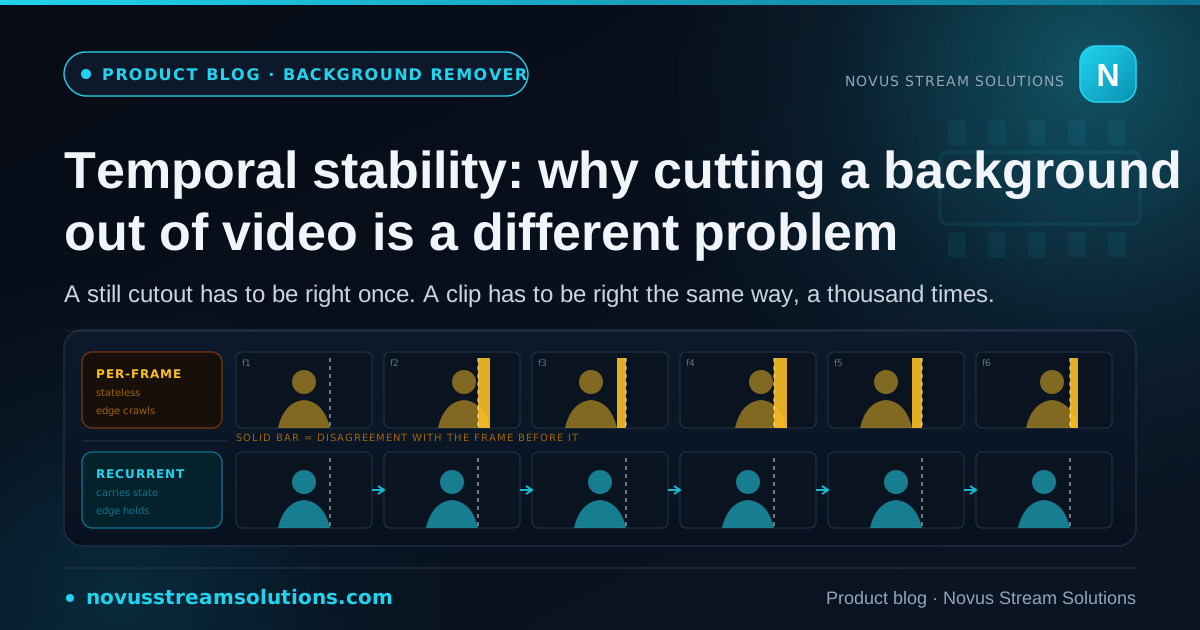
Per-frame accuracy and temporal stability are different problems, and the second one is why video background removal needs its own model rather than the still remover in a loop. What the recurrent matting engine buys, what being tuned for people costs, and why MP4 quietly throws your alpha channel away.
Contents
- 1.Overview
- 2.The failure mode is not error, it is variance
- 3.Why running the still model a thousand times does not work
- 4.What that stability cost: the model is tuned for people
- 5.GIF is where the format takes the decision away from you
- 6.MP4 has no alpha channel, and this surprises almost everyone
- 7.The source decides more than any setting does
- 8.Where we deliberately did not use AI, and why we label it
- 9.Everything here still runs on your device, which is where video bites hardest
- 10.So which tool, for what
Overview
A still cutout has to be right once. Get the edge of a subject correct in a photograph and you are finished; nobody will ever see it against a different version of itself. A clip does not work that way. A minute of footage at ordinary frame rates is well over a thousand frames, and every one of them gets its own answer to the same question about where the subject ends. The viewer does not evaluate those answers individually. They evaluate the differences between them.
That is the whole subject of this article, and it is the reason NSS Background Remover ships a separate tool at /video-background-remover rather than pointing the still remover at a video file and letting it run. The two problems look identical and are not. What follows is why, what the video tool can therefore do that a loop over the image tool cannot, what we gave up to get there, and the handful of format facts that decide whether any of it survives the moment you hit export. Some of those facts are not about our tool at all: they are properties of the file formats, and no amount of engineering on our side changes them.
The failure mode is not error, it is variance
Take a single frame from a clip and cut the subject out of it. Suppose the edge is two pixels off in one place: a strand of hair clipped, or a sliver of background retained along a shoulder. In a photograph that is essentially invisible. You would have to know where to look, and even then it reads as a slightly soft boundary rather than as a mistake. Photographs forgive small, static errors because a static error looks like texture.
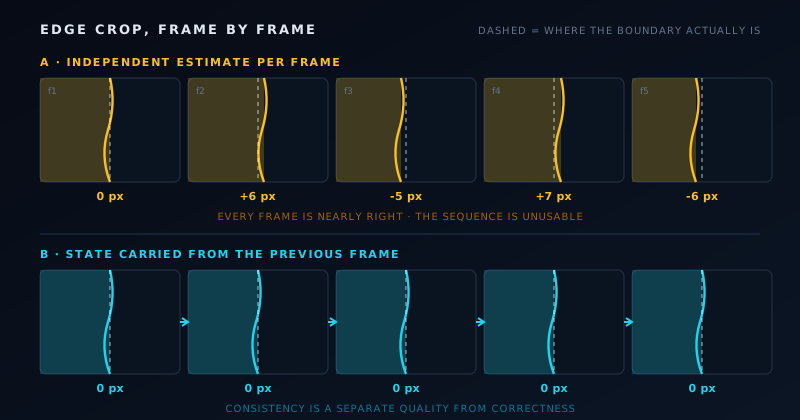
Now suppose the same two-pixel error moves. Frame one clips the shoulder, frame two does not, frame three clips it again. Nothing has got worse in any individual frame; every frame is still within two pixels of correct. But the sequence now has an edge that crawls, and that is immediately, unmissably wrong. Human vision is built as a motion detector far more than as a detail detector. A static imperfection is background; a moving imperfection is an event, and the eye goes straight to it.
This is the trap that makes moving-image matting counterintuitive. Per-frame accuracy and temporal stability are separate axes, and optimising the first does not deliver the second. You can build a cutout system that scores well on every single frame you test it against and still produce a clip nobody would publish, because the metric that decides whether the clip is usable (consistency between neighbouring frames) is not the metric you were measuring. That is not a subtle engineering distinction. It is the difference between a demo and a deliverable.
Why running the still model a thousand times does not work
The obvious implementation is the wrong one, and it is worth being precise about why, because the reason is structural rather than a matter of tuning. The still segmentation model is stateless. It looks at one image, estimates a per-pixel opacity, and returns it. Show it the next frame and it starts fresh, with no knowledge that it has just seen an almost identical picture. Every frame gets an independent estimate.
Independent estimates of a genuinely ambiguous boundary disagree. That is not a defect; it is what independence means. Where the subject boundary is unambiguous (a hard silhouette against a contrasting wall), successive estimates agree and nothing flickers. Where the boundary is genuinely uncertain, which is exactly the hair, fur, blur, and semi-transparent fabric that make matting interesting in the first place, two runs on two nearly-identical inputs land on slightly different answers. Play those answers in sequence and the disagreement is the flicker. The per-frame model is not producing noise on top of a stable result; the instability is the result.
The tempting fix is to smooth afterwards: average each frame against its neighbours and let the jitter cancel out. It does not work, and the reason it does not work is instructive. A temporal smoothing pass cannot distinguish an edge that moved because the estimate was noisy from an edge that moved because the subject moved. Smooth hard enough to kill the crawl and you have also smeared the actual motion, which produces a subject that lags its own outline. You have traded a flicker for a ghost.
What the video tool runs instead is a recurrent matting engine: the matte for this frame is informed by the state carried forward from the previous one. Because the model has continuity, the ambiguous regions stop being re-guessed from scratch every frame; the previous answer is evidence about this one. The published shorthand for the result is "green-screen results without a green screen", and that is a fair description of what temporal continuity buys you: a matte that holds still when the subject does, and moves when the subject does.
What that stability cost: the model is tuned for people
Here is the constraint, and we would rather you read it here than discover it on a deadline. The video background remover is tuned for people matting specifically. A clip whose subject is a product rotating on a turntable, or an animal, or an object being demonstrated by hand, sits outside what the engine was built for, and results on that material will be less reliable than they are on a person.
That is a real limitation rather than a cautious disclaimer, and it is the direct price of the stability described above. The pattern that makes on-device machine learning work at all is specificity: narrow tasks compress into weights small enough to download and run in a browser tab, and open-ended ones do not. A model that matted anything that moves, at any scale, with frame-to-frame continuity, at a size we could reasonably ship to a visitor over their own connection, is not a thing we could have shipped by choosing to. The engine is good at people because it was built for people, and the same trade that makes it good at people is what makes it uncertain elsewhere.
We say it plainly for a simple reason: the cost of not saying it is paid entirely by the user. Someone who spends an evening trying to cut a dog out of a clip, getting an inconsistent matte, and concluding that browser tools are not serious, has been failed by our copy rather than by our model. If your subject is a person, this is a tool worth your time. If it is not, the honest answer is that you should expect to do more by hand, or reach for something built for your case.
GIF is where the format takes the decision away from you
Short animated loops go through a different tool, the GIF background remover at /gif-background-remover, which processes frame by frame and can export a transparent GIF or an APNG. Frame-by-frame is acceptable here in a way it is not for video, because loops are short and their subjects are commonly high-contrast graphics with unambiguous silhouettes, the regime where independent per-frame estimates happen to agree anyway.
The interesting part is the export choice, and it is a format constraint rather than a tool constraint. GIF transparency is one bit. A pixel is either fully opaque or fully transparent, with nothing in between and no way to express anything in between. Everything the matting stage worked out about partial coverage (the strand that is forty per cent hair and sixty per cent background, the soft falloff at a blurred boundary) has to be thrown away when the file is written, because the container has nowhere to put it. Soft edges become hard ones, and hard edges on a curved subject read as jagged.
APNG carries a real alpha channel, so it can hold the values the model produced. Prefer it whenever the destination supports it. The trade is support: APNG is widely handled but not universally, so check where the file is going before committing to it. Where GIF is genuinely required, the practical advice is to pick a subject with a clean silhouette and accept a harder edge, rather than expecting a soft one to survive a format that cannot represent it.
It is worth noticing that this is the same argument as the one about straight versus premultiplied alpha on the stills side, arriving from the opposite direction. There the container is not the problem at all: PNG can hold the right answer perfectly well, and the dark fringing people get from most cutout tools comes from an encoder baking a background assumption into the colour values before it saves. That is a choice, which is why this app exports straight alpha instead. Here the format itself is the limit. No encoding decision rescues a one-bit channel, and the only correct response is to pick a different container.
MP4 has no alpha channel, and this surprises almost everyone
This is the single most common way a good video cutout gets destroyed at the last step. H.264 MP4 has no alpha channel. Export a transparent clip to MP4 and the transparency does not survive: the frames get flattened against something, and what you have is a video of your subject on a background you did not choose. The matte was correct right up until the container discarded it.
WebM is the format that keeps the alpha, so if you need transparency to leave the tool intact, that is the export. The practical consequence is that the destination has to be decided before the work, not after. If the platform you are delivering to insists on MP4, and plenty do, then the right sequence is to composite the background you actually want first and export finished frames, rather than exporting a cutout and planning to composite later. There is no later. The alpha is gone.
The video editor at /video-editor exists partly for this reason. It can place scene backgrounds behind a cutout and can perform the removal in-editor, which means for anything you were going to composite anyway, staying inside the editor is both faster and safer than a round trip through a transparent intermediate that a container might silently flatten.
The source decides more than any setting does
After all of the above, the largest single factor in whether a moving cutout works is not the model, the export format, or any control in the interface. It is the footage. Even, diffuse lighting on the subject; meaningful separation between subject and background; a background that is not the same tone as the subject. Those three things do more for the result than every parameter combined, and they are free if you know to want them before you shoot.
Motion blur is the specific killer, and it is worth understanding why it is not a tuning problem. A fast pan or a quick gesture produces frames in which the subject boundary genuinely is ambiguous: the sensor integrated light from both the subject and the background into the same pixels over the exposure. There is no correct edge in that frame to recover, because none was captured. A matting model asked to find one is being asked to invent, and inventing is exactly the behaviour that produces frame-to-frame inconsistency, since two invented answers have no reason to agree. Slower movement, or a shorter exposure, fixes at capture what no model can fix afterwards.
This is the least technological paragraph in the article and probably the most useful one. Shooting for the tool is not a workaround for a weak tool; it is what professional compositing has always required, and green-screen practice exists precisely because separating subject from background is easier when someone made a decision about it in advance.
- Light the subject evenly and separate it from the background; tone contrast helps more than any control in the app.
- Avoid motion blur on the subject boundary. No model recovers an edge that was never captured.
- People for the video remover. Products, animals, and objects are outside what the engine was tuned for.
- APNG over GIF for animated loops, because GIF transparency is one bit.
- WebM if the alpha has to survive the export; composite first if the destination demands MP4.
Where we deliberately did not use AI, and why we label it
Two tools in the app upscale, and they do not work the same way. The image upscaler runs Real-ESRGAN at 2x and 4x, and it asks what kind of source it is looking at, routing photographs, graphics, and pixel art through different handling rather than applying one model to all three. The video upscaler runs a classical chain: denoise, then Lanczos resampling, then sharpen. No neural super-resolution.
That asymmetry is deliberate, and the reasoning is the same temporal argument arriving at the opposite conclusion. A neural super-resolution model invents plausible detail. That is what makes it good, and it is genuinely better than resampling on a still image. Run it independently across the frames of a clip and each frame invents its own plausible detail, with no obligation to invent the same detail its neighbour did. The result is texture that shimmers, which is the upscaling equivalent of a crawling edge. A classical chain does not have this property: it is deterministic and derives its output from the pixels that are actually there, so neighbouring frames that were similar stay similar. On a still, resampling is the weaker technique. Across a sequence, its predictability is the point.
There is also an honest cost argument. Per-frame neural inference across a whole clip, on whatever device the visitor happens to be using, is a different order of expense from doing it once on a photograph, and the app has no server to hand that work to. We would rather ship a video upscaler that is quick and predictable than one that is impressive on a ten-second sample and unusable on a real clip.
The reason we describe it as a classical pipeline in the tool map instead of calling everything "AI" is that the label changes what you expect. If you are upscaling a clip and you know the mechanism is resample-and-sharpen, you know not to expect detail that was not in the source, and you will make better decisions about your capture resolution as a result. Labelling a classical technique as AI would buy a marketing sentence and cost the user their calibration.
Everything here still runs on your device, which is where video bites hardest
The constraint underneath all of this is the same one that governs the rest of the app: the file is not uploaded. That is straightforward to hold on a photograph. On video it is where the on-device budget genuinely bites, because the frames are the workload and there are a great many of them. Every design decision above (a recurrent engine rather than a heavier per-frame one, a classical upscaler rather than a neural one, a people-tuned model rather than a general one) is partly a decision about what fits in a browser tab on a machine we do not control.
The same "treat the clip as a sequence, not a bag of frames" instinct shows up elsewhere in the video toolset. Stabilisation tracks the whole camera path rather than damping frame-to-frame jitter, which is the difference between a clip that reads as steady and one that reads as slightly seasick. The cinematic filter presets are shared between the image and video sides, so a still and a clip from the same shoot grade the same way rather than drifting apart because they went through different code. Around those sit the rest of the video utilities (resize, compress, rotate, format conversion and comparison, metadata removal), part of the wider set of 45 tools the app now covers.
None of that is exciting individually. Collectively it is the difference between a background remover with a video mode bolted on and a set of tools that understand what a sequence is.
So which tool, for what
The short version, if you skipped here: a still image goes through the image background remover. A short animated loop goes through the GIF tool, and you export APNG unless the destination forces GIF. A person on video goes through the video background remover, and you export WebM if the transparency needs to survive. Anything else that moves is outside what the video engine was tuned for, and you should plan for manual work or a different capture.
The deeper version is the thing worth carrying away even if you never use these tools: in moving images, consistency is a separate quality from correctness, and it is usually the one that decides whether the work is usable. Most of the engineering described here exists to serve consistency, and several of the decisions (a narrower model, a classical upscaler, a format that is less convenient) look like downgrades until you understand which problem they are solving.
The step-by-step version of all of this lives at Cut out backgrounds from GIFs and video, frame by frame, the compositing side at The NSS Background Remover video editor, end to end, and the reference for models, formats, and browser behaviour at NSS Background Remover. The full inventory of what exists today is at Tool maps.
Frequently asked questions
Quick answers to common questions about this topic.
Why does my video cutout flicker even though every frame looks fine on its own?
Because per-frame accuracy and temporal stability are different problems. A boundary that is two pixels off is invisible in a still, but if the error moves between frames the edge crawls, and human vision is far more sensitive to motion than to small static detail. The sequence is unusable even though no individual frame is wrong.
Can I just run the image background remover on every frame of a video?
You can, and it produces exactly the flicker described above. The still model is stateless, so each frame is estimated independently, and independent estimates of an ambiguous boundary disagree. The video tool runs a recurrent matting engine that carries state between frames, which is what makes the matte hold still.
Why is the video background remover only tuned for people?
Because temporal stability needs a model with continuity, and the recurrent matting engine in the app was built for people matting specifically. Narrow tasks are what compress into weights small enough to run in a browser tab. Products on turntables, animals, and hand-held objects fall outside what it was built for, and we would rather say so than have you find out on a deadline.
Can I export a video with a transparent background as MP4?
No. H.264 MP4 has no alpha channel, so exporting a cutout to MP4 flattens it. Export WebM to keep the transparency, or, if the destination requires MP4, composite the background you want first and export finished frames. This is a property of the format, not a limitation of the tool.
Is the video upscaler AI, like the image upscaler?
No, and that is deliberate. The image upscaler runs Real-ESRGAN at 2x and 4x with routing by source type. The video upscaler runs a classical denoise, Lanczos resample, and sharpen chain, because a neural model invents plausible detail independently per frame and that detail then shimmers across the sequence. We label it as classical rather than calling everything AI, so you know not to expect detail that was not in the source.
Related workflow
Product photo to a transparent image every channel accepts
One photograph, cut out once, then re-encoded for a storefront, a marketplace listing and a social post without redoing the cutout each time.
- Cut the background out and check the edgesNSS Background Remover: Hair, glass and drop shadows are where automatic cutouts fail. Fix them once, on the master, before anything downstream copies the mistake.
- Re-encode and resize per destinationNovus Convert: Transparency survives PNG and WebP and dies in JPEG. Convert validates the file it hands back, so a listing never rejects a silently broken upload.
Related troubleshooting
Was this page helpful?
Your answer stays in this browser, it is not sent anywhere and no account or cookie is involved.