2026 · NSS Background RemoverAbout 13 min readNovus Stream Solutions
When the fallback becomes the real thing: real AI models vs classical baselines in the browser
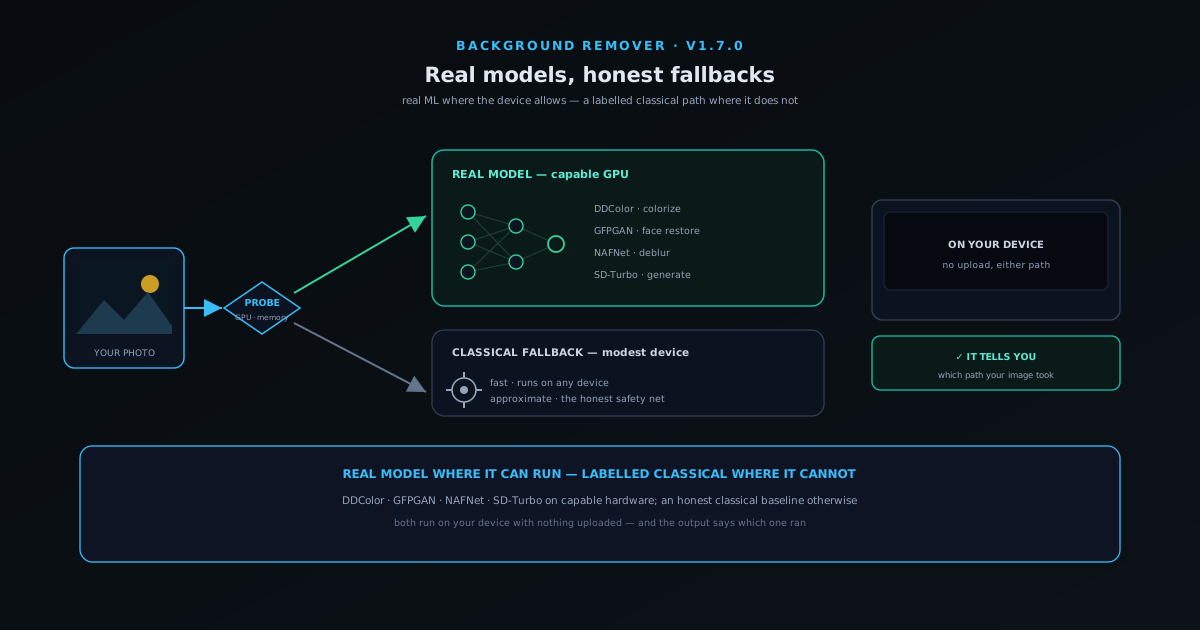
A free in-browser photo editor faces a choice on every tool: run a real machine-learning model, or fake the output with a classical algorithm and hope nobody notices. This is how the NSS Background Remover handles that honestly: real models where the device allows, a labelled classical fallback where it does not, and never a silent pretend.
Contents
- 1.Overview
- 2.What "classical" and "real model" actually mean
- 3.Why the fallback still has a real job
- 4.How the app decides which one runs
- 5.Tool by tool: what the real model buys you
- 6.Why running it on your device changes the calculation
- 7.How the suite got to real models
- 8.Bring your own model: the power-user escape hatch
- 9.What this means when you sit down to edit
- 10.The "honest everywhere" part is the point
Overview
Every free in-browser photo tool that advertises a feature like "remove the background" or "upscale to 4K" faces an uncomfortable choice the moment you click the button. It can run a real machine-learning model (the kind of large, trained network that produces genuinely impressive results but needs serious compute) or it can run a classical algorithm: a clever, decades-old image-processing trick that runs instantly on any device but produces a result that is, at best, a rough approximation. The tempting third option, and the one a lot of tools quietly take, is to run the classical trick and call it AI, betting that most users will not look closely enough to tell the difference. The NSS Background Remover took a different position in its v1.7.0 release, summed up internally as "real models everywhere, honest everywhere", and that phrase is worth unpacking because it describes a design philosophy more than a feature.
The short version is this: where your device can actually run a real model, the app runs the real model; where it cannot, the app runs a clearly labelled classical fallback and tells you that is what happened; and at no point does it run the cheap trick while implying you got the expensive result. That sounds obvious stated plainly, but it is surprisingly rare, because the honest version is harder to build and less flattering in a demo. This article is about why the distinction matters, what a real model buys you over a classical baseline for the specific tools in the suite, how the app decides which one to run, and why the small act of telling you which path your image took is the part that actually earns trust. Everything here runs in the browser on your own hardware, with no upload, which is what makes the whole question live in the first place.
What "classical" and "real model" actually mean
A classical image-processing algorithm is a hand-written procedure that manipulates pixels according to fixed rules. To "upscale" an image classically, you might interpolate between the pixels you already have: bicubic or Lanczos resampling that stretches the picture onto a larger grid and smooths the gaps; to pull a subject off its background classically, you might threshold on colour or trace hard edges. These methods are fast, deterministic, and tiny: they ship as a few kilobytes of code and run instantly on a phone from a decade ago. Their ceiling, though, is low, because they have no understanding of what is in the image. A classical resize does not know what the detail between two pixels should actually be; it is averaging from brightness and colour alone, which is why a classically enlarged image goes soft and mushy the moment you push the scale: there is no new detail, only stretched old detail.
A real model is a neural network trained on huge numbers of examples until it has learned the statistical structure of the task. The super-resolution model the suite uses for upscaling has effectively seen enough pairs of small and large images to infer what plausible detail belongs in the gaps, reconstructing an edge, a texture, a strand of hair rather than merely stretching what was there, which is why a real 2x or 4x upscale can come out genuinely sharper instead of just bigger. The segmentation network behind background removal has learned what real subjects and their edges look like closely enough to trace fine hair and soft boundaries that a colour threshold would butcher. The cost of that capability is size and compute: these models are tens to hundreds of megabytes and want a GPU to run at a reasonable speed. That cost is exactly why the choice between real and classical is forced rather than free, and why "just always use the real model" is not an option a browser tool can honestly promise on every device.
Why the fallback still has a real job
It would be easy to read all of this as "real models good, classical bad", but that is not the lesson, and treating the fallback as merely a consolation prize misses why it earns its place. A classical baseline runs anywhere (on a budget Android phone, on an old laptop, on a locked-down work machine that will not allocate a GPU to a web page), and it runs instantly, with no multi-megabyte download and no warm-up. For a great many real tasks, a fast approximation that the user can see immediately is more useful than a perfect result that requires downloading two hundred megabytes and waiting. The fallback is not the app failing; it is the app refusing to exclude people whose hardware cannot host a large network.
There is also a quieter point about reliability. Real models can fail in ways classical code does not: a WebGPU device can be lost mid-operation, memory can run out on a large image, a model asset can download truncated. A robust tool needs something to fall back to when the ambitious path breaks, and a classical baseline is the natural safety net: a result is produced rather than an error thrown. The design goal, then, is not to eliminate the classical path but to make the boundary between the two honest: run the real model when it can genuinely run, drop to classical when it cannot, and never blur the line between them in the interface. The ecosystem makes the broader case for designing around honest failure in Reliability hardening: device lifecycle, model integrity, and honest failures, and the real-versus-classical boundary is one concrete place that philosophy shows up.
How the app decides which one runs
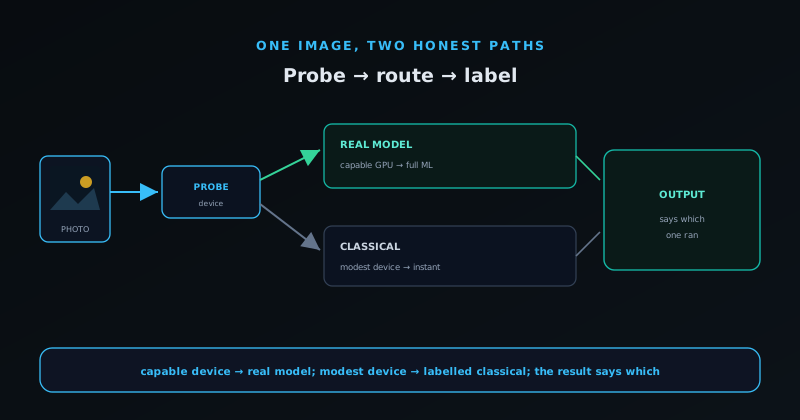
The decision is not made per click by guesswork; it follows from the tiering system the suite uses to size every model to the device. On first use of an AI tool, the app probes what your hardware can actually do (whether WebGPU is available and healthy, how much memory is on hand, whether the adapter is a real GPU or a weak software renderer), and from that it recommends a tier. A capable machine with a working GPU lands in the higher tiers where the real models run; a modest device stays in a lighter tier where the classical baselines do the work. This is the same machinery covered in depth in Honest AI tiers: Lite, Standard, Pro: sized in gigabytes, not hype, and the real-versus-classical split is essentially what those tiers cash out to in practice.
Crucially, the app refuses to pretend a degenerate setup is fine. If it detects a software renderer masquerading as a GPU (the kind of adapter that would technically run a model but at a glacial, unusable speed), it declines to load the heavy model rather than letting you sit through a ten-minute operation that looks broken. It also verifies that downloaded model assets are intact before trusting them, because a truncated download is worse than no download: it produces garbage that looks like the tool failing. The result is a decision flow that errs toward giving you a usable result quickly, escalating to the real model only when the device can host it well, and being explicit at every step about what is happening rather than spinning a hopeful wheel.
Tool by tool: what the real model buys you
The gap between real and classical is not uniform across tools, which is worth knowing so you can judge when it is worth waiting for the heavy path. For upscaling, the difference is dramatic: a real super-resolution model reconstructs believable detail (sharpening text, recovering texture, cleaning up an enlarged edge) where a classical resize can only interpolate and blur, so this is a tool where the real model is the whole point. For background removal, the segmentation network can trace fine hair and soft, semi-transparent edges that a classical colour-threshold cutout leaves jagged or chewed up, again a large gap, especially on busy backgrounds or wispy subjects. On both, the real model is not a nicer version of the classical result; it is doing a fundamentally different job, inferring detail rather than merely rearranging the pixels that were already there.
For other tasks the classical baseline is closer to respectable. A modest enlargement of an already-sharp image, a quick preview, a low-stakes cutout against a clean backdrop: a classical resize or threshold handles these acceptably, even if the real model does better on hard cases; and a classical compressor or format converter is not "AI" at all and needs no model. Knowing roughly where each tool sits helps you spend your patience wisely: on the tasks where the model gap is enormous (a heavy 4x upscale, a clean cutout of a fine-haired subject on a cluttered background), it is worth being on capable hardware and waiting for the download; on the tasks where it is modest, the instant classical result is often all you need. Reading the toolset through the real-versus-classical lens is what tells you where the real models earn their megabytes and where the fast baseline is already enough.
Why running it on your device changes the calculation
A cloud editor sidesteps this whole dilemma by running every model on a server farm, which means it can always use the real model, but at a cost the interface usually hides: your image is uploaded, processed on someone else infrastructure, and potentially retained. The on-device approach trades that away. Running the model in your browser means the image never leaves the device, there is no account or quota, and the tool works on sensitive material you would never upload: client photos, documents, family pictures. The price of that privacy is precisely the hardware constraint that makes the real-versus-classical choice necessary, because now the compute is yours, not a server you rent.
That framing reframes the fallback as a feature of the privacy stance rather than a limitation of it. The app is not choosing classical because it is cheap for the operator; there is no operator cost to speak of, since the compute is the user device. It is choosing classical because the specific device in front of it cannot host the large model, and the alternative (uploading the image to a server that can) is the exact thing the tool exists not to do. So the honest fallback is what lets the privacy promise stay intact on every device rather than only on high-end ones. The broader argument for why on-device processing is private by construction rather than by policy is in Why on-device AI is private by design, and the real-versus-classical boundary is downstream of that commitment.
How the suite got to real models
The honesty in v1.7.0 reads more clearly against the path that led to it, because the suite did not start by promising real models everywhere; it started by being honest about not having them. An early release shipped deliberately labelled classical baselines for jobs like enlarging an image, with the interface saying plainly that these were fast approximations (a plain resize) rather than trained networks. The flagship real model landed first where it mattered most: a trained segmentation network for background removal, which could run comfortably on a wide range of hardware. The progression was incremental on purpose: add a real model only once it could genuinely run on a meaningful share of devices, and until then ship the honest baseline rather than a faked result.
What v1.7.0 represents is the point where the heavier super-resolution upscaling model could be made to run on capable devices too, so the suite could route to real models across the board rather than only where a lightweight network already fit. That is why the release was framed as real models everywhere rather than as a single new feature: it was the moment the default flipped from classical-with-real-where-easy to real-with-classical-where-necessary. Reading the changelog in order shows a tool that grew its capabilities in step with what browsers and the available models could actually deliver, rather than one announcing capabilities it could not honestly stand behind. That restraint is the opposite of how most tools are marketed, and it is the reason the eventual real-models claim carries weight.
Bring your own model: the power-user escape hatch
For users who want to push past even the higher tiers, the suite includes a bring-your-own-model path: you can point specific tools at your own model files and have them run locally through the same on-device machinery. This is squarely a power-user feature, but it captures the philosophy well: rather than gating capability behind a server the operator controls, the suite lets a capable user supply a stronger model and run it on their own hardware, with the same no-upload guarantee as everything else. The model you bring runs where your images already are, not on infrastructure you have to trust with your files.
The practical reason this matters even for people who never use it is that it sets the ceiling. A tool that can accept a user-supplied model is architected to load and run real models locally as a first-class path, which is the same plumbing the built-in real models use. The bring-your-own option is the visible edge of an engine designed around running real models on the device, and it is what makes the real-versus-classical routing a genuine spectrum rather than a binary: from classical baselines, to bundled real models, to whatever model a determined user chooses to supply. Most people will live entirely in the middle of that spectrum, but the existence of the far end is a sign the foundations are real.
What this means when you sit down to edit
Translated into practice, the honest real-versus-classical design changes how you should approach a real editing task. If you are working on something where quality is paramount (a low-resolution image to upscale sharply, a fine-haired subject to cut cleanly off a busy background), it is worth being on a capable machine with a working GPU and giving the models a moment to download, because that is where the real models genuinely outperform. If you are doing something quick and forgiving (a rough cleanup, a fast preview, a low-stakes edit on whatever device is to hand), the classical baseline gives you an instant, usable result without the wait, and that is often exactly the right trade rather than a compromise.
The thing you never have to do is guess which you got, and that is the quiet payoff of the whole design. Because the suite tells you which path ran, you can make an informed choice: accept the fast approximation, or retry on better hardware for the real model, knowing precisely what each option gives you. A tool that hid this would leave you wondering whether a mediocre result was the tool failing or your device falling back; a tool that surfaces it turns the same situation into a decision you control. That transparency, repeated across every tool, is what makes a free in-browser suite trustworthy enough to use on work that genuinely matters rather than only on throwaway experiments.
The "honest everywhere" part is the point
The genuinely distinctive move in v1.7.0 is not that real models run (plenty of tools run real models) but that the app is candid about which path your image took. When a tool reports the model it used and roughly how long it took, or surfaces an honest "this ran the classical fallback because your device could not host the full model" message, it is treating you as someone who can handle the truth about a free tool rather than someone to be impressed by a vague "AI magic" label. That candour costs the marketing some shine, because "real models on capable hardware, honest fallback elsewhere" is a less swaggering claim than "AI-powered everything". But it is the claim that survives contact with reality, and it is the one that builds the kind of trust that makes someone come back.
This is, in the end, the same operating principle the whole ecosystem runs on applied to one technical decision: do not crippleware the free tier, do not fake the results, and do not hide what is happening. A user who knows the classical fallback ran can decide to retry on a better machine or accept the quick approximation; a user who was told nothing just thinks the tool is mediocre. Being explicit turns a hardware limitation into an informed choice, which is the difference between a tool that respects you and one that performs for you. You can see all of it in action (the real models, the honest fallbacks, and the labels that tell you which ran) at bgremover.novusstreamsolutions.com, with nothing uploaded either way.
Frequently asked questions
Quick answers to common questions about this topic.
What is the difference between a real AI model and a classical fallback?
A real model is a trained neural network (a segmentation network for background removal, or a super-resolution model for upscaling) that understands image content and produces high-quality results, but is large and needs a capable GPU. A classical fallback is a hand-written image-processing algorithm, like a bicubic resize, that runs instantly on any device but only approximates the result. The suite runs the real model where the hardware allows and the labelled fallback where it does not.
How does the app decide which one to run?
On first use it probes your device (WebGPU availability and health, memory, and whether the GPU is real rather than a weak software renderer) and recommends a tier. Capable devices get the real models; modest devices get the classical baselines. It also verifies model assets downloaded intact and refuses degenerate GPU setups rather than running unusably slowly.
Does using a real model upload my image to a server?
No. Both the real models and the classical fallbacks run entirely in your browser on your device. The model downloads to your browser on first use and then runs locally; the image itself is never uploaded. The on-device constraint is exactly why the real-versus-classical choice exists.
Is the classical fallback just the tool failing?
No. The fallback runs anywhere, instantly, with no large download, so it keeps the tool usable on budget phones and old laptops, and it acts as a safety net when a real model cannot load. For many tasks a fast approximation you can see immediately beats a perfect result that needs a 200 MB download.
Which tools benefit most from the real model?
The gap is largest on upscaling, where a real super-resolution model reconstructs detail a classical resize can only blur, and on background removal, where the segmentation network traces hair and soft edges a colour threshold cannot. For a modest enlargement of an already-sharp image the classical baseline is closer, and for non-AI tools like compression or format conversion there is no model involved at all.
How do I know which one actually ran on my image?
The app tells you; that candour is the "honest everywhere" half of the v1.7.0 release. Tools report the model used or surface an explicit message when the classical fallback ran because the device could not host the full model, so you can choose to retry on better hardware or accept the quick result.
Related workflow
Product photo to a transparent image every channel accepts
One photograph, cut out once, then re-encoded for a storefront, a marketplace listing and a social post without redoing the cutout each time.
- Cut the background out and check the edgesNSS Background Remover: Hair, glass and drop shadows are where automatic cutouts fail. Fix them once, on the master, before anything downstream copies the mistake.
- Re-encode and resize per destinationNovus Convert: Transparency survives PNG and WebP and dies in JPEG. Convert validates the file it hands back, so a listing never rejects a silently broken upload.
Related troubleshooting
Was this page helpful?
Your answer stays in this browser, it is not sent anywhere and no account or cookie is involved.