2026 · NSS Background RemoverAbout 14 min readNovus Stream Solutions
Amazon product photo requirements (2026): the complete spec, explained
Amazon will suppress a listing whose main image breaks the rules, so the photo spec is not a guideline; it is a gate. Here is the complete 2026 requirement set in plain English, plus how to hit it for free.
Contents
- 1.Overview
- 2.The hard rules: what the main image must be
- 3.Resolution: the number that unlocks zoom
- 4.Accepted formats and the file basics
- 5.Main image vs the secondary slots: divide the work
- 6.Category exceptions worth checking
- 7.Prepping compliant images for free, on your own device
- 8.Consistency across a catalogue
- 9.The most common reasons a main image gets flagged
- 10.Lighting and shooting a product so it preps cleanly
- 11.How shoppers actually read the image block on mobile
- 12.A ten-second pre-upload checklist
- 13.Why photos move the needle more than sellers expect
Overview
Amazon does not treat product photos as a creative choice. The main image in particular is governed by a hard technical specification, and a listing that breaks it can be suppressed from search entirely, meaning shoppers cannot find it no matter how good the product is. That makes the photo spec a gate rather than a guideline, and the difference between a listing that ranks and one that is invisible often comes down to whether the main image is pure white, correctly framed, and high enough resolution to enable zoom. This guide walks the complete 2026 requirement set in plain English, separates the hard rules from the recommendations, and shows how to hit every one of them without a studio or a subscription.
The reason the spec is worth learning properly, rather than guessing at, is that Amazon's enforcement is automated and unforgiving. A main image with a prop, a watermark, a coloured background, or text gets flagged or suppressed by systems that do not care about your intent. Conversely, a listing that nails the spec gets the zoom feature, looks consistent in the grid alongside competitors, and removes one of the most common reasons listings quietly underperform. Treating the requirements as the non-negotiable foundation they are (and then using the secondary image slots for the persuasion the main image is not allowed to do) is how you turn the photo block into an asset instead of a liability.
The hard rules: what the main image must be
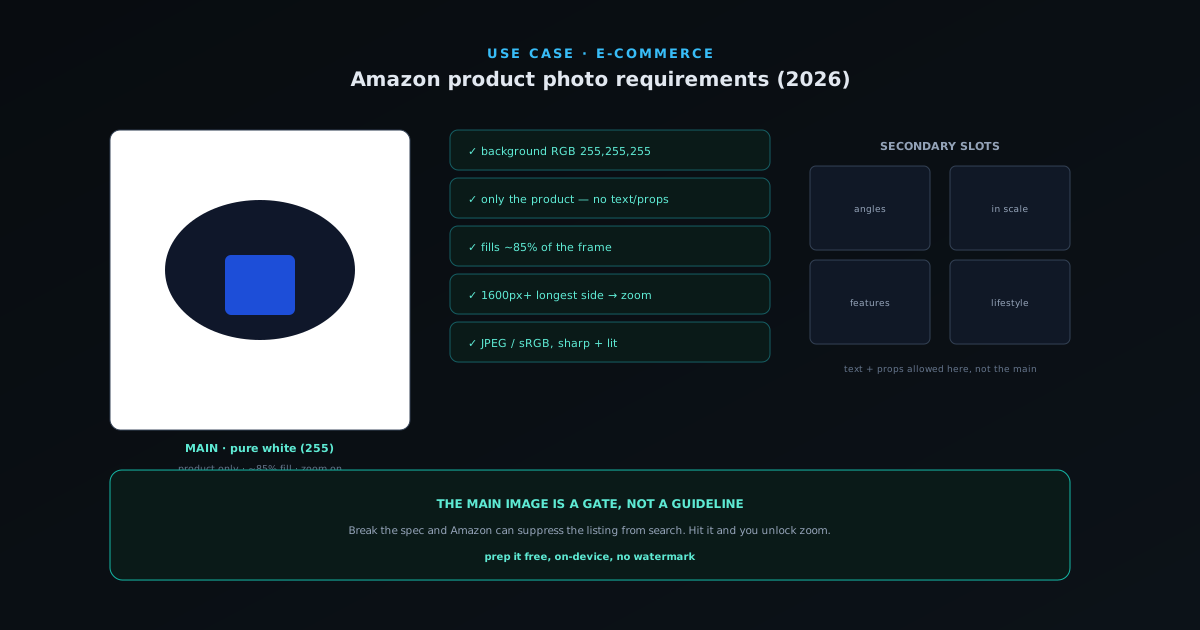
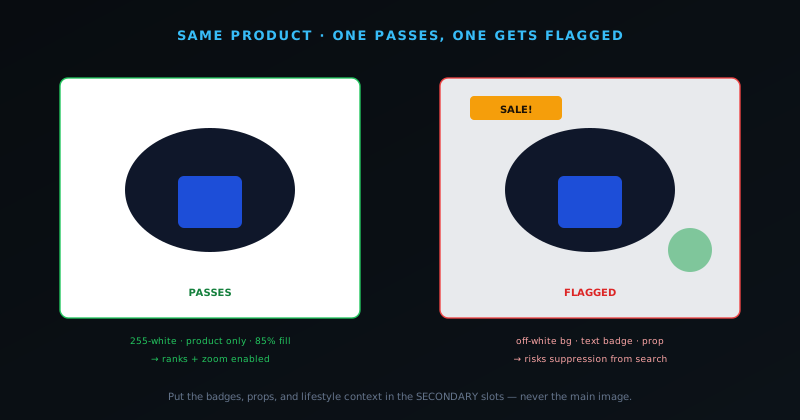
The main image (the one shoppers see in search results and at the top of the listing) has the strictest requirements because it is the one Amazon uses to present your product across the marketplace. It must show the actual product you are selling, out of its packaging, against a pure white background. "Pure white" is specific: RGB 255, 255, 255, the value that blends seamlessly into Amazon's own white interface so the product appears to float. A background that looks white to the eye but reads as 252 or 248 is not compliant, and it shows as a faint grey box around your product in the grid, which both looks unprofessional and risks a flag.
The main image must contain only the product. No text, no logos, no watermarks, no badges, no inset graphics, no props, and no additional objects that are not part of what the customer receives. The product should be in focus, well lit, and fill roughly 85% of the image frame, large enough to see clearly without being cropped at the edges. For most categories the image must be a real photograph rather than an illustration or render, and the product must be shown from a flattering, recognizable angle. These are the rules that get listings suppressed when broken, so they are the ones to verify first and every time.
- Pure white background (RGB 255, 255, 255) for the main image.
- Only the product, out of packaging: no text, logos, watermarks, props, or extra objects.
- Product fills ~85% of the frame, in focus and well lit.
- A real photograph (most categories), shown from a clear, flattering angle.
Resolution: the number that unlocks zoom
Amazon accepts images at a minimum of 500 pixels on the longest side, but that minimum is a floor you should never actually use, because the resolution number that matters for conversion is the one that enables the zoom feature. When an image is at least 1,000 pixels on the longest side, Amazon turns on hover-to-zoom, letting shoppers inspect texture, stitching, material, and detail. Zoom is one of the strongest trust signals on a product page, because it lets a buyer scrutinize the product the way they would in a store, and listings without it feel evasive by comparison.
The practical recommendation is to upload images at 1,600 pixels or larger on the longest side. This comfortably clears the zoom threshold, future-proofs against rising display resolutions, and gives the zoom feature enough detail to be genuinely useful rather than a blurry magnification. Shooting and exporting at high resolution costs nothing extra and removes a whole category of "why is my listing underperforming" questions. If your source photography is high resolution (and any modern phone camera easily clears this), the only thing standing between you and zoom-enabled images is exporting at the right size rather than letting a tool downscale them.
Accepted formats and the file basics
Amazon accepts JPEG, TIFF, PNG, and GIF for product images, with JPEG being the most common choice because it balances quality and file size well for photographs on a white background. The colour space should be sRGB or CMYK, with sRGB the safe default for anything destined for a screen, since it is the standard colour space the web and Amazon's display pipeline expect. Files should be free of additional embedded elements and reasonably sized: large enough for the resolution you need, but not so heavy that they slow the listing.
A subtle but important point is that the main image's pure-white background does not require transparency; it requires actual white pixels. This is where a clean cutout workflow helps even though the final main image is opaque: you remove the original background to get a clean edge, then place the product on a solid white canvas. The result is a JPEG with a genuinely 255-white background and a crisp, halo-free product edge, which is exactly what the spec wants. Secondary images, by contrast, can use other backgrounds and lifestyle contexts, where a transparent PNG cutout becomes the flexible source you composite from.
Main image vs the secondary slots: divide the work
A listing typically allows multiple images, and the smartest way to use them is to let the main image satisfy the spec while the secondary slots do the selling the main image is forbidden from doing. The main image, locked to pure white and product-only, establishes legitimacy and unlocks zoom. The remaining slots are where you show the product in use, at different angles, with scale references, with key features called out, and in the lifestyle contexts that help a shopper imagine owning it. Splitting the job this way means you never have to compromise the compliant main image to fit in persuasion, because persuasion has its own slots.
A strong secondary set usually includes: additional angles and detail shots that the zoom-enabled main image complements; an in-scale or in-hand shot so size is unambiguous; a feature-callout image with short labels pointing at what matters; and one or more lifestyle images placing the product in a real setting. Infographic-style images with text are allowed in the secondary slots even though they are banned from the main, so this is where specifications, dimensions, and benefit callouts belong. Planning the full set before you shoot (main plus a deliberate sequence of secondaries) is what turns a compliant listing into a persuasive one.
Category exceptions worth checking
While the pure-white main-image rule covers most of the catalogue, some categories have their own conventions and exceptions, and checking your specific category's requirements before a big shoot saves rework. Certain categories permit or expect lifestyle or model imagery in ways others do not, and a few have additional requirements around how the product must be shown. The general white-background rule is the safe default that will not get you flagged, but if your category has a documented exception that better serves the product, it is worth knowing rather than assuming the strictest rule applies everywhere.
The reliable approach is to treat Amazon's own category-specific image guidelines as the source of truth and this article as the framework for understanding them. The structure (a compliant, spec-driven main image plus a deliberate set of persuasive secondaries) holds across categories even where the specifics shift. When in doubt, the pure-white, product-only main image is the version least likely to be suppressed, so defaulting to it while using the secondary slots for category-appropriate context is the lowest-risk way to cover both compliance and conversion. You can read Amazon's current image requirements directly at sellercentral.amazon.com, which is the canonical reference for any edge case this guide does not cover.
Prepping compliant images for free, on your own device
You do not need a studio or a subscription to produce spec-compliant Amazon images. The workflow is straightforward: shoot the product in even, soft light against any background, remove that background to get a clean cutout, place the cutout on a pure-white canvas for the main image, and export at 1,600 pixels or larger. The NSS Background Remover at bgremover.novusstreamsolutions.com handles the cutout and the white-canvas placement entirely in your browser, with no upload and no watermark, which means your product photography never leaves your device and the output is free of the badges or limits that paid tools often impose.
Because the background removal produces a true straight-alpha cutout, the edge stays clean when you composite the product onto white: no grey halo, no dark fringe, just a crisp product on a genuine 255-white field. For the secondary slots, the same transparent cutout becomes the source you drop into lifestyle scenes or feature-callout layouts. Doing the whole set from one clean cutout is what keeps a catalogue visually consistent, and running many products through the background remover in one session keeps them uniform. The step-by-step is covered in the product-photo tutorial at Prepping product photos for Amazon, Etsy, and Shopify.
Consistency across a catalogue
When you sell more than a handful of products, consistency across the catalogue becomes its own competitive advantage, because a shopper browsing your storefront or comparing your items in search reads visual uniformity as professionalism. Every main image on the same pure-white field, every product framed to the same approximate fill, every export at the same resolution: this uniformity makes a small seller look established. Inconsistency does the opposite: a mix of off-white backgrounds, varying crops, and different resolutions signals an amateur operation even when each individual product is good.
Achieving consistency is mostly a matter of fixing your settings once and applying them across the whole catalogue rather than deciding per image. Decide your framing, your white canvas, and your export resolution, then run every product through the same process. Running every product through the background remover with the same settings makes this practical at scale (one consistent model and setup applied across the catalogue), so a hundred-product catalogue comes out uniform without a hundred individual decisions. The consistency is a byproduct of the standardized process, not an extra creative effort per product, which is exactly why building the process once pays off across every listing you will ever create.
The most common reasons a main image gets flagged
Most main-image rejections come from a short list of recurring mistakes, and knowing them lets you check against the list before you ever upload. The off-white background is the most common: a background that looks white but measures 250 or 245 instead of 255, producing a faint box around the product. Props and extra objects are next: a prop that helps tell the story in a lifestyle shot is forbidden in the main image, where only the product itself may appear. Text, logos, badges, and watermarks baked into the image are a frequent flag, including watermarks added by free editing tools that impose them on the output.
Other common issues include a product that fills too little of the frame, looking lost in white space, or too much, getting cropped at the edges; an image that is a render or illustration where the category requires a photograph; and low resolution that fails to unlock zoom and looks soft. Every one of these is avoidable with a clean cutout placed on a true-white canvas at adequate resolution, which is why the prep workflow matters as much as the shoot. Running a quick mental checklist (pure white, product only, ~85% fill, sharp, 1,600px+, no text) before each upload catches essentially all of the avoidable flags.
Lighting and shooting a product so it preps cleanly
The cleanest cutout starts with the cleanest source photo, so a few minutes of attention at the shoot saves far more time in editing. Soft, even light is the goal: a product lit by diffuse daylight from a window, or a cheap softbox, has gentle shadows and no harsh hotspots, which gives the background-removal model a clear edge to find and gives you accurate colour to work with. Hard direct light creates deep shadows and blown highlights that complicate both the cutout and the colour, so diffusing the light (a sheer curtain over a window works) is the single highest-value shooting decision for product photos destined for a white background.
Shoot against a plain, contrasting background rather than a busy one, because the more the product stands out from what is behind it, the cleaner the automatic cutout will be. A mid-grey or plain backdrop behind the product makes the edge unambiguous; a cluttered background with colours similar to the product makes the model work harder and can leave a rough edge to refine. You do not need a real white backdrop at the shoot (you will replace the background with a true 255-white canvas in editing), so the practical aim is simply even light and a clean, contrasting background. Getting those two right means the prep step is a quick automatic cutout rather than a manual cleanup, which is what makes processing a whole catalogue fast.
How shoppers actually read the image block on mobile
Most marketplace shopping now happens on phones, where the image block is the dominant element of the listing and the shopper swipes through it before reading a word of text, so designing the image set for the small screen is not optional. On a phone, the main image appears small in search and fills the screen on the listing, which means a product that fills the frame and reads clearly at thumbnail size wins, while one lost in white space or cluttered with detail loses the click. The same 85% fill rule that satisfies Amazon's spec also happens to be what makes the product legible on a small screen, which is a useful alignment between compliance and conversion.
The secondary images are swiped, not clicked, on mobile, so the sequence matters: the most persuasive shots should come first because many shoppers never reach the end of the carousel. Lead with the angles and the in-use or in-scale shot that answer the biggest questions, and put the detailed infographic later for the shoppers who swipe that far. Text on infographic images must be large enough to read on a phone, since small annotations that look fine on a desktop preview become illegible at mobile size. Designing the image block for how it is actually consumed (small, swiped, and mobile-first) is what turns a technically-compliant set into one that actually converts the majority of shoppers who are on their phones.
A ten-second pre-upload checklist
Because most main-image rejections come from the same short list of mistakes, a quick mental checklist run before every upload catches essentially all of them. Is the background pure white (actually 255, not just white-ish)? Is the product the only thing in the frame, with no props, text, logos, or watermarks? Does it fill roughly 85% of the frame, sharp and in focus, without being cropped at the edges? Is the image at least 1,000 pixels on the longest side (ideally 1,600) so zoom turns on? Five questions, ten seconds, and the listing clears the gate that suppresses non-compliant images.
The same discipline applied to the secondary slots is a different checklist focused on persuasion rather than compliance: is there an in-scale shot so size is unambiguous, a detail shot that complements the zoom, a feature-callout image, and at least one lifestyle context? Running the compliance check on the main image and the persuasion check on the secondaries, every time, is what makes a catalogue both safe from suppression and consistently strong at converting. The checklist costs almost nothing per listing and removes the single most common reason listings quietly underperform, which is a main image that breaks a rule the seller did not know to check.
Why photos move the needle more than sellers expect
It is tempting to treat product photos as a box to tick and move on to pricing and keywords, but on a marketplace where the shopper cannot touch the product, the images are doing most of the persuasion. The main image determines whether someone clicks from search at all, the zoom determines whether they trust the detail, and the secondary set determines whether they can picture owning it. A listing with a compliant but lifeless image block converts worse than an identical product with a deliberate, high-quality set, which means photo quality is one of the highest-leverage things a seller controls.
This is why the small investment in getting the photos right (learning the spec, shooting cleanly, prepping consistently) returns more than its effort. The product, the price, and the reviews matter, but the images are the first and often the deciding impression, and they are entirely within your control in a way that competition and demand are not. Treating the photo block as a conversion surface to optimize rather than a compliance hurdle to clear is the mindset shift that separates listings that quietly underperform from listings that earn the click and the trust. The spec gets you in the door; the deliberate, consistent, persuasive set is what actually sells.
Frequently asked questions
Quick answers to common questions about this topic.
What is the white background requirement for Amazon main images?
The main image must use a pure white background (RGB 255, 255, 255), so the product appears to float against Amazon's white interface. A background that merely looks white but measures off-white can show as a grey box and risks a flag.
What size should Amazon product photos be?
At least 1,000 pixels on the longest side to enable hover-to-zoom, and ideally 1,600 pixels or larger. The 500-pixel minimum is a floor you should not use: zoom is a major trust signal and only turns on above 1,000 pixels.
Can I have text or logos on my Amazon main image?
No. The main image must show only the product with no text, logos, watermarks, badges, or props. Infographic-style images with text are allowed in the secondary image slots, not the main one.
How do I make a pure-white Amazon image for free?
Remove the background from your product photo and place the cutout on a solid white canvas, then export at 1,600px+. The NSS Background Remover does this in your browser for free with no watermark and no upload; see https://bgremover.novusstreamsolutions.com.
Related workflow
Product photo to a transparent image every channel accepts
One photograph, cut out once, then re-encoded for a storefront, a marketplace listing and a social post without redoing the cutout each time.
- Cut the background out and check the edgesNSS Background Remover: Hair, glass and drop shadows are where automatic cutouts fail. Fix them once, on the master, before anything downstream copies the mistake.
- Re-encode and resize per destinationNovus Convert: Transparency survives PNG and WebP and dies in JPEG. Convert validates the file it hands back, so a listing never rejects a silently broken upload.
Related troubleshooting
Was this page helpful?
Your answer stays in this browser, it is not sent anywhere and no account or cookie is involved.