2026 · NSS Background RemoverAbout 13 min readNovus Stream Solutions
Ghost-mannequin product photos without a studio
The ghost-mannequin effect shows a garment's shape and fit with no visible model or mannequin, the standard for apparel e-commerce. Here is the two-shot method and how to composite it free, on-device.
Contents
- 1.Overview
- 2.What the ghost-mannequin effect actually is
- 3.Why it converts for apparel
- 4.The two-shot method
- 5.Shooting the components without a studio
- 6.Compositing the effect
- 7.When to use alternatives instead
- 8.Color accuracy is critical for apparel
- 9.Showing construction and fit details
- 10.Common ghost-mannequin mistakes
- 11.Consistency across an apparel catalogue
Overview
The ghost-mannequin effect (also called the invisible-mannequin or hollow-man effect) is the apparel-photography technique where a garment is shown holding its shape and form as if worn, but with no visible model or mannequin inside it. It is the standard look for clothing e-commerce because it shows the garment's fit, drape, and dimensionality (how it actually sits on a body) while keeping the focus entirely on the product, with no model to distract or date the image. Achieving it looks like it requires a studio, but the technique is accessible without one: it comes down to a simple two-shot method and some compositing, both of which can be done with a phone and free on-device editing. This guide covers what the effect is, why it converts, the method to capture it, and how to composite it without a studio.
The reason ghost-mannequin photography is worth learning for anyone selling clothing online is that it noticeably raises the perceived professionalism and clarity of apparel listings, which directly affects conversion. A flat-lay photo of a garment lying on a surface shows the item but not how it sits on a body; an on-model photo shows fit but introduces a model whose look may not suit every buyer and dates the image. The ghost-mannequin effect splits the difference: it shows the three-dimensional shape and fit, like an on-model shot, while keeping the clean, product-focused, timeless quality of a studio product shot. For apparel sellers, it is the look buyers expect from quality stores, and it is achievable on a budget once you know the method.
What the ghost-mannequin effect actually is
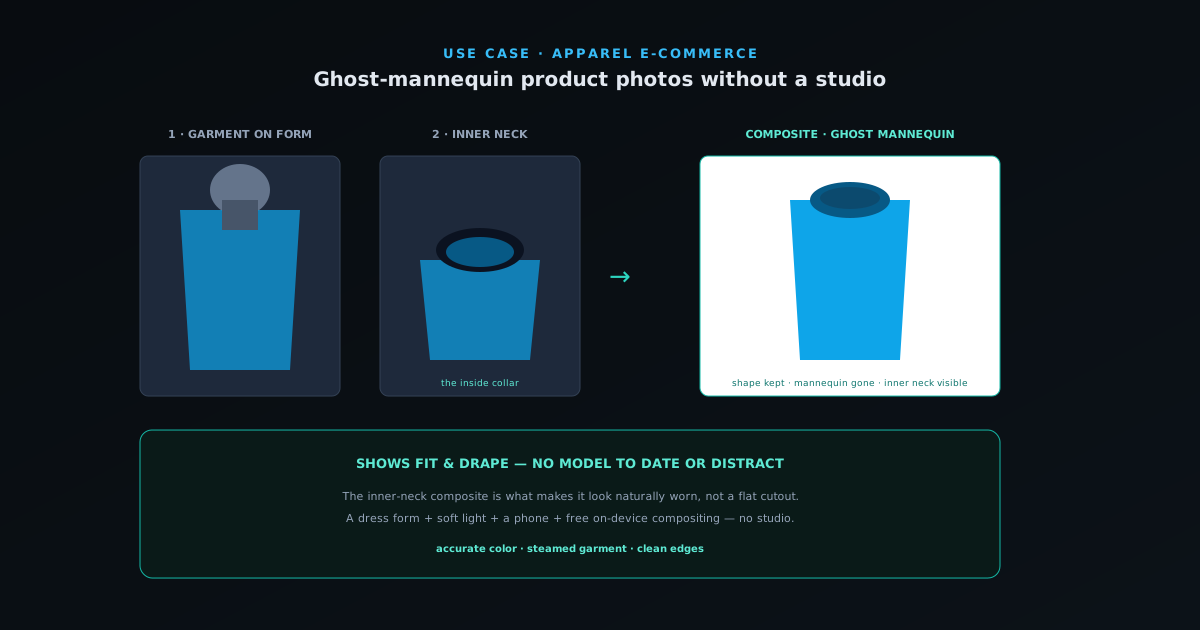
The ghost-mannequin effect shows a garment with its natural three-dimensional shape (filled out as if worn, with the collar, shoulders, and body holding their form) but with the mannequin or form that gave it that shape edited out, so the garment appears to float, holding its shape on an invisible body. The defining detail that makes it convincing is the inner neck: in a real worn garment you can see a bit of the inside back of the collar, and a good ghost-mannequin image shows this inner neck, which is what distinguishes the effect from a garment simply cut out from a mannequin (which would show a hollow or solid neck opening that looks wrong).
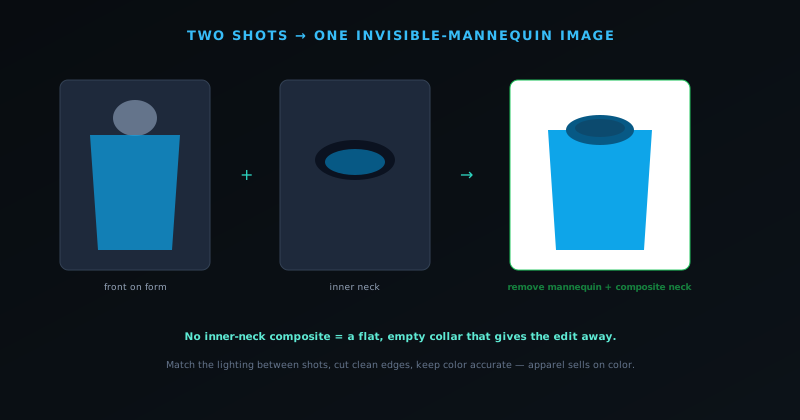
This inner-neck detail is why the effect is captured with two shots rather than one: a main shot of the garment on the form, and a second shot of the inside of the neck, which are then composited so the final image shows the garment's shape with the realistic inner-neck detail and no mannequin. Without the inner-neck composite, removing the mannequin leaves a flat or empty neck opening that betrays the edit; with it, the garment looks naturally worn by an invisible body. Understanding that the effect is specifically about showing three-dimensional shape plus the realistic inner neck, with the mannequin removed, is the foundation for capturing and compositing it correctly, since the inner neck is the detail that separates a convincing ghost mannequin from an obvious cutout.
Why it converts for apparel
The ghost-mannequin effect converts for apparel because it answers the buyer's core question (how will this garment look and fit) better than the alternatives while keeping the image clean and product-focused. A flat lay shows the garment's pattern and color but not its three-dimensional fit; the buyer cannot see how it drapes or sits on a body. An on-model shot shows fit but introduces a specific model whose body, look, and styling may not match the buyer's sense of themselves, and it dates the image to a particular model and styling moment. The ghost mannequin shows the fit and drape (the three-dimensionality that matters for clothing) without a model to distract, mismatch, or date it.
This combination of showing fit while staying product-focused is exactly what apparel e-commerce wants, which is why the ghost-mannequin look is the standard for quality clothing stores. It signals professionalism, since buyers associate the effect with established retailers, and it provides the dimensional information buyers need to judge a garment they cannot try on. For a small apparel seller, adopting the ghost-mannequin look raises their listings to the visual standard buyers expect from larger stores, which builds the trust that converts. The effect is not merely aesthetic; it conveys functional information about fit and shape that flat lays miss and does so without the downsides of on-model shots, which is the practical reason it has become the apparel e-commerce standard worth matching.
The two-shot method
Capturing a ghost-mannequin image starts with two photographs of the garment on a form (a mannequin, a dress form, or even a carefully arranged hanger setup). The first is the main shot: the garment on the form, photographed from the front, filled out to show its shape, with even lighting and a clean background. The second is the inner-neck shot: the back inner collar of the garment, photographed so you capture the inside of the neckline that will be visible in the final composite. These two shots provide the two pieces the composite needs: the garment's shape from the main shot, and the realistic inner neck from the second shot.
For the inner-neck shot, the garment is arranged or photographed so the inside back of the collar is visible, often by photographing the garment on the form turned to show the inner collar, or by capturing the neckline separately. The goal is simply to have a clean image of the inner neck that can be placed into the final composite where the mannequin's neck would have been. With these two shots in hand, the compositing step removes the mannequin from the main shot and inserts the inner-neck detail, producing the floating, naturally-shaped garment. The method is conceptually simple (two shots, then composite) which is what makes it achievable without a studio, since the two shots can be taken with a phone and good light, and the compositing done in a free editing tool.
Shooting the components without a studio
You do not need a studio to shoot the two components: you need a form to give the garment shape, even light, and a clean background, all of which are achievable on a budget. The form can be an inexpensive mannequin or dress form, which is the one piece of equipment worth acquiring for regular apparel photography, since it gives the garment the three-dimensional shape the effect depends on. The lighting is soft, even daylight or an affordable softbox, the same as for any product photography, avoiding harsh shadows that complicate the composite. The background should be clean and plain, since you will be removing it anyway, so a simple backdrop or wall works.
The shooting discipline is to fill out the garment naturally on the form so it shows its true shape, light it evenly so the composite is clean, and capture both the main front shot and the inner-neck shot in the same lighting so they match when combined. Consistency between the two shots matters (same lighting, same white balance) so they composite seamlessly, which is mostly a matter of shooting them in the same session under the same light. The garment should be steamed or pressed so it looks its best, since the photo will show every wrinkle. None of this requires a studio; it requires a form, decent light, a plain background, and care in arranging the garment, which is well within reach of a small seller shooting at home.
Compositing the effect
The compositing step is where the two shots become the ghost-mannequin image: the mannequin is removed from the main shot, and the inner-neck detail from the second shot is placed into the neckline so the garment shows its realistic inner collar with no visible form. The background-removal and editing tools do the heavy lifting: removing the mannequin and the background to isolate the garment, then layering the inner-neck shot behind the neckline so it shows through naturally. The result is the garment holding its shape, with the inner neck visible, floating on a clean (usually white) background, which is the finished ghost-mannequin look.
The NSS Background Remover's editing tools at bgremover.novusstreamsolutions.com/editor handle this compositing in the browser (removing the mannequin and background with bgremover.novusstreamsolutions.com/background-remover, and layering the components) all on your device for free, so your product photography stays private and there is no per-image cost. Because the tool produces clean cutouts with true transparency, the garment isolates cleanly from the mannequin and background, and the layered composite of the front and inner-neck shots comes together without the halos or rough edges that would betray the edit. The compositing is the step that looks most intimidating from the outside but is straightforward with the right tools: isolate the garment, remove the mannequin, composite the inner neck, place on a clean background. Doing it free and on-device puts the professional ghost-mannequin look within reach of any apparel seller willing to learn the method.
When to use alternatives instead
The ghost mannequin is the standard for many apparel items, but it is not the only approach, and knowing when an alternative serves better keeps your photography fit-for-purpose. Flat lays (the garment arranged neatly on a flat surface, shot from above) are simpler to produce and suit items where the pattern and styling matter more than three-dimensional fit, or where a styled, editorial flat lay fits the brand. On-model shots, despite their downsides, are valuable for showing how a garment looks in real wear and movement, and many listings benefit from including an on-model shot alongside the ghost-mannequin main image, since each shows something the other does not.
The strongest apparel listings often combine approaches: a ghost-mannequin main image for the clean, dimensional product shot, plus on-model shots showing real wear, plus detail shots of fabric and construction, plus perhaps a flat lay for a styled context. The ghost mannequin is the workhorse main image that shows shape and fit cleanly, while the other approaches add context the ghost mannequin cannot. Choosing the right mix depends on the garment and the brand, but the ghost mannequin earns its place as the primary product shot for most apparel because of how clearly it shows fit while staying product-focused. Understanding it as one tool among several (the standard for the clean main shot, complemented by on-model and detail images) is what produces a complete apparel listing rather than relying on any single approach.
Color accuracy is critical for apparel
One detail matters more for apparel than almost any other product category: color accuracy, because a buyer choosing clothing is often choosing partly on color, and a photo that misrepresents the garment's color leads to disappointed buyers and returns. A ghost-mannequin image that shows the garment's shape beautifully but renders its color inaccurately (too warm, too cool, washed out, or oversaturated) sets up a buyer to receive something that does not match what they saw, which erodes trust and drives returns. For apparel, getting the color right is not a nicety but a core requirement of an honest, conversion-supporting photo.
Color accuracy comes from good, neutral lighting and careful color handling: lighting the garment with even, neutral-temperature light that shows its true color, and avoiding edits that shift the color away from reality. The compositing process should preserve the garment's actual color rather than introducing a cast, which is why even lighting at capture and restrained color editing matter. Where a garment comes in multiple colors, each should be shown accurately, since a buyer relies on the photo to choose. The honesty principle that runs through all product photography applies sharply here: the photo should represent the garment truthfully, and for apparel, color is the dimension where inaccuracy most directly causes returns and disappointment. Prioritizing accurate color, through neutral lighting and faithful editing, is part of making ghost-mannequin photos that not only look professional but also set up satisfied buyers rather than returns.
Showing construction and fit details
The ghost-mannequin main image shows overall shape, but apparel buyers also want to see the construction and fit details that signal quality and answer their questions, so a complete apparel listing pairs the ghost-mannequin shot with detail images of the elements that matter. Close-ups of the stitching, the seams, the fabric texture, the buttons or zippers, the hems, and any distinctive construction details demonstrate the quality of the making, which is exactly what a buyer paying for a well-made garment wants to verify. These detail shots do the trust work that the overall shape shot cannot, proving the craftsmanship up close.
Fit details matter too: showing how a garment is cut, how it drapes, where it sits, and any features that affect fit helps a buyer judge whether it will work for them, which reduces the fit-related returns that plague apparel e-commerce. The ghost-mannequin shape shot conveys the general fit, but supporting images and clear information about the cut and measurements complete the picture. The strongest apparel listings therefore use the ghost-mannequin image as the clean main shot and surround it with detail and fit images that build the confidence to buy. This is the same use-every-slot logic that applies to all product photography, tuned for apparel's specific concerns: shape from the ghost mannequin, quality from the construction details, and fit confidence from the cut and measurement information, together giving the buyer what they need to purchase clothing they cannot try on.
Common ghost-mannequin mistakes
A few recurring mistakes separate convincing ghost-mannequin images from obvious or amateur ones, and knowing them helps avoid producing the latter. The most common is the missing or wrong inner neck: removing the mannequin without compositing in the inner-neck detail, leaving a flat or empty neck opening that immediately looks wrong and reveals the edit. Another is inconsistent lighting between the main shot and the inner-neck shot, so they do not match when composited and the seam shows. A third is a sloppy cutout with halos or rough edges where the mannequin was removed, which betrays the editing and looks unprofessional.
Other frequent mistakes include a garment poorly arranged on the form so it does not show its true shape, wrinkles and creases left visible (the photo shows everything, so the garment should be steamed), and color inaccuracy as discussed. Each of these is avoidable with care at the relevant step: composite the inner neck, match the lighting between shots, use a clean-cutting tool for crisp edges, arrange and steam the garment well, and handle color faithfully. The throughline is that a convincing ghost mannequin requires attention at each stage (capture, arrangement, and compositing) and the mistakes come from neglecting one of them. Running through this list when producing ghost-mannequin images catches the typical failures, ensuring the result looks like the professional, naturally-worn garment the effect is meant to convey rather than an obvious edit.
Consistency across an apparel catalogue
For a seller with many garments, the value of the ghost-mannequin technique multiplies when applied consistently across the catalogue, because a set of apparel images that all share the same clean, dimensional, white-background look reads as a professional, cohesive store. Consistency in the ghost-mannequin treatment (same shape, same lighting, same background, same framing) across every garment is what makes an apparel catalogue look established and trustworthy, while a mix of flat lays, on-model shots, and inconsistent ghost mannequins looks amateur. The technique is most powerful not as a one-off but as the consistent standard for the catalogue's main product images.
Achieving consistency is, as with all repeated product photography, a matter of standardizing the process and applying it across every item: the same shooting setup, the same compositing approach, the same output. Running every garment through the same background remover at bgremover.novusstreamsolutions.com/background-remover, and applying the same settings, produces the uniform look efficiently, with consistency as a byproduct of the standardized process. The companion guide at Prepping a whole product catalog, solo covers processing a whole catalogue, but the principle for apparel is that the ghost-mannequin effect, applied consistently across the catalogue through a repeatable process, is what gives a small apparel store the professional, cohesive product photography that builds buyer trust. Learning the technique once and applying it consistently is what turns it from a single impressive photo into a catalogue-wide standard that elevates the whole store.
Frequently asked questions
Quick answers to common questions about this topic.
What is the ghost-mannequin effect?
It is the apparel-photography technique where a garment is shown holding its three-dimensional shape as if worn, but with the mannequin or model edited out, so it floats on an invisible body. The visible inner neck is the detail that makes it look naturally worn rather than a flat cutout.
How do I take ghost-mannequin photos without a studio?
Use a dress form or mannequin, soft even light, and a plain background. Shoot two photos (the garment on the form from the front, and the inner neck) then composite them: remove the mannequin and layer the inner neck in. A phone and free on-device editing are enough.
Why is the inner-neck shot important?
In a real worn garment, the inside back of the collar is visible. Without compositing that inner neck in, removing the mannequin leaves a flat or empty neck opening that looks wrong. The inner-neck shot is what makes the garment look naturally worn by an invisible body.
How do I composite a ghost-mannequin image for free?
Use the NSS Background Remover at https://bgremover.novusstreamsolutions.com to remove the mannequin and background and layer the front and inner-neck shots, all in your browser, free, with no watermark, so the garment isolates cleanly onto a white background.
Related workflow
Product photo to a transparent image every channel accepts
One photograph, cut out once, then re-encoded for a storefront, a marketplace listing and a social post without redoing the cutout each time.
- Cut the background out and check the edgesNSS Background Remover: Hair, glass and drop shadows are where automatic cutouts fail. Fix them once, on the master, before anything downstream copies the mistake.
- Re-encode and resize per destinationNovus Convert: Transparency survives PNG and WebP and dies in JPEG. Convert validates the file it hands back, so a listing never rejects a silently broken upload.
Related troubleshooting
Was this page helpful?
Your answer stays in this browser, it is not sent anywhere and no account or cookie is involved.