2026 · NSS Background RemoverAbout 13 min readNovus Stream Solutions
Prepping a whole product catalog, solo
How one person can turn a folder of raw product photos into a clean, consistent, marketplace-ready catalog in an afternoon: free, in the browser, no photographer.
Contents
- 1.Overview
- 2.Step 1: remove every background
- 3.Step 2: standardize background and size
- 4.Step 3: compress for fast pages
- 5.Step 4: add lifestyle and variations from the same masters
- 6.The studio-without-a-studio shift
- 7.Why batch processing is the foundation
- 8.Standardizing onto one background and size
- 9.Compression and the page-speed payoff
- 10.Reusing masters instead of recutting
- 11.Doing it well without a photographer
- 12.Maintaining the catalog as it grows
- 13.The pitfalls that trip up solo catalog prep
- 14.A realistic timeline for a first catalog
- 15.The economics that make solo catalog prep work
Overview
A clean, consistent product catalog used to mean a photographer, a studio, and a budget. For a solo seller, it can now mean an afternoon in the browser. This playbook turns a folder of raw product photos into marketplace-ready images (cut out, standardized, and compressed) without uploading anything or paying per image.
Step 1: remove every background
Open the background remover at bgremover.novusstreamsolutions.com/background-remover and run your product photos through it. It removes the background from each one using the same model and settings, all on-device, and exports transparent cutouts you can keep as masters. Work through a catalog of dozens of products without a single upload. When the catalog runs to hundreds rather than dozens, the batch mechanics get their own playbook in Batch background removal for large product catalogs.
Keep these transparent masters: you will reuse them for every version of each product image.
Step 2: standardize background and size
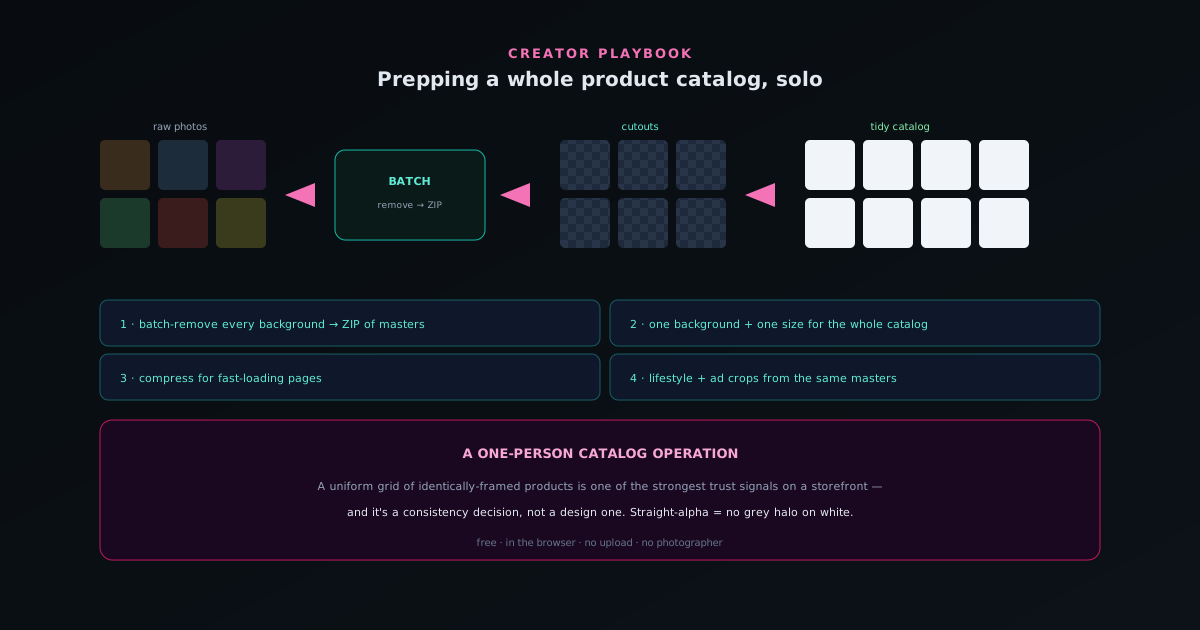
Decide one treatment for the whole catalog: pure white for marketplace main images, or a consistent brand background. Place each cutout on it, then use bgremover.novusstreamsolutions.com/tools/image-resizer to bring every image to identical dimensions. A uniform grid of identically-framed products is one of the strongest trust signals on a storefront, and it is purely a consistency decision, not a design one.
Because the cutout edges are straight-alpha, products sit on white with no grey halo, which is exactly what marketplace image checks expect.
Step 3: compress for fast pages
Run the images through bgremover.novusstreamsolutions.com/tools/image-compressor with WebP/JPEG quality control so your storefront loads fast without visible quality loss. Page weight matters for conversion; doing it locally means no upload round-trip per image and no cost.
Set your dimensions and compression target once and apply them across the catalog so everything comes out consistent.
- Batch remove → ZIP of cutouts.
- One background + one size for the whole catalog.
- Compress for fast-loading pages.
Step 4: add lifestyle and variations from the same masters
With transparent masters in hand, you can produce more without more cutting: drop products into lifestyle scenes, create ad crops at different aspect ratios, and build seasonal variations, all from the images you already cut out. One afternoon of cutting yields a catalog you can re-dress for months.
The whole pipeline (remove, standardize, compress, repurpose) runs free and in the browser, which is what makes a one-person catalog operation realistic.
The studio-without-a-studio shift
It is worth appreciating how recently a clean, consistent product catalog required resources a solo seller did not have. The traditional path meant a photographer, a studio space with controlled lighting, and a budget to pay for both, which put professional-looking product imagery out of reach for many small sellers or made it a significant recurring expense. The shift that makes a one-person catalog operation realistic is that the steps which used to require that studio (clean isolation of the product, consistent presentation, proper sizing) can now be done in a browser, on photos you took yourself, for free.
This is not merely a cost saving; it is a change in who can produce professional product imagery at all. A seller with a phone camera and an afternoon can now achieve the clean, uniform catalog that used to signal a real budget behind the operation, which levels a playing field that was previously tilted toward those who could afford a studio. The tools do the part the studio used to do (isolating the product and standardizing its presentation), so the seller supplies only the raw photos and the decisions. Recognizing this shift reframes catalog prep from an expense to outsource into a routine task one person can own, which is exactly what makes the solo approach viable.
Why batch processing is the foundation
The entire solo-catalog workflow rests on being able to process many images at once, because doing it one at a time does not scale to a real catalog. Removing the background from a single product is quick; doing it across dozens or hundreds of products, by hand, individually, is the kind of repetitive labor that turns catalog prep back into the all-day chore the studio was supposed to handle. Batch processing is what collapses that: you hand the tool the whole folder, it works through them sequentially while you do something else, and you get back a set of cutouts in one operation.
Beyond saving time, batching is what guarantees the consistency that makes a catalog look professional, because every image is processed with the same model and the same settings. Hand-processing invites small variations from image to image (slightly different handling, drifting attention over a long session), whereas a batch applies identical treatment uniformly. So batch processing is not just the efficient foundation but the consistency foundation: it is what lets one person produce a catalog that is both complete and uniform, which is the combination that reads as a real operation rather than a collection of separately-edited photos. The batch is where the solo catalog becomes possible at all.
Standardizing onto one background and size
Once you have the transparent cutouts, the step that most determines how professional the catalog looks is standardizing them onto one consistent treatment, because uniformity across listings is a powerful trust signal. Decide a single approach for the whole catalog (pure white for marketplace main images, or a consistent brand background) and place every cutout on it, then bring every image to identical dimensions. The result is a uniform grid where every product is framed the same way, which is one of the strongest signals to a buyer that they are dealing with a legitimate, organized seller.
The important insight is that this uniformity is a consistency decision, not a design skill. You are not artfully composing each shot; you are applying the same background and the same size to every product mechanically, which anyone can do. Because the cutouts have clean, straight-alpha edges, products sit on a white background with no grey halo, which is exactly what marketplace image requirements expect. The discipline is simply to choose one treatment and apply it to everything rather than handling each product differently. That mechanical uniformity is what produces the polished, grid-like catalog that looks like it came from a studio, achieved through consistency rather than artistry.
Compression and the page-speed payoff
A step that is easy to skip but matters for a real storefront is compressing the images so pages load fast, because page weight directly affects whether visitors stay long enough to buy. A catalog of large, uncompressed images makes a storefront slow, and a slow store loses impatient shoppers before they see the products. Running the standardized images through compression with quality control produces files that load quickly without visible quality loss, which keeps the storefront responsive even as the catalog grows. For a seller, fast pages are not a technical nicety but a conversion factor.
Doing the compression locally, as part of the same browser-based pipeline, means there is no upload round-trip per image and no per-image cost, so compressing a whole catalog is as free and private as the rest of the workflow. The practical approach is to set your target dimensions and compression level once and apply them across the catalog, so every image comes out consistently sized and weighted. This consistency in file handling matters as much as consistency in appearance: a catalog where some images are heavy and others light loads unevenly. Compressing uniformly as a standard step is what ensures the finished catalog is not just visually consistent but fast, which the storefront's performance depends on.
Reusing masters instead of recutting
The transparent cutouts you produce in the first pass are not single-use listing images but reusable masters, and treating them as such is what multiplies the value of one afternoon's work. From the same cutout you can produce the white-background listing image, a lifestyle composition showing the product in a scene, ad crops at different aspect ratios for different placements, and seasonal variations, all without cutting the product out again. The expensive step, isolating the product, is done once, and every subsequent presentation derives from that master.
This reuse is the key to sustaining a catalog over time without sustained effort. A seller who keeps their transparent masters can re-dress the catalog for a sale, a season, or a new marketplace by working from the cutouts they already have, rather than reprocessing from raw photos each time. One session of cutting yields a library you can repurpose for months, which is what turns catalog prep from a recurring ordeal into an occasional investment with a long payoff. Thinking of the cutouts as durable assets rather than disposable outputs is the mindset that makes a solo catalog operation not just possible to set up but cheap to maintain, because most future needs are met by repurposing rather than redoing.
Doing it well without a photographer
A reasonable worry is whether photos taken without a photographer can yield a professional catalog, and the honest answer is that the tools handle much of what a studio used to, provided you give them a reasonable starting point. The cutout process isolates the product regardless of the background you shot against, and the standardization places it on a clean, uniform backdrop, so you do not need a seamless studio sweep behind every shot. What you do need is a product that is in focus, reasonably lit, and clearly separated from whatever is behind it, which is achievable with a phone and a bit of care.
The few habits that most improve self-shot product photos are simple: shoot in good, even light to avoid harsh shadows, keep the product sharp and filling the frame, and use a background that contrasts with the product so the cutout is clean. These are not photography skills so much as basic attention, and they give the tools a clean signal to work from, which is most of what a studio provided. The result is that a solo seller, shooting their own products with ordinary equipment and a little intention, can feed the pipeline images good enough to produce a catalog that looks professionally prepared. The photographer's role narrows to a few sensible shooting habits, which anyone can adopt.
Maintaining the catalog as it grows
A catalog is not a one-time project but a living thing that gains products, retires others, and needs periodic refreshes, so the workflow has to support ongoing maintenance, not just an initial build. The good news is that the same pipeline handles maintenance trivially: a new product is processed exactly like the originals (cut out, standardized onto the same background and size, compressed to the same target), so it slots seamlessly into the existing catalog with matching presentation. The consistency that the standardized process produces is what makes additions blend in rather than stand out as obviously newer.
The key to maintaining consistency over time is to keep using the same settings and treatments for every addition, so the catalog stays uniform even as it grows across many sessions. Because the process is documented in your own routine (this background, this size, this compression), applying it to new products is mechanical, and the catalog remains coherent indefinitely. This is the difference between a catalog that looks consistent on launch and then drifts as products are added haphazardly, and one that stays uniform because every addition runs through the identical pipeline. For a solo seller, that repeatable maintenance is what keeps the catalog professional not just on day one but as the business evolves, which is the realistic timescale that matters.
The pitfalls that trip up solo catalog prep
A few avoidable mistakes account for most disappointing solo catalogs, and naming them prevents them. The most common is inconsistency creeping in across a long session (different backgrounds, slightly different sizes, varying compression), which the discipline of deciding one treatment and applying it uniformly is meant to prevent, but which slips when you process images ad hoc rather than as a deliberate batch with fixed settings. Another is skipping the check that products sit cleanly on white without a halo, which can leave marketplace images that fail platform requirements. A third is neglecting compression, leaving a storefront slow with heavy images.
The deeper pitfall is treating the catalog as a one-time push rather than a repeatable process, so that the initial set looks consistent but later additions drift because the original settings were not recorded or reused. Avoiding these comes down to the same principle: fix your treatment (background, size, compression) once, write it into your own routine, and apply it identically to every image, original or added. The tools make consistency easy, but consistency is still a decision you have to make and hold; the pitfalls are all variations of letting it slip. A solo seller who decides the treatment deliberately and applies it uniformly sidesteps essentially all of them, which is why the standardize step is emphasized as much as the removal step.
A realistic timeline for a first catalog
Setting honest expectations about how long this takes helps you commit to it rather than imagining it as an open-ended ordeal. For a first catalog, the bulk of the time is the initial batch removal, which runs largely unattended (you set it going and it works through your products while you do something else), followed by the standardization and compression, which are quick once you have decided your treatment. For a catalog of dozens of products, the active work is genuinely an afternoon, not a multi-day project, because the most time-consuming part is automated and the rest is fast, uniform application of settled choices.
Subsequent work is faster still, because the first pass establishes the treatment and produces the reusable masters. Adding products later is a matter of running them through the same settled pipeline, and re-dressing the catalog for a season or a sale draws on masters you already have. So the realistic timeline is an afternoon for the initial build and minutes for ongoing maintenance, which is a completely different proposition from the recurring expense and scheduling of studio shoots. Knowing that the first catalog is an afternoon's work, not a daunting project, is often what gets a solo seller to actually do it, and the speed of subsequent maintenance is what keeps the catalog professional as the business grows without it becoming a burden.
The economics that make solo catalog prep work
Stepping back, the reason a solo catalog operation is now realistic comes down to economics: the per-image cost has gone to zero, and the time cost has collapsed through batching. A studio charges per shoot and a cloud tool charges per image, both of which make a large catalog expensive to produce and re-produce. A free, on-device pipeline charges nothing per image, so the marginal cost of processing one more product, or re-dressing the whole catalog, is just your time, and batching minimizes even that. The combination removes the financial barrier that made professional catalog imagery a budget item.
This zero marginal cost changes what a solo seller can do. With no per-image expense, you can afford to maintain consistency across a large catalog, refresh it for seasons, produce multiple presentations per product, and expand to new marketplaces, none of which would be feasible if each image cost money to produce. The economics that used to favor only sellers with budgets now favor anyone willing to invest an afternoon, because the recurring cost is gone. That shift (from a per-image expense to a one-time effort with free repetition) is the quiet foundation under everything in this playbook, and it is what makes a one-person, professional-quality catalog operation not just possible but genuinely sustainable.
Frequently asked questions
Quick answers to common questions about this topic.
How do I prepare a large product catalog by myself?
Shoot everything against a simple background, then remove each background and standardize the framing with one consistent set of settings. The Background Remover runs entirely on your device with no per-image cost, which makes clearing a whole catalog yourself manageable.
How do I make all my product photos look consistent?
Use the same background, crop, and output format across the whole set. Processing them all with one set of settings enforces that uniformity automatically.
What image specs do marketplaces want?
Most want a clean white or transparent background, the product centered with margin, and high resolution. See the product-photo tutorial at Prepping product photos for Amazon, Etsy, and Shopify for platform-specific guidance.
Related workflow
Product photo to a transparent image every channel accepts
One photograph, cut out once, then re-encoded for a storefront, a marketplace listing and a social post without redoing the cutout each time.
- Cut the background out and check the edgesNSS Background Remover: Hair, glass and drop shadows are where automatic cutouts fail. Fix them once, on the master, before anything downstream copies the mistake.
- Re-encode and resize per destinationNovus Convert: Transparency survives PNG and WebP and dies in JPEG. Convert validates the file it hands back, so a listing never rejects a silently broken upload.
Related troubleshooting
Was this page helpful?
Your answer stays in this browser, it is not sent anywhere and no account or cookie is involved.