2026 · NSS Background RemoverAbout 12 min readNovus Stream Solutions
What runs on your device vs in the cloud
Some AI features can run entirely on your device; others genuinely need a server. A plain-language map of which is which, and why it matters for privacy and cost.
Contents
- 1.Overview
- 2.What runs well on-device
- 3.What genuinely needs the cloud
- 4.Why the split drives privacy and cost
- 5.The spectrum from tiny to frontier
- 6.Why size decides where a model runs
- 7.On-device tasks, in more detail
- 8.Cloud-bound tasks, and why
- 9.The grey zone in the middle
- 10.How efficiency moves the line over time
- 11.The business model is a reliable tell
- 12.Hybrid tools and where they draw the line
- 13.Even language models are coming on-device
- 14.How to tell what a tool is doing
Overview
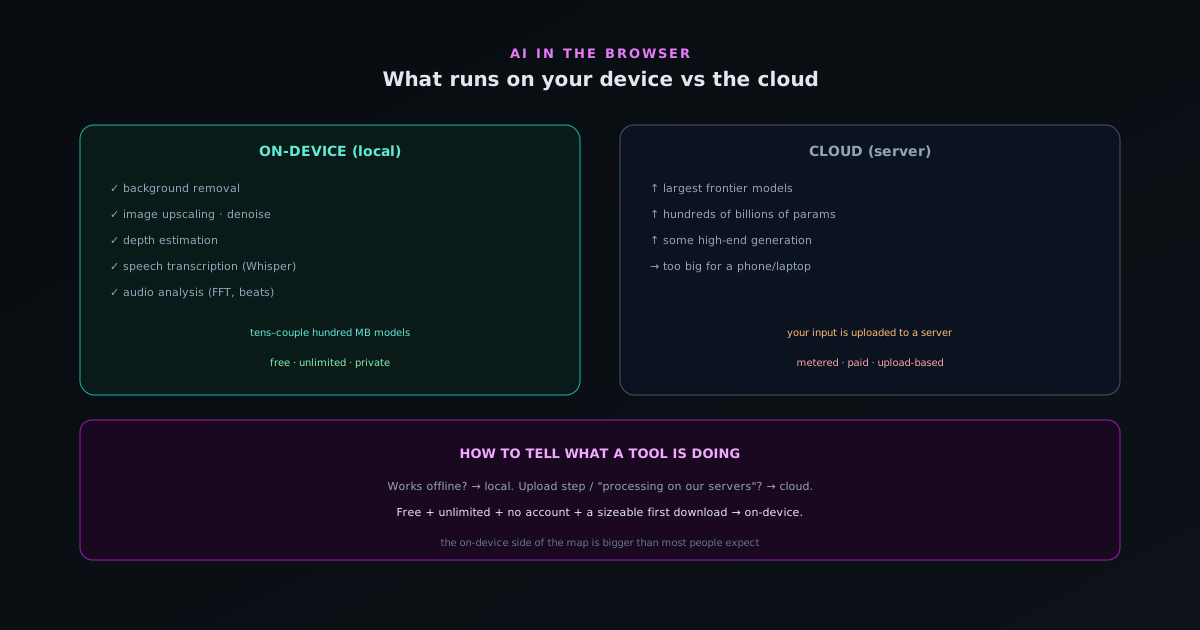
"AI" is not one thing, and not all of it runs the same way. Some AI tasks fit comfortably on your own device; others rely on enormous models that realistically need a data center. Knowing which is which helps you understand what a given tool is doing with your data, and why some tools are free while others charge.
What runs well on-device
A surprising amount. Background removal, image upscaling, depth estimation, on-device speech transcription, and audio analysis all run on models small and efficient enough to execute in a browser on ordinary hardware. The Novus apps lean on exactly these: NSS Background Remover at bgremover.novusstreamsolutions.com/background-remover runs its removal and upscaling models locally, and Novus Visualizers at visualizers.novusstreamsolutions.com/features runs its audio analysis and even Whisper captions on-device.
These models are typically tens to a couple hundred megabytes: large enough to be capable, small enough to download once and run locally.
What genuinely needs the cloud
The biggest frontier models (the ones with hundreds of billions of parameters behind the most capable chat assistants and image generators) are too large to run on a phone or laptop. Those legitimately need a server. Some high-end generative tasks and very large language models fall into this category.
So when a tool offers cutting-edge generation that clearly could not fit on your device, it is almost certainly sending your input to a server. That is not wrong, but it is a different privacy and cost profile than on-device processing.
Why the split drives privacy and cost
On-device tasks cost the provider nothing per use and keep your data local, which is why tools built around them can be free, unlimited, and private. Cloud tasks cost the provider money on every request and require sending your data to a server, which is why they tend to be metered, paid, and upload-based.
The architecture and the business model are linked. A free, unlimited, no-upload tool is almost always doing the work on your device; a metered, upload-based one is almost always doing it in the cloud.
The spectrum from tiny to frontier
It helps to picture AI models not as a single category but as a spectrum that spans an enormous range of sizes, because where a model sits on that spectrum largely determines where it can run. At one end are compact, specialized models (tens to a couple hundred megabytes) trained to do one job well, like separating a subject from a background or transcribing speech. At the other end are the frontier models behind the most capable general assistants and image generators, with parameter counts in the hundreds of billions, requiring hardware that fills server racks. Between those extremes lies everything else, and a tool's position on this spectrum is the single best predictor of whether it runs on your device or in a data center.
Understanding the spectrum dissolves the confusion that comes from treating "AI" as one thing. The compact specialized models can comfortably run in a browser on ordinary hardware; the frontier models cannot run on consumer devices at all. So the question "can this run on my device?" is really the question "where on the size spectrum does this model sit?", and once you think in those terms, the seemingly mysterious split between free local tools and metered cloud tools becomes a straightforward consequence of model size. The map of what runs where is, at bottom, a map of how big the models are.
Why size decides where a model runs
The reason model size is so decisive comes down to memory and computation. A model has to fit in the memory available to wherever it runs, and it has to execute its calculations fast enough to be useful there. A compact model fits comfortably in the memory a browser tab can use and runs its calculations quickly on consumer hardware, especially with graphics-hardware acceleration. A frontier model with hundreds of billions of parameters needs far more memory than any phone or laptop has, and its computation is so vast that even powerful consumer hardware would be impractically slow, which is why it lives on specialized server infrastructure built for exactly that load.
This is not a temporary limitation that better software will fully erase; it is rooted in the physical resources different models demand. There is real engineering that pushes the boundary (making models smaller and more efficient so larger capabilities fit on-device) but the fundamental relationship holds: a model can run where there is enough memory and compute for it, and not where there is not. So when you wonder whether a given AI feature runs locally, the underlying question is whether the model behind it is small enough to fit and fast enough to be usable on your hardware, which is why the size spectrum maps so directly onto the device-versus-cloud split.
On-device tasks, in more detail
It is worth appreciating how much genuinely runs on-device, because the list is longer and more capable than most people assume. Background removal segments a subject from its surroundings with a model compact enough to run locally. Image upscaling reconstructs detail as it enlarges. Denoising cleans up grain and compression artifacts. Depth estimation infers the three-dimensional structure of a scene for effects like portrait blur. Speech transcription turns audio into timed text. Audio analysis breaks a track into its rhythmic and frequency components. Vision models can tag and categorize images by understanding their content. Each of these is a real, useful AI capability running on a model that fits on your device.
What these tasks share is that they are specialized rather than general: each does one well-defined job, which is exactly what lets the model be compact enough to run locally. The capability is deep within its domain but narrow in scope, and that narrowness is the feature, not a limitation, because it is what makes on-device execution possible. The breadth of this list is the surprising part: a great deal of the AI processing people actually need day to day falls into this category of specialized, locally-runnable tasks, which is why a suite of on-device tools can cover so much ground without ever calling a server. The on-device side of the map is far larger than the popular image of AI-as-giant-chatbot suggests.
Cloud-bound tasks, and why
On the other side of the map are the tasks that genuinely require a server, and being honest about them is part of an accurate picture. The most capable general-purpose conversational assistants, which need to draw on vast general knowledge and reasoning, run on frontier-scale models too large for consumer hardware. The highest-end image and video generation, producing complex novel imagery from a prompt at the cutting edge of quality, often relies on very large models as well. These are legitimately cloud-bound: the capability depends on a model that simply cannot fit or run usably on a phone or laptop.
Recognizing these as genuinely server-dependent is important because it keeps the on-device argument honest: not everything can or should run locally, and a tool offering cutting-edge generation that obviously could not fit on your device is almost certainly sending your input to a server. That is not a criticism; it is a different profile. The point of the map is not that cloud AI is bad but that you should know which kind you are using, because the two carry different implications for your data and your wallet. When a capability clearly exceeds what a device could run, the cloud is doing the work, and you can reason accordingly about where your input is going.
The grey zone in the middle
Not every task sits cleanly at one end of the spectrum; there is a grey zone of capabilities that could plausibly run either on-device or in the cloud depending on the quality target and the implementation. Some language tasks, certain generation features, and various enhancement operations can be done with a smaller local model or a larger remote one, with the trade being quality and capability against privacy and cost. A tool in this zone has made a choice, and that choice is exactly what determines its data profile, even though the task itself does not force one architecture.
This grey zone is where it most pays to look at what a specific tool actually does rather than assuming from the task alone. Two tools offering a superficially similar feature might implement it very differently (one keeping everything local with a compact model, the other calling a powerful server model) and the difference is invisible from the feature description but decisive for your data. The existence of the grey zone is also why the trend matters: as efficient on-device models improve, more of these middle tasks become runnable locally, shifting capabilities that used to require the cloud onto the device. The boundary is not fixed, and the grey zone is where it is actively moving.
How efficiency moves the line over time
The boundary between what runs on-device and what needs the cloud is not static, and the direction it moves is worth understanding because it shapes where this is all heading. Two forces push capabilities from the cloud onto the device: consumer hardware keeps getting more powerful, with more memory and faster graphics processing, and models keep getting more efficient, achieving more capability per parameter through better architectures and techniques that shrink them without proportionally shrinking what they can do. Both forces work in the same direction, steadily enlarging the set of tasks a device can handle.
This means the on-device side of the map has been growing and will continue to, as things that genuinely required a server become feasible locally. Capabilities that were cloud-only a few years ago run on-device today, and that pattern is ongoing rather than finished. The practical implication is that betting on on-device is betting with the trend, not against it: the advantages of local processing (privacy, no per-use cost, offline capability) are permanent properties of the architecture, while the main reason to use the cloud, insufficient local resources, is exactly the constraint that efficiency and hardware improvements keep eroding. The line moves toward the device over time, which is why building around on-device capability is a forward-looking choice rather than a compromise.
The business model is a reliable tell
One of the most reliable ways to infer where a tool runs, without any technical investigation, is to look at its business model, because architecture and economics are tightly linked. On-device tasks cost the provider essentially nothing per use, since the user's hardware does the work, which is why tools built around them can sustainably be free, unlimited, and account-free, funded by something other than per-use charges. Cloud tasks cost the provider real money on every single request (compute, memory, bandwidth) which is why they tend toward metering, per-use pricing, or subscriptions to recover that cost.
So the shape of the pricing tells you a lot about the architecture. A tool that is genuinely free and unlimited with no account is almost certainly doing the work on your device, because that is the only way the economics support no limits; a tool that meters usage or charges per operation is almost certainly running on servers it must pay for. This is not a perfect rule, but it is a strong heuristic, and it is available to anyone without looking at a single line of code. When the pricing model and the data-flow question line up (free and unlimited pointing to local, metered pointing to cloud) you can read the business model as a window onto the architecture.
Hybrid tools and where they draw the line
Some tools are not purely one or the other but hybrid, running most tasks on-device while reaching for the cloud only for specific features that genuinely need it, and these deserve a more nuanced read than a simple local-or-cloud label. A suite might do all its everyday processing locally and offer one or two advanced, frontier-scale capabilities that call a server, which means your data stays local for the bulk of what you do and leaves only for the specific features that require it. The honest version of such a tool makes clear which features are which, so you know when you are on the local side and when you are crossing to the cloud.
For a hybrid tool, the useful question is not "is it local or cloud?" but "where exactly does it draw the line, and is that line clear to me?" A well-designed hybrid keeps the privacy-sensitive default on-device and reserves the cloud for opt-in advanced features you choose knowingly, rather than quietly sending your data to a server for routine tasks. Understanding that hybrids exist prevents two mistakes: assuming a tool with one cloud feature uploads everything, and assuming a mostly-local tool never touches a server. The map is not always all-or-nothing per tool; sometimes it runs through the middle of a single product, and knowing where helps you use it with your eyes open.
Even language models are coming on-device
The most striking sign of the boundary moving is that even language models (the category most associated with giant server-bound systems) now have versions small enough to run locally. Through techniques that compress models substantially while preserving much of their usefulness, compact language models in the range of a few hundred megabytes to a couple of gigabytes can run in a browser, powering an opt-in local assistant that processes your requests on your own device. These are not the largest frontier systems, and they trade some capability for their smaller size, but they are genuinely useful for many tasks and they keep your input local.
This matters because it shows the on-device side of the map expanding into territory that seemed permanently cloud-bound. A few years ago, the idea of running any capable language model in a browser would have been far-fetched; now there are tiers of them sized to match different hardware, from lighter models for modest machines to larger ones for capable devices. The pattern is the same one driving the rest of the map's evolution: efficiency improvements and better hardware bringing more capability on-device over time. That even language models are crossing this line is the clearest evidence that the local side is growing, and that the assumption "real AI needs the cloud" describes the past more than the future.
How to tell what a tool is doing
A few signals: Does it work offline? (If yes, it is local.) Is there an upload step or a "processing on our servers" message? (Then it is cloud.) Is it free and unlimited with no account? (Strong hint it is local.) Does the first use download something sizeable? (That is the model being cached for on-device use.)
For the Novus apps, the answer is consistent: the model downloads once, then everything runs on your device, offline-capable, with nothing uploaded. That is the on-device side of the map, and it is bigger than most people expect.
- On-device: removal, upscale, denoise, depth, transcription, audio analysis.
- Cloud: the largest frontier models and some high-end generation.
- Tell-tale: offline + free + no upload = local.
Frequently asked questions
Quick answers to common questions about this topic.
How do I know whether an AI tool runs on my device or in the cloud?
Check the Network tab: a cloud tool uploads your file to a server, while an on-device tool only downloads the model once and processes locally. Offline capability and "no upload" claims you can verify are the tells.
What does it mean for compute to be on-device?
It means the actual processing (the model inference, rendering, or transcription) happens on your own hardware in the browser, so your files stay local. In the Novus tools, the heavy compute is on-device even when an account stores your project data.
Why does on-device vs cloud matter to me?
It affects three things: privacy (whether your files are uploaded), cost (on-device has no per-use server bill, enabling free tools), and offline use (on-device tools can keep working without a connection).
Related workflow
Product photo to a transparent image every channel accepts
One photograph, cut out once, then re-encoded for a storefront, a marketplace listing and a social post without redoing the cutout each time.
- Cut the background out and check the edgesNSS Background Remover: Hair, glass and drop shadows are where automatic cutouts fail. Fix them once, on the master, before anything downstream copies the mistake.
- Re-encode and resize per destinationNovus Convert: Transparency survives PNG and WebP and dies in JPEG. Convert validates the file it hands back, so a listing never rejects a silently broken upload.
Related troubleshooting
Was this page helpful?
Your answer stays in this browser, it is not sent anywhere and no account or cookie is involved.