2026 · NSS Background RemoverAbout 12 min readNovus Stream Solutions
Do browser AI tools work offline?
If the AI runs on your device, do you even need the internet? Mostly no, and that is one of the quiet advantages of on-device, in-browser tools.
Contents
- 1.Overview
- 2.The first load needs the network
- 3.After that, it runs offline
- 4.Why offline capability is more than a convenience
- 5.Why this seems impossible but is not
- 6.The service worker, explained simply
- 7.Offline is the cleanest proof of privacy
- 8.Reliability that does not depend on a provider
- 9.Working where there is no good connection
- 10.How this differs from a cloud tool that "caches"
- 11.The quieter savings: battery and data
- 12.What a brand-new device needs first
- 13.Why offline capability is so underrated
- 14.What still needs a connection
Overview
It sounds like a contradiction (an AI tool in your web browser that works without the internet) but it is exactly how on-device tools behave. If the AI runs on your machine, the network is only needed to load the page and the model the first time. After that, you can disconnect and keep working. Here is how that works and where the limits are.
The first load needs the network
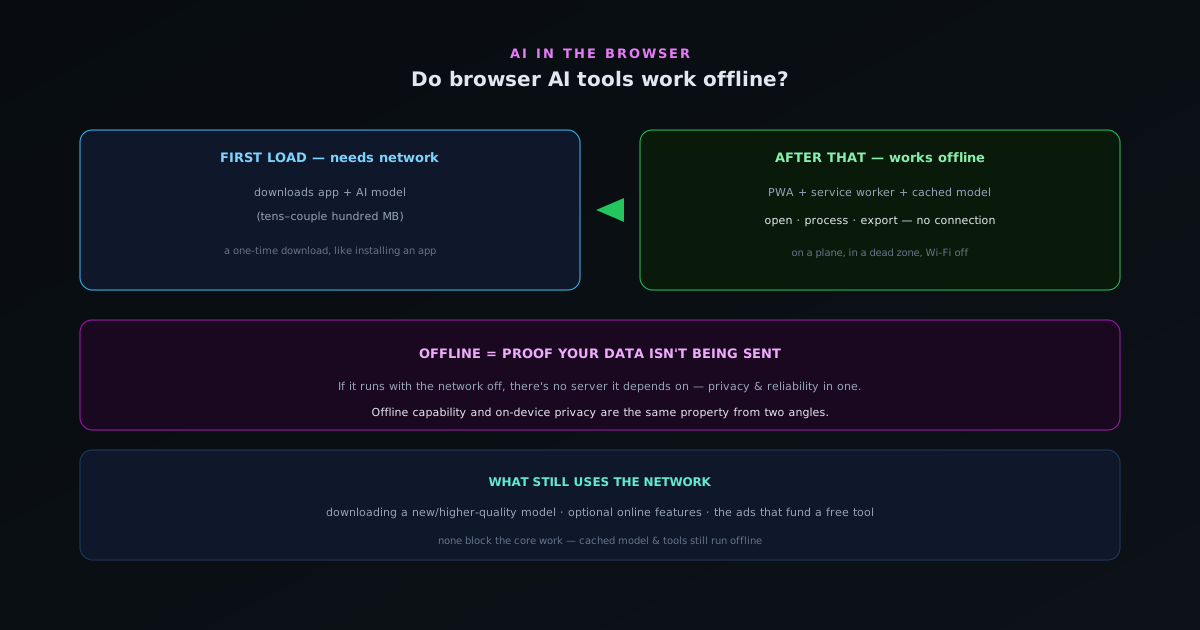
The one time you do need a connection is the first visit: the browser downloads the app and the AI model (tens to a couple hundred megabytes) and caches them on your device. This is a normal one-time download, like installing an app, except it happens automatically when you open the page.
After that download completes, the essential pieces are stored locally and the connection becomes optional.
After that, it runs offline
Many on-device tools are built as Progressive Web Apps (PWAs) with a service worker, which lets the browser serve the app from its local cache instead of the network. Combined with the cached model, that means the whole tool (opening it, processing your files, exporting the result) works with no connection at all.
NSS Background Remover works this way: open bgremover.novusstreamsolutions.com/background-remover once to warm the model, and then you can remove backgrounds on a plane, in a dead zone, or with your Wi-Fi off, with nothing about your files needing the internet.
Why offline capability is more than a convenience
Working offline is partly about convenience (process files anywhere) but it is also a privacy and reliability win. If a tool can run with the network off, it is proof that your data is not being sent anywhere; there is no server it depends on. And it means the tool keeps working regardless of the provider's uptime, because the work happens on your device.
Offline capability and on-device privacy are really the same property viewed from two angles: the computation is local, so neither your data nor your ability to work depends on a connection. What that local computation can actually accomplish (which jobs run well on a device today and which still do not) is the wider survey in What local AI can actually do in mid-2026.
Why this seems impossible but is not
The instinct that an AI tool in a web browser must need the internet is understandable, because almost everything we do in a browser does: pages load from servers, apps sync to the cloud, and "web" has become nearly synonymous with "online." So a web-based AI tool that keeps working with the connection off can feel like a contradiction. The resolution is that "in the browser" and "from a server" are not the same thing: a browser is also a capable local runtime, able to store data and run code on your device, and a tool built to use it that way depends on the network only to arrive, not to function.
Once you separate the browser as a delivery mechanism from the browser as a local runtime, the apparent paradox dissolves. The network delivers the tool and its model to your device the first time; after that, the browser runs them locally, the same way an installed application runs without re-downloading itself each time you open it. The difference from a typical web app is simply that this one does its work on your device rather than calling a server, so once it has been delivered, the server is no longer in the loop. What seems impossible is just an unfamiliar use of the browser, as a place to run things, not only a window onto things elsewhere.
The service worker, explained simply
The piece of technology that makes a web tool work offline is called a service worker, and while the name is technical, what it does is easy to picture. A service worker is a small piece of the app that the browser keeps around and can run even when the page is not actively loaded from the network, acting as a local intermediary that can serve the app's files from a stored copy instead of fetching them from a server. When you open the tool while offline, the service worker hands the browser the cached version, so the app loads from your device rather than failing because the network is unavailable.
Paired with the cached model, the service worker is what lets the entire experience run without a connection: the app shell comes from the service worker's cache, the model comes from local storage, and the processing happens on your device, so no part of the core workflow reaches for the network. This is the same technology behind installable web apps that behave like native ones, and it is why a well-built in-browser tool can feel and function like an installed application despite being delivered through a web address. You do not need to understand the mechanism to benefit from it, but knowing that a service worker is quietly serving the app locally explains how a web page manages to work with the internet switched off.
Offline is the cleanest proof of privacy
Beyond convenience, the offline capability doubles as the simplest, most convincing demonstration that an on-device tool is genuinely private, available to anyone without technical knowledge. The logic is airtight: if the tool keeps removing backgrounds or transcribing audio with your internet connection switched off, it cannot be sending your data to a server, because there is no connection over which to send it. Where inspecting network traffic requires some technical comfort, the offline test requires only flipping a switch: turn off the connection, confirm the tool still works, and you have proven that your data is not leaving your device.
This makes offline capability a privacy feature as much as a convenience one, and arguably the most accessible privacy proof there is. A privacy policy asks you to trust an unverifiable claim; the offline test lets you verify the most important claim yourself in seconds. It reframes "your data stays local" from a promise into a demonstrable fact, which is exactly the kind of structural, checkable guarantee that distinguishes on-device tools from those that merely assert good behavior. The next time you wonder whether a browser tool is truly local, the quickest answer is to use it offline: if it works, the question is settled, because a tool that functions without the network is a tool that was never relying on it to handle your data.
Reliability that does not depend on a provider
Offline capability carries a reliability benefit that is easy to overlook until a cloud service you depend on goes down at the wrong moment. A tool that processes on your device keeps working regardless of the provider's uptime, server load, or continued operation, because the work happens on your machine rather than theirs. A cloud tool, by contrast, is only as available as its servers: if they are down, overloaded, rate-limiting, or discontinued, the tool stops working, and there is nothing you can do but wait. The on-device tool has no such single point of failure outside your own device.
This independence matters most precisely when you most need the tool to work: a deadline, a moment with no margin for a service outage. With local processing, the only thing that has to be working is your own device, which you control, rather than a remote service whose status is out of your hands. The same property that protects your privacy by removing the server from the data path also protects your workflow by removing the server from the dependency path. For anyone who has been stranded by a cloud tool failing at an inconvenient time, the reliability of a tool that cannot be taken down by someone else's server problems is a quietly significant advantage of doing the work locally.
Working where there is no good connection
The practical value of offline capability is clearest in the many real situations where a connection is absent, unreliable, or expensive. On a plane, in a basement, in a rural area, while traveling internationally with limited data, on a congested network at an event: these are common circumstances where a cloud tool becomes useless or costly, and an on-device tool simply keeps working. The ability to remove backgrounds, make a visualizer, or transcribe audio without needing the network means the tool is available wherever you are, not only where the connection is good.
This portability of capability is genuinely freeing for anyone whose work is not tethered to a desk with reliable internet. A creator can process content on the move, a traveler can work without burning expensive mobile data on uploads, and anyone in a low-connectivity environment retains full functionality. The cloud model implicitly assumes a good connection is always available, which is a poor match for the real, uneven connectivity of actual life; the on-device model makes no such assumption, because it does not need the network for the work. Offline capability is not an edge case for occasional disconnection but a recognition that connectivity is variable and a tool should not stop being useful the moment it dips.
How this differs from a cloud tool that "caches"
It is worth distinguishing genuine offline capability from the partial caching some cloud tools offer, because they are not the same and the difference shows exactly when it matters. A cloud tool might cache its interface so the page loads offline, or queue your actions to send once you reconnect, but the actual processing still requires the server, so offline, you can open the app and perhaps line up work, but you cannot get a result until you are back online. The core function remains tethered to the network even if the shell is cached.
A truly on-device tool is different in kind: not only does the interface load offline, but the processing itself completes offline, because the model and the computation are local. There is no queued work waiting to reach a server, because there is no server in the workflow; the result is produced on your device, then and there, connection or not. This is the line between a cloud tool that has made its shell available offline and a local tool that genuinely does the work offline. When evaluating whether a tool truly runs locally, the test is not whether it opens without a connection but whether it produces results without one; full offline function, not just an offline-accessible interface, is the mark of real on-device processing.
The quieter savings: battery and data
Offline-capable, on-device processing brings a couple of savings that rarely make headlines but add up in daily use: data and, often, battery. Because nothing is uploaded or downloaded during normal use after the first load, you are not spending mobile data transferring files back and forth to a server every time you process something, which matters on metered or limited connections where each upload of a sizeable image or video would consume real data. The one-time model download is the only significant transfer; everything after is local and free of data cost.
The battery picture is more nuanced but often favorable: while local computation uses power, it can avoid the repeated energy cost of maintaining network connections and transferring data for every operation, and modern graphics-accelerated processing is reasonably efficient for the bursts these tasks involve. For a user on the move, the combination of not burning mobile data on uploads and not constantly hitting the network can be a meaningful practical benefit over a cloud tool that transfers data on every use. These savings are not the headline reason to prefer on-device tools, but they are real conveniences that come along with the architecture, especially for anyone working away from unlimited connectivity and power.
What a brand-new device needs first
To use an on-device tool on a device that has never run it before, there is exactly one thing the network is required for: the initial delivery of the app and its model. On a fresh device, you open the tool once with a connection, the browser fetches and caches the app and downloads the model, and from that point the device is equipped to run the tool offline. This is the same one-time setup as installing an application, just initiated by visiting a page rather than running an installer, and it is the only point at which a connection is genuinely necessary.
Understanding this clarifies the honest scope of "works offline": it means works offline after that first setup, not works offline on a device that has never seen it. The distinction matters for planning: if you know you will need a tool somewhere without connectivity, open it once while you still have a connection so the model caches, and it will then be available where you are going. This is a small, intuitive requirement, the same foresight you would apply to anything you install before traveling. After that single online visit, the tool joins the set of things your device can do on its own, anywhere, which is the whole promise of on-device capability.
Why offline capability is so underrated
Offline capability tends to be undersold, mentioned as a minor convenience when it is really a window onto everything good about on-device processing. It is underrated partly because most people first encounter AI tools as cloud services, where offline operation is impossible, so they do not expect it and do not think to value it. And it is underrated because, when a tool simply works whether or not you are connected, the offline capability becomes invisible; you only notice it in the moments a cloud tool would have failed and this one did not, which are exactly the moments you are not thinking about architecture.
But offline capability is the single property that ties together privacy, reliability, portability, and cost. It proves the data is local, it removes the dependence on a provider's servers, it makes the tool available anywhere, and it avoids spending data on every operation, all at once, because all of those flow from the same fact that the work happens on your device. Far from a minor feature, it is the most concise demonstration that a tool is genuinely on-device, and a good shorthand for the whole approach. The next time a tool keeps working with the connection off, it is worth recognizing that small fact as the visible tip of a fundamentally better architecture, not just a handy convenience for the occasional flight.
What still needs a connection
A few things still use the network when available: downloading a different or higher-quality model you have not used before, loading optional online features, and the non-intrusive ads that fund a free tool. None of those block the core work: if you are offline, the cached model and tools still run.
So the honest answer to "do browser AI tools work offline?" is: the on-device ones, yes; after the first load, the core features keep working with no connection, which is one of the underrated advantages of doing the AI on your own device.
- First load: needs the network (downloads app + model).
- After that: core features run fully offline.
- Network still used for new models and optional online features.
Frequently asked questions
Quick answers to common questions about this topic.
Can browser AI tools work without an internet connection?
Yes, if they are built as progressive web apps that cache their code and model weights. After the first visit warms the cache, the Novus tools keep running offline because the model is read from local storage rather than the network.
What needs a connection in an offline-capable AI tool?
The first visit (to download the app and model) and any optional account or community features need the network. The core processing (removing a background, rendering a visualizer) runs fully offline once cached.
How do I use a background remover offline?
Load https://bgremover.novusstreamsolutions.com once while online so the model caches, then you can disconnect and keep removing backgrounds. You can install it as an app for quick offline access.
Related workflow
Product photo to a transparent image every channel accepts
One photograph, cut out once, then re-encoded for a storefront, a marketplace listing and a social post without redoing the cutout each time.
- Cut the background out and check the edgesNSS Background Remover: Hair, glass and drop shadows are where automatic cutouts fail. Fix them once, on the master, before anything downstream copies the mistake.
- Re-encode and resize per destinationNovus Convert: Transparency survives PNG and WebP and dies in JPEG. Convert validates the file it hands back, so a listing never rejects a silently broken upload.
Related troubleshooting
Was this page helpful?
Your answer stays in this browser, it is not sent anywhere and no account or cookie is involved.