2026 · Novus Stream Solutions (hub)About 13 min readNovus Stream Solutions
What local AI can actually do in mid-2026
Half the coverage of local AI says your laptop matches a data center; the other half says on-device models are toys. Both are selling something. We run neural networks in browsers for a living, so here is the unglamorous mid-2026 truth: which workloads run well locally, which still need a server, and the memory and latency numbers behind the line.
Contents
- 1.Overview
- 2.The local column, as of mid-2026
- 3.Segmentation and image models: the solved category
- 4.Small language models: useful, with a visible ceiling
- 5.Transcription: the quiet win nobody markets
- 6.What still needs a server, and why
- 7.Memory and latency: the numbers behind the line
- 8.The privacy dividend, stated without romance
- 9.How we draw the line in our own apps
Overview
Every few months someone announces that local AI has made the cloud obsolete, and someone else responds that on-device models are toys for demos. Both takes get traffic, and both are wrong in ways that only show up when you ship. We have been running neural networks inside browsers (segmentation, matting, upscaling, transcription) since before it was fashionable, our users run them on everything from gaming rigs to five-year-old laptops, and that gives us a data set most commentators lack: not what local AI can do on a demo machine, but what it does on the machines people actually own.
So this is a status report, written mid-2026, with the vendor enthusiasm filtered out. The short version: the local column has grown startlingly long: image segmentation, background matting, upscaling, speech-to-text, OCR, embeddings, and small language models all run genuinely well on ordinary hardware now, and WebGPU shipping across every major browser engine removed the last platform excuse. The server column is shorter but stubborn: frontier-scale reasoning, long-context work, and video generation are not coming to your laptop soon, and the reason is a number, not a conspiracy. The rest of this post walks the line item by item, with the memory and latency figures that decide each case.
The local column, as of mid-2026
Start with what is settled, because it is more than most people think. Vision models were local first and remain the flagship: segmentation and background matting produce professional-grade cutouts in well under a second on a mid-range GPU, and in a few seconds on WebAssembly fallback paths when no GPU is available. Super-resolution upscaling, depth estimation, and OCR are similarly routine. Speech-to-text went local next (Whisper-class models transcribe faster than real time on ordinary laptops) and text embeddings for search and clustering are so small they barely register. The newest arrival is the small language model: 1-to-4-billion-parameter instruction-tuned models, quantized to four bits, now hold a conversation, summarize a document, and draft passable text at interactive speeds on consumer hardware.
What changed underneath to make this list possible was less about model breakthroughs than about plumbing catching up. WebGPU is now available in every major engine (Chromium had it for years, Firefox and Safari closed the gap) so browser inference finally gets real GPU compute on essentially every modern device instead of treating acceleration as a lucky bonus. Quantization matured from a research trick into standard practice, cutting model memory by three quarters with quality losses most tasks never notice. And the runtimes (ONNX Runtime’s web builds, Transformers.js, WebLLM) hardened from experiments into boring infrastructure, which is the highest compliment infrastructure can receive. We wrote up the mechanics in How AI runs in your browser (WebGPU and WebAssembly, explained); the headline is that the browser stopped being the limiting factor.
- Image segmentation and matting: sub-second on GPU, seconds on WASM fallback.
- Upscaling, depth estimation, OCR: routine, shipped in production browser tools.
- Speech-to-text: Whisper-class accuracy, faster than real time on ordinary laptops.
- Embeddings: tens of megabytes, near-instant: local semantic search is trivial now.
- Small LLMs (1–4B, 4-bit): usable chat, summarization, and drafting on consumer devices.
Segmentation and image models: the solved category
Image models are worth singling out because they show what “solved locally” actually looks like. The segmentation and matting models behind our own background remover range from a few tens of megabytes to a few hundred depending on quality tier, cache after the first download, and then execute entirely on the visitor’s device: a photo goes in, an alpha-matted cutout comes out, and no pixel ever touches a network. On a machine with a discrete or decent integrated GPU, inference is fast enough that the bottleneck in the workflow is the human dragging the file, not the model. That is the practical definition of solved: the AI stopped being the slow part.
The reason vision fell first is instructive for reading the rest of the landscape. Image models are small because their job is narrow (one task, one input shape, no open-ended world knowledge) and narrow jobs compress beautifully. A matting model does not need to know who won the World Cup; it needs to know where hair ends and background begins, and that competence fits in megabytes. The general pattern holds across the local column: task-specific models go local early, open-ended models go local last, and any tool whose pitch involves knowing everything should make you immediately suspicious of the word “local” in its marketing. Specificity is what compresses.
Small language models: useful, with a visible ceiling
The honest report on local LLMs is that they crossed from demo to useful sometime in the last eighteen months, and the ceiling is still easy to hit. A quantized 3-billion-parameter model on a 2024-or-later laptop summarizes an article competently, rewrites an email, answers questions about a pasted document, autocompletes code in a narrow context, and generates tags or titles: call it the competent-intern tier, and for a surprising share of daily tasks that tier is all anyone needed. Token throughput on consumer hardware sits comfortably in the tens per second, which reads as instant for short outputs.
The ceiling shows up on three fronts, reliably. Reasoning depth: multi-step problems that a frontier model walks through cleanly cause small models to wander, and no amount of prompting fixes a capability that is not there. Knowledge: a 2-gigabyte file cannot contain the internet, so obscure facts come back wrong with the same confident tone as right ones: retrieval helps, but only as far as your documents go. And context: local models handle thousands of tokens well, while serious long-document work at frontier quality still belongs to hardware you do not own. None of this is a scandal; it is a size class. The mistake is not using a small model: it is using one while expecting the behavior of a model a hundred times its size, a mismatch we mapped in more detail in What on-device AI can't do yet.
If you are choosing a small model for a real workflow, the selection heuristics are mercifully short. Prefer the newest model generation over the biggest parameter count your budget allows (an efficient recent 3B routinely beats a two-year-old 7B at the tasks this class is good at) and test at the quantization level you will actually ship, because a model that impresses at full precision can wobble at four bits. Above all, test the failure tone: hand it a question it cannot answer and watch whether it says so. For an embedded product feature, a small model that declines cleanly is worth more than one that scores two benchmark points higher and fabricates under pressure, because your users will meet the failure long before they meet the benchmark.
Transcription: the quiet win nobody markets
Speech-to-text deserves its own section because it may be the single most underrated local capability of this whole era. Whisper-class models in the browser transcribe podcasts, meetings, lectures, and song lyrics with accuracy that would have been a paid API product five years ago, at zero marginal cost, faster than real time, in dozens of languages, and because the audio never leaves the device, the recordings that most need transcribing, which are precisely the sensitive ones, can finally be transcribed without a privacy decision. A journalist’s interview, a therapy note, an unreleased track: these were exactly the files people hesitated to upload, and now they do not have to.
We use this capability directly (our caption workflow runs Whisper on-device rather than shipping audio to a cloud endpoint, a comparison we published honestly in On-device Whisper vs cloud transcription for captions) and the operational lesson generalizes. Cloud transcription still wins at the margins: speaker diarization at scale, rare-accent robustness, hour-long files on weak hardware. But the default flipped. For the common case, local transcription is not the budget option that sacrifices quality for privacy; it is simply the better engineering, and the fact that it also removes a per-minute invoice and a data-handling policy from your life is the kind of win that never makes a keynote.
What still needs a server, and why
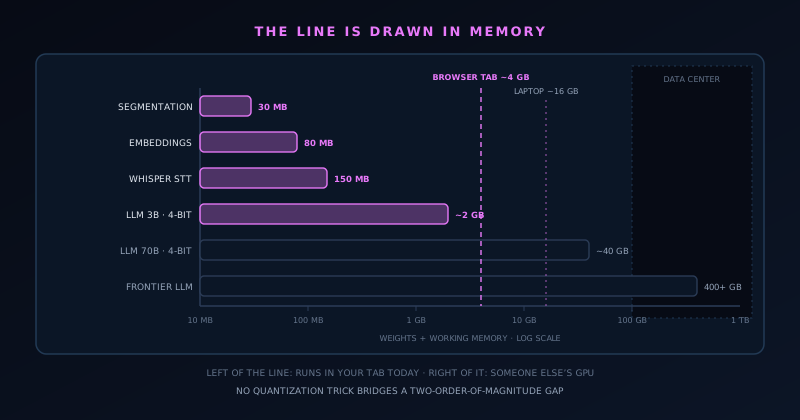
The server column in mid-2026 has four stubborn residents. Frontier-model reasoning (the long-horizon, multi-step work that agents and serious coding assistants depend on) needs hundreds of gigabytes of weights and correspondingly serious compute; no quantization trick bridges a two-order-of-magnitude gap. Long-context work at quality follows for the same reason. Video generation is worse: producing seconds of coherent footage saturates data-center GPUs for minutes, so consumer hardware is not merely slow at it, it is the wrong tool category entirely. High-fidelity image generation sits at the boundary (cut-down diffusion models do run locally) but the versions people actually want, with clean text rendering and prompt fidelity, remain server-sized. And training or fine-tuning anything nontrivial stays a rented-GPU activity.
It matters that the boundary is physics rather than gatekeeping, because physics moves on a schedule you can reason about. The binding constraint is memory: model weights must live somewhere with enormous bandwidth, consumer devices offer a handful of gigabytes of practical headroom where data-center accelerators offer hundreds, and that gap closes slowly (through better small models and unified-memory architectures) not suddenly. So the sober forecast is continuity: the local column keeps absorbing tasks from the bottom as small models improve, the frontier keeps advancing at the top, and the interesting engineering lives in hybrid designs that keep private data local while renting reasoning only when a task genuinely demands it.
The hybrid pattern deserves one concrete illustration, because it is where most real products will land. Picture a notes app that transcribes meetings: the transcription (the sensitive part, the raw audio of people speaking candidly) runs locally on Whisper-class models, while an optional summarize-the-quarter feature, which genuinely needs long-context reasoning, sends only the already-transcribed text the user explicitly selects, with the boundary stated in the interface at the moment of the send. That is the shape worth copying: private data stays local by default, the server is an explicit escalation for tasks that need it, and the user can always see which mode they are in. The failure of the current tool generation is not that hybrids exist. It is that most of them hide the seam.
- Frontier LLM reasoning and long-context work: weights alone exceed consumer memory by 100×.
- Video generation: data-center GPUs run for minutes per clip: wrong tool category for laptops.
- Top-tier image generation: local diffusion exists, but the quality people expect is server-sized.
- Training and fine-tuning: still a rented-GPU activity for anything beyond toys.
Memory and latency: the numbers behind the line
If you want to predict whether a workload can go local, ignore the marketing and do the memory arithmetic. A model needs its weights resident plus working space: a 30 MB segmentation model is trivial anywhere; a 4-bit 3B-parameter LLM wants roughly 2 GB plus context overhead, which fits a modern laptop and crowds a budget phone; a 4-bit 70B model wants around 40 GB, which is enthusiast-workstation territory; frontier models add a zero to that. Browsers tighten every bound further, since a tab shares RAM with everything else the visitor has open and cannot assume it owns the machine: the sizing discipline we detailed in How big are in-browser AI models (and why size matters), and the reason our tools offer tiered models with honest download numbers instead of one heroic default.
Latency splits into the two numbers vendors love to conflate. First-use cost is dominated by downloading weights (seconds to minutes depending on tier and connection) which is why serious local tools cache aggressively and tell you what they are fetching. Steady-state inference is where local shines: no network round trip, no queue behind other tenants, no rate limit, and for interactive workloads that often nets out faster than a cloud API even when the remote silicon is vastly stronger, because a hundred milliseconds of physics sits in front of every remote token. The rule of thumb we design by: local wins whenever the model fits and the interaction is chatty; the server wins when the model does not fit, and no amount of chattiness rescues it.
The privacy dividend, stated without romance
The privacy case for local AI is structural, which is what makes it durable: a file processed on your own device generates nothing to leak, subpoena, retain, train on, or misconfigure into a public bucket. There is no policy to trust and no policy to change, because there is no custody transfer at all: the guarantee is architectural, verifiable by anyone who opens a network tab or flips on airplane mode, rather than contractual and verifiable by nobody. We built our entire tool line on this argument, laid out in Why on-device AI is private by design, and mid-2026 is the first moment the capability list above makes it practical rather than aspirational for everyday creative work.
Stated without romance, the dividend has limits worth naming. Local processing protects the content of your files; it does not make a tool trustworthy in general: a local app can still phone home telemetry, and “on-device” in a marketing page sometimes means “partially, sometimes, on some plans.” The workloads that genuinely need a server genuinely send your data to one, and pretending otherwise helps nobody. The honest framing is a default, not an absolute: for every task in the local column, there is now a version of the tool where privacy is not a promise but a property, and for tasks still in the server column, you should know that is where your data goes, and choose vendors accordingly.
There is also a quieter benefit that gets less airtime than privacy: predictability. A local model is a file. It does not get silently upgraded, deprecated, safety-tuned into different behavior, or rate-limited during your launch week. The segmentation model our tools shipped last year produces the same cutout today, byte for byte, which matters enormously once users build workflows on top of your output. Cloud models improve on average and wobble in particular, and anyone who has watched a prompt pipeline degrade overnight knows the price of that variance. Pinning a version is trivial when the version is an artifact you host; it is a negotiation when it is an endpoint someone else operates.
How we draw the line in our own apps
Theory is cheap, so here is where the line sits in software we actually operate. Everything in the background remover and editors we ran until September 2026 ran on-device, full stop: segmentation, matting, upscaling, and the image and video utilities executed in the visitor’s browser via WebGPU with WebAssembly fallbacks, which is why those tools worked without accounts and why a network-tab audit showed no pixels in flight. Captioning runs Whisper locally for the same reason. Our visualizer render pipeline is local compute too: audio analysis and frame rendering happen on the user’s machine, and exporting a video never means uploading a track. Where users want heavier model tiers, they download bigger weights, disclosed in megabytes up front; the trade is theirs to make.
And where a capability sits in the server column, our answer has been to not ship it rather than to quietly break the privacy model: the discipline is the product, a stance we have defended before when it meant saying no to popular feature requests. That is the operator’s version of this whole snapshot: local AI in mid-2026 is capable enough to build real, competitive products on, provided you design inside its actual envelope instead of the imagined one. Know the memory math, tier the models, cache the weights, fall back gracefully, and be honest about the line, because users can check now, and the ones who check are exactly the users worth keeping.
Frequently asked questions
Quick answers to common questions about this topic.
What AI tasks can run fully locally in 2026?
A longer list than most people expect: image segmentation and background matting, upscaling, depth estimation, OCR, text embeddings for semantic search, Whisper-class speech-to-text, and small instruction-tuned language models in the 1-to-4-billion-parameter range. All of these run at usable speeds on ordinary consumer hardware, and in modern browsers via WebGPU with WebAssembly fallbacks. The common thread is task specificity: narrow models compress into megabytes or a few gigabytes, which is what makes local execution practical.
What still requires cloud AI in 2026?
Frontier-model reasoning, long-context document work at high quality, video generation, top-tier image generation, and any meaningful training or fine-tuning. The constraint is memory bandwidth and capacity: frontier model weights run to hundreds of gigabytes while consumer devices offer a few gigabytes of practical headroom, and video generation saturates data-center GPUs for minutes per clip. This boundary is physics rather than vendor gatekeeping, which means it moves gradually: small models keep absorbing tasks from the bottom, but the top of the stack stays remote.
Are small local language models actually useful?
Yes, within an honest envelope. A quantized 3B-parameter model on a recent laptop handles summarization, rewriting, question-answering over pasted documents, tagging, and short drafting at interactive speeds, a competent-intern tier that covers a surprising share of everyday tasks. The ceiling appears on multi-step reasoning, obscure factual knowledge, and very long documents, where small models degrade noticeably. The failure mode to avoid is expecting frontier behavior from a model one-hundredth the size; used for what they are, they are genuinely productive.
Is local AI really more private than cloud AI?
For the content you process, yes: structurally, not contractually. A file that never leaves your device cannot be retained, trained on, leaked, or subpoenaed from a provider, and you can verify the claim yourself with a network tab or airplane mode rather than trusting a policy document. Two caveats keep the claim honest: a local app can still send telemetry, and tools that are only partially on-device sometimes market themselves as local. Verify the specific tool; the architecture makes verification possible.
How much memory do local AI models need?
It scales with the job. Segmentation and matting models run tens to a few hundred megabytes; embedding models are smaller still; a 4-bit quantized 3B language model wants roughly 2 GB plus context overhead; a 70B model needs around 40 GB, which is workstation territory; frontier models are beyond consumer hardware entirely. Browser-based tools face tighter budgets than native apps because a tab shares memory with everything else, which is why well-built ones offer tiered model sizes and state download costs before you commit.
Related troubleshooting
Was this page helpful?
Your answer stays in this browser, it is not sent anywhere and no account or cookie is involved.