2026 · NSS Background RemoverAbout 9 min readNovus Stream Solutions
What on-device AI can't do yet
On-device AI is more capable than most people expect, but it is not magic. Here is an honest map of what it still cannot do well, and why naming those limits is the most trustworthy thing a tool can do.
Contents
- 1.Overview
- 2.The limits all come back to size
- 3.Frontier-scale models won't fit, full stop
- 4.Heavy, long-form video is where it strains
- 5.Phones have a memory ceiling a tab cannot ignore
- 6.What pushes a job toward the wall
- 7.When a classical fallback quietly wins
- 8.Where the cloud is, rarely, the honest answer
- 9.How a good tool fails gracefully
- 10.Why the limits keep shrinking
- 11.Setting honest expectations is the point
Overview
It is tempting, when you are excited about on-device AI, to oversell it. The truth is more interesting and more trustworthy: in-browser AI handles a remarkable amount of real work privately, offline and for free, and it also has genuine limits that are worth naming plainly. A tool that pretends to do everything is harder to trust than one that tells you exactly where it stops.
So this is the honest map. We will walk through what on-device AI cannot do well yet, why those limits exist, where a humbler classical method or, rarely, the cloud is genuinely the better tool, and how a well-built tool copes gracefully at the edges instead of crashing into them. Setting realistic expectations is not a weakness of the approach; it is how you build something people can rely on.
The limits all come back to size
Almost every limit of on-device AI traces back to one fact: a model has to fit in the memory a browser tab can use and run fast enough to be useful on your hardware. Compact, specialized models (the ones behind background removal, upscaling, denoising and transcription) fit comfortably and run quickly, which is why so much genuinely works locally. The trouble starts when a task needs a model, or an amount of data, that pushes past what a tab can hold.
This is not a temporary software gap that the next update will erase; it is rooted in the physical resources different jobs demand. There is real engineering that keeps pushing the boundary outward (smaller, more efficient models and more capable devices), but the underlying rule holds: a model can run where there is enough memory and compute for it, and not where there is not. Keep that single idea in mind and every specific limit below stops being mysterious.
Frontier-scale models won't fit, full stop
The clearest limit is the largest models. The frontier systems behind the most capable general-purpose chat assistants and the highest-end image and video generators have parameter counts in the hundreds of billions, demanding hardware that fills server racks. Those cannot run on a phone or a laptop, and no amount of clever browser engineering changes that; the gap between what they need and what a consumer device has is enormous.
This is the honest line that keeps the whole on-device argument credible. If a tool offers cutting-edge generation that obviously could not fit on your device, it is almost certainly sending your input to a server, and that is fine as long as it is clear about it. On-device AI is not a claim that everything can run locally; it is a claim that a great deal can, while being honest that the very largest models genuinely cannot. Pretending otherwise would undermine the trust the approach depends on.
Heavy, long-form video is where it strains
A single image is a bounded job: a known amount of memory, a few seconds of work, done. Video breaks that comfortable bound by multiplying everything by the number of frames. A short clip is fine, but a long, high-resolution video is thousands of frames, and running a model over every one of them, while holding intermediate results in memory, can exhaust both the device and your patience well before the cloud would have.
This does not mean on-device video is impossible; plenty of short-clip processing runs locally just fine. It means there is a practical ceiling that arrives much sooner for video than for stills, set by how much memory frames and activations consume and how long the user is willing to wait. A good tool processes video frame by frame to keep memory bounded and is upfront that very heavy, long-form video is near or past the edge of what a browser tab should attempt. Honesty about that ceiling beats a spinner that never finishes.
Phones have a memory ceiling a tab cannot ignore
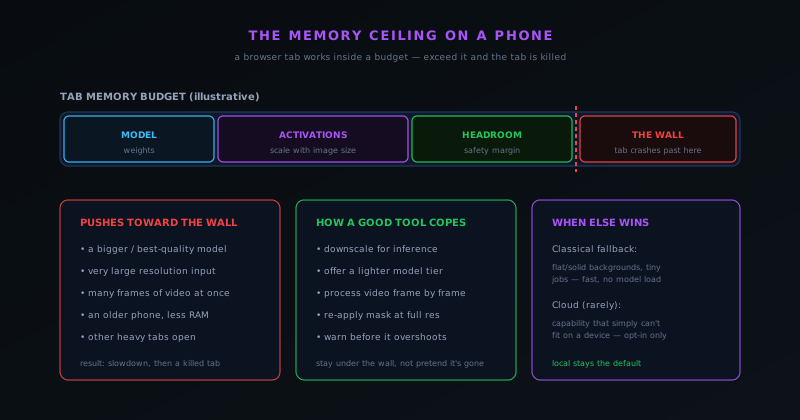
On a phone, the constraint is sharpest. A browser tab does not get the whole device's memory; it gets a slice, shared with the rest of the system and any other open tabs. That budget has to cover the model's weights plus the activations that scale with the size of your input, and on a memory-constrained phone the headroom can be thin. Push past it and the result is not a polite error but a slowdown followed by the tab being killed outright.
This is why the same tool can feel effortless on a capable laptop and strained on an older phone running the best-quality tier at full resolution. The fix is not to pretend the ceiling is not there but to stay under it: offer a lighter model tier, downscale large images for inference and re-apply the result at full resolution, and warn before a job is likely to overshoot. The limit is real, but a tool that respects it gives a phone user a smooth experience instead of a crash, which is the difference between a thoughtful design and a careless one.
What pushes a job toward the wall
It is useful to know the specific things that drive memory use up, because they are the levers both you and the tool can pull. A bigger, best-quality model uses more memory than a fast one. A very large resolution input creates larger activations. Many video frames in flight multiply the cost. An older phone simply has less to work with, and other heavy tabs open at the same time eat into the same budget. Any one of these alone is usually fine; several at once is what reaches the ceiling.
Recognizing these levers turns a frustrating crash into an avoidable one. If a heavy job is struggling, the practical moves are the obvious ones in reverse: choose a lighter tier, work at a more modest resolution, process fewer frames at a time, and close other demanding tabs. A well-built tool does much of this for you automatically, but understanding what loads the budget lets you help it along on a constrained device, and explains why the very same task can sail through in one situation and stall in another.
- A larger, best-quality model instead of a fast tier.
- Very high-resolution input, which inflates activations.
- Many video frames processed at once.
- An older or low-memory phone, especially with other heavy tabs open.
When a classical fallback quietly wins
Not every problem deserves a neural network, and one of the more grown-up things a tool can do is reach for a simpler method when a simpler method is better. For a flat, solid-colour background, or a tiny image, or a quick one-off, a classical technique can produce a clean result faster than it would take to even load a model: no download, no memory pressure, no warm-up. Insisting on AI for a job a classical method nails would be using a sledgehammer on a tack.
The point is that AI earns its cost on the hard cases (the messy edges, the ambiguous subjects, the things a rule-based approach genuinely cannot handle), and on the easy cases a lightweight fallback is often the smarter choice. A tool that knows the difference, and uses each where it shines, gives you the best of both: the speed and lightness of classical methods for the trivial cases and the power of a model for the difficult ones. Treating "use AI" as always-correct is itself a limit; the better approach is to use the right tool for the specific job.
Where the cloud is, rarely, the honest answer
There are tasks that simply cannot fit on a device (a frontier-scale capability, a model far beyond what a browser tab can hold), and for those, the cloud is not a compromise but the only place the work can happen. The honest position is not that the cloud is forbidden, but that it should be the rare exception, clearly marked, and never the quiet default for routine work that could run locally.
A well-designed tool draws that line deliberately: the privacy-sensitive everyday processing stays on your device, and the cloud is reserved, if it is used at all, for an opt-in advanced capability you choose knowingly. What matters is that you always know which side of the line you are on: that nothing leaves your machine without you understanding it has. The existence of a few genuinely cloud-bound tasks does not weaken the on-device case; being honest about them is exactly what makes the rest of the privacy promise believable.
How a good tool fails gracefully
The mark of a mature on-device tool is not that it never meets a limit but that it behaves well when it does. Instead of letting a huge image silently crash the tab, it downscales for inference and re-applies the mask at full resolution. Instead of forcing the heaviest model on a weak phone, it offers a lighter tier. Instead of grinding to a halt on a long video, it processes frame by frame to keep memory bounded, and it warns you before a job is likely to overshoot rather than after.
This graceful behaviour is where honesty becomes a feature rather than a disclaimer. A tool that quietly does the achievable thing well, and tells you plainly when something is beyond comfortable local limits, earns far more trust than one that promises everything and then freezes. Failing gracefully (degrading, warning, suggesting a lighter path) is the practical expression of knowing your limits, and it is what lets an on-device tool be reliable precisely because it does not pretend the limits are not there.
Why the limits keep shrinking
None of these limits are fixed, and the direction they move is encouraging. Two forces push the boundary outward at once: consumer devices keep gaining memory and faster graphics hardware, and models keep getting more efficient, achieving more capability per parameter through better architectures and quantization. Together they steadily enlarge the set of tasks a browser tab can handle, so things that strain a device today run comfortably on next year's.
Capabilities that were cloud-only a few years ago run on-device now, and that pattern is ongoing rather than finished. Even compact language models can run locally today, which would have sounded far-fetched not long ago. So most of the limits in this article are better read as "not yet" than "not ever." The exception remains the genuine frontier: the very largest models will stay too big for consumer hardware for the foreseeable future, simply because of their scale. Everything else is a moving line, and it moves toward the device.
Setting honest expectations is the point
It might seem strange for a tool that runs AI on your device to spend an article on what it cannot do, but this is exactly the kind of honesty the approach is built on. On-device AI's whole appeal is that you do not have to take its claims on faith: you can verify the privacy by going offline, and you should be able to trust the capability claims because they are not inflated. Naming the limits is part of being the kind of tool whose promises you can believe.
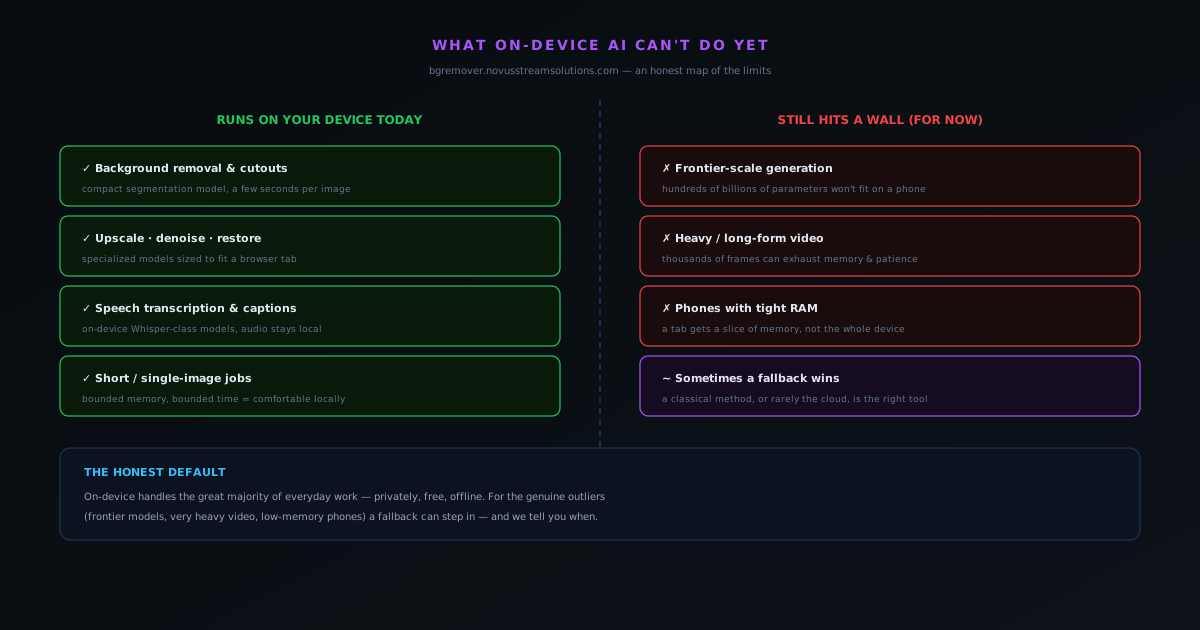
So the realistic picture is this: on-device AI handles the great majority of everyday work privately, offline and for free, and there is a smaller set of genuine outliers (frontier models, very heavy video, tight phone memory) where a fallback steps in or the work belongs elsewhere. A tool that is clear about both halves is more useful than one that oversells the first and hides the second. Knowing what it cannot do yet is precisely what lets you rely on everything it can.
Frequently asked questions
Quick answers to common questions about this topic.
What can on-device AI not do yet?
It cannot run the largest frontier models (the hundreds-of-billions-of-parameter systems behind the most capable chatbots and high-end generators) because they are far too big to fit in a browser tab. It also struggles with very heavy, long-form video and with demanding jobs on phones that have little memory to spare.
Why can't big AI models run in my browser?
A model has to fit in the memory available to a browser tab and run fast enough to be usable on your hardware. Frontier models need far more memory and compute than any phone or laptop has, so they genuinely require server infrastructure. Size is the real constraint.
Does on-device AI ever fall back to the cloud?
A well-designed tool keeps the privacy-sensitive default on-device and only reaches for the cloud, if ever, for an opt-in capability that simply cannot fit on a device. The honest approach is to keep local as the default and be explicit on the rare occasion something leaves your machine.
When is a classical (non-AI) method better than a model?
For simple, well-defined cases (a flat solid-colour background, a tiny image, a quick job) a classical method can be faster and lighter than loading a neural network, with no model download and no memory pressure. AI earns its cost on the hard cases, not the trivial ones.
Will these limits go away?
Many will shrink. Devices keep gaining memory and faster graphics hardware, and models keep getting more efficient, so the set of things on-device AI can handle grows every year. But the largest frontier models will stay cloud-bound for the foreseeable future simply because of their scale.
Related workflow
Product photo to a transparent image every channel accepts
One photograph, cut out once, then re-encoded for a storefront, a marketplace listing and a social post without redoing the cutout each time.
- Cut the background out and check the edgesNSS Background Remover: Hair, glass and drop shadows are where automatic cutouts fail. Fix them once, on the master, before anything downstream copies the mistake.
- Re-encode and resize per destinationNovus Convert: Transparency survives PNG and WebP and dies in JPEG. Convert validates the file it hands back, so a listing never rejects a silently broken upload.
Related troubleshooting
Was this page helpful?
Your answer stays in this browser, it is not sent anywhere and no account or cookie is involved.