2026 · NSS Background RemoverAbout 9 min readNovus Stream Solutions
How big are in-browser AI models (and why size matters)
In-browser AI models are bigger than a web page and smaller than an app: roughly 80 to 180 megabytes. Here is where that number comes from, why you only pay it once, and why the size is really the price of privacy.
Contents
- 1.Overview
- 2.The numbers, concretely
- 3.What is actually in those megabytes
- 4.Why a more capable model is a bigger one
- 5.Quantization: shrinking the file without gutting the model
- 6.You pay the size once, on the first load
- 7.Cold load versus warm cache
- 8.Caching is what makes the size acceptable
- 9.The size is the price of privacy, not a tax on it
- 10.How to choose a tier without overthinking it
- 11.Why models keep getting smaller for the same quality
- 12.The size, in one honest sentence
Overview
When a tool runs AI in your browser, something has to do the thinking, and that something is a model: a file full of learned numbers that the browser runs on your own hardware. The first question people ask once they understand that is a practical one: how big is that file? The honest answer is that an in-browser AI model is bigger than a typical web page and smaller than a desktop app, usually somewhere between tens and a couple hundred megabytes.
That range is not arbitrary, and the size is not a flaw to apologize for. It is the direct consequence of what the model does and where it runs. This guide walks through where the number comes from, why you only pay it once, how tiers let you trade size for capability, and why, counterintuitively, the megabytes are the price of your privacy rather than a cost imposed on it.
The numbers, concretely
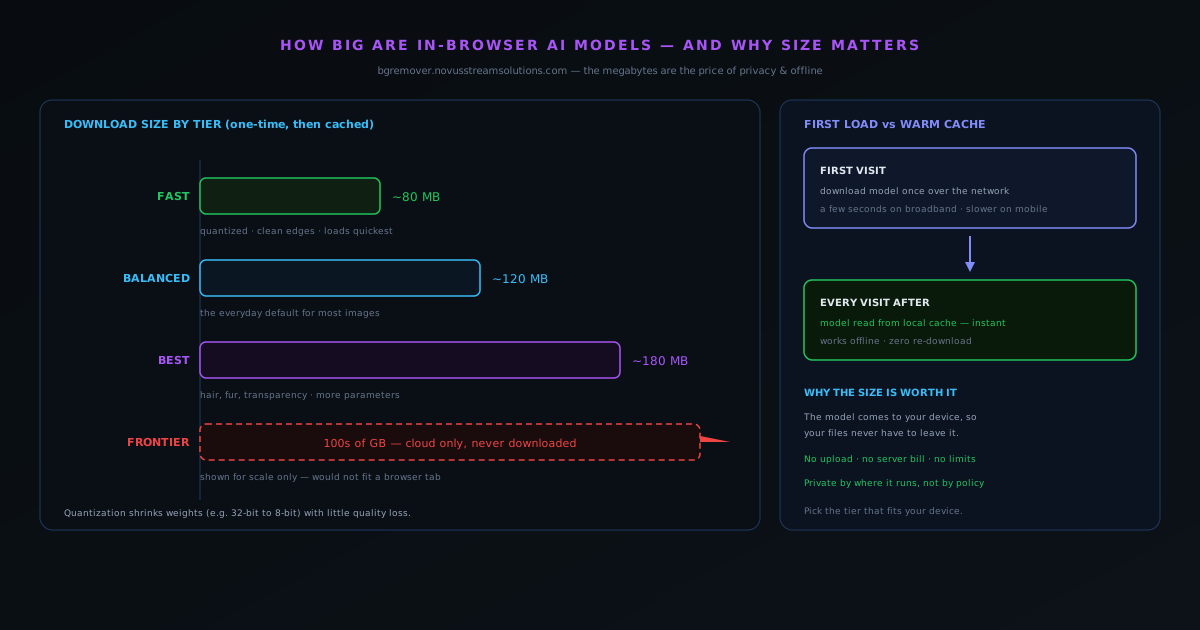
For a background remover, a fast tier model lands around 80 MB and a best-quality tier around 180 MB, with balanced options sitting in between. Those are real, representative figures for compact, specialized models: large enough to be genuinely capable, small enough to download once and run in a browser tab on ordinary hardware.
It helps to put that in context. A single high-resolution photo from a modern phone can be 5 to 15 MB, so a model is roughly the weight of a small album of images: substantial, but nothing like installing a multi-gigabyte program. And unlike those photos, you download the model exactly once.
- Fast tier: roughly 80 MB. Quickest to load, great for clean edges and product shots.
- Balanced tier: roughly 120 MB. The everyday default for most images.
- Best tier: roughly 180 MB. Earns its size on hair, fur and transparency.
What is actually in those megabytes
It is worth knowing what you are downloading, because "model" can sound more mysterious than the thing. The bulk of the file is the network's weights: the millions of numbers it learned during training, which encode everything it knows about separating a subject from a background or cleaning up noise. A small amount of the file describes the structure that says how those numbers connect, but the weights are where the size lives.
This is why a model is, in the end, just data. Downloading it means fetching that block of learned numbers to your device; running it means doing arithmetic with them locally. There is nothing alive or magical in the file; it is a large mathematical function captured as bytes. Holding that picture in mind makes the size feel ordinary: more capability means more learned numbers, and more numbers means more megabytes.
Why a more capable model is a bigger one
The reason the best-quality tier is larger than the fast tier is the same reason a more detailed map is a bigger file: it is holding more information. A model with more parameters has more capacity to represent the subtle, awkward cases (the wisps of hair, the soft edge of fur, the semi-transparent glass) that a smaller model has to approximate. That extra capacity is stored as extra weights, and extra weights are extra megabytes.
This is a genuine trade rather than a quirk, and it is why tiers exist instead of one fixed model. The fast tier is not a crippled version of the best tier; it is a different point on the curve, tuned to do the common cases excellently while staying small and quick to load. The best tier spends its additional size on the hard 10 percent that the fast tier would only approximate. Neither is universally correct; the right size depends on the image and the device.
Quantization: shrinking the file without gutting the model
If capability costs megabytes, you might expect on-device models to be far larger than they are. The reason they stay practical is a technique called quantization, which stores each weight using fewer bits than the full precision it was trained in, for example representing numbers that were 32-bit as 8-bit values. Because a neural network is robust to small rounding, this can shrink a model dramatically while preserving most of its quality.
Quantization is one of the quiet workhorses of in-browser AI. It is a large part of why a model that would otherwise be too big to download comfortably can fit in tens or low hundreds of megabytes and still do excellent work. It is not free (push it too far and quality starts to suffer), so the art is finding the level that meaningfully shrinks the file while keeping the results indistinguishable for real use. When you download a compact model that punches above its size, quantization is usually part of the explanation.
You pay the size once, on the first load
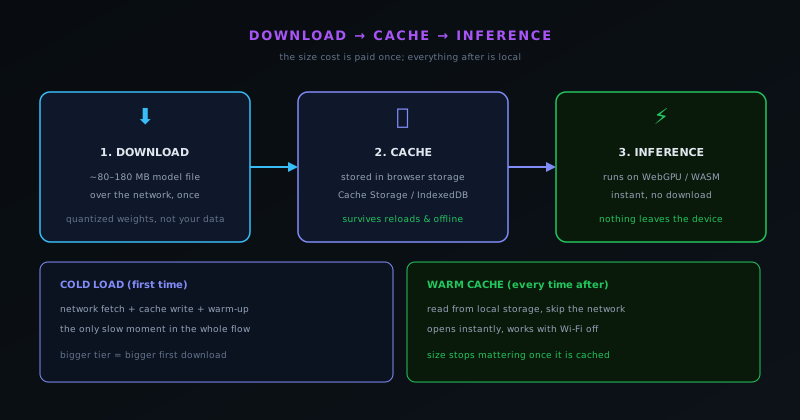
The single most important thing to understand about model size is that it is a one-time cost. The first time you open the tool, the browser downloads the model over the network and stores it in local storage: Cache Storage or IndexedDB, depending on the build. That first visit is the only moment the size is felt as a wait, and on broadband it is usually a matter of seconds.
Every visit after that reads the model from the cache instead of the network. The tool opens instantly, runs immediately, and keeps working even with the connection switched off, because the megabytes are already sitting on your device. This is why the first use of an on-device tool is a little slower than the rest: you are fetching the model that one time, exactly like the one-time download when you install an app, just triggered by opening a page.
Cold load versus warm cache
It helps to separate two experiences that people sometimes blur together. The cold load is the first time, when the model is downloaded, written to cache, and warmed up. It is the only slow moment in the whole flow, and the one where a bigger tier costs you a longer wait. The warm cache is every time afterward, when the model is read locally and inference begins almost immediately regardless of how big the file is.
Framing it this way makes the tradeoff clear and undramatic. Choosing the best-quality tier means a somewhat longer cold load, but once it is cached, its size is invisible: a 180 MB model runs from cache just as instantly as an 80 MB one, because both are already local. So the size question is really a question about that single first download, not about ongoing speed. After the cache is warm, what matters is how fast the model runs, not how big it was to fetch.
Caching is what makes the size acceptable
Without caching, downloading a model on every use would be intolerable; nobody wants to wait for 100-plus megabytes each time they remove a background. Caching is precisely what turns a one-time inconvenience into a non-issue, and it is why on-device tools can ask you to download a substantial file at all. The browser holds onto the model so the network only matters once.
This is also why these tools are often built as installable progressive web apps. The same caching that stores the model can store the app itself, so the whole thing, interface and model, is available locally and offline after the first visit. The practical upshot is that a tool you can simply open in a browser ends up behaving like an installed application: a bit of patience the first time, then instant and self-contained from then on.
The size is the price of privacy, not a tax on it
Here is the reframing that makes everything click: the model download exists because the model is coming to your data instead of your data going to a server. A cloud tool keeps its model on its own machines and asks you to upload your file to it; you never download a model, but you pay on every use by sending your data away. An on-device tool inverts that: it sends the model to you, once, so your files never have to leave your device at all.
Seen that way, the megabytes are not a cost layered on top of privacy; they are how privacy is delivered. The one-time download is what buys structural privacy, offline capability and unlimited free use, because the work happens locally on a model you already hold. Paying in size once, on your terms, is a far better deal than paying in uploaded data every single time, and it is a cost you can see happen, which is the opposite of an upload you cannot follow.
How to choose a tier without overthinking it
Because size and capability trade off, picking a tier is a small, sensible decision rather than a hard one. For most images (product shots, portraits with clean outlines, anything without fiddly edges) the fast tier is the right call: it loads quickest and handles the common cases excellently. Reach for the best tier when the subject genuinely demands it, like flyaway hair, fur, or semi-transparent material, where the extra parameters earn their megabytes.
Your device matters too. A capable laptop or recent phone handles the larger tiers comfortably; an older or memory-constrained device is happier with a smaller model that asks for less. A well-built tool lets you switch tiers so you can match the model to both the image and the hardware, and a good default sits in the balanced middle so most people never have to think about it at all.
- Most images on most devices: the fast or balanced tier is plenty.
- Hair, fur, transparency, complex edges: step up to the best tier.
- Older or low-memory device: prefer a smaller tier for a smoother run.
Why models keep getting smaller for the same quality
The sizes here are a snapshot, and the trend over time is encouraging: models keep delivering more capability per megabyte. Better architectures, smarter training, and techniques like quantization mean the quality you get for a given file size keeps improving, so a model that is compact today would have been considered large for its results a few years ago. The direction of travel is toward smaller files that do more.
At the same time, devices keep gaining memory and faster graphics hardware, which raises the size a browser tab can comfortably handle. Both trends point the same way (more on-device capability becomes practical as the megabytes buy more and the hardware tolerates more), which is why building around in-browser models is a forward-looking choice. The size cost is real today, but it is shrinking relative to what it delivers, and that is the opposite of a dead end.
The size, in one honest sentence
So: an in-browser AI model is roughly 80 to 180 megabytes depending on how much capability you want, you download it once, it caches, and from then on it runs instantly and offline on your own device. The number is the weight of capability made local, and quantization keeps it as small as it can be without giving up quality.
If you want to feel the whole thing rather than read about it, open the tool once and watch the first load happen, then reload and notice it is instant. That difference between the cold download and the warm cache is the entire size story in two clicks, and once you have seen it, the megabytes stop looking like a cost and start looking like the price of keeping your files on your own machine.
Frequently asked questions
Quick answers to common questions about this topic.
How big is an in-browser AI model?
For a tool like a background remover, the model is roughly 80 MB for a fast tier and around 180 MB for a best-quality tier, with balanced options in between. That is large for a web page but small compared with an installed application, and it downloads only once.
Do I download the model every time I use the tool?
No. The model downloads on your first visit and is cached in your browser. Every visit after that reads it from local storage, so the tool opens instantly and works offline, with no re-download.
Why are the models that size and not smaller?
The size is mostly the learned weights of the neural network: the numbers that make it good at its job. A bigger model has more parameters and can handle harder cases like hair and transparency, which is why the best-quality tier is larger than the fast one. Quantization shrinks the file, but capability still costs some megabytes.
Is a smaller model worse?
Not for most images. A fast, smaller model handles clean edges and product shots beautifully and loads quickest. The larger tiers earn their size only on genuinely hard subjects, so picking a tier is about matching the job and your device, not chasing the biggest file.
Why download a big model instead of just using a server?
Because the model coming to your device is exactly what lets your files stay on it. The one-time size is the price of structural privacy, offline capability and unlimited free use. You pay in megabytes once instead of paying in uploaded data every time.
Related workflow
Product photo to a transparent image every channel accepts
One photograph, cut out once, then re-encoded for a storefront, a marketplace listing and a social post without redoing the cutout each time.
- Cut the background out and check the edgesNSS Background Remover: Hair, glass and drop shadows are where automatic cutouts fail. Fix them once, on the master, before anything downstream copies the mistake.
- Re-encode and resize per destinationNovus Convert: Transparency survives PNG and WebP and dies in JPEG. Convert validates the file it hands back, so a listing never rejects a silently broken upload.
Related troubleshooting
Was this page helpful?
Your answer stays in this browser, it is not sent anywhere and no account or cookie is involved.