2026 · NSS Background RemoverAbout 13 min readNovus Stream Solutions
How AI runs in your browser (WebGPU and WebAssembly, explained)
A few years ago, running a real neural network in a web page was impractical. WebGPU and WebAssembly changed that. Here is how modern browsers run AI locally, without the jargon.
Contents
- 1.Overview
- 2.WebGPU: using your graphics card
- 3.WebAssembly: the universal fallback
- 4.The model, downloaded once
- 5.What a model actually is, in plain terms
- 6.Why this kind of math suits a graphics chip
- 7.Picking the fast path without you noticing
- 8.Why nothing needs to be installed
- 9.The one-time download, and why it is worth it
- 10.A brief history of how this became possible
- 11.What it feels like from the user side
- 12.What this enables beyond any single tool
- 13.What your device actually needs
- 14.The privacy that comes free with local execution
- 15.Why this is a big deal
Overview
Running a neural network means doing a huge number of math operations very quickly. For years, the browser could not do that fast enough to be useful, so AI lived on servers. Two technologies (WebGPU and WebAssembly) changed that, and they are why tools like NSS Background Remover and Novus Visualizers can run real AI right in a web page. This explains how, without the jargon.
WebGPU: using your graphics card
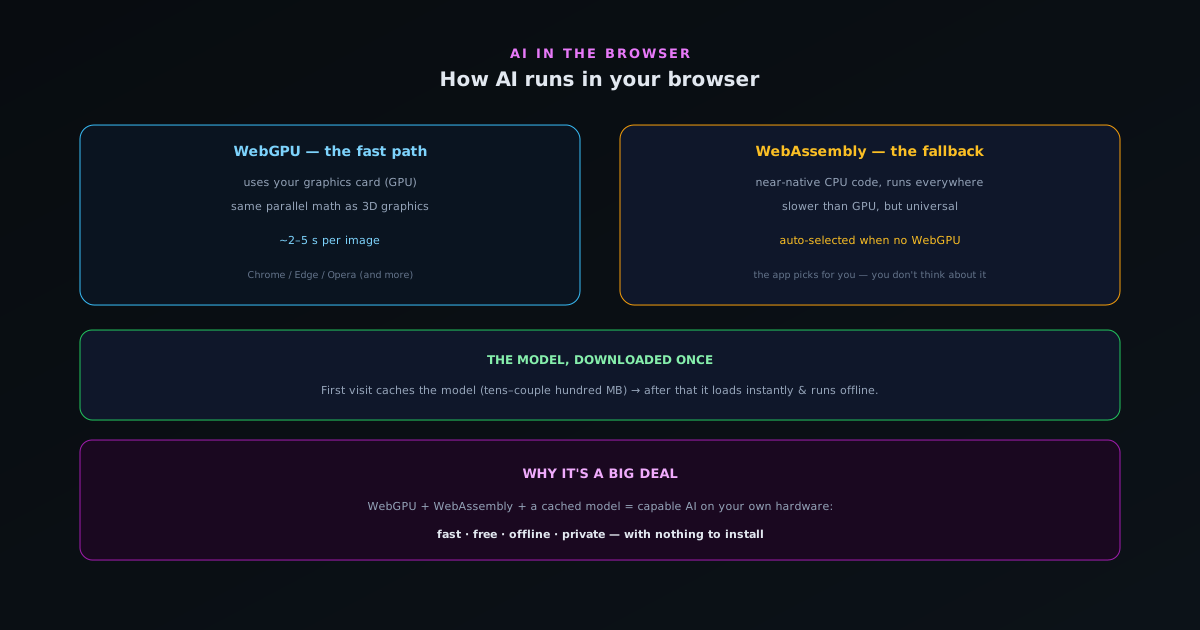
The math behind AI is the same kind of math behind 3D graphics: lots of small operations done in parallel. Your computer already has a chip built for exactly that: the GPU (graphics card). WebGPU is a modern browser feature that lets a web page use your GPU directly for general computation, including AI.
When a browser supports WebGPU, an in-browser AI tool can run its model on your graphics hardware, which makes things like background removal quick, often a couple of seconds per image. It is the fast path.
WebAssembly: the universal fallback
Not every browser or device exposes WebGPU yet. WebAssembly (WASM) is the fallback: it runs compiled, near-native-speed code in any modern browser, using the CPU. It is slower than the GPU for this kind of work, but it runs basically everywhere, so the tool still works even without WebGPU.
Good in-browser AI apps detect what your browser supports and pick automatically: WebGPU when available, WebAssembly otherwise. You do not have to think about it; the app just runs.
The model, downloaded once
For the AI to run locally, the model itself has to be on your device. The first time you open the tool, it downloads the model (tens to a couple hundred megabytes) and caches it in your browser. After that, it is there: the tool loads instantly and runs offline, with no further download.
This one-time download is the only "cost" of on-device AI, and it is why the first use is a little slower than later ones.
What a model actually is, in plain terms
Before getting into how a model runs, it helps to demystify what a model is, because the word can sound more mysterious than the thing. A trained neural network is, at its core, a very large collection of numbers (the values it learned during training) together with a set of rules for combining those numbers with your input to produce an output. When the tool "runs the model," it is feeding your image or audio through that collection of numbers according to those rules, doing a great many small arithmetic operations, and the result of all that arithmetic is the cutout, the transcription, or whatever the model produces.
This is why a model is just a file: it is the learned numbers, saved, that the running code reads and applies. Downloading the model means downloading that file of numbers to your device; running it means doing the arithmetic locally. There is nothing magical or alive about it: it is a large mathematical function, captured as data, that transforms an input into an output. Holding that plain picture in mind makes everything else about on-device AI easier to follow: the download is fetching the numbers, the processing is applying them, and the reason it can happen on your device is simply that your device is capable of doing that arithmetic when given the file.
Why this kind of math suits a graphics chip
The reason a graphics processor turns out to be ideal for AI is a happy coincidence of what each was built for. Rendering graphics means performing the same simple calculation across enormous numbers of pixels simultaneously, so graphics chips were designed to do many small operations in parallel rather than a few complex ones in sequence. Neural-network math has exactly the same shape: vast numbers of small, independent multiply-and-add operations that can all happen at once. The chip built to paint millions of pixels in parallel is, without modification, well suited to crunching the arithmetic of a model.
This is why access to the graphics processor was such a turning point for in-browser AI. The hardware that makes a web page run AI quickly was already in your device for entirely different reasons (playing games, rendering interfaces, displaying video) and the modern browser feature that opens that hardware to general computation lets AI tools borrow it. You do not need special AI hardware; the graphics capability most devices already have does the job. Understanding this overlap explains why on-device AI became practical when it did: it was less about inventing new hardware and more about giving web pages a way to use parallel-processing power that was sitting in devices all along.
Picking the fast path without you noticing
A nice property of how these tools are built is that you never have to choose between the graphics-processor path and the universal fallback: the tool checks what your browser and device support and selects automatically. When you open it, it quietly determines whether the fast graphics path is available and uses it if so, falling back to the slower-but-universal option if not. The whole determination happens in the background, so the user just gets the best processing their device can offer without being asked a technical question they would have no basis to answer.
This invisible selection is part of what makes in-browser AI approachable rather than intimidating. A tool that asked users to pick an execution backend would confuse most of them and add friction for no benefit, since the right answer is simply "the fastest one available." By detecting and choosing automatically, the tool keeps the complexity hidden and presents a single experience: you use it, and it runs as fast as your device allows. The fast path and the compatible path are the same button, and which one actually runs is a detail handled for you. That hidden adaptiveness is why these tools work across a huge range of devices without the user ever managing the difference.
Why nothing needs to be installed
It can seem surprising that something as capable as a real AI model can run with nothing to install, and the reason is that a web page is already a sandboxed program your browser knows how to run safely. The browser provides a controlled environment in which code can execute, access certain hardware capabilities like the graphics processor through well-defined interfaces, and store data locally, all without the code being installed into your operating system the way a traditional application is. The tool runs inside that environment, which is why opening the page is all it takes.
This sandbox is also a security benefit, not just a convenience. Because the tool runs within the browser's controlled environment rather than being installed with broad access to your system, it operates under the browser's restrictions, which limit what any web page can do to your device. You get capable AI processing without granting an installer deep access to your machine, because the whole thing runs in the constrained space the browser provides for web content. The absence of an install is therefore both why these tools are friction-free and part of why they are safe to try: there is nothing to install, nothing to grant system access to, just a page that runs in the sandbox every web page runs in.
The one-time download, and why it is worth it
The single cost of on-device AI is that the model file has to reach your device, which happens as a one-time download the first time you use the tool, after which it is stored locally and reused. This is why the first use is a little slower than subsequent ones (you are fetching the model that first time) and why every use after that is quick, because the model is already there. It is comparable to installing an application, except it happens automatically when you open the page and requires no separate setup step.
That one-time download buys a great deal: after it completes, the tool runs locally, instantly, offline, and privately, with no further transfers. Weighed against what it enables (unlimited free use with your data never leaving your device) a single download of the model is a modest and entirely reasonable cost. It is also a transparent one, in that you can see it happen the first time and understand that it is the model being cached rather than your data being uploaded. The download flows toward your device, bringing the capability to you, which is the opposite direction from an upload and the foundation of everything good about the on-device approach.
A brief history of how this became possible
It is worth a moment on how recent all of this is, because it explains why in-browser AI feels new even though browsers are old. For most of the web's history, a page could not run heavy computation: the language browsers ran was too slow for intensive math, and there was no way for a page to use the device's parallel-processing hardware. Serious computation therefore lived in installed applications or on servers, and the browser was firmly the place for light, interactive content rather than demanding work.
Two developments changed the picture: a way to run compiled, near-native-speed code in the browser, and an interface that lets pages use the device's graphics processor for general computation. Together they removed the two specific barriers that had kept heavy computation out of the browser, and almost immediately the kind of work that required an install (including running real AI models) became feasible in a web page. The whole category of capable in-browser tools dates from this shift, which is why it can feel like browsers suddenly gained a new power. They did, in effect: the recent arrival of these capabilities is exactly why on-device, in-browser AI is a development of the last few years rather than something that was always possible.
What it feels like from the user side
For all the technical machinery underneath, the experience of using in-browser AI is deliberately simple, and that simplicity is the point. You open a web address, the tool loads, and you use it: drop in an image at bgremover.novusstreamsolutions.com/background-remover and get a cutout, add a track at visualizers.novusstreamsolutions.com/editor and get a visualizer. The capability detection, the model loading, the choice of execution path, the local processing all happen out of sight, so what you experience is just a tool that works, quickly, without an account or an install or an upload. The complexity is real but hidden, by design.
This is the right way to deliver sophisticated technology: surface the benefit, conceal the machinery. A user does not need to understand graphics processors or compiled web code to enjoy fast, free, private AI any more than a driver needs to understand an engine to drive. The value of explaining how it works, as this article does, is to satisfy curiosity and build trust by showing there is nothing hidden going on, but using the tool requires none of it. You get real AI processing that never touches a server, delivered as the plain experience of opening a page and getting a result, which is exactly how capable technology should feel when it is working well.
What this enables beyond any single tool
It is worth zooming out from background removal or visualizers to see that these technologies enable a whole category, not just a few tools. Once a web page can run real models on your hardware, the door opens to an entire class of capable, private, install-free applications: image and video editing, audio processing, transcription, vision tasks, and increasingly language tasks, all running locally in a browser. The same foundation that makes one tool possible makes the next one possible, which is why on-device, in-browser AI is better understood as a platform shift than as a feature of any particular product.
This is why the explainer is worth more than the specific examples it uses. Understanding that browsers can now run models locally lets you recognize the pattern across many tools and evaluate any of them on the same terms: does it run on my device, is it therefore private and free and offline-capable. The capability is general, so the literacy is general: someone who grasps how AI runs in the browser can make sense of the growing field of tools built on it, rather than treating each as a novelty. The big deal is not one clever app but the arrival of a new place to run capable AI (your own browser) and everything that place will host.
What your device actually needs
A natural question is what hardware you need to use these tools, and the reassuring answer is: less than you might think, and almost certainly what you already have. A reasonably modern computer or phone from the last several years, running an up-to-date browser, can run compact on-device models, with the graphics-processor path providing speed where available and the universal fallback keeping things working where it is not. There is no special AI chip required and no high-end machine needed for the everyday tasks these tools handle; the capability is built on hardware that is already widespread.
Where hardware matters is at the margins (a very old or low-powered device will run the fallback path more slowly, and the largest on-device models ask for more capable machines) but the common case is well within reach of ordinary consumer devices. This accessibility is part of why on-device AI has spread: it does not require buying anything, because the necessary capability is already in the phones and laptops people own. Knowing that the bar is low, rather than assuming local AI demands a powerful rig, removes a misconception that might otherwise keep people from trying tools that would run perfectly well on the device already in their hands.
The privacy that comes free with local execution
A consequence worth making explicit is that running the model locally delivers privacy as an automatic byproduct, not as a separate feature someone had to add. Because the computation happens on your device and your input is fed through the locally-stored model right there, there is no point in the process where your data is sent anywhere: the privacy is simply what happens when the work is local. The same architecture that makes the tool fast, free, and offline-capable also makes it private, because all four properties flow from the single fact of where the computation occurs.
This is why on-device AI ties privacy and capability together rather than trading them off. In the server model, getting the capability means sending your data away, so privacy and function pull against each other; in the local model, the capability is delivered precisely by processing on your device, which is exactly what keeps the data private. You are not choosing between a useful tool and a private one; the usefulness and the privacy are produced by the same design. Understanding the mechanism makes clear that this is not a marketing balance struck between competing goods but a structural alignment: local execution gives you the result and the privacy in one motion, which is the quiet beauty of the whole approach.
Why this is a big deal
Put together, WebGPU, WebAssembly, and a cached model mean a web page can run capable AI on your own hardware (fast, free, offline, and private) with nothing to install. That combination did not exist a few years ago, and it is what makes the whole category of serious in-browser tools possible.
For you as a user, the upshot is simple: you open a URL and get real AI processing that never touches a server. The complexity is hidden; the benefit (private, free, install-free AI) is what you experience.
- WebGPU: runs the model on your GPU (fast path).
- WebAssembly: CPU fallback that runs everywhere.
- Model cached once → instant, offline, private after that.
Frequently asked questions
Quick answers to common questions about this topic.
How can a neural network run in a web browser?
The model weights download once and run through a JavaScript runtime like Transformers.js, executing on your GPU via WebGPU or your CPU via WebAssembly. No server is involved in the inference: the math happens in the browser tab.
What are WebGPU and WebAssembly?
WebGPU gives the browser access to your graphics processor for fast parallel computation, ideal for AI inference. WebAssembly is a fast, low-level format that runs the same computation on the CPU as a universal fallback where WebGPU is unavailable.
Does running AI in the browser drain my battery or slow my device?
Inference is intensive while it runs, but it is brief and bounded, a few seconds per image on WebGPU. The model is cached after the first download, so repeat use does not re-download anything.
Related workflow
Product photo to a transparent image every channel accepts
One photograph, cut out once, then re-encoded for a storefront, a marketplace listing and a social post without redoing the cutout each time.
- Cut the background out and check the edgesNSS Background Remover: Hair, glass and drop shadows are where automatic cutouts fail. Fix them once, on the master, before anything downstream copies the mistake.
- Re-encode and resize per destinationNovus Convert: Transparency survives PNG and WebP and dies in JPEG. Convert validates the file it hands back, so a listing never rejects a silently broken upload.
Related troubleshooting
Was this page helpful?
Your answer stays in this browser, it is not sent anywhere and no account or cookie is involved.