2026 · Novus Stream Solutions (hub)About 13 min readNovus Stream Solutions
Browser tools vs desktop apps for creative work
Installed desktop software used to be the only serious option. Modern browser tools now run real AI and video processing locally. Here is how the two compare today.
Contents
- 1.Overview
- 2.Browser tools: nothing to install, still local
- 3.Where desktop still leads
- 4.The convergence in the middle
- 5.What changed to move the line
- 6.The access advantage, in full
- 7.The surprise: access without giving up local
- 8.Where desktop genuinely still leads
- 9.The expanding middle ground
- 10.Offline and ownership concerns
- 11.A reframe that fits today
- 12.Collaboration: a link versus an install
- 13.The cost barrier of professional suites
- 14.Judge the tool, not the category
- 15.How to choose
Overview
There used to be a clear line: serious creative work meant installed desktop software, and the browser was for light tasks. That line has moved. Browsers can now run real machine-learning models and video processing locally, the same kind of work that used to require an install. This compares the two for creative work today.
Both Novus apps are browser-based (bgremover.novusstreamsolutions.com/background-remover and visualizers.novusstreamsolutions.com/editor), so this is the perspective of someone who chose the browser, but the tradeoffs are laid out honestly.
Browser tools: nothing to install, still local
The headline advantage is access: open a URL and you are working: no download, no install, no update cycle, on any operating system. The modern surprise is that this no longer means giving up local processing. Tools like NSS Background Remover and Novus Visualizers download a model once and then run the AI and rendering on your device, so you get install-free access and on-device privacy at the same time, and you can confirm it yourself at bgremover.novusstreamsolutions.com/how-it-works.
They also work offline after the first load, update instantly (the latest version is just the page you open), and never need admin rights to install.
Where desktop still leads
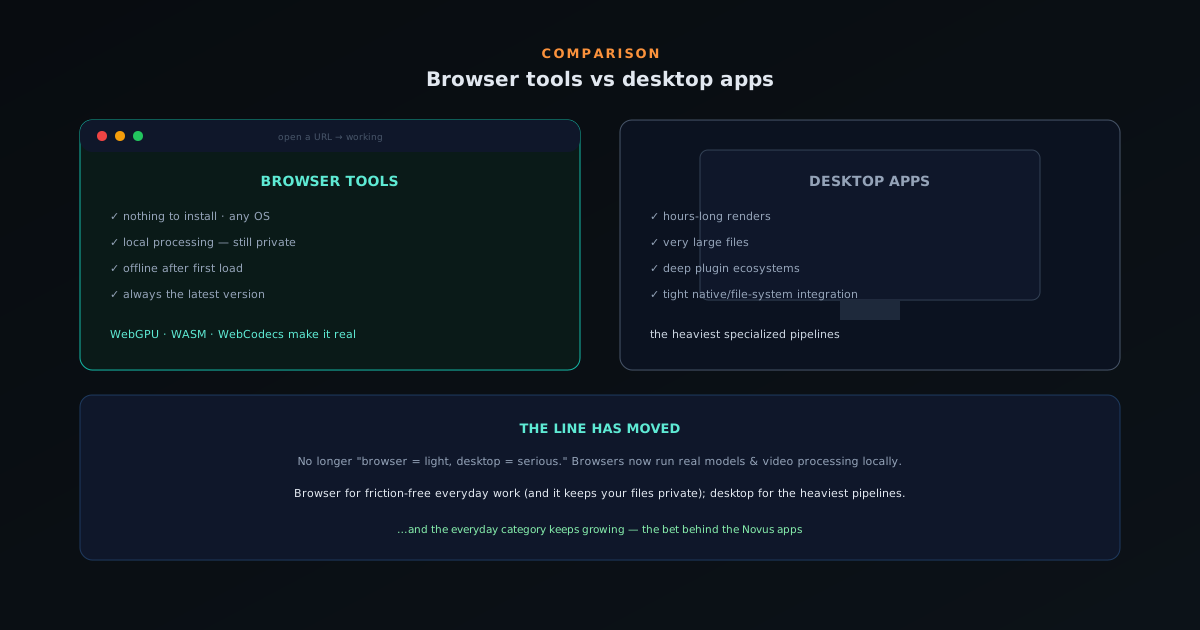
Desktop apps still win for the heaviest, longest workloads: hours-long video renders, very large files that strain browser memory, deep plugin ecosystems, and workflows that integrate tightly with your file system and other native software. A professional finishing a feature film is not doing it in a browser tab.
Desktop also has decades of mature, specialized tooling. For the deepest, most demanding professional pipelines, native software remains the standard.
The convergence in the middle
For the large middle (cutting out images, making visualizers, quick video edits, batch processing, everyday creative tasks), browser tools have become genuinely competitive. WebGPU and WebAssembly let them run real models fast, WebCodecs handles video export, and the result is professional-quality output with none of the install friction.
That is the bet behind the Novus apps: most creative tasks do not need a heavyweight install, and removing that friction (while keeping processing local) is a better experience for most people most of the time.
- Browser: instant access, no install, local processing, offline, cross-platform.
- Desktop: heaviest renders, huge files, deep plugin ecosystems.
What changed to move the line
The old rule (serious work means an install, the browser is for light tasks) was correct for a long time, and understanding why it stopped being true clarifies the whole comparison. For most of the web's history, a browser tab genuinely could not run heavy computation: there was no way to access the machine's graphics hardware for general computation, and JavaScript alone was too slow for the kind of number-crunching that machine learning and video processing demand. So anything serious had to be a native application with direct access to the hardware, and the browser was left with the light work.
Two developments moved that line. A low-level, near-native execution format arrived that lets demanding code run in the browser at speeds close to native, and a modern interface to the device's graphics processor gave web code access to the same parallel hardware that makes machine learning fast. Together, these mean a browser tab can now run real neural-network models and process video locally, the exact workloads that used to require an install. The line did not blur because browsers got marginally better; it moved because the specific technical barriers that kept serious work out of the browser were removed. That is why capable creative tools can now live at a URL.
The access advantage, in full
The headline benefit of a browser tool is access, and it is worth spelling out how many separate frictions that single word removes. There is no download to wait for, no installer to run, no admin rights to obtain, no disk space to clear, and no operating-system compatibility to check: you open a URL and you are working, on whatever device and platform you happen to be using. For anyone who has been blocked by a locked-down work computer, an incompatible operating system, or simply a slow download, the immediacy of a tool that runs the instant you visit it is a genuine, recurring relief.
This access advantage compounds in ways that are easy to undervalue. There is no update cycle to manage, because the latest version is simply the page you load, so you are never running outdated software or prompted to update. The tool works across every device you own without separate installs, so the same capability is available on your laptop, your desktop, and a borrowed machine identically. And onboarding a collaborator means sending a link, not walking them through an installation. The friction a native install imposes is paid every time, by every user, on every machine; a browser tool pays it never, which across many uses and many people is a substantial cumulative advantage.
The surprise: access without giving up local
The genuinely modern development, and the one that upends the old tradeoff, is that browser-based no longer means giving up local processing. The historical assumption was that a browser tool must send your work to a server to do anything heavy, trading privacy for access, and for a long time that was true. But a tool that downloads its model once and then runs the computation on your device delivers install-free access and on-device processing at the same time, which the old framing treated as mutually exclusive. You get the convenience of the browser and the privacy of local computation together.
This is the point most comparisons of browser versus desktop miss, because it is recent. A capable browser tool today can keep your files entirely on your machine (no upload, processing done locally, working offline after the first load) while still requiring nothing to install. The privacy that used to be a reason to prefer native software is no longer surrendered by choosing the browser, provided the browser tool is built to run locally rather than to call a server. So the comparison is not access-versus-privacy anymore; a well-built browser tool offers both, which removes the strongest historical reason to insist on a desktop install for everyday creative work.
Where desktop genuinely still leads
Honesty requires being specific about where native software retains a real advantage, because it does, and pretending otherwise would mislead. The heaviest, longest workloads (hours-long video renders, projects with very large files that strain the memory a browser tab can use, and pipelines that push hardware to its limits for extended periods) are still better served by native applications with unrestricted access to the machine's resources. A browser tab operates within limits a native app does not, and for the most demanding sustained work those limits matter.
Beyond raw capacity, desktop software has the advantage of decades of mature, specialized development and deep ecosystems. Professional suites integrate tightly with the file system and with other native tools, support extensive plugin ecosystems built up over years, and offer the deepest, most specialized feature sets for their domains. A professional finishing a feature film, managing an enormous media library, or working inside a specialized pipeline is relying on capabilities that browser tools have not replicated and may not need to. For the deepest, most demanding professional work, native software remains the standard, and that is not a temporary gap but a reflection of genuinely different requirements.
The expanding middle ground
The most important part of the comparison is the large and growing middle, because that is where most actual work lives. Cutting out images, making visualizers, quick video edits, batch processing, and the everyday creative tasks the majority of people do most of the time fall between the trivial and the feature-film-grade, and for that middle, browser tools have become genuinely competitive. The technologies that moved the line (fast local execution, graphics-hardware access, client-side video encoding) let browser tools handle these tasks with real models at real speed, producing professional-quality output without the install.
This middle ground is expanding as the underlying technology improves, which is the dynamic worth watching. Tasks that were too heavy for the browser a few years ago are routine in it now, and the boundary continues to move in the browser's favor as devices get faster and the runtimes mature. The category of work that genuinely requires a desktop install is shrinking, not because desktop is getting worse but because the browser keeps absorbing more of what used to need native software. For an increasing share of creative work, the install is simply no longer necessary, and removing it, while keeping processing local, is a better experience for most people most of the time.
Offline and ownership concerns
Two reasonable worries about browser tools deserve direct answers, because they are often cited as reasons to prefer desktop. The first is offline use: surely a browser tool needs a connection? For a server-based one, yes, but a browser tool that runs locally and caches its model works offline after the first load, just like an installed app: the connection is needed once to fetch the tool and model, and not again. So offline capability, often assumed to be a desktop-only property, is available from a properly-built local browser tool too.
The second worry is durability: the sense that an installed app is yours in a way a website is not, that a browser tool could change or vanish. This has some force, but it cuts less cleanly than it seems: installed software also depends on updates, licenses, and the developer's continued support, and can be discontinued or change its terms just as a web tool can. A browser tool that runs locally at least keeps the actual processing on your machine. Neither model offers permanent guarantees, and the durability difference between them is smaller than the intuition suggests. For everyday work, the access and privacy benefits of a capable local browser tool generally outweigh this concern.
A reframe that fits today
The useful conclusion is not that browser tools have beaten desktop, but that the old mental model (browser equals light, desktop equals serious) no longer describes reality and should be replaced. A more accurate framing is: the browser for friction-free everyday work that keeps your files local, and desktop for the heaviest, most specialized professional pipelines. That reframe assigns each its genuine strength without the outdated assumption that anything capable must be installed, and it matches where the technology actually sits today rather than where it sat several years ago.
Adopting that reframe leads to better tool choices. It means not reflexively installing heavy software for tasks a browser tool now handles well, and not assuming a browser tool must be sending your data somewhere. It means judging each tool by what it actually does (does it run locally, does it produce the quality you need, does it fit the task) rather than by the category it belongs to. The everyday creative category that browser tools serve keeps growing, and recognizing that is what lets you take advantage of the friction-free, private, capable tools now available at a URL instead of defaulting to an install out of an outdated habit.
Collaboration: a link versus an install
A dimension the browser-versus-desktop comparison often omits is collaboration, where the access advantage of a browser tool becomes especially pronounced. Sharing a browser-based tool with a collaborator means sending a link: they open it and they are working, on whatever device they have, with nothing to install. Sharing a desktop workflow means ensuring everyone has the same software installed, on a compatible operating system, at a compatible version, which for a distributed or casual group is real friction that can block participation entirely. The lower the barrier to picking up the same tool, the easier collaboration becomes.
This matters most for loose, ad-hoc, or cross-organization collaboration, where you cannot assume everyone has the same professional suite installed. A browser tool meets people where they are, on whatever machine they happen to be using, which makes it far easier to bring someone into a task without a setup process. For tightly-integrated professional teams who all run the same native software by default, this is less of an advantage, but for the broad middle of people who collaborate occasionally and across different setups, the ability to share capability with a link rather than an installation requirement is a genuine, underappreciated benefit of building on the browser.
The cost barrier of professional suites
Cost is part of the comparison that the feature discussion can obscure, and it shapes who can use what. Professional desktop creative suites are frequently expensive, often sold as ongoing subscriptions, which puts the deepest native tools out of reach for many individuals, hobbyists, students, and small operations. The capability exists, but behind a price that not everyone can or wants to pay, so for a large population the practical alternative to a desktop suite is not the suite at all but whatever they can access for free.
Browser tools, especially free ones that run locally, change this calculus by delivering capable creative processing at no cost and with no install, which opens the work to everyone the price barrier excluded. For someone who cannot justify a professional subscription, a free browser tool that cuts out images or makes visualizers well is not competing with the expensive suite on their desk; it is the thing that makes the capability available to them at all. Just as AI removal opened background removal to people who could never set up a green screen, free browser-based creative tools open creative work to people for whom the professional desktop option was never financially within reach. The comparison, for them, is decisively in the browser's favor because it is the only option that is actually accessible.
Judge the tool, not the category
The most useful habit that comes out of this comparison is to evaluate each tool by what it actually does rather than by whether it is a website or an application. The old categories carried reliable assumptions (installed meant capable and private, browser meant light and probably sending your data somewhere), and those assumptions no longer hold uniformly. Some browser tools run entirely locally and rival native software for everyday tasks; some are thin clients for servers. Some desktop apps are lean, some are bloated. The category no longer predicts the properties, so the category is no longer a good basis for choosing.
Judging the specific tool means asking the questions that matter directly: does it run the processing locally or send my data to a server, is it fast enough for my task, does it produce the quality I need, does it fit how I work? A capable local browser tool and a heavyweight native suite can both be right answers for different tasks, and the way to tell is to look at what each actually delivers rather than at which side of the old divide it sits on. That tool-by-tool evaluation is what lets you take advantage of the genuinely good browser tools now available without either dismissing them out of outdated habit or assuming every browser tool shares their virtues.
How to choose
If your task is everyday creative work and you value getting started instantly without an install, a capable browser tool is likely all you need, and you keep your files private since the processing is local. If you are running marathon renders, wrangling enormous files, or living inside a specialized professional suite, desktop is still the place.
The useful reframe: it is no longer "browser = light, desktop = serious." It is "browser for friction-free everyday work, desktop for the heaviest specialized pipelines", and the everyday category keeps growing.
Frequently asked questions
Quick answers to common questions about this topic.
Can browser tools replace desktop apps for creative work?
For many focused tasks, yes: modern browser tools run real AI and rendering locally via WebGPU and WebAssembly, with no install, no license, and no upload. Desktop apps still lead for deep, multi-hour projects, but a lot of everyday work no longer needs them.
Are browser tools slower than desktop apps?
Not necessarily. With WebGPU, in-browser inference and rendering can be fast, and the gap keeps closing. The main difference is that a browser tool is bound by your device just as a desktop app is.
Do browser tools work offline?
Some do. The Novus tools are progressive web apps that cache their code and models, so after the first visit they keep working without a connection, closer to a desktop app than a typical website.
Related troubleshooting
Was this page helpful?
Your answer stays in this browser, it is not sent anywhere and no account or cookie is involved.