2026 · Novus VisualizersAbout 12 min readNovus Stream Solutions
On-device Whisper vs cloud transcription for captions
Captioning a video means transcribing its audio, and where that transcription happens matters. Novus Visualizers runs Whisper on your device so your audio never leaves the browser. Here is how that compares to the usual cloud transcription, on privacy, cost, and control.
Contents
- 1.Overview
- 2.Privacy: your audio, or someone else's server
- 3.Cost: a download versus a meter
- 4.Control: per-word timing you can edit
- 5.What Whisper is, and why it runs in a tab at all
- 6.The one-time download, demystified
- 7.Captions and lyrics are the same step, used two ways
- 8.Fixing the errors transcription always makes
- 9.Styling the captions to match the work
- 10.Offline, and free of the network round-trip
- 11.Being honest about accuracy over music
- 12.The volume case, made concrete
- 13.The accessibility and reach payoff
- 14.When the cloud still wins, and the bottom line
Overview
Captions and lyric videos both start from the same step: turning spoken or sung audio into timed text. The model that does this (most commonly OpenAI's Whisper family) is the same whether it runs on a server or on your laptop. What differs, and differs a lot, is where it runs. Novus Visualizers runs Whisper on your device through Transformers.js, so your audio is transcribed in the browser and never leaves it. The default everywhere else is to upload your audio to a cloud API. This post compares the two honestly, because the model is identical and the architecture is the whole story.
It is worth saying upfront that cloud transcription is not evil: for some workloads it is the right tool. The point is that for a creator captioning their own track or video, the on-device approach wins on the axes that usually matter most.
Privacy: your audio, or someone else's server
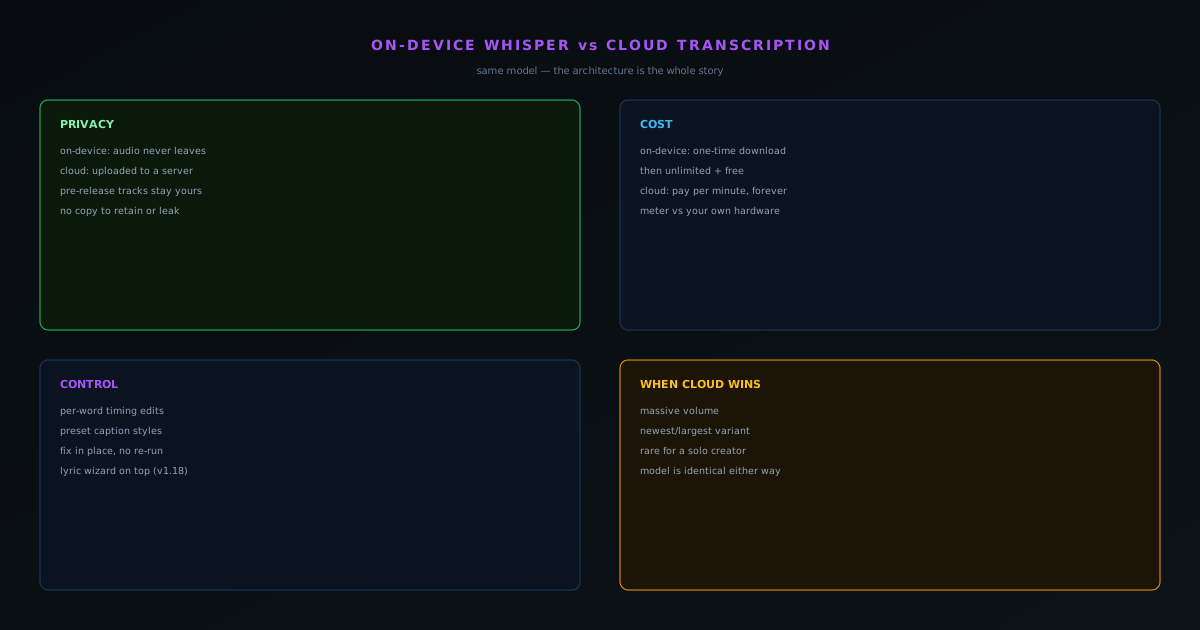
With cloud transcription, your audio is uploaded to a third-party server, processed there, and the text is sent back. That means an unreleased track, a private voice memo, or a client's footage now exists as a copy on a machine you do not control, governed by a retention policy you cannot audit. For finished public content that may be fine; for anything sensitive or pre-release it is a real exposure dressed up as convenience.
On-device Whisper removes the exposure structurally. The audio is transcribed in the same browser tab you are working in and is never transmitted, so there is no server-side copy to retain, leak, or subpoena. For an artist captioning an unreleased single, that is not a nice-to-have: it is the difference between a tool they can use before launch and one they cannot.
Cost: a download versus a meter
Cloud transcription is metered. You pay per minute of audio, every time, forever, which is fine at small scale and a real line item once you are captioning regularly. On-device Whisper inverts the cost model: the marginal cost of transcribing another minute is paid by your own hardware, not an API bill, which is exactly why captioning in Novus Visualizers is free and unlimited rather than a credit you spend down.
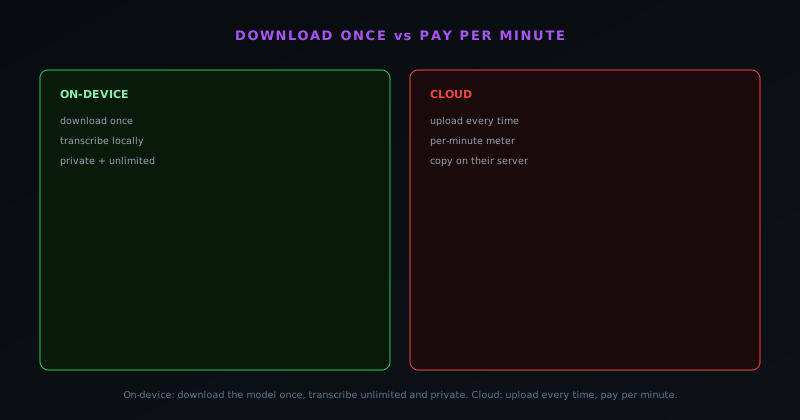
The one cost on-device pays is the initial model download: the Whisper weights come down once and run locally thereafter. That is the same tradeoff the rest of the on-device suite makes: a one-time download in exchange for unmetered, private use. For anyone captioning more than a handful of videos, that trade pays for itself almost immediately.
Control: per-word timing you can edit
A transcription is rarely perfect on the first pass: a name is misspelled, a lyric is misheard, a caption needs to land on the beat. The on-device captioning in Novus Visualizers exposes per-word timing edits and preset caption styles, so you can fix the text and nudge the timing right where you are working, without round-tripping a file back to a cloud service and waiting for a re-run. The transcription is a starting point you refine in place, not a black-box output you accept or resubmit.
For lyric videos especially, that control is the whole game. Lyrics need to hit with the vocal, and the visualizers.novusstreamsolutions.com/lyric-videos wizard plus editable per-word timing means you can get the words landing exactly where they should. A cloud API hands you text and timestamps; the on-device flow hands you text, timestamps, and the editor to perfect them.
What Whisper is, and why it runs in a tab at all
Whisper is an automatic speech recognition model (it turns spoken or sung audio into text with timing) and it is the same family of model whether it runs on a data-center GPU or in your browser. What makes the browser version possible is Transformers.js, the JavaScript machine-learning runtime that can execute the model locally, the same runtime the Background Remover uses for its vision models. The model weights download once and then run on your device, which is the entire reason the audio never has to be uploaded: the model comes to your file rather than your file going to the model. The technology that used to require a server now fits in a tab.
It is worth sitting with how recently that became true, because it is the thing that makes the whole privacy argument practical rather than aspirational. A few years ago, running a real transcription model client-side would have been a research demo; today it is a shipping feature in a free tool. The capability did not get worse by moving on-device (it is the same model producing the same kind of transcription) it simply moved to where your data already is, which changes who can see your audio without changing what the transcription can do.
The one-time download, demystified
The single cost the on-device approach pays is the initial model download, and being concrete about it removes the mystery. The Whisper model used for captioning is on the order of a couple hundred megabytes, comparable to the base Whisper model size, and it comes down once and is cached locally thereafter. After that first fetch, every transcription you run draws on the cached model with no further download and no per-use network cost. It is the same trade the rest of the on-device suite makes everywhere: pay once in bytes to download the capability, then use it freely, privately, and without a meter.
For anyone weighing that trade, the math is straightforward. If you caption one video ever, a cloud API's pay-per-minute model is cheaper in raw bytes transferred. If you caption more than a handful, the one-time download is paid back almost immediately and everything after it is free, where the metered service keeps charging forever. Since the people who reach for captioning tend to do it repeatedly (every release, every clip) the download-once model is the economical one for the actual usage pattern, not just the private one.
Captions and lyrics are the same step, used two ways
It is worth distinguishing the two jobs this capability serves, because they share a foundation. Both captions and lyric videos begin with the same act: transcribing audio into timed text on the device. From there they diverge in intent (captions are an accessibility and muted-viewing aid laid over a video, while a lyric video makes the words themselves the visual centerpiece) but the underlying transcription is identical, which is why one on-device model powers both. The dedicated lyric-video wizard sits on top of that shared transcription, turning the timed text into a finished lyric piece rather than a subtitle track.
Recognizing that they are the same step explains why the privacy and cost properties apply equally to both. Whether you are adding accessibility captions to a tutorial or building a stylized lyric video for a single, the audio is transcribed locally and never uploaded, and the transcription is free and unmetered in both cases. The creative output is different; the engine underneath is one, which is a tidy example of building a capability once and pointing it at more than one job.
Fixing the errors transcription always makes
No automatic transcription is perfect, especially over music, where vocals compete with instruments and a model can mishear a lyric or a proper name. What separates a usable captioning tool from a frustrating one is how easily you can fix those errors, and this is where the on-device editing model is strongest. The transcription is exposed with per-word timing you can edit directly, so correcting a misheard word or nudging a caption to land on the beat happens right in the editor, immediately, without exporting a file to a cloud service and waiting for a re-run. The transcription is a first draft you refine in place.
That in-place correction loop is fast in a way a round-trip to an API never is. With a cloud service, fixing timing or text often means editing a transcript file, re-uploading or re-processing, and re-syncing, a slow cycle that discourages the small adjustments that make captions feel professional. Editing locally, where the words and their timing are right there in front of the video, makes those adjustments cheap enough that you actually make them, which is the difference between captions that are technically present and captions that are genuinely well-timed.
Styling the captions to match the work
Transcription accuracy is only half of good captions; the other half is how they look, and the captioning here ships with preset caption styles so the text matches the piece rather than sitting on it as a generic overlay. For a lyric video especially, the styling is not a nicety: the way the words appear, move, and land is a large part of the visual, and preset styles give a starting point that can be adjusted to fit the mood of the track. A clean style suits a tutorial; a bolder, more animated treatment suits a music piece. The styles meet the content where it is.
Pairing editable per-word timing with preset styles is what lets the captions become part of the design rather than an afterthought stapled to it. The timing makes the words land with the audio; the styling makes them belong to the visual. Both happen on the device, in the same editor, so the entire captioning workflow (transcribe, correct, time, style) stays in one place and never sends the audio anywhere, which is exactly the integrated, private loop a creator wants when the captions are part of the finished product.
Offline, and free of the network round-trip
A consequence of running locally that is easy to overlook: once the model is cached, transcription does not need the network at all. There is no upload to wait on, no server queue, and no dependency on a connection: the audio is processed on the device whether or not you are online. For a creator working on the move, on a flaky connection, or simply tired of features that spin forever waiting on a server, that independence is a real quality-of-life difference. The transcription is bound by your hardware, not by your bandwidth or a remote service's availability.
This also means the captioning is never gated by an outage or a rate limit on someone else's infrastructure. Cloud transcription can be down, throttled, or slow at exactly the wrong moment; a local model cannot, because there is no remote dependency in the path. The same property that protects your audio's privacy (that it never leaves the device) also protects your workflow from the failure modes of relying on a server you do not control. Local is not only more private, it is more dependable for the moments you most need the tool to just work.
Being honest about accuracy over music
Fairness requires acknowledging where transcription is genuinely hard, and sung audio over a busy mix is one of those places. A model transcribing speech in a quiet recording has an easier job than one transcribing a vocal buried under instrumentation, and both on-device and cloud models face that difficulty: it is a property of the audio, not of where the model runs. So the realistic expectation for lyric transcription is a strong first draft that you correct, not a flawless output, which is exactly why the editable per-word timing matters so much: the tool is designed around the assumption that you will refine the result.
Setting that expectation honestly is better than pretending the transcription is perfect, because a creator who knows to expect a few corrections will have a smooth experience, while one who expects magic will be frustrated by the first misheard lyric. The on-device model is good, and it gives you a real head start over typing lyrics by hand, but the design treats it as a draft-and-refine tool rather than a one-click oracle. That honesty about accuracy is consistent with how the whole ecosystem talks about its AI: capable, useful, and clear about where human judgment still belongs.
The volume case, made concrete
The cost argument sharpens when you picture real usage rather than a single file. A musician releasing regularly might caption a full track for a lyric video, several vertical clips of the hook for short-form platforms, and the occasional behind-the-scenes video: a steady stream of transcription jobs, every release, indefinitely. Under a per-minute cloud model, that is a recurring bill that grows with output; under the on-device model, it is all free after the one-time download. The more you create, the more lopsided the comparison becomes in favor of running locally.
This is why the choice is not really close for the tool's core audience. Independent creators are precisely the people who caption often and earn irregularly, which is the worst possible match for a metered service and the best possible match for a download-once, use-free model. The cloud's advantages (raw throughput, the newest giant model) are real for a transcription business processing enormous volumes, and irrelevant to a solo artist captioning their own releases. For that person, on-device is cheaper, more private, and more dependable, which is three reasons pointing the same way.
The accessibility and reach payoff
It is easy to frame captioning purely as a creative choice, but it is also an accessibility and reach decision, and that raises the stakes of making it free and easy. Captions make content usable by people who are deaf or hard of hearing, and they make any video legible to the enormous share of viewers who watch muted in public, in bed, or while doing something else. A tool that removes every barrier to captioning (no cost, no upload, no account, fast in-place editing) lowers the friction enough that creators actually do it, which is a genuine good beyond the individual workflow.
Because the captioning is free and unmetered, there is no economic disincentive to caption everything, which is exactly the right incentive structure for accessibility. A per-minute model quietly pushes creators to caption selectively to control cost; a free, on-device model removes that pressure, so the easy default becomes captioning by habit. For platforms where muted autoplay is the norm, that habit also directly improves a video's performance, since captioned content holds the attention of viewers who would otherwise scroll past silent footage. The accessibility win and the reach win are the same feature, and making it free is what lets both happen by default.
When the cloud still wins, and the bottom line
Cloud transcription has its place: if you need to process enormous volumes of audio faster than any single device could, or you want the absolute latest, largest model variant the moment it ships, a server has more headroom than a browser tab. Those are real advantages for a transcription business. For an individual creator captioning their own work, though, they rarely outweigh the privacy, cost, and control of running the model locally.
The honest bottom line is that the model is the same; the architecture decides who sees your audio and who pays per minute. Novus Visualizers chose on-device because, for the people actually using it, that is the better trade. The free captioning guide shows the workflow in practice, and the private-by-design post explains why on-device is structurally, not just nominally, more private.
Frequently asked questions
Quick answers to common questions about this topic.
Is on-device Whisper as good as cloud transcription?
For most content it is very close, and it keeps your audio private by never uploading it. Cloud services may edge ahead on the largest models, but local Whisper avoids the upload, cost, and dependency entirely.
Why run Whisper in the browser instead of the cloud?
Privacy and cost: the audio never leaves your device, there is no per-minute API bill, and it works without a server. Novus Visualizers uses on-device Whisper for exactly these reasons.
Can I edit AI-generated captions?
Yes. Transcriptions come with per-word timing and can be corrected before you style and render them, so you fix names or terms the model mishears.
Related workflow
A track to a release-ready visualizer, per platform
Render the visual once, then produce the platform masters from it, instead of re-rendering the whole video for every aspect ratio.
- Render the beat-synced videoNovus Visualizers: Pick the engine and mode against your actual track; the analysis is done on your audio, not on a preset preview.
- Trim or upscale the exportNSS Background Remover: The video utilities handle the tidy-up pass so the render does not have to be repeated to fix ten seconds of it.
- Produce the per-platform mastersNovus Convert: Each destination wants a different container and bitrate; converting the finished render is far cheaper than re-rendering it.
Related troubleshooting
Was this page helpful?
Your answer stays in this browser, it is not sent anywhere and no account or cookie is involved.