2026 · Novus Stream SolutionsAbout 12 min readNovus Stream Solutions
Free alternatives to paid creative apps that actually hold up
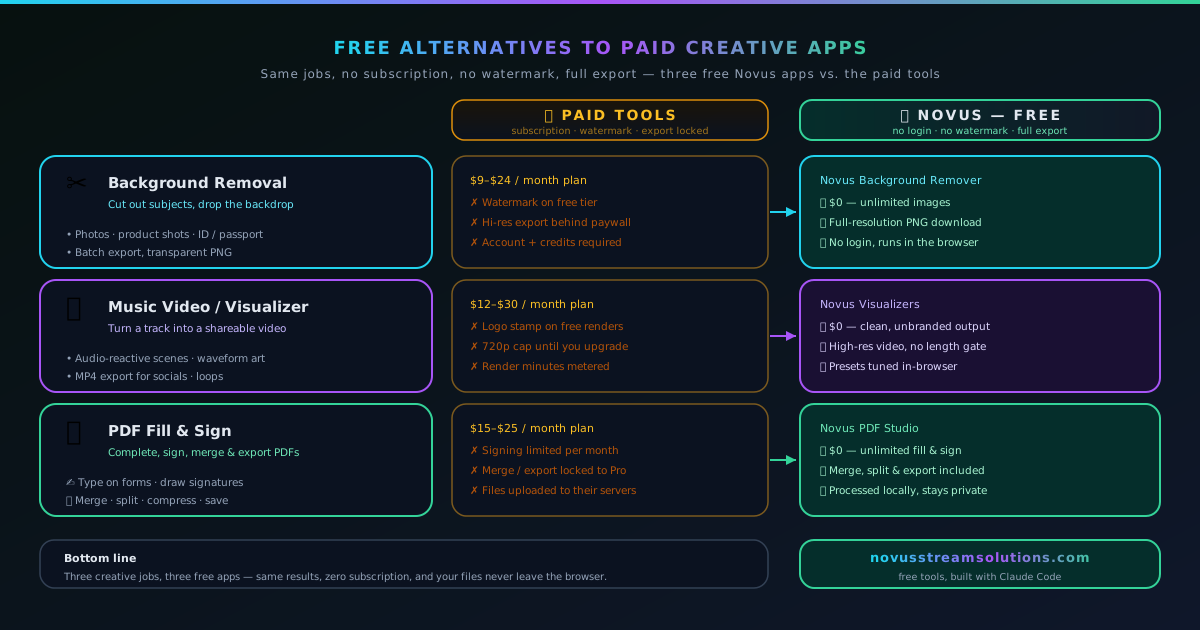
A no-hype look at where free browser apps genuinely replace paid creative subscriptions. The test is simple: does the tool hand you a clean, full-resolution export, or hold it hostage?
Contents
- 1.Overview
- 2.The real question is not free vs paid: it is whether the export is held hostage
- 3.Background removal: what a subscription is actually buying you
- 4.Music videos: rendering without the render queue
- 5.PDFs: filling and signing without the trap
- 6.What “no watermark, no paywall on export” actually guarantees
- 7.Where paid tools still genuinely earn their price
- 8.How free stays free: ads, not a hidden paywall
- 9.A one-minute test for any “free” creative app
Overview
Almost every creative subscription sells the same quiet threat: pay monthly, or the work you just made stays locked behind a watermark, a resolution cap, or an export button that greys out until your card clears. For a long stretch that was simply the price of doing digital work. If you needed to cut a subject out of a photo, render a music video, or fill and sign a PDF, the capable tools lived behind a login and a recurring charge, and the free options were demos designed to make you feel the missing piece.
That has stopped being true for a surprisingly large slice of everyday creative tasks, and this is an honest accounting of where free tools now hold up and where they still do not. Novus Stream Solutions builds free, ad-supported browser apps with modern AI tooling, so there is a stake in the answer, but the claim here is narrower and more defensible than “free always wins.” A free tool holds up when it does not hold your export hostage. If the finished file comes out clean, full-resolution, and unambiguously yours, the fact that you paid nothing for it has no bearing on the result. You can line up the whole set on Portfolio and measure each one against whatever you currently pay for.
The real question is not free vs paid: it is whether the export is held hostage
Most people frame the choice as free versus paid, but that framing hides the thing that actually matters. Plenty of paid tools are genuinely excellent, and plenty of free tools are worthless, so the price tag alone tells you almost nothing. The property that decides whether a tool is usable for real work is what happens at the export step, the moment you try to walk away with the file you came to make.
A tool that does beautiful work on screen and then stamps a logo across the download, shrinks the image to a preview size, or demands a subscription before it will let the file leave, has not given you a free tool. It has given you a paid tool with a demo attached. The demo can be impressive; it is still a demo. The distinction is not cynical, it is practical: a watermarked cutout cannot go on a product listing, a downscaled render cannot go on a channel banner, and a locked PDF cannot go to the person who needs it signed.
So the test that runs through this entire comparison is deliberately simple. Make something real, press export, and look at what you get. If the output is clean, full-size, and free of any mark or lock, the tool holds up regardless of what it cost. If the output is compromised in a way that forces payment to fix, the tool is paid, no matter how prominently its landing page says otherwise. Everything below is an application of that one test to three specific jobs.
Background removal: what a subscription is actually buying you
Cutting a subject out of a photo is the classic case where “free” has been thoroughly gamed. Search the phrase and you will find a wall of tools that remove the background instantly, show you a flawless preview, and then reveal that the clean, full-resolution version costs credits, a subscription, or an account you did not want to make. The removal itself was never the product being sold; the download was.
An in-browser background remover inverts that arrangement completely. It runs the segmentation model on your own device inside the browser, so there is no per-image server cost pushing it toward metering, and the export comes out at full resolution with true straight-alpha transparency and no watermark, every time, with no cap on how many you do. The reason it can afford to do that is the same reason it can promise your image never uploads: the work happens on your machine, not on someone else’s server that has to be paid for.
To be fair about what a paid remover is buying you: a deep integration into a larger design suite, a hosted API for an automated pipeline, or guaranteed uptime for a business workflow can all be worth real money. But for the common job (a person at a computer cutting out a product shot, a headshot, or a piece of content and needing a clean file back), the subscription is mostly paying for cloud convenience and the vendor’s server bill, not for a better cutout. The output that matters is the same, and one of them hands it to you without asking for your card.
Music videos: rendering without the render queue
Turning a track into a shareable video is the kind of task that has historically demanded either a desktop editor with a steep license or a web app that queues your render on a server and meters how many minutes you are allowed to export. The queue and the meter are not incidental: they exist because encoding video on someone else’s hardware costs money, and that cost has to come from somewhere, usually a watermark on the free tier or a cap on length and resolution.
Sonic Weaver at sonicweaver.com sidesteps the whole arrangement by encoding the video in your browser with WebCodecs. There is no upload of your audio, no render queue to wait in, and no server-side minute counter, so the export comes out clean, up to 4K, as MP4 or WebM, with no watermark burned into the corner. Because the encode is local and effectively free to the provider, exporting is not a scarce resource to be rationed: you can render the same project twice in different formats if you want a master file and a lean web version, without a paywall deciding you have used your allowance. The full feature set and format guidance are documented at Sonic Weaver, and a start-to-finish build sits at Sonic Weaver tutorials.
Where a paid desktop editor still clearly leads is deep, multi-hour, timeline-heavy production: keyframed motion graphics, precise audio editing, complex compositing. A focused browser tool is not trying to replace that, and it would be dishonest to pretend it does. But for the specific, extremely common task of turning a song into a clean visualizer video ready to upload, the free browser tool produces a file that is genuinely release-ready, which is the only test that counts.
PDFs: filling and signing without the trap
PDF editing is where the hostage model is at its most brazen. The dominant paid tools will happily let you open a form, type into every field, and place your signature, and then present a subscription wall the instant you try to save or export the filled document. You did all the work; the tool simply refuses to let you keep it without a monthly fee. It is the export-held-hostage pattern in its purest form, because the editing was never the hard part.
An in-browser PDF editor fills, signs, merges, splits, and reorders PDFs on your device and lets you download the finished file with no watermark, no account, and no save-blocking paywall. The document is processed on your device, which matters more for PDFs than for almost anything else, because the files people fill and sign are often exactly the sensitive ones (contracts, tax forms, medical paperwork, agreements) that you would least want uploaded to an unknown server. Handing that file to a browser tool that never transmits it is a categorically different act than uploading it to a cloud editor.
The honest caveat is that a heavyweight paid PDF suite offers things a focused tool does not: advanced OCR on scanned documents, redaction with legal guarantees, deep enterprise integrations, and automated bulk processing. If your job depends on those, pay for them. But for the everyday task of receiving a PDF, filling it out, signing it, and sending it back, a subscription that gates the save button is charging you for a wall it built itself, and a free tool that simply lets you download the result is the more honest deal.
What “no watermark, no paywall on export” actually guarantees
It is worth being precise about the promise, because “free” is a slippery word and the whole argument rests on this. No watermark means the file you download carries no logo, no stamp, and no pattern that marks it as coming from a free tier: it is visually indistinguishable from what a paying customer of any tool would get. No paywall on export means the button that produces your finished file is never the button that asks for money; the core capability and its output are both on the free side of the line.
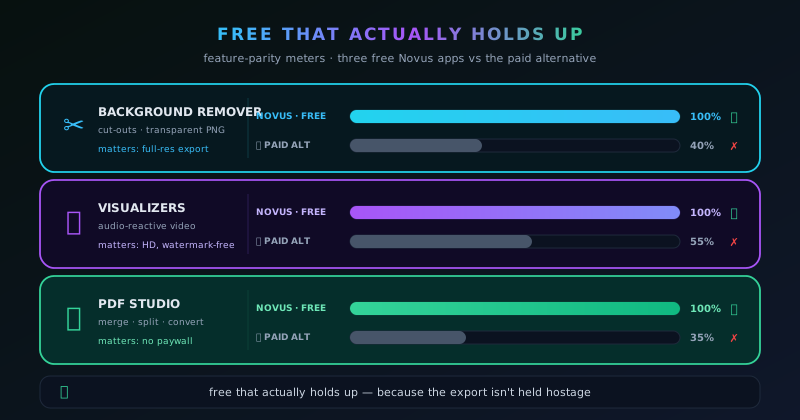
These two properties together are what make “free” hold up rather than merely exist. A tool can be free to open and free to use right up until the moment of value, and still be functionally paid if that moment is gated. By moving the gate off the export entirely, a genuinely free tool changes the deal from “try it and pay for the result” to “the result is yours, full stop.” That is not a marketing softening of the freemium model; it is a different model, and the difference is the entire point.
The corollary worth stating plainly is that the file being yours also means it is complete. Full resolution, correct transparency, proper format, no degradation introduced to nudge you toward an upgrade. A free tool that quietly downscales the export has reintroduced the hostage under a subtler name. Holding up means the export is not just unmarked but uncompromised: the same file the tool is technically capable of producing, handed over without a catch.
Where paid tools still genuinely earn their price
An honest comparison has to concede where the paid option is simply better, and there are real cases. Deep professional suites that a whole workflow is built around (where the value is the integration, the ecosystem, and the accumulated muscle memory of a team) are worth their cost precisely because switching would be more expensive than paying. Specialized capabilities that a focused free tool does not attempt, like legally-guaranteed redaction, broadcast-grade color pipelines, or large-scale automated processing, are legitimate reasons to pay. So is dedicated support and a service-level guarantee when a business depends on the tool not going down.
The mistake is not paying for those things; the mistake is paying for them by default, out of an assumption that free must mean compromised. That assumption was accurate for a long time and is now often wrong, because the technology that lets capable models and video encoders run locally in a browser matured to the point where the everyday version of these tasks no longer needs a server behind it. When the per-use cost to the provider collapses to nearly nothing, the economic pressure to gate the output collapses with it, and “free and unlimited” becomes sustainable rather than a bait tactic.
So the useful question is not “free or paid” but “what specifically am I paying for.” If the answer is deep integration, specialized capability, or guaranteed support that your work genuinely needs, paying is the right call. If the answer is “a clean version of the file this tool just made,” you are paying for a wall, and a free alternative that skips the wall will hold up fine. Several such comparisons, task by task, live under Comparisons.
A one-minute test for any “free” creative app
You do not have to take any of this on faith, including the claims made here. The test that separates a real free alternative from a paid demo takes about a minute and works on any tool in any category, so run it before you commit a workflow to something. Make one real thing at the actual size and quality you need, press export, and inspect what lands in your downloads folder rather than what glowed on the screen.
Check four things specifically, because they are the four places a hostage tends to hide. Look for a watermark on the output. Check the actual pixel dimensions against what you need, since a downscale is the catch you are least likely to notice until it is inconvenient. Watch whether the tool required uploading your file to a server, which is a cost paid in privacy rather than money. And confirm that the save or export button was not the moment a paywall appeared. The answers tell you what you are actually getting, independent of what the marketing promised.
- Watermark on the exported file? If yes, the free tier is a preview.
- Real resolution vs. the on-screen preview? A quiet downscale is a hidden paywall.
- Did your file upload to a server, or stay on your device? That is the privacy cost.
- Did the export or save button trigger a paywall? That is the export being held hostage.
- Run the same test on the Novus apps and hold them to it: that is the point.
Frequently asked questions
Quick answers to common questions about this topic.
Are free creative apps actually good enough to replace paid subscriptions?
For a large share of everyday tasks, yes. Cutting out a background, rendering a music-video visualizer, and filling and signing a PDF can all be done to a professional standard by free browser tools that export clean, full-resolution files. Paid suites still lead for deep, specialized, or heavily-integrated professional work, so the honest answer is task-by-task rather than all-or-nothing.
What is the catch with the Novus apps if they are free?
The apps are supported by non-intrusive ads rather than by gating your output, and the on-device tools ask your own device to do the processing and to download a model once on first use. There is no watermark, no resolution cap, and no paywall on export. The trade is ads plus local processing in exchange for a genuinely complete, free file.
Why do so many “free” tools put a watermark or a paywall on the download?
Because most of them run the work on a server that costs the provider money per use, which pushes them toward recovering that cost by gating the finished file. When the processing happens on your own device instead, the per-use cost nearly disappears, which removes the economic pressure to hold the export hostage and lets the output stay free.
When should I still pay for a creative app?
Pay when you need something a focused free tool does not offer: deep integration into a professional suite, specialized capabilities like legally-guaranteed redaction or broadcast color pipelines, large-scale automation, or a support and uptime guarantee your work depends on. Pay for real advantages, not out of an assumption that free must mean compromised. Often it no longer does.
Related troubleshooting
Was this page helpful?
Your answer stays in this browser, it is not sent anywhere and no account or cookie is involved.