2026 · Novus Stream SolutionsAbout 13 min readNovus Stream Solutions
The free browser toolkit every creator needs in 2026
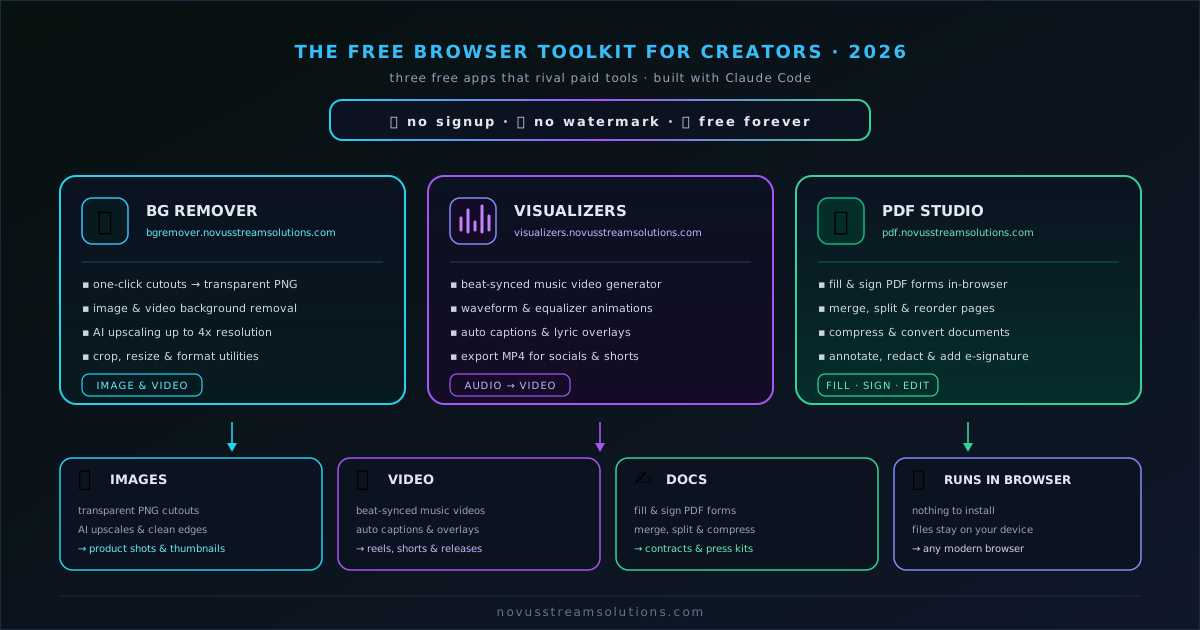
A roundup of three free browser tools that cover image, video, and document work for creators in 2026, with Sonic Weaver for the video: no signup, no watermark, no paywall, free forever.
Contents
- 1.Overview
- 2.What “free” actually means here
- 3.The image tool: an in-browser background remover
- 4.The video tool: Sonic Weaver
- 5.The document tool: an in-browser PDF editor
- 6.Why in-browser and on-device is the whole point
- 7.How the three tools chain together
- 8.Built with modern AI tooling, and why that shows
- 9.Building your own free creator stack
Overview
Most creator tooling in 2026 arrives as a subscription. You sign up, you hand over a card, you accept a trial, and three tools later you are paying for four services you actually open twice a month. The work itself (cutting a subject out of a photo, building a short video for a feed, signing a release form) has not gotten harder, but the tax on doing it has quietly climbed. Every small task now seems to route through a login screen and a monthly charge, and the total creeps up until your tools cost more than the projects they produce.
This roundup is the opposite bet. It is a small set of free, no-signup browser tools that cover the image, video, and document work a solo creator does most weeks, with no account to create, no watermark stamped across your export, and no paywall standing between you and your finished file. Three apps, one browser tab each, nothing to install. You can see all of them live on Portfolio, and the point of gathering them here is to show that a genuinely capable creator stack does not have to be a stack of invoices.
What “free” actually means here
The word free has been so abused by software marketing that it needs a definition before it means anything. In this toolkit, free is not a trial that expires, a hobbled preview that nags you to upgrade, or a generous-sounding tier that turns out to block the one feature you needed. Free means you open the app and do the whole job (including the export) without paying, without an account, and without a watermark burned into the result. The apps are ad-supported, which is how they stay free, but the ads never sit between you and your output. Nothing about your finished work is held hostage.
That distinction matters more than it sounds, because the industry norm is to give away the easy part and charge for the moment of value. You can often remove a background for free, right up until you click download and discover the clean file costs money. You can build a video for free until you try to export without a logo splashed across it. The Novus tools invert that: the removal, the render, the filled form, and the download are all free, every time. There is no premium checkout waiting at the end of the flow, which is the single most important thing to know before you invest an afternoon in any tool.
It also means your files stay yours. Because these apps do their work in the browser rather than on a server, there is no upload step where your photos, audio, or documents leave your machine to be processed elsewhere. That is a privacy property, but it is also a practical one: nothing to wait for, nothing to trust, nothing sitting in someone else’s account. You can read exactly how each tool is meant to be used across Documentation, and every one of them shares this baseline: free to finish, private by default.
The image tool: an in-browser background remover
The most repetitive image task in a creator’s week is isolation: getting a subject or a product cleanly away from whatever was behind it when the photo was taken. Thumbnails need a face on a designed background, listings need a product on white, and social cutouts need a clean edge with no grey halo. An in-browser background remover handles that on your own device, so a photo you drop in is processed locally and comes back as a transparent cutout you can keep as a master and reuse everywhere.
What makes it a toolkit and not a single trick is what surrounds the removal. The same app carries image and video editors, an upscaler for both stills and clips, and a set of utilities (resize, compress, background swap) that turn a bare cutout into whatever the destination needs. You cut the subject out once, then place it on white for a marketplace, on your brand color for a thumbnail, or into a scene for a lifestyle shot, without cutting it out again. For the per-tool specifics, the reference lives at Documentation, and the result is that one clean removal quietly feeds a dozen downstream images.
The economics are the quiet advantage. A cloud remover charges per image or per month, which caps how freely you can experiment and makes a large batch a budget decision. When the marginal cost of one more image is zero and nothing uploads, you stop rationing. You can clear a whole folder of product shots in a session, refresh a catalog for a sale, or try three background treatments before committing, none of which is worth doing when each click has a price attached.
The video tool: Sonic Weaver
Video is where the subscription tax hits hardest, because the traditional path runs through heavy desktop editors or web tools that stamp a logo on anything you export for free. For a musician, a podcaster, or anyone turning audio into something watchable, that is a real barrier: the whole point is a clean clip for a feed, and a watermark defeats it. Sonic Weaver at sonicweaver.com is built for exactly that job: you bring a track, it analyzes the audio in the browser, and it produces a beat-synced visualizer that moves with the music, then exports it without a watermark, free.
The tool is deliberately shaped around the way releases actually work now. You build one anchor video and export the platform cuts you need (a landscape version for the large screen, a vertical version for short-form feeds, a short looping piece for streaming canvases) from the same project, so the whole set stays visually consistent instead of being reinvented per platform. On-device captioning meets the muted-viewing reality of feeds, and a saved brand kit carries your palette, font, and logo from one project to the next. The controls and presets are documented at Sonic Weaver if you want to go deeper than the defaults.
Because the rendering and export happen client-side, producing several sizes is a matter of minutes rather than a queue of server renders, and there is no upload of your audio to anyone’s cloud. That combination (no watermark, no upload, instant multi-format export, all free) is what makes it realistic for one person to ship a complete video asset set for every release, which is the kind of output that used to require either money or a lot of technical patience. If you want the build-up story, the launch path is written out in the Sonic Weaver MVP post.
The document tool: an in-browser PDF editor
The third tool covers the least glamorous but most unavoidable part of running a creative operation: paperwork. Model releases, contributor agreements, invoices, licensing forms, tax documents: the moment you treat your creative work as a business, PDFs show up, and they always seem to need filling, signing, or merging at an inconvenient time. The reflex is to hunt for a free PDF editor and land on a site that lets you fill the form but charges to download it, or worse, wants the document uploaded to a server you have never heard of. An in-browser PDF editor does the job on your device instead.
It fills form fields, adds text and signatures, and lets you sign a document without printing, scanning, or installing anything, and the finished PDF downloads free and unmarked. Because it runs locally, a contract with real terms or a form with personal details never leaves your device to be processed, which for anything resembling a legal or financial document is not a nicety but the correct default.
Including a document tool in a creator toolkit is a deliberate choice, because the usual creator roundups stop at images and video and pretend the business layer does not exist. It does, and it is the layer that most often forces a creator into a paid tool at exactly the wrong moment, when they just need to sign one form and move on. Having a free, private, no-signup PDF app in the same family as the image and video tools means the boring-but-necessary tasks do not break the pattern.
Why in-browser and on-device is the whole point
The thread running through all three tools is that the work happens where you are, in the browser tab, on your own hardware, rather than on a remote server. That architecture is easy to overlook because it is invisible when it works, but it changes the experience in ways that compound. There is nothing to install and keep updated, nothing to log into, and no upload-and-wait cycle for every operation: you drop a file in and it is being worked on immediately, at the speed of your own machine rather than the speed of a shared queue.
The privacy consequence is the one that gets talked about, and it is real: your photos, your unreleased audio, and your legal documents do not travel to someone else’s infrastructure to be processed, so there is no copy of your work sitting in an account you will forget to delete. But the practical consequences are just as valuable day to day. On-device processing means the tools keep working on a spotty connection, cost nothing per operation because there is no server bill to pass on to you, and never throttle you for using them too much. The zero marginal cost is not a promotional gimmick; it is a direct result of the work not running on hardware someone has to pay for.
This is also what lets the apps stay honestly free rather than free-until-you-need-it. A cloud tool has a real per-user cost that eventually has to be recovered, which is why so many of them quietly gate the export. When the compute is yours, the provider’s cost per export is essentially nothing, so there is no economic pressure to put a paywall at the finish line. The architecture and the pricing are the same decision, which is why the whole toolkit can promise that the download is always free.
How the three tools chain together
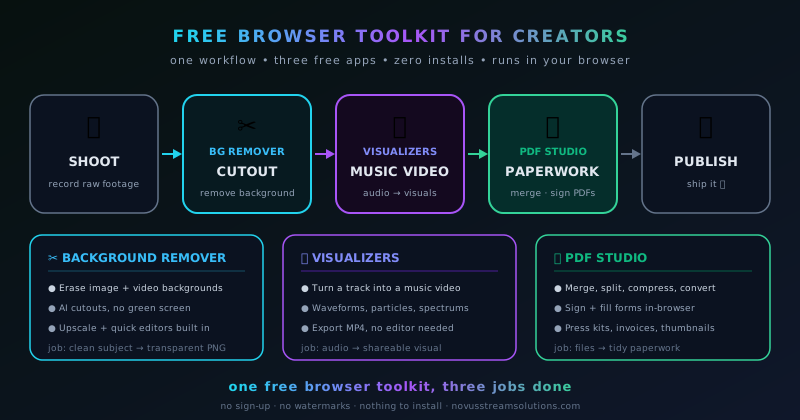
Individually each app solves one problem, but the reason to think of them as a toolkit is that a real project usually touches more than one. Take a music release. You cut your artist photo out cleanly with an in-browser remover and place it on your brand color for the cover, you build the beat-synced video and its platform cuts in Sonic Weaver using that same identity, and when the collaboration paperwork or the licensing form lands, you fill and sign it in a browser PDF editor, all free, without switching between a paid app for the image, a watermarked one for the video, and a sketchy uploader for the document.
The same chaining shows up for a product seller. Cutouts and standardized listing images come out of an in-browser remover, a short vertical promo video comes out of Sonic Weaver, and supplier or marketplace forms get handled in a browser PDF editor. Because every step shares the same principles (no signup, no watermark, on-device, free to export), the workflow does not keep breaking against a different tool’s limits. You are not constantly hitting a wall where one app suddenly demands payment while the others did not, which is what makes a mixed subscription stack so frustrating to actually work in.
That coherence is worth as much as any single feature. A toolkit where every tool follows the same rules is predictable, and predictability is what lets you build a repeatable routine instead of relearning each tool’s particular paywall every time. You can see the three apps side by side on Portfolio, and once you have run a project through all of them once, the pattern holds for the next one and the one after that.
Built with modern AI tooling, and why that shows
These tools exist because a small operation can now build and ship real software quickly, and the whole Novus family is built with AI-assisted development. That origin is not a marketing line so much as an explanation for why the toolkit looks the way it does. Building fast and cheaply means there is no venture-scale cost structure demanding aggressive monetization, which is precisely what frees the apps from the free-until-you-export trap. When the software is inexpensive to produce and runs on the user’s own device, ad support is enough to keep it free, and the export never has to be sold.
It also explains the focus. Rather than one bloated app trying to be everything, the toolkit is three sharp tools that each do a real job well and follow the same principles, which is easier to build honestly and easier to trust as a user. Each app has been slimmed to its core over time rather than padded with features that exist only to justify a subscription. The philosophy behind the whole portfolio (free apps that aim to rival paid alternatives) is only possible because the cost of building them no longer forces a paywall, and you can read how each one is meant to work across Documentation.
For a creator, the practical takeaway is that the incentives line up in your favor for once. The tools are free because they are cheap to build and cheap to run, not because you are the product being harvested for a future upsell. That is a different and more durable kind of free than a trial designed to convert you, and it is the reason this toolkit can credibly promise to stay free rather than quietly introducing a paid tier the moment it gets popular.
Building your own free creator stack
Assembling a free stack from these three tools is less about setup and more about a mindset shift: stop reaching for a paid tool by reflex and check whether a free, in-browser one already covers the job. For image work, that is an in-browser background remover and editor. For anything that turns audio or motion into a shareable clip, that is Sonic Weaver. For the paperwork that comes with treating your work as a business, that is a browser PDF editor. Bookmark the three, and a large share of a solo creator’s recurring tasks are covered without a single subscription. The Novus portfolio itself is Sonic Weaver, Testaroo for test files, and Novus Striker for the arcade game, all listed at Portfolio, and all following the same free-first, on-device stance.
The honest scope note is that these are not trying to be everything. A creator with deep, specialized needs will still reach for heavier professional software occasionally, and that is fine: the point is not to replace every tool that exists but to cover the common eighty percent for free, so you pay for the genuinely specialized twenty percent only when you actually need it. Most weeks, the common tasks are the ones that were quietly draining your budget through half-used subscriptions, and reclaiming those is the whole win. The tutorials at Tutorials walk through the specific workflows if you want to go from bookmarking to actually using them well.
The larger case this toolkit makes is that in 2026 a capable creator stack does not have to be a monthly bill. The barrier to producing clean images, watermark-free video, and signed documents has dropped to the cost of a browser tab and the ads that keep the lights on, which is a genuinely different world from the one where each of those tasks routed through a separate paid service. Start with the one task you do most often, run it through the matching free tool once, and let the pattern grow from there. The rest of the stack is waiting on Portfolio whenever the next task comes up.
Frequently asked questions
Quick answers to common questions about this topic.
Are these creator tools really free, or is there a catch?
They are genuinely free to finish the job. There is no signup, no watermark on your export, and no paywall at the download step. The apps are ad-supported, which is how they stay free, but the ads never block your output: the removal, the render, the filled PDF, and the download are all free every time.
Do I have to create an account or install anything?
No. All three kinds of tool run in a normal browser tab with nothing to install and no account to create. You open the app, do the work, and download the result.
Do my files get uploaded to a server?
No. Each tool does its processing on your own device in the browser, so your photos, audio, and documents never leave your machine to be processed elsewhere. That keeps sensitive files private and means there is no upload-and-wait step for every operation.
Which tool should I start with?
Start with whichever task you do most often. For cutouts, thumbnails, and product photos, use an in-browser background remover; for beat-synced videos and social clips, use Sonic Weaver; for filling and signing forms, use a browser PDF editor. The walkthroughs on Tutorials cover each one step by step.
Related troubleshooting
Was this page helpful?
Your answer stays in this browser, it is not sent anywhere and no account or cookie is involved.