2026 · NSS Background RemoverAbout 15 min readNovus Stream Solutions
NSS Background Remover: AI-powered, in-browser background removal, free forever, no signup
bgremover.novusstreamsolutions.com is our new AI image tool: remove backgrounds entirely in the browser, export true straight-alpha PNGs, and never upload a file to a server.

Contents
- 1.Overview
- 2.Why in-browser AI changes the privacy equation
- 3.Straight-alpha export: the technical detail professionals notice
- 4.Brush editor and in-editor finishing
- 5.How Background Remover fits the Novus portfolio
- 6.Who the tool is built for
- 7.The WebGPU path and the WebAssembly fallback
- 8.Why two models instead of one
- 9.What free forever requires of the architecture
- 10.Edge cases the AI handles well and where the brush helps
- 11.Performance across devices and image sizes
- 12.How the cutout fits a real publishing workflow
- 13.Where to go next
- 14.What the app grew into
- 15.From metadata remover to metadata inspector
- 16.What we removed
Overview
NSS Background Remover is live at bgremover.novusstreamsolutions.com. It removes image backgrounds using AI that runs entirely inside the browser: no server uploads, no account required, no cost. The result is exported as a true straight-alpha PNG that opens correctly in Photoshop, Figma, print software, and any e-commerce platform expecting real transparency.
The problem it solves is more specific than it sounds. Most background removal tools either upload your images to a remote server, restrict quality behind a subscription, or export premultiplied alpha that causes dark fringing when you composite the result. NSS Background Remover addresses all three issues in the same product. Local inference means images never leave your device. There is no free tier versus paid tier; the full tool is free. And the export pipeline produces straight-alpha channels that behave correctly without a cleanup pass.
Why in-browser AI changes the privacy equation
Sending images to a remote API is the standard architecture for most AI tools because it is simpler to build and easier to monetize at scale. For background removal specifically, that model creates a real problem: users regularly need to cut out client deliverables, proprietary product photography, unpublished artwork, and confidential documents. Uploading those to an opaque server is a trust decision most professionals would prefer not to make.
NSS Background Remover sidesteps that entirely. The first time you open the app, the AI model downloads to your browser cache, about 80 MB for the Fast model or 180 MB for the Best Quality model. After that download completes, every image you process stays local. There is no network request for inference, no server log, and no third-party service with visibility into what you are removing backgrounds from. The app works offline after the initial cache is warm.
- Fast model (RMBG-1.4, ~80 MB): optimized for standard product shots and headshots.
- Best Quality model (RMBG-2.0, the BiRefNet-based bilateral reference network, ~180 MB): handles fine hair, complex edges, and difficult backgrounds.
- Both models run in the browser via Transformers.js: WebGPU acceleration where the browser supports it, multi- or single-threaded WebAssembly as the automatic fallback.
Straight-alpha export: the technical detail professionals notice
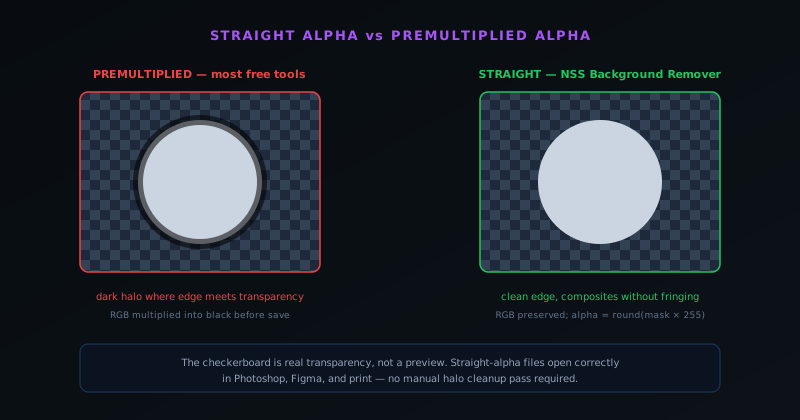
Transparency is stored differently depending on how the encoder was written. Premultiplied alpha (the default output of most AI cutout tools) bakes a background assumption into the pixel color values before saving. Open that file in Photoshop or place it in a print layout and you see dark halos around the edges where the background was blended in. Removing those halos requires a manual cleanup step that should not exist.
Straight-alpha stores the color and the transparency independently, exactly as Photoshop expects when it shows the checkerboard pattern on a transparent layer. NSS Background Remover writes straight-alpha channels. The checkerboard you see in the app after removal is real transparency, not a preview; the exported file places cleanly without fringing in any tool that handles alpha correctly.
Brush editor and in-editor finishing
After the AI pass, a built-in brush editor lets you refine edges by painting inclusion or exclusion areas over the result. It is designed as a finishing step for complex subjects (hair, transparent fabric, product packaging with cutout shapes), where the AI gets most of the mask right but a few brush strokes recover the detail it missed. Simple product shots on plain backgrounds rarely need it; the AI output is clean enough to export directly.
Once a cutout is clean, the built-in image editor picks up where removal leaves off: layers, filters, adjustments, and in-editor utilities let you finish the asset (crop, resize, tidy stray pixels, or drop the subject onto a new background) without leaving the browser. Every image stays local throughout, so nothing is uploaded at any stage of the workflow.
How Background Remover fits the Novus portfolio
NSS Background Remover sits in the Novus Stream Solutions portfolio alongside Novus Visualizers and Novus PDF Studio. Each app solves a practical job with a complete free workflow: Visualizers turns audio into exportable video, Background Remover prepares images for publishing and design, and PDF Studio fills and signs forms.
The in-browser architecture of Background Remover also makes a different technical statement than most free tools in this category. Running the model locally is harder to build than wrapping a remote API, but it produces a qualitatively different product, one where the privacy properties are structural rather than policy-based. It demonstrates that free tools do not have to compromise on quality, privacy, or professional output to be sustainable.
Who the tool is built for
NSS Background Remover is built for the people who remove backgrounds repeatedly and care about the result: e-commerce sellers preparing product listings, designers cutting subjects for compositing, photographers delivering headshots, and creators assembling marketing assets. These users share two characteristics that shaped the product: they do this often enough that per-image friction matters, and they work with images they would prefer not to upload to an unknown server. A casual user who needs one cutout occasionally is served fine, but the tool is designed around the professional who does this as a recurring part of their work and judges the output against the standard their own deliverables demand.
This audience focus explains decisions that might otherwise look like over-engineering. The straight-alpha export exists because professionals compositing in Photoshop and Figma notice the fringing that premultiplied alpha produces and resent the cleanup it forces. The brush editor exists because the hardest edges (flyaway hair, transparent fabric, cutout packaging) need a few manual strokes that a discerning professional will insist on. The on-device architecture exists because client deliverables, unpublished work, and proprietary product photography are exactly the kind of images that professionals are uncomfortable uploading. Building for the recurring professional user rather than the occasional casual one is what makes the tool feel purpose-built rather than generic, because every decision was made against the standard of someone who would actually notice the difference.
The WebGPU path and the WebAssembly fallback
Running an AI model in the browser requires the browser to actually execute neural-network inference, which is computationally heavy, and the tool achieves usable performance by using WebGPU where it is available and falling back to WebAssembly where it is not. WebGPU gives the browser access to the machine's graphics hardware for the matrix math that inference depends on, which makes the model run substantially faster than it would on the CPU alone. On a browser and device that support WebGPU, the cutout is quick enough to feel responsive even on the higher-quality model, which is what makes in-browser inference practical rather than merely possible.
The WebAssembly fallback matters because not every browser and device combination supports WebGPU, and a tool that only worked on the latest hardware would exclude a meaningful share of users. WebAssembly runs the same model on the CPU, multi-threaded where the browser allows it and single-threaded where it does not, which is slower but functional; the cutout still happens, just with more processing time on a constrained device. This automatic fallback is what lets the tool make the strong claim of working in the browser without an asterisk excluding older or less capable setups. The user does not have to know or choose which path runs; the tool detects the available capability and uses the fastest one the device supports, which is how it delivers on-device inference across the real diversity of hardware rather than only on the machines that happen to have the newest features.
Why two models instead of one
The tool ships two models (a Fast model around 80 MB and a Best Quality model around 180 MB) because background removal spans a range of difficulty that no single model serves optimally given the constraints of running locally. The Fast model handles the common cases well: standard product shots on plain backgrounds, headshots, and the straightforward subjects that make up most of the volume, with a smaller download and quicker inference that suit a user processing many simple images. The Best Quality model handles the hard cases (fine hair, complex edges, transparent and wispy subjects, difficult backgrounds), where the extra capability is worth the larger download and longer processing time.
Offering both rather than forcing one is a recognition that the right tradeoff between speed and quality depends on the image and the user's need, which only the user knows. A seller working through a catalog of clean product shots is best served by the Fast model's speed; a photographer cutting a portrait with flyaway hair needs the Best Quality model's edge handling. A single model would either be too heavy and slow for the simple cases or too weak for the hard ones, so the tool lets the user choose the model that fits the job. This is the same philosophy as the rest of the product: rather than hiding the tradeoff behind a one-size decision, it exposes a clear choice to the user who is best positioned to know which side of the speed-quality tradeoff their specific image and workflow actually need.
What free forever requires of the architecture
The promise that the tool is free forever is not just a pricing decision; it is a constraint that the architecture had to satisfy, because a tool whose per-use cost falls on the operator cannot credibly promise to stay free at scale. The on-device architecture is what makes free-forever economically possible: because inference runs on the user's own hardware rather than on a server the operator pays for, the marginal cost of each background removal is borne by the user's device, not by an infrastructure bill that grows with usage. A server-based tool processing the same volume would accumulate a GPU cost for every cutout, which is exactly the kind of growing expense that forces free tools toward paywalls or usage limits.
This is why the free-forever promise and the privacy property are two consequences of the same architectural decision rather than separate features. Running locally removes both the server cost that would threaten free access and the server upload that would threaten privacy, which is why the tool can credibly promise both at once. A different architecture would have forced a choice (charge to cover the server cost, or limit usage to contain it, or monetize the uploaded images), and the on-device approach sidesteps all of these. The free-forever claim is therefore not a generous gesture that could be withdrawn when costs mount; it is a structural property of a tool whose costs do not mount with usage in the first place, which is what makes the promise durable rather than a temporary loss-leader.
Edge cases the AI handles well and where the brush helps
The AI handles the bulk of background removal well enough to export directly: clear subjects on distinguishable backgrounds, standard product photography, and typical headshots come out clean without manual touch-up. Where it gets harder is the genuinely difficult edges: individual strands of hair against a busy background, semi-transparent fabric, glass and other transparent materials, and subjects whose color closely matches the background. The Best Quality model handles many of these far better than simpler approaches, but the hardest cases are where even good AI leaves a few imperfections that a discerning user will notice in their final deliverable.
This is exactly where the brush editor earns its place, as a finishing step rather than a primary tool. After the AI pass gets most of the mask right, the brush lets the user paint inclusion or exclusion to recover the detail the AI missed: adding back a wisp of hair the model trimmed, or removing a fringe of background the model kept. The design intent is that simple images need no brushing at all and complex ones need only a few strokes to reach a professional result, rather than the brush being a manual fallback for an AI that does not work. Pairing strong AI for the common case with targeted manual refinement for the hard edges is what lets the tool produce professional cutouts across the full range of difficulty, rather than being excellent on easy images and unusable on the hard ones that professionals most need help with.
Performance across devices and image sizes
Because inference runs on the user's hardware, performance varies with the device and the image, which is an honest property of the on-device approach rather than a flaw. A capable machine with WebGPU support processes images quickly even on the Best Quality model, while a modest laptop on the WebAssembly fallback takes longer, especially on larger images where there are more pixels for the model to process. The tool does not hide this variability; it is the direct consequence of doing the work locally, where the speed is bound by the device rather than by a server the user does not control.
The practical implication is that users get to make the speed-quality-size tradeoff that fits their hardware and their need. A user on a constrained device processing large images can choose the Fast model to keep things responsive, while a user on a capable machine can run the Best Quality model on full-resolution images without much wait. Processing one image at a time is itself a deliberate accommodation of device limits, keeping memory usage bounded so that a large, high-resolution image does not overwhelm a modest machine. Being transparent about how performance depends on the device, and giving users the controls to manage it, is more honest than pretending in-browser inference is uniformly instant, and it lets each user find the configuration that works on the hardware they actually have rather than the hardware the tool wishes they had.
How the cutout fits a real publishing workflow
A background removal is rarely the end goal; it is a step in a larger workflow (preparing a product listing, building a composite, assembling a marketing asset), and the tool is designed to hand off cleanly to whatever comes next rather than to be a destination in itself. The straight-alpha PNG export is the key to this: because the file places correctly in Photoshop, Figma, print layouts, and e-commerce platforms without fringing or a cleanup pass, the cutout drops straight into the next stage of the workflow. A tool that produced technically-removed backgrounds with edge artifacts would force a cleanup step that breaks the workflow; the clean export is what lets the cutout flow directly into the design or listing it was made for.
This workflow-fit thinking is why the export format is the professional-standard straight alpha rather than whatever was easiest to encode, and why a clean cutout hands straight off to the built-in editor and utilities. The user preparing a product listing needs a file they can drop into their listing pipeline; the designer needs a file that behaves correctly the moment it lands in their compositing tool. By treating the cutout as one step in the user's real process rather than as the whole job, the tool optimizes for the handoff to the next stage, which is where a background remover either saves time or creates a cleanup tax. Producing output that fits cleanly into the publishing, listing, and design workflows that the cutout feeds is what makes the tool genuinely useful to professionals, as opposed to merely capable of removing a background in isolation.
Where to go next
Open bgremover.novusstreamsolutions.com to use the tool now. No signup required. For the full technical reference on models, formats, and what straight-alpha means for your workflow, see the hub docs at NSS Background Remover. For the full Novus Stream Solutions product lineup, visit Portfolio.
What the app grew into
The launch above describes a background remover with a brush editor. The app is now 32 tools, and the shape of that growth says something about which additions were worth making.
Removal itself widened first: video background removal runs a recurrent matting engine that keeps the matte stable between frames, which is a genuinely different problem from a still cutout: a two-pixel edge wobble is invisible in a photograph and extremely visible in motion. GIF removal works frame by frame with APNG export, worth preferring over GIF because GIF transparency is binary and turns a soft edge into a jagged one. Upscaling runs Real-ESRGAN at 2× and 4× and now asks what kind of source it is looking at, routing photographs, graphics, and pixel art differently rather than applying one model to all three.
Around those sit the utilities: 22 cinematic filter presets shared across image and video, stabilisation that tracks the whole camera path rather than damping frame-to-frame jitter, resizing, compression, format conversion and comparison, canvas padding, palette extraction, transparency checking, and an ICO creator. Individually unglamorous; collectively the reason the app stopped being a single-purpose page.
From metadata remover to metadata inspector
One change is worth calling out on its own, because it inverted the design rather than extending it. The metadata tool used to strip fields. It now shows you what is in the file first (EXIF, GPS coordinates, camera and lens details, timestamps, editing history) and lets you decide.
That matters because not all metadata is a liability. Colour-profile information affects how an image renders and copyright fields matter on work you want attributed, so stripping everything by reflex degrades the file as well as anonymising it. The fields most people actually need gone are location, device identifiers, and timestamps, and you cannot make that judgement about a file whose contents you have not seen.
It also reads C2PA provenance manifests, which increasingly record how an image was made, including whether a generative model was involved. For anyone assessing where an image came from, that is a record the file carries rather than an inference about its pixels, and surfacing it is more useful than any amount of detector guesswork.
What we removed
Growth is the easy half of the story. In July 2026 the app also shed a 92-tool AI Suite that had accumulated around the core, and went back to being an image and video editor with utilities.
The suite was not broken so much as unfocused. Ninety-two tools is not a product, it is a directory, and most of them were doing a mediocre version of a job some other tool did properly. What survived is what people actually opened: removal, the editors, upscaling, and the utilities that support them. The tool map at Tool maps lists what is there now, and it is deliberately shorter than it once was.
Related workflow
Product photo to a transparent image every channel accepts
One photograph, cut out once, then re-encoded for a storefront, a marketplace listing and a social post without redoing the cutout each time.
- Cut the background out and check the edgesNSS Background Remover: Hair, glass and drop shadows are where automatic cutouts fail. Fix them once, on the master, before anything downstream copies the mistake.
- Re-encode and resize per destinationNovus Convert: Transparency survives PNG and WebP and dies in JPEG. Convert validates the file it hands back, so a listing never rejects a silently broken upload.
Related troubleshooting
Was this page helpful?
Your answer stays in this browser, it is not sent anywhere and no account or cookie is involved.