2026 · Novus ConvertAbout 14 min readNovus Stream Solutions
The Novus Convert format-engine expansion: ~1,000 working routes
Novus Convert grew from images, data, and archives to roughly a thousand working routes across nine families (images with camera RAW, video, audio, documents, ebooks, archives, vector/CAD/3D, and fonts) all processed locally and validated before download.
Contents
- 1.Overview
- 2.What a working route actually means
- 3.Where it started: images, data, and archives
- 4.The nine families today
- 5.Images, now including camera RAW
- 6.Video and audio: FFmpeg compiled to WebAssembly
- 7.Documents: pdf.js, pdf-lib, and office extraction
- 8.Ebooks, archives, vector, CAD, 3D, and fonts
- 9.The engines underneath, and how a file finds one
- 10.Why every enabled download is validated first
- 11.The /conversions directory is the source of truth
- 12.Mixed batches survived the expansion
- 13.What the expansion did not change
Overview
Novus Convert did not begin as a nine-family engine. The first release converted a focused set (supported image formats, structured data like JSON and CSV, and a handful of archive containers) because those were the jobs it could produce and prove. In the months since, the working surface has grown to roughly a thousand active conversion routes spread across nine families. That growth is the subject of this post, but the number matters less than the discipline behind it. Every route in that count is a job the browser can actually finish and check, not a format name printed on a page.
It is easy to publish a large catalog of file extensions and call it a converter. Most sites that list a thousand formats are listing formats, not conversions: the page exists whether or not any code behind it can turn one file into another. Novus Convert draws that line deliberately. A route earns its place in the product only when the app can decode the input, encode the output, and confirm the result before letting you download it. The expansion from three families to nine is really an expansion of that guarantee, applied to progressively harder categories: media, documents, ebooks, three-dimensional meshes, and fonts.
What a working route actually means
A working route is a specific input-to-output pair the app runs end to end in your browser. PNG to ICO is a route. CR2 to JPG is a route. MP4 to MP3 is a route. Each one has code that reads the source, transforms it, and writes a valid destination file. The distinction sounds pedantic until you have used a converter that advertised a pair, accepted your upload, churned for a while, and handed back a renamed file that no downstream tool would open. A working route is the opposite of that experience: if the pair is listed as active, the pipeline exists and has been exercised on real input.
A format guide is a different thing, and Novus Convert keeps it separate on purpose. A guide can explain what an AVIF file is, when TIFF makes sense for print, or why an M4R is just an AAC ringtone with a different extension. That editorial material is useful, and it lives in the documentation and tutorials. But a guide does not imply a route. The product never shows an upload workflow for a pair it cannot complete, so the presence of a converter in the interface is itself the promise. The line between explaining a format and converting it is the line the whole product is built around.
Where it started: images, data, and archives
The launch scope was narrow by design. Images covered the common raster and container formats (HEIC, HEIF, AVIF, JPG, PNG, WebP, BMP, and TIFF) with SVG accepted as a vector source. Structured data covered JSON, CSV, TSV, and plain text, the everyday shapes people reshape when moving between tools. Archives covered ZIP, TAR, and TAR.GZ, the containers most likely to arrive in a download folder. Those three families shared a property that made them a sensible starting point: each could be decoded and re-encoded in the browser with libraries mature enough to trust, small enough to ship, and safe to run on untrusted input.
Compression arrived alongside conversion but stayed a separate surface. Changing a file's format and reducing its size are different jobs, and conflating them tends to produce a confusing interface where a quality control fights an output picker. The /compress route re-encodes JPG, PNG, and WebP with an adjustable quality setting and reports the measured result size before you commit. Keeping compression distinct from conversion set a pattern the later families inherited: each job gets a surface that does one thing clearly, and the app tells you what it actually produced rather than describing what it might. That early restraint made the expansion possible without the product losing its shape.
The nine families today
The working surface now spans nine families, and the /conversions directory carries a dedicated page for every active pair inside them. The headline figure is roughly a thousand routes, but the more useful way to read the catalog is by family, because each family has its own engine, its own limits, and its own idea of what a valid output looks like. A camera RAW decoder has nothing in common with a subtitle converter, and a font transcoder shares no code with an archive repacker. The number is a sum of very different pipelines that happen to live behind one queue.
Here is the current shape of the catalog, family by family, with the approximate size of each. These are working routes today, not a roadmap: every one has an upload workflow because every one can produce and validate a real file. The counts move as pairs are added, which is why the live directory, not any blog post, is the canonical list. Reading the families together makes the expansion legible: it is not a thousand variations on image conversion, it is nine genuinely different problems, each solved locally.
- Images (~300): JPG, PNG, WebP, GIF, AVIF, HEIC/HEIF, TIFF, BMP, SVG, PSD, and camera RAW (CR2, NEF, ARW) into raster outputs plus PDF.
- Video (~300): MP4, MOV, MKV, WebM, AVI and more, plus audio extraction and poster-frame capture.
- Audio (~120): MP3, WAV, FLAC, AAC, M4A, OGG, OPUS and others, including M4R iPhone ringtones.
- Documents (~128): PDF, DOCX, RTF, ODT, XLSX, PPTX, TXT, CSV, HTML, MD, image-to-PDF, and SRT/VTT subtitles.
- Archives (~35): ZIP, 7Z, RAR, TAR, GZ, BZ2, XZ, CAB, ISO, JAR.
- Ebooks (~33): EPUB, MOBI, AZW, AZW3, FB2, PDB, CBZ, CBR.
- Vector, CAD, and 3D (~76): EPS, AI, DXF, STEP, STL, OBJ, 3MF, GLB, glTF, PLY.
- Fonts (~16): TTF, OTF, WOFF, WOFF2, EOT.
Images, now including camera RAW
The image family grew in two directions. The output set widened first: a single source can now land as JPG, PNG, WebP, GIF, APNG, BMP, TIFF, TGA, ICO, or PDF, so a screenshot can become a favicon, a photo can become a print-ready TIFF, and a set of stills can become an animated APNG without leaving the browser. PSD is accepted as a source, so a flattened Photoshop export drops into the same queue as everything else. Each pair is its own page in the directory, which is why the image family alone accounts for roughly three hundred routes rather than a dozen.
Camera RAW is the addition that changed the family's character. CR2 from Canon, NEF from Nikon, and ARW from Sony are not really images until something demosaics the sensor data, and that decoding usually happens in desktop software or on a server. Novus Convert runs RAW decoders locally, so a photographer can turn a card full of proprietary RAW files into JPG, PNG, or TIFF without uploading originals to a stranger's cloud. RAW files are large, so this family leans hardest on the size and megapixel ceilings, and the validation step matters most here: a half-decoded sensor dump should fail, not download as a plausible-looking but broken JPG.
Video and audio: FFmpeg compiled to WebAssembly
Media is where the expansion is most visible, because transcoding video in a browser tab was, until recently, something most people assumed had to happen on a server. Novus Convert runs FFmpeg compiled to WebAssembly, so MP4, MOV, MKV, WebM, AVI and their neighbors transcode entirely on your machine. The video family also does the adjacent jobs that clips actually need: pulling the audio track out as a standalone file, and capturing a poster frame as a still. With roughly three hundred video routes, most sensible container-and-codec destinations are covered, and each is confirmed as a real pair in the directory before you commit a long clip to it.
Audio rides on the same engine with its own set of destinations. MP3, WAV, FLAC, AAC, M4A, OGG, and OPUS span the range from lossless archival to small, streamable files, and the family includes M4R, which is simply the AAC ringtone container an iPhone expects. Around a hundred and twenty audio routes handle the reshaping people repeat constantly: a FLAC rip down to MP3 for a phone, a voice memo into WAV for an editor, a podcast export into OPUS. Because FFmpeg does the work locally, a two-hour recording never leaves the device, and the only real constraints are memory and the same daily allowances the rest of the app uses.
Documents: pdf.js, pdf-lib, and office extraction
The document family is the one people underestimate, because 'convert a document' hides a dozen different operations. Novus Convert reads PDFs with pdf.js and writes them with pdf-lib, which together cover rendering, text extraction, and assembly. On top of that foundation the family turns Markdown, HTML, or plain text into DOCX, PDF, or EPUB; extracts text and tables from Office files like DOCX, XLSX, and PPTX; builds a PDF from a set of images; and converts subtitles between SRT and VTT. Roughly a hundred and twenty-eight routes live here, less about swapping one extension for another than about moving content between the shapes that writing, publishing, and captioning actually use.
Documents also show why outputs depend so heavily on the source. A spreadsheet's natural exports are not a presentation's, and a Markdown file can become a clean EPUB in a way a scanned PDF cannot. Rather than pretend every document pair exists, the family exposes the ones that produce a faithful result and routes the rest to the appropriate surface: structured data for reshaping tables, image conversion for page rasters. Subtitle conversion is a small but telling inclusion: SRT and VTT carry the same cues in slightly different syntax, and getting the timing and encoding right is exactly the kind of unglamorous correctness the validation gate is meant to enforce.
Ebooks, archives, vector, CAD, 3D, and fonts
The newer families are where the catalog stops looking like an image tool at all. Ebooks convert among EPUB, MOBI, AZW, AZW3, FB2, PDB, and the comic-book containers CBZ and CBR, so a book bought in one reader's format can move to the one you actually use. Archives expanded well past the launch trio: ZIP, 7Z, RAR, TAR, GZ, BZ2, XZ, CAB, ISO, and JAR now repack and extract, each treated as untrusted input with checks against path traversal, runaway entry counts, and decompression bombs. These families share nothing technically, but they share the product's core rule: a container only converts when the result is a valid container.
The vector, CAD, and 3D family is the most surprising addition. EPS and AI cover print vector art; DXF and STEP reach into CAD; and STL, OBJ, 3MF, GLB, glTF, and PLY cover the meshes that 3D printing and real-time graphics depend on. Turning a STEP model into an STL for a printer, or an OBJ into a GLB for the web, is work that normally means installing specialized software. Fonts round out the catalog: TTF, OTF, WOFF, WOFF2, and EOT convert among themselves, exactly the transcoding a web project needs when a typeface arrives in the wrong wrapper. Roughly seventy-six vector/CAD/3D routes and sixteen font routes sit behind the same queue as a HEIC photo.
The engines underneath, and how a file finds one
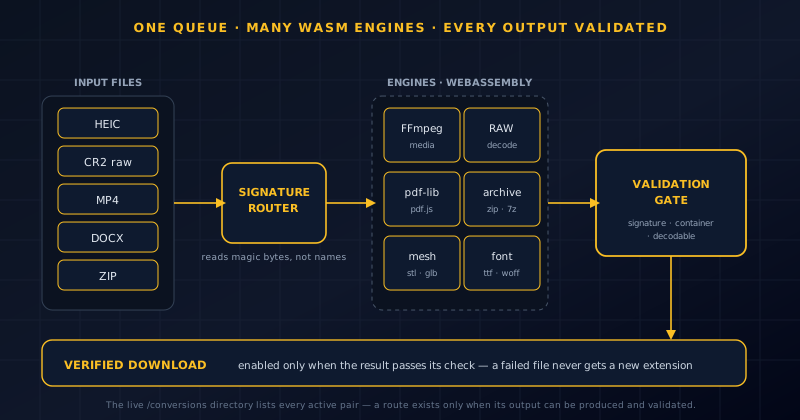
There is no single converter inside Novus Convert. There is a dispatcher and a set of specialized engines, each compiled to WebAssembly and loaded only when a job needs it. FFmpeg handles media. RAW decoders handle camera sensor formats. pdf.js and pdf-lib handle PDF reading and writing. Archive, ebook, mesh, and font libraries each own their category. Loading them lazily keeps the initial page light (you do not pay the cost of the video engine to convert a CSV) and it keeps each family's code isolated, so a bug in the archive handler cannot corrupt an image conversion. The thousand-route figure is really the reach of a handful of engines multiplied by the pairs each can produce.
What decides which engine runs is the file itself, not its name. Novus Convert reads the signature (the magic bytes and container structure) rather than trusting the extension, because a file called photo.png that is actually a HEIC should be handled as a HEIC. Signature-based routing is what lets a mixed queue work: the app inspects each row, sends it to the right engine, and offers only the outputs that engine can genuinely produce for that input. This is also the first line of the validation story, because a file that matches no known signature is rejected before an engine ever touches it, rather than failing halfway through a conversion.
Why every enabled download is validated first
Running a conversion locally is necessary but not sufficient. A pipeline can complete without producing a usable file: a codec can be unsupported, an input can be truncated, a mesh can be malformed, an archive can be encrypted. Novus Convert treats the moment before download as a checkpoint. It verifies the expected signature, container, or decodability of the result, and only then enables the download action. A file that fails this check does not receive a confident new extension and slip into your folder; it fails visibly, so you learn the conversion did not work rather than discovering it later when a downstream tool refuses to open the result.
This gate is the reason the route count can be trusted. When the product says a pair is active, it means the app has produced and validated that output, not that a menu entry exists. The stricter the category, the more the gate earns its keep: a broken RAW decode, a corrupt EPUB, or a subtitle file with mangled timing all look superficially fine and are exactly the failures a naive converter passes along. Validation is not a feature bolted onto conversion; it is the definition of what conversion means here. An enabled download is a claim the app is willing to stand behind, and the check is how it keeps that claim honest.
The /conversions directory is the source of truth
Because routes are added as they become real, no static document can stay authoritative for long. The live /conversions directory solves this by listing every active pair, each with its own page, so the catalog is self-describing. If a pair has a page, it works; if it does not, the product is not claiming it. This is why the tutorials repeatedly tell you to confirm a route in /conversions before committing files, not as a hedge, but because the directory is the single accurate answer to whether the app can do a given job, updated in lockstep with the code rather than with a marketing cycle.
The directory also reframes what the thousand-route number is for. It is not a boast to memorize; it is a searchable map. Someone with a Sony ARW file does not need to know the image family's total; they need the ARW-to-JPG page to exist, and it does. Someone repacking a RAR into a ZIP needs that one archive page. Treating the catalog as a directory rather than a headline keeps the focus where it belongs: on whether your specific job is supported, answered precisely, one pair at a time. The sum is just what you get when you count the pages.
Mixed batches survived the expansion
The per-file batch model that shipped at launch scaled straight into nine families. You can drop a HEIC photo, a CR2 RAW, an MP4 clip, a DOCX, and a ZIP into the same queue and assign each row its own output (JPG, TIFF, MP3, PDF, and TAR.GZ respectively) then run the lot. The dispatcher sends each file to its engine, and the results come back independently. A row that fails validation does not take the successful rows down with it, and each validated result downloads on its own rather than being bundled into a single archive you then have to unpack.
That independence matters more as the families diverge. A long video transcode and a fast CSV reshape have wildly different runtimes, and a strict archive check might reject one entry while every image in the batch sails through. Because each row carries its own engine, output choice, and validation state, the queue accommodates that variance instead of forcing the slowest or strictest job to define the session. Real folders are heterogeneous, and the expansion made them more so; the batch model's job is to let a messy, mixed pile of files convert as one pass without the user pre-sorting anything by type.
What the expansion did not change
Growing to a thousand routes changed the catalog, not the contract. Everything still runs locally in the browser, with no account and no upload to a conversion server; temporary result URLs are revoked when a job is cleared or the page closes. The app is still free, with the same honest guardrails it launched with: per-format daily download allowances and size, megapixel, and expansion ceilings shown where they apply, rather than an 'unlimited' claim the product could not keep. The validation gate still stands in front of every download. Nine families did not dilute those commitments; they extended them to harder material.
The expansion is best understood as the same small promise applied at scale: an enabled download is one the app has actually produced and checked, on your device, for free. That was true when the working surface was images, data, and archives, and it is true now that it reaches video, audio, documents, ebooks, three-dimensional meshes, and fonts. The number will keep moving as pairs are added and the live directory keeps pace. If you want to see where it stands today, the /conversions directory is the honest answer, and the converter workspace is one drag-and-drop away from proving any route it lists.
Frequently asked questions
Quick answers to common questions about this topic.
How many file conversions does Novus Convert support?
Roughly a thousand working routes across nine families: images (including camera RAW), video, audio, documents, ebooks, archives, vector/CAD/3D, and fonts. The live /conversions directory is the canonical list, since a pair appears only when the app can produce and validate a real output.
What is the difference between a working route and a format guide?
A working route is an input-to-output pair the browser actually runs end to end, like CR2 to JPG or MP4 to MP3. A format guide only explains a format; it never implies the app can convert it. Novus Convert shows an upload workflow only for routes it can complete.
Does converting video or RAW files upload them anywhere?
No. Media runs through FFmpeg compiled to WebAssembly and RAW files decode locally, all in browser memory. Nothing is sent to a conversion server, and temporary result URLs are revoked when a job is cleared or the page closes.
Why does a download sometimes fail after the conversion runs?
Because Novus Convert validates the result before enabling the download. If the output fails its signature, container, or decodability check (an unsupported codec, a truncated input, a malformed file) it fails visibly instead of handing you a broken file with a convincing extension.
Related workflow
Product photo to a transparent image every channel accepts
One photograph, cut out once, then re-encoded for a storefront, a marketplace listing and a social post without redoing the cutout each time.
- Cut the background out and check the edgesNSS Background Remover: Hair, glass and drop shadows are where automatic cutouts fail. Fix them once, on the master, before anything downstream copies the mistake.
- Re-encode and resize per destinationNovus Convert: Transparency survives PNG and WebP and dies in JPEG. Convert validates the file it hands back, so a listing never rejects a silently broken upload.
Related troubleshooting
Was this page helpful?
Your answer stays in this browser, it is not sent anywhere and no account or cookie is involved.