2026 · Novus ConvertAbout 7 min readNovus Stream Solutions
Novus Convert launch: private file conversion with verified outputs
Meet Novus Convert, the free browser-first file converter for images (including camera RAW), video, audio, documents, ebooks, vector/CAD/3D, and fonts, with local processing, mixed batches, compression, and output validation.
Reviewed and updated August 1, 2026. The route figures were re-checked against the July 31, 2026 registry snapshot: 1,636 working conversion routes across 209 browser-ready inputs (1,075 indexable), 243 documented formats, and 66 same-format compressors. The launch-day breakdown of 1,022 routes has been replaced.
Contents
- 1.Overview
- 2.What is available at launch
- 3.A mixed batch should stay mixed
- 4.Local processing is useful only when the output is real
- 5.Archives need stricter boundaries
- 6.Free, with visible safeguards rather than hidden promises
- 7.The fourth live Novus app
- 8.What the route count actually means
- 9.How the format coverage grew
- 10.What local processing costs, honestly
Overview
Today we are adding Novus Convert to the Novus Stream Solutions portfolio. It is a free, browser-first file converter built for the jobs people actually repeat: changing supported image formats, compressing images, moving structured data between active formats, repackaging common archives, and processing a mixed queue without uploading supported files to a remote conversion service.
The most important word in that description is supported. File-converter sites often advertise a wall of extensions as though listing a format and converting it were the same thing. Novus Convert keeps those ideas separate. The directory can explain a common format, but an upload workflow appears only when this release can create a real output and validate it before download.
What is available at launch
At launch, the core input set spanned images (HEIC, HEIF, AVIF, JPG, PNG, WebP, BMP, and TIFF/TIF, plus SVG as a vector source) alongside structured data (JSON, CSV, TSV, TXT) and archives (ZIP, TAR, and TAR.GZ). Image routes now convert into a much broader output set than the original three: JPG, PNG, WebP, GIF, APNG, BMP, TIFF, TGA, and ICO, so a single source can land in whichever raster format its destination expects, with the full matrix of active pairs published at /conversions. The compression surface re-encodes JPG, PNG, and WebP with adjustable quality and a measured result size. Structured-data routes cover the live JSON, CSV, TSV, and TXT combinations, while archive routes move between ZIP, TAR, and TAR.GZ.
The /conversions directory and the sitemap contain a dedicated page for every active conversion pair (hundreds of image routes at launch, now roughly 1,000+ across every category), which gives each working job a clear entry point. Categories that were once only reference pages, including video, audio, office documents, ebooks, vector/CAD/3D-mesh, and fonts, now run as real browser-local conversions too; an upload workflow still appears only once a route can produce and validate its output, and the live /conversions directory stays the canonical list of everything that runs today.
A mixed batch should stay mixed
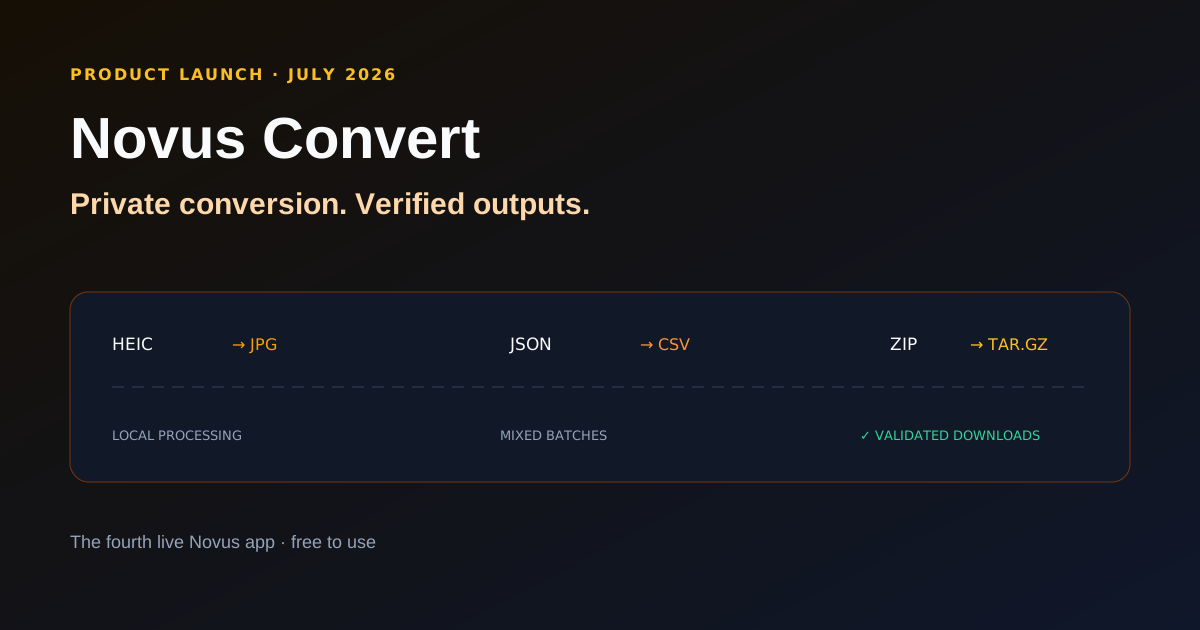
A queue does not need to be uniform. You can add an HEIC photo, a JSON export, and a ZIP archive, then select JPG, CSV, and TAR.GZ for those rows independently. Successful files remain downloadable when another row fails, and retrying one file does not throw away the work already completed elsewhere in the batch.
That per-file model is a small interaction decision with a large practical effect. Real folders are messy. A converter should accommodate the work as it arrives instead of making the user build a separate session for every extension.
Local processing is useful only when the output is real
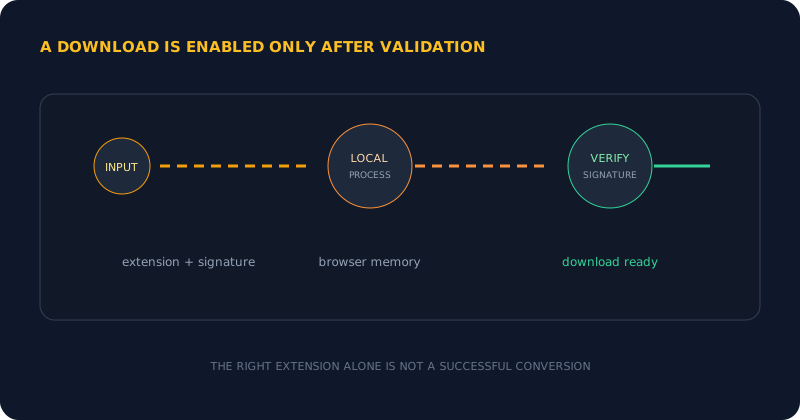
Every conversion currently available in the interface runs in browser memory. HEIC and HEIF decoding uses a lazy-loaded local WebAssembly worker; standard image, structured-data, and archive paths use browser-side processing. Results live behind temporary object URLs that disappear when a job is removed or the page closes.
Local processing alone is not enough. Novus Convert checks the expected signature, container, or decodability before enabling download. A malformed input, encrypted file, unsupported codec, or invalid result fails rather than receiving a convincing new extension. The product promise is not that every file can be converted. It is that an enabled download has passed the checks for the output it claims to be.
Archives need stricter boundaries
Archive conversion treats inputs as untrusted. The active ZIP, TAR, and TAR.GZ paths reject path traversal, cap entry counts and expansion, verify TAR checksums, and validate the resulting container. Those checks protect the browser from unsafe paths and archive bombs while keeping the work local.
Current archive inputs can be up to 200 MB compressed, contain no more than 5,000 entries, and expand to no more than 512 MB. Image and structured-data routes have their own memory safeguards: 100 MB and 80 megapixels per image, and 25 MB for text or structured data.
The fourth live Novus app
Novus Convert joins the NSS Background Remover, Novus Visualizers, and Novus PDF Studio. The portfolio now covers image preparation, creator video, PDF forms, and everyday file conversion. Each app remains focused on its own job, while the hub connects its documentation, tool map, tutorials, and product notes.
Open convert.novusstreamsolutions.com to try it. For the exact current inventory, use Tool maps. For a complete first workflow, follow How to convert and compress files privately with Novus Convert. As new converters become real and verifiable, the live product, documentation, and tool map will expand together.
What the route count actually means
As of the July 31, 2026 registry snapshot the directory documents 243 formats, publishes 209 browser-ready input formats, and exposes 1,636 working conversion routes plus 66 same-format compressors. That number is worth a little scepticism, because a route count is the easiest statistic in this category to inflate: a converter can claim thousands of pairs by listing every theoretical combination and letting the unsupported ones fail at runtime.
The reason ours is not that is a build-time check: the site refuses to publish a route that has no implemented, output-validating engine behind it. If a pair is in the directory, something can produce it and something can verify the result. If it is not in the directory, this release genuinely cannot do it yet, and we would rather say so than let you find out after picking a file.
There is a second gate on top of that one, and it is the reason the indexable number is smaller than the working number. Only 1,075 mature pairs and 125 format profiles are marked indexable; newer routes stay live but noindex until their browser end-to-end fixture and reopen checks pass. A route you can run is not automatically a route we are willing to advertise to a search engine, and keeping those two ideas separate is what stops the directory from becoming a landing-page farm.
The practical version of that promise is the sentence on the live site: you should never encounter a listed conversion that quietly fails. Publishing fewer routes honestly is a worse marketing number and a better product.
How the format coverage grew
Two waves in July widened it substantially. On 22 July: image and SVG routes gained PDF page output, still-image pipelines gained local AVIF encoding, CSV, JSON, and TSV gained conversion into XLSX or ODS, spreadsheets gained XLSX-to-ODS interchange with multi-sheet extraction, TXT, Markdown, and HTML gained DOCX, PDF, and EPUB output, GIF and APNG gained transcoding to MP4 or WebM through local FFmpeg, and mesh formats gained GLB, glTF, and PLY interchange.
On 24 July: SBV, YouTube's caption format, and LRC, the synced-lyrics format, joined SRT and VTT, so all four caption formats now convert to and from each other locally. Twelve new guides landed alongside them covering image, video, audio, camera RAW, document, spreadsheet, 3D model, ebook, and archive work.
The through-line is that none of this moved off the device. Every one of those routes runs in browser memory on WebAssembly: FFmpeg for audio and video, LibRaw for camera RAW, pdf.js and pdf-lib for documents, SheetJS for spreadsheets, libarchive for RAR and 7-Zip, Open CASCADE for CAD, @jsquash for AVIF and JXL, and hand-written encoders for images and meshes.
What local processing costs, honestly
Running everything on the device is the right architecture for privacy and it is not free. A large video transcode is real work for your machine, and a laptop on battery will do it slower than a server farm would. There is no queue to wait in, but there is also nobody else's hardware to borrow.
The trade is worth naming rather than glossing. What you get is that the file never crosses the network: no upload progress bar, no file-size pricing tier, no server queue, and nothing sitting in someone's temporary storage after you close the tab. For a holiday photo that is a nice-to-have. For a contract, a medical form, a client's unreleased footage, or a spreadsheet of customer records, it is the difference between a tool you can use at work and one you cannot.
Frequently asked questions
Quick answers to common questions about this topic.
How many conversions does it support?
1,636 working conversion routes across 209 browser-ready input formats, plus 66 same-format compressors, from a registry that documents 243 formats in total (July 31, 2026 snapshot). Of those routes, 1,075 mature pairs and 125 format profiles are indexable; newer ones stay live but noindex until their browser fixture checks pass. A build-time check refuses to publish a route with no implemented, output-validating engine, so nothing in the directory quietly fails.
Which caption formats can it convert?
SRT, VTT, SBV (YouTube), and LRC (synced lyrics), all converting to and from each other locally. SBV and LRC joined on 24 July 2026.
Can it turn CSV or JSON into a spreadsheet?
Yes. CSV, JSON, and TSV convert into XLSX or ODS, and XLSX and ODS interchange with multi-sheet extraction, all in browser memory, with no desktop application involved.
Is Novus Convert free?
Yes. The active converter, image compressor, and validated downloads are free to use. Local size safeguards and per-format daily download allowances still apply.
Which conversions are available?
Novus Convert converts images (including camera RAW), video, audio, documents, ebooks, vector/CAD/3D-mesh files, and fonts, all locally in the browser. It also provides compression across images, video, and audio, plus a validated mixed batch queue. Browse the live /conversions directory for the canonical list of every active pair; an upload workflow appears only when a route can produce and validate a real output.
Are files sent to a conversion server?
No. Every conversion currently exposed in the interface runs in browser memory, and temporary result URLs are revoked when jobs are removed or the page closes.
How are downloads verified?
Novus Convert checks the expected output signature, container, or decodability before enabling the download action.
Related workflow
Product photo to a transparent image every channel accepts
One photograph, cut out once, then re-encoded for a storefront, a marketplace listing and a social post without redoing the cutout each time.
- Cut the background out and check the edgesNSS Background Remover: Hair, glass and drop shadows are where automatic cutouts fail. Fix them once, on the master, before anything downstream copies the mistake.
- Re-encode and resize per destinationNovus Convert: Transparency survives PNG and WebP and dies in JPEG. Convert validates the file it hands back, so a listing never rejects a silently broken upload.
Related troubleshooting
Was this page helpful?
Your answer stays in this browser, it is not sent anywhere and no account or cookie is involved.