Novus Convert
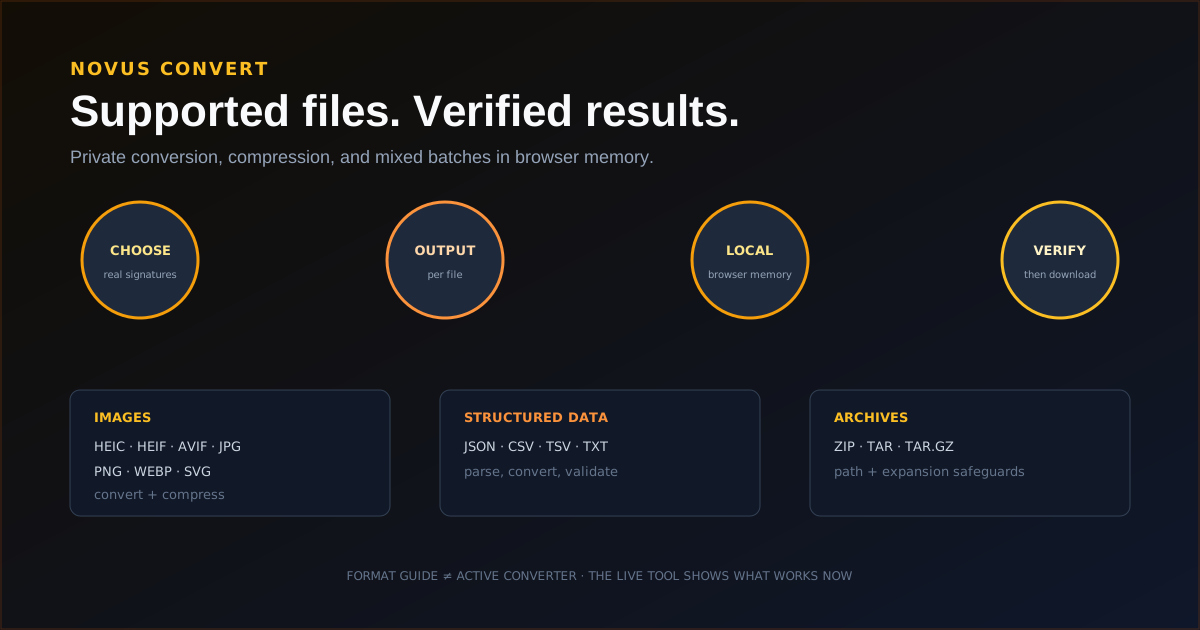
Novus Convert is the browser-first file conversion app in the Novus Stream Solutions portfolio. It converts and compresses files entirely on your device (with no account and no supported source files sent to a remote conversion service) and validates every result before a download is enabled. The workflow now spans 2,400 working routes over 274 documented formats, 255 of which are browser-ready inputs, across images (including camera RAW inputs), video, audio, documents, ebooks, archives, vector/CAD/3D meshes, and fonts, plus adjustable-quality compression for 125 same-format inputs, and mixed batches where each file can take a different output. The heavy lifting runs locally in WebAssembly: FFmpeg for audio and video, dedicated decoders for camera RAW formats, and pdf.js with pdf-lib for documents. Because the route matrix is so large, the live conversion directory at /conversions is the canonical, always-current list of every active input-to-output pair; 2,397 mature pairs and 243 format profiles are indexable, while newer fixture-pending routes stay noindex until their gates pass.
Contents
- 1.What Novus Convert does today
- 2.The workflow: choose, configure, process, verify
- 3.Local conversion engines and compression
- 4.Documents, structured data, and archive conversion
- 5.Privacy, temporary storage, and validation
- 6.Current size limits and download allowances
- 7.Failures and browser boundaries
- 8.How Novus Convert fits the portfolio
What Novus Convert does today
Novus Convert now spans 2,400 working routes across nine families of files. Images (547 routes) accept JPG, PNG, WebP, GIF, AVIF, HEIC/HEIF, TIFF, BMP, SVG, PSD, camera RAW, OpenEXR, Radiance HDR, and JPEG 2000. Video (628 routes) writes fourteen containers beyond MP4/MOV/MKV/WebM. Audio (180 routes) includes AIFF, AU, ALAC, AC-3, and WMA. Documents (439 routes) cover Office including macro-enabled and template wrappers, Apple Numbers, XLSB, AsciiDoc, reStructuredText, LaTeX, and Jupyter notebooks. Data (231 routes) covers JSON/CSV plus Arrow, MessagePack, SQLite, NumPy, safetensors, NetCDF, and FITS. Archives and packages (90 routes) include Zstandard, LZ4, CPIO, ar, WARC, DEB, and RPM. Ebooks, vector/CAD/mesh (including USDZ and point clouds), and fonts each have their own working sets. The conversion directory at /conversions is the authoritative list; 2,397 mature pairs and 243 format profiles are indexable.
All of this runs locally: the heavy lifting is done in-browser by WebAssembly (FFmpeg for audio and video, dedicated decoders for camera RAW formats, and pdf.js with pdf-lib for documents) so supported source files never leave the device. Compression is no longer image-only; images, video, and audio can each be re-encoded with an adjustable quality control that reports the measured result size before download, and animated GIF/APNG can transcode to MP4 or WebM. Every route produces a real, validated output rather than a renamed file, and each result in a mixed batch downloads independently once it passes its final check.
- Images (547 routes): JPG, PNG, WebP, GIF, AVIF, HEIC/HEIF, TIFF, BMP, SVG, PSD, camera RAW, OpenEXR, Radiance HDR, JPEG 2000, Netpbm.
- Video (628 routes): MP4, MOV, MKV, WebM, plus WMV, AVI, MPEG, VOB, MXF, OGV, and more; audio extraction and poster-frame capture included.
- Audio (180 routes): MP3, WAV, FLAC, AAC, M4A, OGG, OPUS, WMA, AIFF, AU, ALAC, AC-3, M4R.
- Documents (439 routes): PDF, Office including macro-enabled/templates, Apple Numbers, XLSB, AsciiDoc, RST, LaTeX, Jupyter, captions.
- Data (231 routes): JSON/CSV/TSV plus Arrow, Feather, MessagePack, CBOR, BSON, Avro, SQLite, NumPy, safetensors, NetCDF, FITS.
- Archives & packages (90 routes): ZIP, 7Z, RAR, TAR, Zstandard, LZ4, CPIO, ar, WARC, DEB, RPM, APK, IPA, wheels.
- Ebooks (47 routes): EPUB, MOBI, AZW/AZW3, FB2, PDB, CBZ, and CBR.
- Vector, CAD & 3D mesh (160 routes): EPS, DXF, STEP, STL, OBJ, 3MF, GLB, glTF, PLY, OFF, COLLADA, VRML, X3D, USDA/USDZ, PCD, XYZ.
- Fonts (19 routes): TTF, OTF, WOFF, WOFF2, EOT, TTC, BDF.
- Compression: 125 same-format compressors with adjustable quality and measured output size.
The workflow: choose, configure, process, verify
Choose one or more supported files from the homepage or /convert. Novus Convert checks file signatures and browser capabilities instead of trusting a filename extension. Compatible outputs appear for each row, so one mixed batch can send an image to WebP, a MOV to MP4, a DOCX to PDF, and an archive to 7Z without forcing the whole queue into one format.
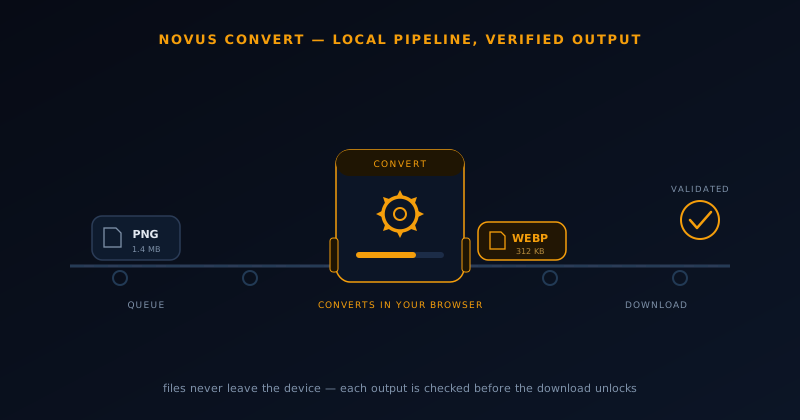
Processing runs in browser memory for every conversion currently available in the interface. Successful rows remain available when another file fails, and each result is checked for its expected container, signature, or decodability before the download action is enabled. The source file remains unchanged throughout the workflow.
- Choose supported files and let signatures determine compatible outputs.
- Set one output across compatible rows or choose an output per file.
- Process locally and retry an individual failure without discarding successful rows.
- Download only after the output passes validation.
Local conversion engines and compression
Different families use different in-browser engines, but all of them run on the device. Standard browser image APIs handle the JPG, PNG, WebP, AVIF, SVG, BMP, and TIFF paths; a lazy-loaded WebAssembly worker decodes HEIC/HEIF and camera RAW formats such as CR2, NEF, and ARW; FFmpeg compiled to WebAssembly powers audio and video conversion, audio extraction, and poster-frame capture; and pdf.js with pdf-lib drives the document routes. When an image with transparency is exported to a format that cannot store alpha (JPG or BMP, for example) Novus Convert flattens onto a white background rather than dropping the channel silently.
Compression is now a cross-media surface rather than an image-only one. Images, video, and audio can each be re-encoded with an adjustable output-quality control that runs locally and reports the resulting file size before the user downloads it, and animated GIF/APNG can transcode to MP4 or WebM. Compression quality and size remain a visible tradeoff rather than a hidden preset.
Documents, structured data, and archive conversion
Document routes convert among PDF, Office (including macro-enabled and template wrappers with VBA stripped before parse), Apple Numbers, XLSB, AsciiDoc, reStructuredText, LaTeX, and Jupyter notebooks that never execute code. Spreadsheets interchange between XLSX and ODS with multi-sheet extraction. Structured-data and science routes move between JSON, CSV, Arrow, MessagePack, SQLite, NumPy, safetensors, NetCDF, and FITS, parsing inputs as data rather than renaming them so malformed content fails without changing the original file.
Archive conversion treats every input as untrusted. ZIP, 7Z, RAR, TAR, GZ, BZ2, XZ, Zstandard, LZ4, CPIO, ar, WARC, CAB, ISO, JAR, and software packages (DEB, RPM, APK, IPA, wheels) reject path traversal, cap entry counts and expanded size, verify checksums, and confirm the real output container before download. Package members are copied as bytes: no install script is read as code or executed.
Privacy, temporary storage, and validation
Active conversion runs on the user's device. Results live behind temporary object URLs in the current browser session; removing a job or closing the page revokes those URLs. Novus Convert does not silently send an unsupported file to another service or relabel it as a format it did not produce.
Validation is part of the product promise. A result must match its expected signature, container, or decoding behavior before its download button is exposed. A file can therefore fail after processing when its output does not pass the final check. That failure is safer than offering a download that only has the right extension.
Current size limits and download allowances
Local limits protect browser memory, and they vary by family because a decoded RAW photo, a multi-minute video, and a small text file stress the browser very differently. Images cap on both file size and decoded megapixels; video and audio are bounded so an FFmpeg job fits in memory; and documents, archives, and structured data have their own ceilings, with archives additionally capping entry counts and total expanded size. The live Help page carries the current per-family limits.
Download allowances are tracked per input format in the browser and reset by local calendar day, so heavier families get their own budget. Each downloaded batch item counts once, and the interface shows the remaining allowance for that format alongside the current numbers on the live Help page. The app is free to use, but free should not be mistaken for unlimited.
Failures and browser boundaries
A conversion can fail because a file is malformed, encrypted, uses an unsupported codec or internal variant, exceeds a local safety limit, or produces a result that fails validation. The original remains untouched. Users can remove or retry the failed row while retaining completed results from the rest of a batch.
Performance depends on the device, available memory, file size, and browser support. A format being recognized does not guarantee every possible codec or variant can be decoded. The live Help and Security pages are the current source for operational limits and reporting guidance.
How Novus Convert fits the portfolio
Novus Convert adds a general file-preparation surface to the portfolio. NSS Background Remover handles image cutouts and editing, Novus Visualizers handles creator video, Novus PDF Studio handles PDF forms, and Novus Convert handles the practical work of changing, compressing, and packaging supported files. Like the other apps, it keeps the core job free and uses the browser when local processing is the right architecture.
Open convert.novusstreamsolutions.com to use the app. The exact working inventory is mapped at Tool maps, the first complete walkthrough is How to convert and compress files privately with Novus Convert, and the launch story is Novus Convert launch: private file conversion with verified outputs.
Frequently asked questions
Quick answers to common questions about this topic.
Which files can Novus Convert process right now?
2,400 working routes span nine families: images (including camera RAW, OpenEXR, and JPEG 2000), video, audio, documents (including Apple Numbers, LaTeX, and Jupyter), structured data and science formats, ebooks, archives and software packages, vector/CAD/3D meshes (including USDZ and point clouds), and fonts. Image outputs include JPG, PNG, WebP, GIF, APNG, BMP, TIFF, TGA, ICO, and image-to-PDF. The conversion directory at /conversions is the canonical, always-current list of every active input-to-output pair.
Are files uploaded for conversion?
No. Conversions run locally in browser memory, with WebAssembly doing the heavy lifting (FFmpeg for audio and video, dedicated decoders for camera RAW photos, and pdf.js/pdf-lib for documents) so supported source files never leave your device. Results use temporary object URLs that disappear when the job is removed or the page closes.
Why can a conversion fail after processing?
Novus Convert validates the real output signature, container, or decodability before enabling download. A malformed, encrypted, unsupported, over-limit, or invalid result fails instead of being offered with a misleading extension.
Is Novus Convert unlimited?
It is free to use, but it has local size safeguards and per-format daily download allowances. The live Help page shows the current limits and each download control shows the remaining allowance.
Related workflow
Product photo to a transparent image every channel accepts
One photograph, cut out once, then re-encoded for a storefront, a marketplace listing and a social post without redoing the cutout each time.
- Cut the background out and check the edgesNSS Background Remover: Hair, glass and drop shadows are where automatic cutouts fail. Fix them once, on the master, before anything downstream copies the mistake.
- Re-encode and resize per destinationNovus Convert: Transparency survives PNG and WebP and dies in JPEG. Convert validates the file it hands back, so a listing never rejects a silently broken upload.
Related troubleshooting
Was this page helpful?
Your answer stays in this browser, it is not sent anywhere and no account or cookie is involved.