2026 · Novus ConvertAbout 13 min readNovus Stream Solutions
The four ways a file conversion goes wrong, and which ones a converter can catch
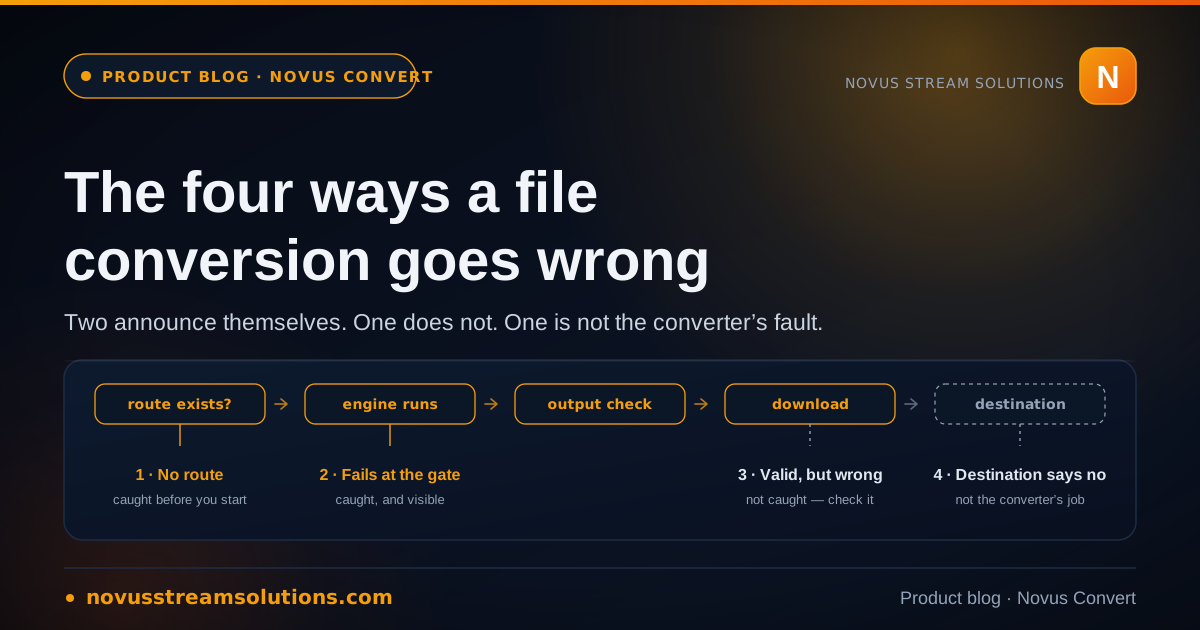
A conversion can be refused, fail loudly, quietly succeed into the wrong file, or produce exactly the right file and still be rejected by whatever you needed it for. Only two of those announce themselves. Here is how Novus Convert handles each, what its validation gate actually proves, and the one failure you have to check for yourself.
Contents
- 1.Overview
- 2.Failure one: the conversion never starts
- 3.Failure two: it starts, and it stops
- 4.Failure three: it succeeds, and the file is still wrong
- 5.How to catch failure three in about a minute
- 6.Failure four: the file is right and the destination still says no
- 7.What we decided not to promise
- 8.Where to check things
Overview
There is a question everybody asks after running a file through a converter, and it is almost always the wrong one: did it work? Work is binary and conversion outcomes are not. A conversion can be refused before it starts. It can begin and stop in the middle. It can complete cleanly and hand back a perfectly valid file that is not the file you wanted. Or it can produce exactly the right file and still be rejected by whatever you were converting it for. Four outcomes, four different responses required from you, and only two of them will tell you they happened.
This piece is written around Novus Convert because that is the converter whose internals we can describe honestly, but the taxonomy is not ours and the third case in particular is a property of file formats rather than of any product. If you take one thing from it, take this: an output-validation step can prove that a result is a genuine, readable instance of the format it claims to be. It cannot prove that the result is the file you meant to make. Knowing exactly where that line falls is the difference between trusting a tool and being surprised by one.
Failure one: the conversion never starts
The cheapest failure is the one that happens before you commit anything. You look for a pair, it is not there, and you go and find another way to do the job. It costs you thirty seconds and no false confidence. Most file-converter sites are structured so that this failure cannot occur, which sounds like a feature and is not: they publish a page for every plausible extension pair, accept the upload, and let the unsupported ones fail somewhere further down where you have already spent your attention.
Novus Convert draws the line in a different place. A route appears in the product only when there is an implemented engine behind it that can produce the output and check it, and a build-time gate refuses to publish a pair that has no such engine. That is why the numbers are what they are: 2,478 working conversion routes across nine families: images (including OpenEXR and JPEG 2000), video, audio, documents (including Apple Numbers, LaTeX, and Jupyter), structured data and science formats, ebooks, archives and software packages, vector/CAD/3D meshes (including USDZ and point clouds), and fonts. They span 255 browser-ready input formats, drawn from a registry that documents 274 formats in total, plus 125 same-format compressors. The gap between 274 documented formats and 255 browser-ready inputs is not an omission. It is the difference between a page that explains a format and a pipeline that converts it, kept visible on purpose.
There is a second, stricter gate sitting on top of that one, and it is worth knowing about because it explains an apparent inconsistency. Only 2,465 mature pairs and 254 format profiles are marked indexable; newer routes stay live and usable but noindex until their browser end-to-end fixture and reopen checks pass. So a route you can run today may not be a route a search engine has been told about. Runnable and advertisable are deliberately different thresholds, and the second one is higher, which is the mechanism that keeps a directory of this size from filling up with pages written for crawlers rather than for people with a file to convert.
One consequence of all this catches people out. Routing is decided by the file itself (the signature and container structure) rather than by the extension on its name. That is the right behaviour: something renamed to report.jpg that is really a PNG underneath ought to be treated as the PNG it is, whatever anybody typed after the dot. But it means "this input is not supported" occasionally means "this file is not the format you believe it is". When a route you were sure existed refuses an input, the fastest diagnostic is to check what the file actually is before concluding anything about the converter.
- A route is a specific input-to-output pair the browser runs end to end, not a page describing a format.
- The live /conversions directory is the canonical list: a pair with a page works, and a pair without one is not being claimed.
- A build-time check refuses to publish a route with no implemented, output-validating engine behind it.
- Indexable and runnable are separate states; newer pairs run while staying noindex until their fixture checks pass.
- Inputs are routed by signature, not by filename, so an unexpected refusal is sometimes a mislabelled file.
Failure two: it starts, and it stops
The second failure is visible, which makes it the easy one to handle even though it feels like the worst. A row begins and then stops with a reason. The original file is untouched throughout (Novus Convert never edits your source) and in a mixed batch the rows that succeeded stay downloadable, so a single failure does not cost you the work already finished elsewhere in the queue. You remove or retry that one row and carry on.
The reasons cluster into five. The input is malformed or truncated. The input is encrypted or otherwise locked. The input uses a codec or internal variant the local engine cannot decode, and this is a real category rather than a hedge, because a format being recognised does not guarantee that every possible variant inside it can be read. The job exceeds a local safety ceiling. Or the conversion ran and the result failed its final check, which is the gate doing its job rather than a bug.
The ceilings are the part worth understanding rather than memorising. They exist because everything runs in browser memory on your device, and a decoded camera RAW frame, a multi-minute video, and a small CSV stress that memory in wildly different ways. So the limits are per family: images cap on both file size and decoded megapixels, video and audio are bounded so a local FFmpeg job fits in memory, and documents, archives, and structured data carry their own ceilings, archives additionally capping entry counts and total expanded size, because an archive is untrusted input and a decompression bomb is a real thing. The current numbers live on the live Help page, and that is deliberately where we point rather than reprinting them here, because they move as the engines change and a figure frozen into a blog post is how a site starts lying to people slowly.
There is one more boundary that is not a failure at all but is often mistaken for one. Novus Convert is free and it is not unlimited: download allowances are tracked per input format in your own browser and reset by local calendar day, and the interface shows the remaining allowance where it applies. We would rather show you a real budget than describe the product as unlimited and then quietly enforce something else.
Failure three: it succeeds, and the file is still wrong
This is the one this article exists for. The conversion completes, the output passes its check, the download enables, and the file you get is a genuine, well-formed instance of the format you asked for, and it is not the file you wanted. No error appears because, by every test the converter is able to run, nothing went wrong.
It helps to be precise about what a validation gate can see. Novus Convert verifies the expected signature, container, or decodability of a result before enabling the download, which is a strong guarantee against the single most common failure in this category of tool: handing back an input with a new extension glued on. What that check compares the output against is the format specification. What it cannot compare the output against is your intention, because your intention is not in the file. A validation gate is a spell-checker, not an editor. It will confirm every word is a word. It has no opinion about whether you wrote the right sentence.
The changes that slip through are the ones inherent to moving between formats, and most of them are decisions somebody has to make. Transparency is the clearest example: JPG and BMP cannot store an alpha channel, so a transparent PNG heading to either has to become something. Novus Convert flattens onto white rather than dropping the channel silently, which is the honest handling and still a change you have to actually want: a logo cut out for a dark page will come back with a white box around it, and the file is completely valid.
The others follow the same shape. Rasterising a vector fixes a resolution the source never had, so an SVG that was sharp at any size becomes an image that is sharp at one. A multi-sheet workbook has to lose something on the way to a format that holds a single table; the XLSX and ODS interchange does multi-sheet extraction precisely because that structure is worth preserving where it can be, but the destination format still decides what survives. Captions carry the same cues in different syntax between SRT, VTT, SBV, and LRC, and the interesting bugs there live in encodings and line endings rather than in the timings. And any transcode is a re-encode: going from one lossy format to another is a second generation of loss, which is invisible in a thumbnail and audible or visible at the boundaries.
None of this is a criticism of the converter, and it is not fixable by a better gate. It is what format conversion is. The only defence is knowing which properties you care about and checking them, which takes about a minute if you know what you are looking at.
- Transparency: flattened onto white when the destination cannot hold alpha.
- Resolution: a vector becomes a raster at one fixed size.
- Structure: sheets, layers, tracks, or pages the destination format cannot represent.
- Encoding: text and caption files carry character sets and line endings that travel badly.
- Generation: lossy to lossy is a second re-encode, and it compounds.
How to catch failure three in about a minute
The method is short and it is worth turning into a habit, because the cost of skipping it is always paid later and by somebody else. It applies to any converter, not just this one.
Open the output in the tool that will actually consume it, not in the one that produced it or the first previewer that will render anything. The most forgiving reader you own is the one most likely to tell you a broken file is fine. If the file is going into a print workflow, open it in the print workflow. If it is going into a build, put it in the build.
Then check the properties rather than the file. Dimensions, duration, page count, sheet count, channel count, sample rate, colour mode, whether the alpha channel survived, the specific ones that matter for the job, which you already know if you think about it for a moment. A file that looks right in a thumbnail can be wrong in every one of them.
Check the awkward case on purpose instead of the easy one. Convert the transparent image, not the opaque one. Use the caption file with the non-Latin script in it. Take the workbook with three sheets. The clean case will pass no matter what, which is exactly why it tells you nothing.
And convert a file you already understand before you convert one you care about. This is the part people skip, and it is the part that turns a vague suspicion into a fact you can act on. If the input is a sample whose properties are written down, a difference in the output is a statement about the converter. If the input is a file of unknown provenance from your downloads folder, a difference is a mystery with two suspects. That is the whole argument of the companion piece to this one: Novus Examples exists to make the first case easy, and Generated, not collected: what a test file’s provenance decides covers why a known input is what makes any of this readable.
Finally, keep the original. Novus Convert leaves your source file untouched by design, so the comparison is always available and a bad conversion costs you nothing but the time.
Failure four: the file is right and the destination still says no
The last failure is not a conversion failure at all, but it arrives dressed as one and it gets blamed on the converter constantly. You produce a valid MP4 and the platform you are uploading to will not accept its codec. You produce a valid EPUB and the reader you own will not sideload it. You produce a valid font wrapper and the build tool wants a different one. Every file is correct. Every check passed. And the job is still not done.
What has actually happened is that the requirement lives at the destination, and the destination did not tell the converter about it. No converter can catch this, because the constraint is not visible from inside the file: "valid MP4" and "an MP4 this particular service will accept" are different claims, and only one of them is a property of the file. Container, codec, profile, level, colour space, page size, embedded font permissions: any of these can be the thing the destination cares about, and none of them are wrong in the file that was rejected.
The fix is a change of order rather than a change of tool. Find the destination’s stated requirement first, then pick the route that satisfies it, rather than converting to the extension you assumed and discovering the constraint on upload. This is the practical reason the /conversions directory is structured one page per pair: you are not looking for "a video converter", you are looking for the specific pair that produces what the other end asked for, and that question has a precise answer.
What we decided not to promise
Nothing on a converter’s homepage is easier to fake than its catalog size, and a visitor has no way to audit one from the outside. Enumerate every theoretical pairing of every format you have heard of, publish the lot, and let the ones without an implementation fail after the upload: the headline number goes up and the product gets worse. Our figure is 2,478 because the build will not ship a pair that has no engine able to produce and check it. That trade (a smaller number in exchange for a directory whose entries are all real) is the reason the promise printed on the live site, that you should never encounter a listed conversion that quietly fails, is one we can keep rather than one we hope nobody tests.
The same instinct runs through the rest of the boundaries. The app is free and says so, and it also says the download allowances are real, per-format, and reset by local calendar day. Everything runs on your device, which is the architecture you want the moment the file is a signed agreement, a patient form, footage a client has not released, or a customer list, and the corollary is that your machine is the one doing the work. Nothing is queued behind other people’s jobs, and equally there is no rented hardware quietly absorbing the cost. On a thin laptop a long transcode takes as long as a thin laptop takes, and saying so up front is cheaper for everyone than letting the first large video be the discovery.
And this article itself is the honest version of a feature page. The validation gate is genuinely good at what it does and it is not a guarantee of correctness, so we would rather write down where it stops than let you find the boundary on a file that mattered.
Where to check things
The live /conversions directory is the canonical answer to whether a specific pair runs today, because it moves in lockstep with the code rather than with a document somebody remembered to update. Find any conversion in the /conversions directory is the two-minute version of using it. When a row fails, Troubleshoot failed conversions in Novus Convert covers what to do about each reason. The full picture of formats, engines, safeguards, and current limits is in Novus Convert, and the route-by-route inventory of the app is Tool maps.
And if you are about to evaluate any converter, ours included, start by picking an input you already understand. The rest of this method only works when you know what went in.
Frequently asked questions
Quick answers to common questions about this topic.
My conversion succeeded but the file looks wrong. Is that a bug?
Usually not. A validation gate proves the output is a genuine, readable instance of the format it claims to be; it cannot prove the output is what you intended. Transparency flattened onto white, a vector fixed at one resolution, a multi-sheet workbook reduced to a single table, or a second generation of lossy re-encoding are all valid results of a correct conversion. Check the specific properties you care about (dimensions, duration, sheets, channels, alpha) in the tool that will actually consume the file.
What does Novus Convert actually check before it enables a download?
The expected signature, container, or decodability of the result. That check is what stops the most common failure in this category (an input handed back with a new extension attached) and it is why a job can fail after processing rather than during it. It compares the output to the format specification, not to your intention.
Why is the conversion I need missing from the directory?
Because publication requires an engine that can both produce that output and prove it afterwards, and the build blocks any pair that lacks one. An absent pair therefore means this release genuinely cannot do the job yet, which we would rather state now than have you find out after you have picked a file. It is also worth checking that the input really is the format its name claims, since the router goes by file signature rather than by extension.
Why did a large file fail when a small one in the same format worked?
Everything runs in browser memory on your own device, so each family carries its own ceilings: images cap on file size and decoded megapixels, video and audio are bounded so a local job fits in memory, and archives additionally cap entry counts and total expanded size. The current per-family numbers are on the live Help page rather than in this post, because they change as the engines do.
A site rejected my converted file even though it opens fine. What happened?
That is a destination requirement rather than a conversion failure. "A valid MP4" and "an MP4 this particular service accepts" are different claims, and only the first is a property of the file: container, codec, profile, colour space, or page size can each be the thing the other end cares about. Find the destination’s stated requirement first, then pick the route in /conversions that satisfies it.
Does converting a file change or upload the original?
No on both counts. Your source file is never modified, and every conversion the interface currently exposes runs in browser memory on your own machine. Finished results are held behind temporary object URLs that get revoked the moment you clear the job or leave the page, so nothing lingers once the tab is gone.
Related workflow
Product photo to a transparent image every channel accepts
One photograph, cut out once, then re-encoded for a storefront, a marketplace listing and a social post without redoing the cutout each time.
- Cut the background out and check the edgesNSS Background Remover: Hair, glass and drop shadows are where automatic cutouts fail. Fix them once, on the master, before anything downstream copies the mistake.
- Re-encode and resize per destinationNovus Convert: Transparency survives PNG and WebP and dies in JPEG. Convert validates the file it hands back, so a listing never rejects a silently broken upload.
Related troubleshooting
Was this page helpful?
Your answer stays in this browser, it is not sent anywhere and no account or cookie is involved.