Novus Visualizers
Sharing your work on the Novus Visualizers community feed
Browse the public community feed, then sign in to like, save, and post your own visualizers, all copyright-free, so publishing never trades away ownership of your exports.
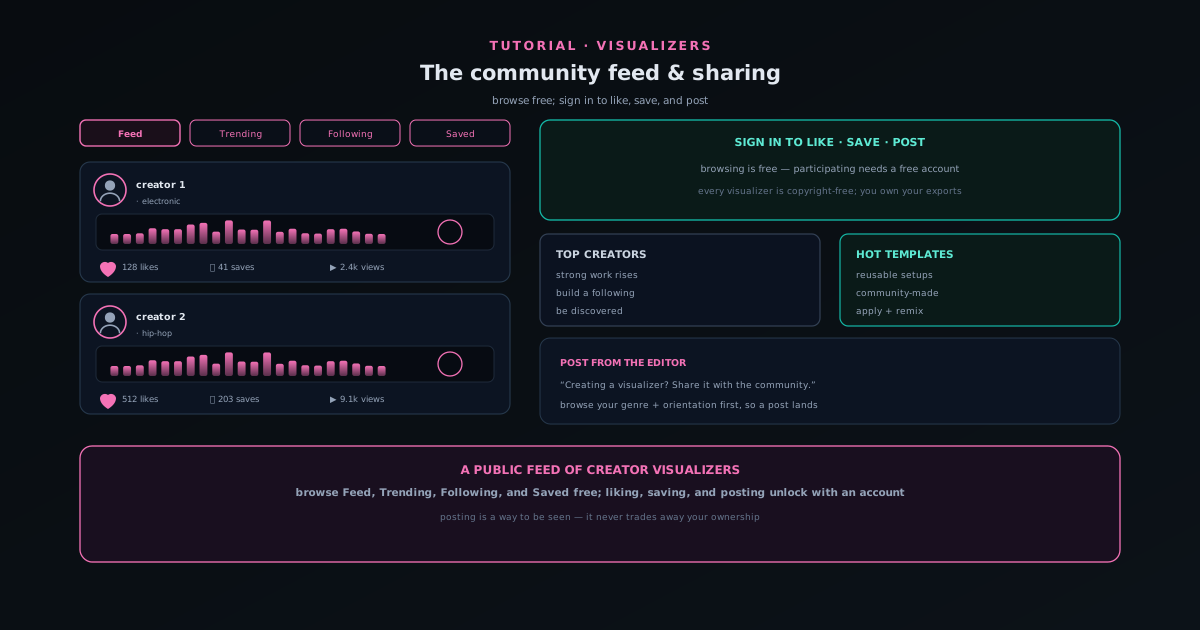
Novus Visualizers is now a place to publish, not only a place to render. The Community page is a public feed of audio-reactive visualizers made by creators, and it is where your work can live in public alongside others.
This tutorial covers how to browse the feed, how the social actions work, and how to post your own visualizer, plus the ownership stance that makes publishing safe: every visualizer is copyright-free, and you keep full ownership of your exports, including the ones you post.
Contents
- 1
1. Browse the feed: no account needed
Open the Community page. Browsing is free and open, with views for the main Feed, Trending, Following, and Saved, genre filters (Electronic, Hip-Hop, Ambient, Rock, Jazz, Pop), sort options (Recent, Most Liked, Most Viewed), and aspect-ratio toggles for 16:9, 9:16, and 1:1.
Browsing first is a good way to calibrate what reads well in your genre and preferred orientation before you post anything.
- Views: Feed, Trending, Following, Saved.
- Filter by genre; sort by Recent / Most Liked / Most Viewed.
- Toggle aspect ratio to browse the format you care about.
- 2
2. Sign in to like, save, and post
The social actions (like, save, and post) require a signed-in account, which is the natural upgrade moment for a creator who has been rendering and now wants their work seen. Browsing stays free; signing in unlocks participation.
Liking and saving build your own Following and Saved views over time, so the feed becomes tailored to the creators and styles you care about.
- Browsing is free; liking, saving, and posting need an account.
- Saves and follows populate your Saved and Following views.
- 3
3. Post your own visualizer
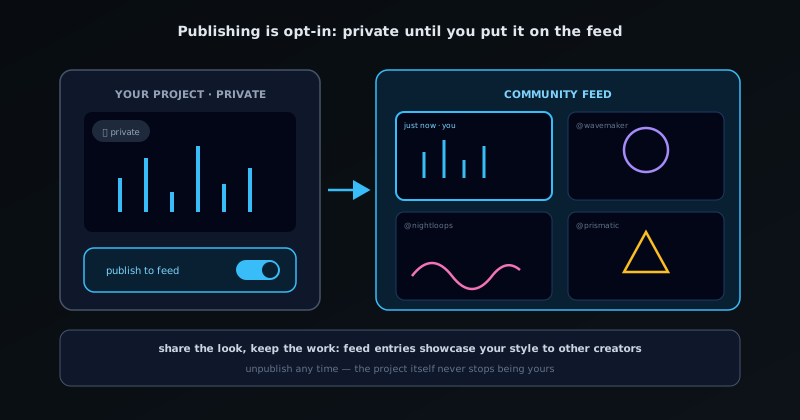
When you have made something you are proud of, post it to the feed from the editor; the call to action is right there: creating a visualizer? Share it with the community. Posting puts your work where it can be discovered, liked, and saved by others.
Strong work rises via the Top Creators surface, so good posts are seen rather than disappearing into a chronological stream.
- Post from the editor to publish to the public feed.
- Top Creators surfaces strong work.
Publishing is opt-in: a visualizer stays private until you put it on the feed. - 4
4. Keep your rights: copyright-free, fully owned
Publishing to the community does not sign away rights to your work. Every visualizer is copyright-free, and you retain full ownership of your exports (including the ones you post) so you can use them commercially or personally, anywhere, without restriction.
That ownership stance is the durable fact underneath the community: posting is a way to be seen, not a trade of your rights.
- All visualizers are copyright-free.
- You keep full ownership of exports, including posted ones.
Browse before you post
Spend a few minutes in the feed for your genre and orientation before posting; it tells you what reads well small and in motion, which is exactly what helps a post land. The community is young and growing, so being early is a different bet than joining a large network: you will not find a massive built-in audience yet, but anything you post stays fully yours to use everywhere else.
Frequently asked questions
Quick answers to common questions about this topic.
How do I share a visualizer to the community feed?
Sign in and post your visualizer to the public feed, where others can view, like, and save it. Browsing the feed is open; posting, liking, and saving require a free account.
Do I keep ownership of visualizers I post?
Yes. Every visualizer is copyright-free and you retain full ownership of your exports, including ones you post to the community.
Related workflow
A track to a release-ready visualizer, per platform
Render the visual once, then produce the platform masters from it, instead of re-rendering the whole video for every aspect ratio.
- Render the beat-synced videoNovus Visualizers: Pick the engine and mode against your actual track; the analysis is done on your audio, not on a preset preview.
- Trim or upscale the exportNSS Background Remover: The video utilities handle the tidy-up pass so the render does not have to be repeated to fix ten seconds of it.
- Produce the per-platform mastersNovus Convert: Each destination wants a different container and bitrate; converting the finished render is far cheaper than re-rendering it.
Related troubleshooting
Was this page helpful?
Your answer stays in this browser, it is not sent anywhere and no account or cookie is involved.