Novus Learn
Find a career direction with the Novus Learn matcher
Use the Novus Learn career matcher end to end: pick the quick, full, or career-change questionnaire, read the shortlist against 565 occupation profiles in 20 families, open a profile properly, and verify every suggestion against public labour-market data before you act on it.
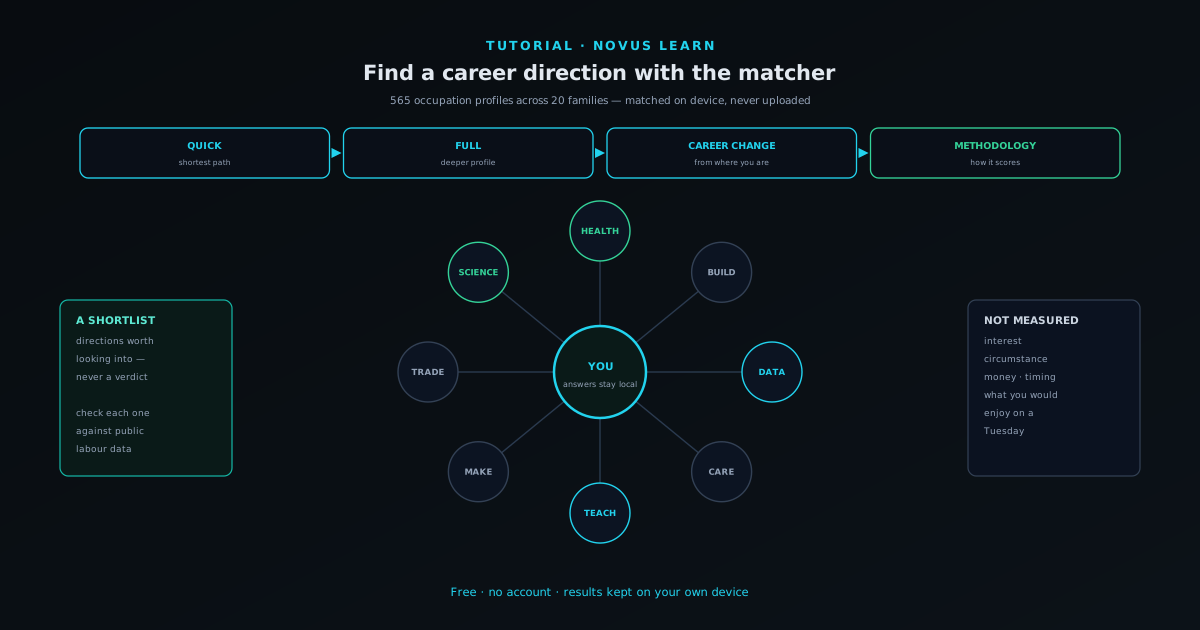
Novus Learn carries a full careers layer alongside its source-grounded reading tools: 565 occupation profiles organised into 20 families, country views, an explicit methodology page, and a matcher with three entry paths. It is free, needs no account, and keeps your answers and results on your own device rather than in a profile somebody else holds.
This walkthrough takes one pass through the matcher and then does the part most people skip: interrogating the shortlist instead of accepting it. The matcher is genuinely good at widening the set of occupations you know exist. It is not, and does not claim to be, a machine that knows what you should do with your life, and using it well means holding those two things apart.
Contents
Two ways to finish
Quick or full
Start from scratch with the shortest questionnaire, or the deeper one when you want more signal.
Career change
Start from where you already are and look for adjacent moves rather than a blank-slate answer.
- 1
1. Choose the right entry path
Open learn.novusstreamsolutions.com/careers and pick a matcher path. Quick is the shortest route to a shortlist and is the right first move if you are exploring. Full asks more and gives the matcher more to work with. Career change starts from what you already do, which matters because the useful question at that point is rarely "what am I like" but "what is adjacent to this, and what would transfer".
There is no penalty for running more than one. Because nothing is stored on a server and there is no profile being built, you can take the quick path today, the full path when you have twenty minutes, and compare what the two produce. Disagreement between them is informative rather than a problem; it usually means a genuine spread rather than a single obvious direction.
- Quick for exploration, full for signal, career-change for adjacency.
- Run more than one; nothing is stored server-side and nothing is scored against you.
- 2
2. Answer honestly, not strategically
It is worth stating plainly because the instinct is real: there is no audience here. The answers are processed on your device and the result is not sent anywhere, shown to an employer, or kept in an account. Answering the way you think you should look produces a shortlist for a person who does not exist, which is a waste of the twenty minutes.
Where a question feels genuinely ambiguous, answer for your ordinary self rather than your best day. Assessment noise is largest when people answer aspirationally, and the resulting shortlist drifts toward occupations that match an idealised profile rather than the one that will actually turn up to work on a Wednesday in February.
- 3
3. Read the shortlist as leads, not as a verdict
The output is a set of occupations worth looking into. That is the correct way to read it and the only claim it can support. A matcher observes how you answered a defined set of questions and points at roles where those patterns are common; it has no access to your circumstances, your finances, your location, your caring responsibilities, what you would enjoy, or what you are willing to spend three years becoming competent at.
The genuine value is discovery. Most people can name perhaps thirty occupations, drawn from family, friends, and television. A structured catalogue holds hundreds, and being handed one you had never considered is worth the exercise even if the rest of the list is wrong. Scan for the unfamiliar entries first; they are the ones the list exists to surface.
The matcher produces leads. The research after it is what turns a lead into a decision. - 4
4. Open an occupation profile and browse by family
Selecting an occupation opens its profile: what the work involves and how it relates to neighbouring roles. From there, /careers/families groups the catalogue into 20 families, which is the better surface when you want to explore a whole area rather than one job title, and /careers/countries gives you regional views where the picture genuinely differs by country.
Use the family view to widen deliberately. If one suggested occupation appeals, its family almost always contains three or four adjacent roles with different entry costs, different day-to-day textures, and different demand. People frequently find that the appealing thing about a suggestion is present in a sibling role that suits them far better.
- /careers/families: 20 families for exploring a whole area.
- /careers/countries: regional views where the picture differs.
- /careers/methodology: how matching works, stated rather than implied.
- 5
5. Read the methodology before you trust the ranking
The /careers/methodology page exists so that the matching is inspectable rather than magical, and reading it is the single fastest way to calibrate how much weight the ordering deserves. A tool that will not explain how it scores is asking for trust it has not earned; one that publishes its method is inviting you to disagree with it, which is the healthier arrangement.
There is also a /careers/privacy page covering how the careers layer handles your answers. Assessment responses are unusually personal data (they are inferences about a person's abilities and preferences) so it is worth knowing where they go. In this case the answer is: your device, and nowhere else.
- 6
6. Verify outside the app before you act
This is the step that turns the exercise into something useful. Take the two or three occupations that genuinely interest you and check each against public data. O*NET OnLine describes tasks, skills, and work context in real detail. The BLS Occupational Outlook Handbook covers typical entry requirements, pay ranges, and demand projections. Twenty minutes across two independent public sources tells you more than another hour of self-assessment, because it replaces an inference about you with a fact about the job.
Then talk to somebody who does it. Every occupational description is a summary, and summaries systematically omit the texture that decides whether you would last: the meetings, the seasonality, the tedious parts, the quietly wonderful parts. One honest conversation routinely reorders a shortlist, and no assessment can substitute for it.
- Cross-check every serious candidate against two independent public sources.
- Look up realistic regional pay, not the national headline figure.
- Have one real conversation with someone doing the work.
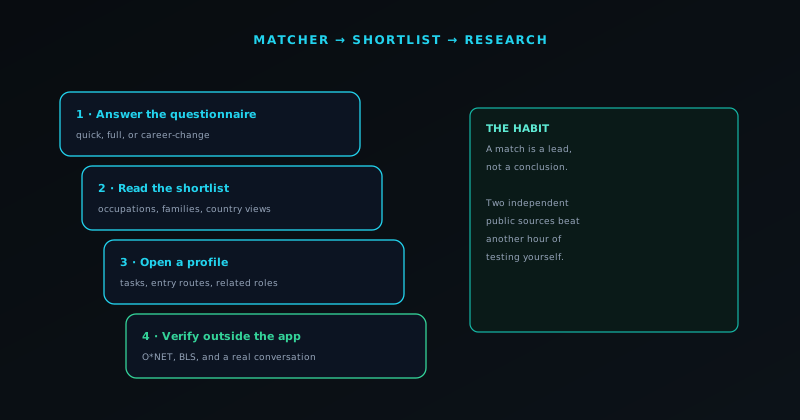
A shortlist is a reading list
The matcher is at its best when you treat its output as a list of things to go and research, and at its worst when you treat it as a description of yourself. Run more than one path, look hardest at the occupations you had never heard of, read the methodology so you know what the ordering means, and check anything you are serious about against public labour-market data and a real person before it influences a decision.
Frequently asked questions
Quick answers to common questions about this topic.
How many occupations does the Novus Learn matcher cover?
565 occupation profiles organised into 20 families, with country views for regions where the picture differs and a published methodology page explaining how matching works.
Can the matcher tell me what job I should do?
No, and it does not claim to. It reports occupations where your answer patterns are common, which makes it a discovery tool. Interest, circumstance, finances, location, and what you would actually enjoy are all decisive and none of them are measured.
Are my answers uploaded or stored in an account?
No. Novus Learn is free and accountless, and the careers layer processes your answers on your device. There is a dedicated /careers/privacy page covering exactly how the data is handled.
What should I do with the shortlist?
Treat it as a reading list. Pick the two or three that genuinely interest you (especially any you had never heard of) and check each against O*NET and the BLS Occupational Outlook Handbook, then talk to someone doing the work before you act.
Related workflow
From a source you can cite to a study pack you can hand out
Read from the source rather than a summary of it, then turn what you verified into a document someone else can use.
- Find the source and check the claim against itNovus Learn: The study material is extractive, not generative: what you get back is what the source says, which is the only kind you can safely cite.
- Assemble and finish the packNovus PDF Studio: Merge the pieces, add the fields a learner fills in, and sign it locally, so unpublished material stays unpublished.
Related troubleshooting
Was this page helpful?
Your answer stays in this browser, it is not sent anywhere and no account or cookie is involved.