Novus Learn
Getting started with Novus Learn: from search to source
Learn the core Novus Learn flow (Search, Select, Inspect) by taking one query all the way to its source: type a topic, pick the exact Wikipedia edition and page you mean, then read it and follow a single claim to the citation behind it.
Novus Learn is a source-grounded reading tool, not an answer machine. It is built directly on official Wikipedia and Wikimedia content, so every topic you open carries a clear source identity and every claim can be followed to the citation behind it. Nothing here is generated, paraphrased by an AI, or invented: the app finds real encyclopedia pages, shows you exactly which one you are reading, and keeps the references intact. That distinction shapes how you use it.
The whole product is organized around three moves: Search for a topic, Select the exact page you mean, and Inspect it with its sources attached. This guide walks that flow end to end with a deliberately ambiguous example, then teaches the one habit that makes Novus Learn worth using over a plain search box, following a specific claim back to where it actually comes from. It is free, needs no account, and keeps your reading on your device.
Contents
Two ways to finish
Search and select
Type a query, then pick the exact Wikipedia edition and page you actually mean.
Inspect and verify
Read the topic and follow each claim you care about to its cited source.
- 1
1. Start a search on the Explore surface
Open learn.novusstreamsolutions.com/explore and type a topic into the search field. As you type, Novus Learn queries official Wikipedia content and shows live candidate pages that match what you are asking for. Because the results come from a real encyclopedia index rather than a language model, what you see is a set of genuine pages that exist, not a summarized guess about what you probably meant.
Treat the search box as the front door, not the destination. A short, plain query works best: a name, a term, a place, a concept. The point of this first step is only to surface the candidate pages so you can choose deliberately in the next one, which is where the accuracy of everything downstream is decided.
- Results are real Wikipedia pages, not generated answers.
- Keep the query short and plain: refine by selecting, not by over-typing.
- 2
2. Read the results as candidates, not answers
Each result is a page you could open, and each one shows where it comes from: the Wikipedia edition it belongs to and the page it points at. This is the source identity that follows a topic everywhere in Novus Learn. Nothing is blended together from multiple pages into a single synthetic summary: you are always looking at one identifiable encyclopedia article at a time, which is what lets you trust and later cite what you read.
This is the moment a plain search engine gets you into trouble and Novus Learn does not. A one-word query like "Mercury" is genuinely ambiguous, and the results reflect that honestly by offering the separate pages that share the name rather than quietly picking one for you. Slow down here and read the candidates before clicking.
- 3
3. Select the exact page you mean
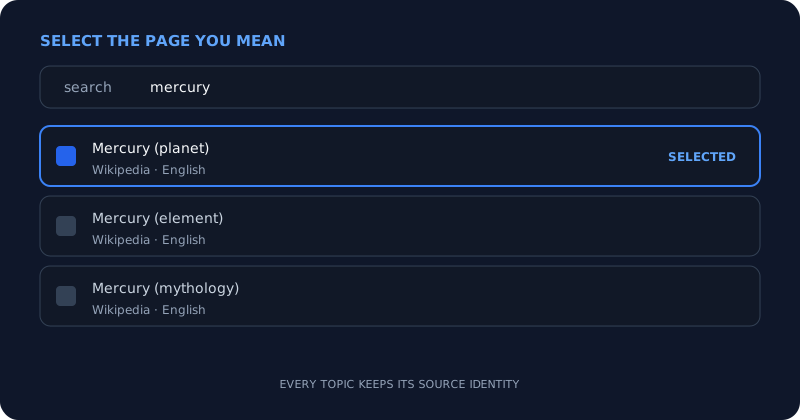
Ambiguity is resolved by you, on purpose. Take "Mercury": the results include the planet, the chemical element, and the Roman god, each a distinct Wikipedia page with its own source identity. Selecting is the act of telling Novus Learn which of those you actually want, so the topic you inspect is unmistakably the right one. Pick the planet page and you get the planet, not a hedged blend of all three meanings.
The same discipline applies to editions. Wikipedia exists in many languages, and the same subject can have a fuller or thinner article depending on the edition. Select the edition and page that match your need, and you have pinned down precisely what you are about to read. This deliberate selection step is the difference between "something about Mercury" and "the English Wikipedia article on the planet Mercury."
Disambiguation is a choice you make: pick the exact page, and its source identity comes with it. - 4
4. Inspect the topic with its source attached
Selecting opens the Inspect view: the topic laid out for reading, still carrying the source identity you chose. You always know which Wikipedia edition and page you are reading, so there is never a question of where the material came from. This is ordinary encyclopedia reading with the provenance kept visible, which matters the moment you want to reuse, quote, or double-check anything on the page.
Read it the way you would read any reference article, but keep the source label in view as you go. The value of Novus Learn is not that it reads for you; it is that it never lets the text drift away from its origin. Everything on the page traces back to a real article you can name, which sets up the one habit worth building next.
- 5
5. Follow a claim to its citation
Pick a specific statement that matters to you (a date, a figure, a cause-and-effect claim) and follow it to its citation. Wikipedia articles cite their sources at the claim level, and Novus Learn keeps those references intact so you can move from "the article says this" to "here is the source the article is standing on." That single step is the whole discipline of source-grounded reading, and it is what separates knowing a fact from being able to defend it.
Build this into a habit rather than saving it for arguments. Any claim you intend to repeat, cite in your own work, or make a decision on is worth one click to its source. Sometimes the source strengthens the claim; sometimes it reveals a caveat the summary left out. Either way you now know, instead of assuming, and because Novus Learn never generates or paraphrases the answer, following the source is always available and always the point.
- Claims carry citations; follow the ones you plan to rely on.
- The source can confirm, qualify, or complicate a claim; read it to find out.
- Follow-the-source is the core habit Novus Learn is built to reward.
- 6
6. Know what Novus Learn is, and what comes next
To use it well, be clear about the boundaries. Novus Learn surfaces and cites official Wikipedia and Wikimedia content; it does not generate answers, does not call a paid AI model, and never fabricates a fact to fill a gap. If something is not in the sourced encyclopedia material, the app does not invent it. That honesty is a feature; it is why what you read here is checkable in a way a generated answer is not.
From the Inspect view, several next steps are worth knowing. You can save a project to your local library to return to it later without re-searching, covered in the local-library tutorial. Visual Studio at /visuals renders the structure a source already contains as hierarchies, labeled systems, and scale comparisons, with a full-screen presentation mode. And a Wikipedia topic is only one of nine ways in: /read takes a URL, /site indexes a whole site, /paper opens an open-access article, /video and /textbook break down long-form material, /upload accepts PDF, EPUB, Word, text, and Markdown, and /code x-rays a JavaScript codebase. For focused help, the guides at Help centre cover getting-started, searching-topics, sources-and-citations, privacy-and-local-processing, accessibility, and troubleshooting.
Choose the page, then follow the source
Novus Learn rewards two deliberate moves: select the exact Wikipedia page you mean instead of accepting the first result, and follow any claim you plan to rely on back to its citation. The app never generates or paraphrases an answer, so the source is always there to check; treat every important fact as one click away from being verified rather than assumed.
Frequently asked questions
Quick answers to common questions about this topic.
Does Novus Learn generate answers with AI?
No. Novus Learn surfaces and cites official Wikipedia and Wikimedia pages. It does not generate, summarize, or paraphrase with a language model, and it never fabricates a fact: every topic is a real encyclopedia article with its source identity attached.
Why does one search show several different pages?
Because the query is ambiguous and Novus Learn is honest about it. A term like "Mercury" maps to distinct Wikipedia pages (the planet, the element, the Roman god) and the Select step lets you choose the exact one you mean instead of guessing for you.
What does it mean to "follow a claim to its source"?
Wikipedia cites its sources at the claim level, and Novus Learn keeps those citations intact. Following a claim means clicking through from a statement in the article to the reference it rests on, so you can verify it rather than take it on trust.
Do I need an account to use Novus Learn?
No. Novus Learn is free and needs no account. Your searching and reading happen in your browser, and topics you choose to save are stored locally on your device rather than in an account.
Related workflow
From a source you can cite to a study pack you can hand out
Read from the source rather than a summary of it, then turn what you verified into a document someone else can use.
- Find the source and check the claim against itNovus Learn: The study material is extractive, not generative: what you get back is what the source says, which is the only kind you can safely cite.
- Assemble and finish the packNovus PDF Studio: Merge the pieces, add the fields a learner fills in, and sign it locally, so unpublished material stays unpublished.
Related troubleshooting
Was this page helpful?
Your answer stays in this browser, it is not sent anywhere and no account or cookie is involved.